Flipper Equation Walkthrough - OliCyber-IT Hard Challenge | AES CBC Bit Flipping Attack
Walkthrough for flipper equation challenge from OliCyber-IT. A cryptography and web challenge featuring a Flask application with AES CBC encryption vulnerable to bit flipping attacks. The application requires solving 1 billion equations to obtain the flag, but by manipulating the session token through XOR operations on CBC ciphertext blocks, the points value can be forged to bypass the requirement.
Challenge Description
I invented a fun game to learn how to solve first-degree equations.
Solution
Website Understanding
First Impression
We are directly presented with this screen:
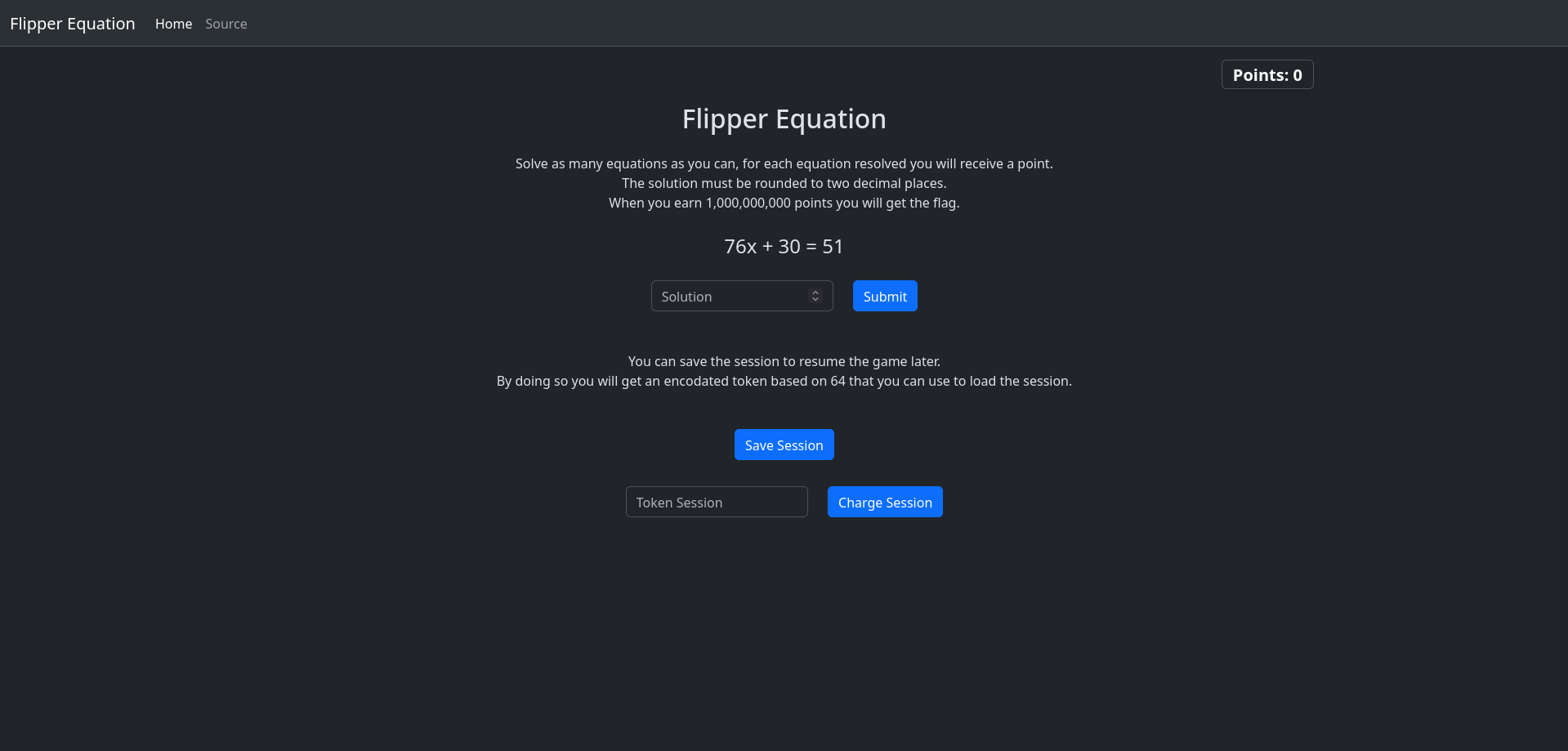
The screen asks us to enter the results of first-degree equations, and if we reach 1,000,000,000 correct answers, we’ll get the flag. Clearly, we cannot brute-force requests for this challenge - we would take down the site.
Analyzing the Source Code
In the upper left corner, there’s a button to view the application’s source code:
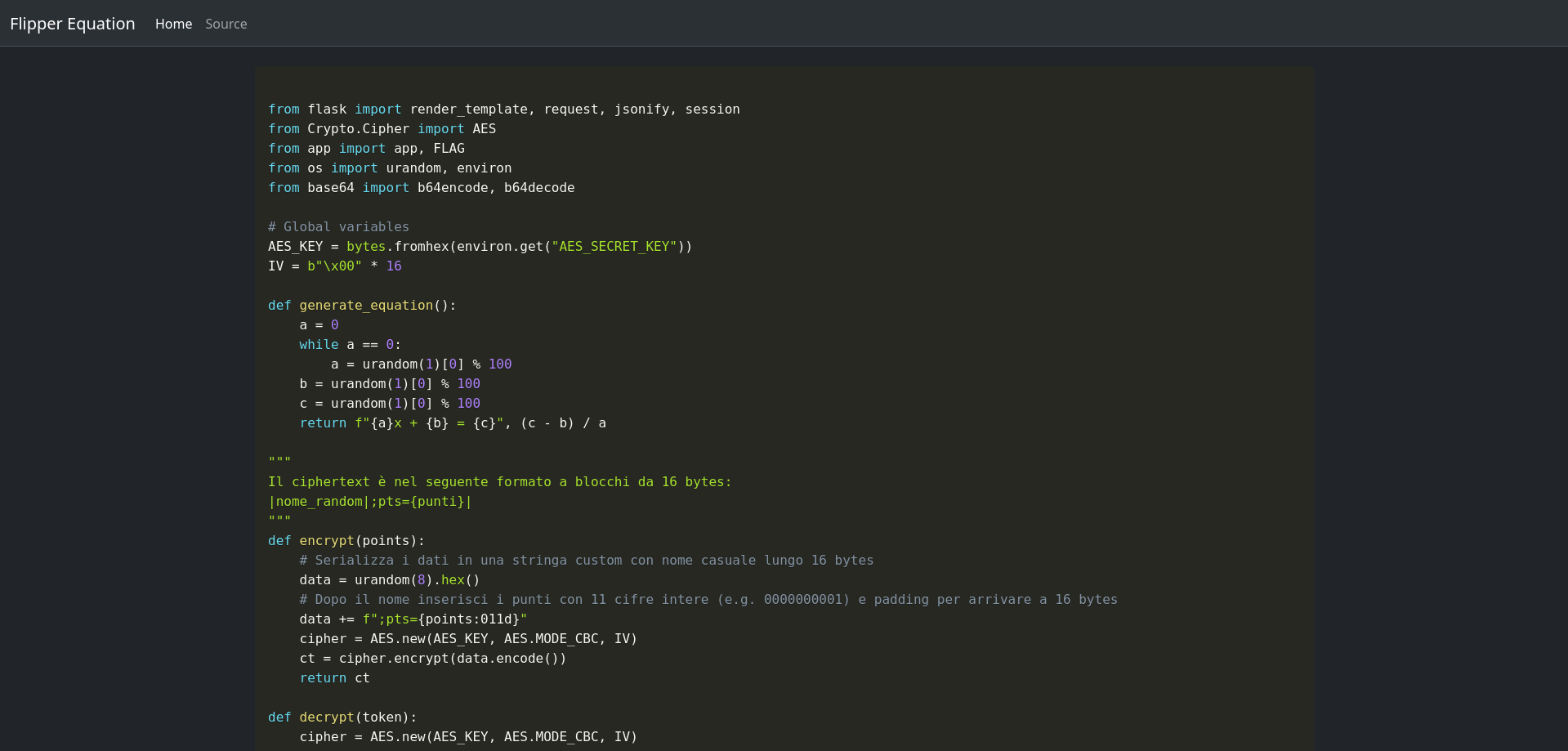
Here’s the complete source code:
1
2
3
4
5
6
7
8
9
10
11
12
13
14
15
16
17
18
19
20
21
22
23
24
25
26
27
28
29
30
31
32
33
34
35
36
37
38
39
40
41
42
43
44
45
46
47
48
49
50
51
52
53
54
55
56
57
58
59
60
from flask import render_template, request, jsonify, session
from Crypto.Cipher import AES
from app import app, FLAG
from os import urandom, environ
from base64 import b64encode, b64decode
# Global variables
AES_KEY = bytes.fromhex(environ.get("AES_SECRET_KEY"))
IV = b"\x00" * 16
def generate_equation():
    a = 0
    while a == 0:
        a = urandom(1)[0] % 100
    b = urandom(1)[0] % 100
    c = urandom(1)[0] % 100
    return f"{a}x + {b} = {c}", (c - b) / a
"""
The ciphertext is in the following format with 16-byte blocks:
|random_name|;pts={points}|
"""
def encrypt(points):
    # Serialize data into a custom string with a random name of 16 bytes
    data = urandom(8).hex()
    # After the name, append the points with 11 integer digits (e.g. 0000000001) and padding to reach 16 bytes
    data += f";pts={points:011d}"
    cipher = AES.new(AES_KEY, AES.MODE_CBC, IV)
    ct = cipher.encrypt(data.encode())
    return ct
def decrypt(token):
    cipher = AES.new(AES_KEY, AES.MODE_CBC, IV)
    data = cipher.decrypt(token)
    # Strip the random name and ";pts="
    data = data[16:].split(b";pts=")[1]
    # Return the points
    return int(data)
@app.route("/", methods=["GET", "POST"])
def index():
    if request.method == "POST":
        token = request.form.get("sessionToken")
        if token:
            token = b64decode(token)
            session["points"] = decrypt(token)
    points = session.get("points", 0)
    # Print the flag if you have 1B points :P
    if points >= 1_000_000_000:
        return render_template("flag.html", flag=FLAG)
    equation, solution = generate_equation()
    session["solution"] = round(solution, 2)
    return render_template("index.html", points=points, equation=equation)
@app.route("/solve", methods=["POST"])
def solve():
    json_data = request.get_json()
    solution = float(json_data["solution"])
    if solution == session.get("solution"):
        session["points"] = session.get("points", 0) + 1
    return jsonify({"correct": solution == session.get("solution")})
@app.route("/save_session")
def save_session():
    points = session.get("points", 0)
    token = b64encode(encrypt(points))
    return jsonify({"token": token.decode()})
We can clearly see that the code is a Flask web app. The most important functions are encrypt and decrypt.
The Encrypt Function
The encrypt function takes the user’s points as input (important for the next steps!), creates a random username, and adds padding to the user’s points.
Then, this string is encrypted using the AES algorithm and further encoded using base64 (when we request the token from the homepage).
The Decrypt Function
The decrypt function does the exact opposite. It base64 decodes the token and then decrypts the AES cipher. There is no form of authentication except for this token. We can exploit the bit flipping attack of CBC (Cipher Block Chaining).
Bit Flipping Attack
Explanation
AES (Advanced Encryption Standard) is a symmetric block cipher: it takes a block of data of exactly 16 bytes and, using a secret key, transforms it into 16 bytes of ciphertext indistinguishable from random data. The operation is reversible only with the key.
When the data to be encrypted exceeds 16 bytes, an operating mode is needed that defines how to handle multiple blocks. The operation is visible in the image: each plaintext block is XORed with the ciphertext of the previous block before being encrypted. The first block has no predecessor, so it is XORed with an initial value called IV (Initialization Vector). This is called CBC (Cipher Block Chaining).
Decryption is symmetric:
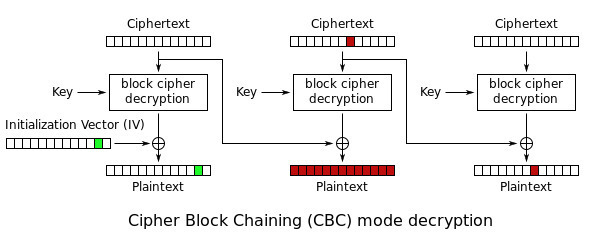
The critical property is this: the plaintext of each block depends linearly on the previous ciphertext block through XOR. This chaining is the heart of the bit flip attack.
Exploitation
Step 1: Request and Convert Token
Request the token and convert it:
1
2
3
4
5
>>> from base64 import b64decode, b64encode
>>> token = '/bJiWLmMxnt82hbKil8JpL/o07jbbDq+mzb5cNZBNc8='
>>> cypher = b64decode(token)
>>> cypher
b'\xfd\xb2bX\xb9\x8c\xc6{|\xda\x16\xca\x8a_\t\xa4\xbf\xe8\xd3\xb8\xdbl:\xbe\x9b6\xf9p\xd6A5\xcf'
Step 2: Obtain the Known Value
Obtain the known value, which is the second ciphertext block decrypted (not yet plaintext, it still needs to pass through XOR with C1):
1
>>> known = bytes(a ^ b for a,b in zip(cypher[:16], b';pts=00000000000'))
With this, we can understand what we need to XOR with to get the desired score.
If you happened to manually answer some equation questions, you must insert your score instead of 0!
Step 3: Craft New Ciphertext Block
Proceed to craft the new ciphertext block to put in the first block:
1
>>> new_C1 = bytes(a ^ b for a,b in zip(known, b';pts=99999999999'))
Now, by XORing known and new_C1, we’ll get the inserted score!
Step 4: Convert and Load
Convert the cipher back to a base64 token and load the game:
1
2
3
4
>>> new_cypher = new_C1 + cypher[16:]
>>> new_token = b64encode(new_cypher).decode()
>>> new_token
'/bJiWLmFz3J10x/Dg1YArb/o07jbbDq+mzb5cNZBNc8='
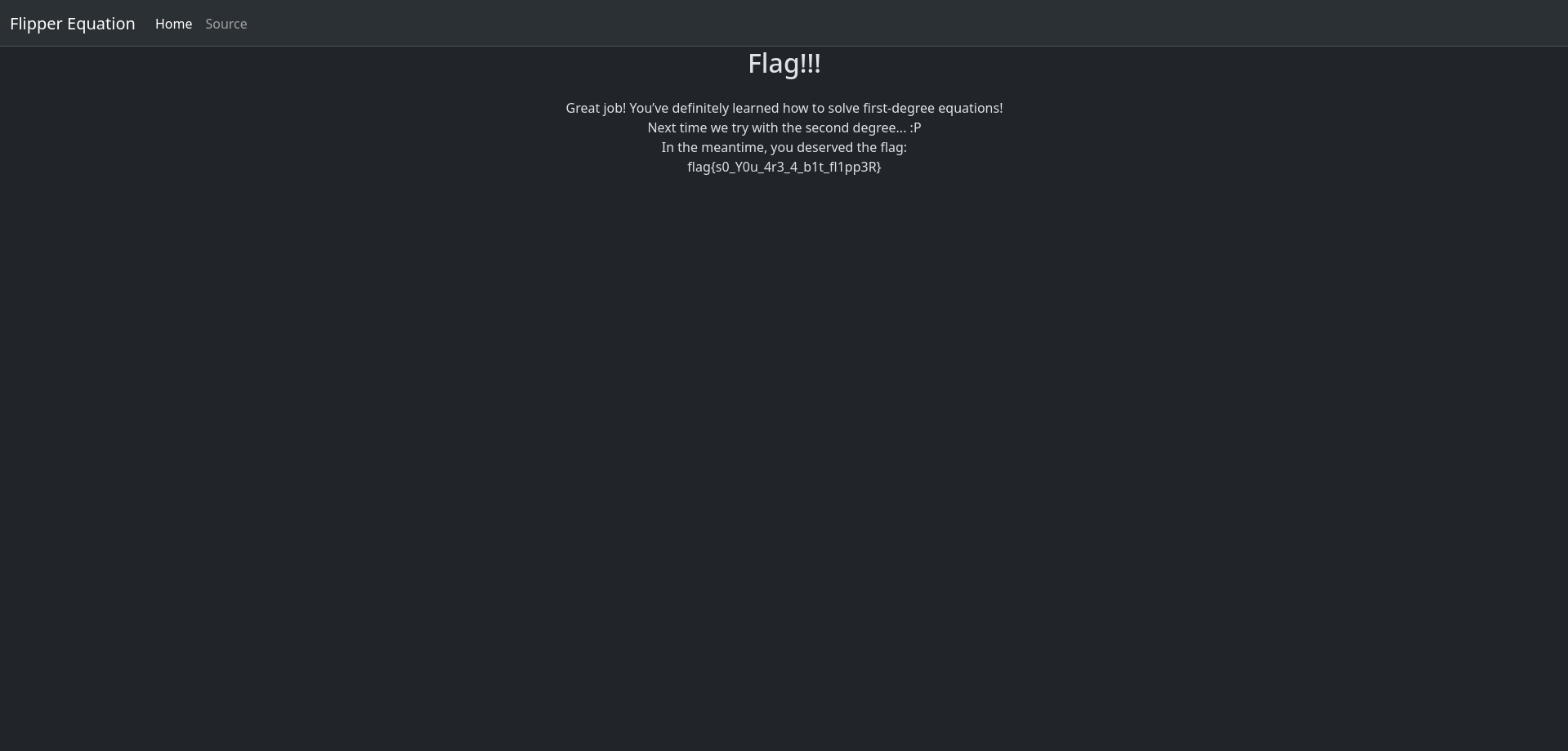
Flag obtained.
Exploit Script
1
2
3
4
5
6
7
8
9
from base64 import b64encode, b64decode
import sys

cypher = b64decode(sys.argv[1])

X      = bytes(a ^ b for a, b in zip(cypher[:16], b';pts=00000000000'))
new_C1 = bytes(a ^ b for a, b in zip(X,           b';pts=99999999999'))

print(b64encode(new_C1 + cypher[16:]).decode())
Usage:
1
python3 gen_token.py 'JFWg1EzNs+xJcN49nP5RBiZDlVI9xNtTQDGS/atSOZ4='