Operation Blackout 2025: Phantom Check Walkthrough - HTB Very Easy Sherlock | PowerShell VM-Detection Forensics
Phantom Check illustrates common virtualization-detection techniques used by attackers. By investigating PowerShell event logs we identify the WMI queries, process comparisons, and registry lookups the attacker used to determine whether the host was a virtual machine — the kind of behavior we can turn into detection rules.

Overview
Talion suspects that the threat actor carried out anti-virtualization checks to avoid detection in sandboxed environments. Your task is to analyze the event logs and identify the specific techniques used for virtualization detection. Byte Doctor requires evidence of the registry checks or processes the attacker executed to perform these checks.
Provided Artifacts
In the zip file we are given, we find 2 files:
- Microsoft-Windows-Powershell.evtx
- Windows-Powershell-Operational.evtx
Instead of completing the Sherlock on Linux, I preferred to use Windows as the operating system thanks to the Event Viewer, which lets us read the logs clearly.
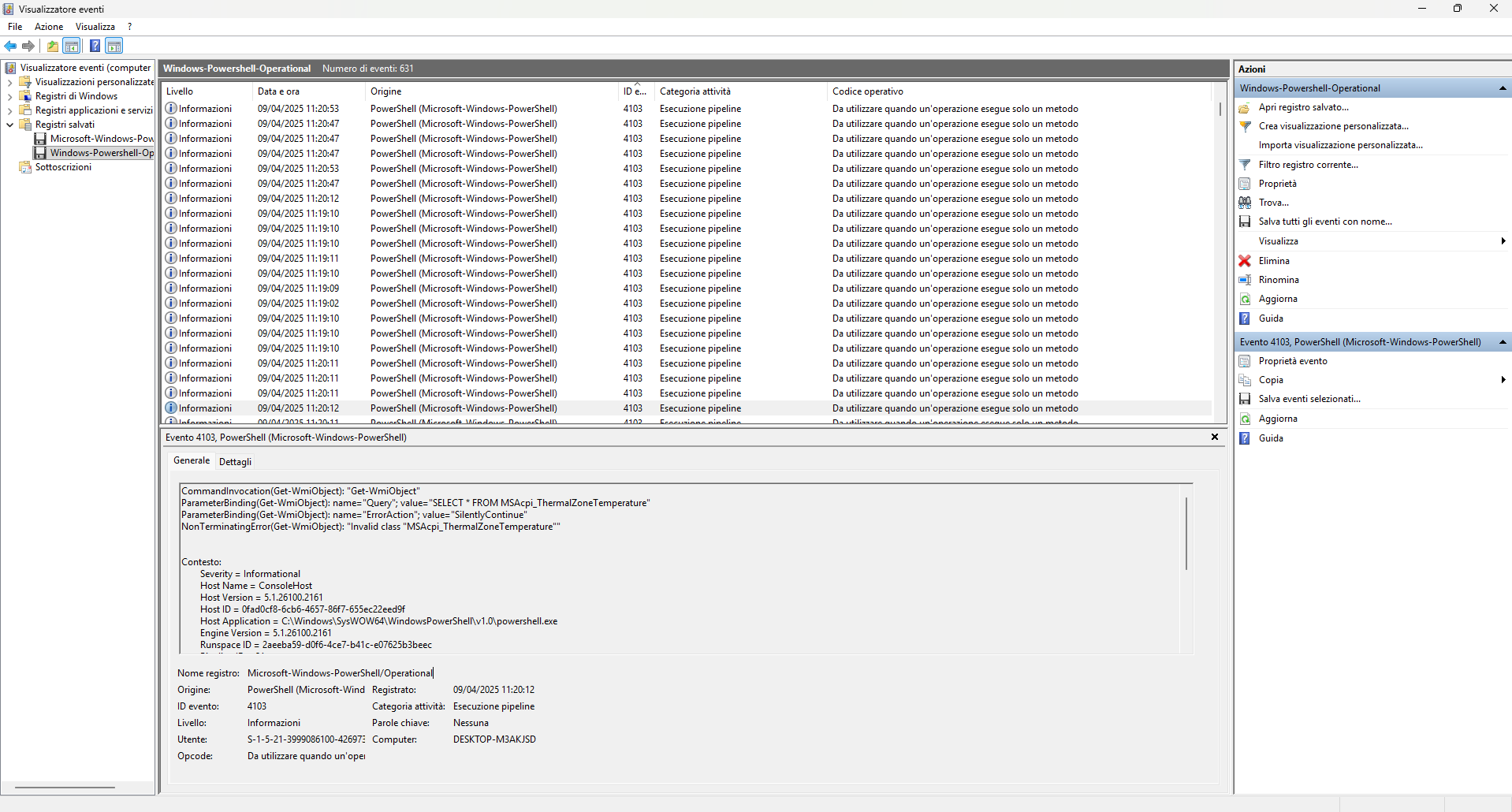
WMI-Based Virtualization Checks
Model & Manufacturer WMI Class
Question 1: Which WMI class did the attacker use to retrieve the model and manufacturer information for virtualization detection?
In the Windows-Powershell-Operational.evtx file we can filter (Ctrl+F) for the word class, and the first result we see is this event:
1
2
3
4
5
6
7
8
9
10
11
12
13
14
15
16
17
18
19
20
21
22
23
- <Event xmlns="http://schemas.microsoft.com/win/2004/08/events/event">
- <System>
  <Provider Name="Microsoft-Windows-PowerShell" Guid="{a0c1853b-5c40-4b15-8766-3cf1c58f985a}" />
  <EventID>4103</EventID>
  <Version>1</Version>
  <Level>4</Level>
  <Task>106</Task>
  <Opcode>20</Opcode>
  <Keywords>0x0</Keywords>
  <TimeCreated SystemTime="2025-04-09T09:19:10.3028212Z" />
  <EventRecordID>2917</EventRecordID>
  <Correlation ActivityID="{8dda4362-a927-0000-b3cf-dc8d27a9db01}" />
  <Execution ProcessID="6064" ThreadID="10848" />
  <Channel>Microsoft-Windows-PowerShell/Operational</Channel>
  <Computer>DESKTOP-M3AKJSD</Computer>
  <Security UserID="S-1-5-21-3999086100-426973801-4203759309-1002" />
  </System>
- <EventData>
  <Data Name="ContextInfo">Severity = Informational Host Name = ConsoleHost Host Version = 5.1.26100.2161 Host ID = 0fad0cf8-6cb6-4657-86f7-655ec22eed9f Host Application = C:\Windows\SysWOW64\WindowsPowerShell\v1.0\powershell.exe Engine Version = 5.1.26100.2161 Runspace ID = 2aeeba59-d0f6-4ce7-b41c-e07625b3beec Pipeline ID = 10 Command Name = Get-WmiObject Command Type = Cmdlet Script Name = Command Path = Sequence Number = 28 User = DESKTOP-M3AKJSD\User Connected User = Shell ID = Microsoft.PowerShell</Data>
  <Data Name="UserData" />
  <Data Name="Payload">CommandInvocation(Get-WmiObject): "Get-WmiObject" ParameterBinding(Get-WmiObject): name="Class"; value="Win32_ComputerSystem" CommandInvocation(Select-Object): "Select-Object" ParameterBinding(Select-Object): name="ExpandProperty"; value="Model" ParameterBinding(Select-Object): name="InputObject"; value="\\DESKTOP-M3AKJSD\root\cimv2:Win32_ComputerSystem.Name="DESKTOP-M3AKJSD""</Data>
  </EventData>
  </Event>
Answer: Win32_ComputerSystem
Thermal Zone Temperature Query
Question 2: Which WMI query did the attacker run to retrieve the machine’s current temperature value?
Like the previous question, we can filter for keywords from the question. Let’s start with the word temperature. Here’s the first result:
1
2
3
4
5
6
7
8
9
10
11
12
13
14
15
16
17
18
19
20
21
22
23
- <Event xmlns="http://schemas.microsoft.com/win/2004/08/events/event">
- <System>
  <Provider Name="Microsoft-Windows-PowerShell" Guid="{a0c1853b-5c40-4b15-8766-3cf1c58f985a}" />
  <EventID>4103</EventID>
  <Version>1</Version>
  <Level>4</Level>
  <Task>106</Task>
  <Opcode>20</Opcode>
  <Keywords>0x0</Keywords>
  <TimeCreated SystemTime="2025-04-09T09:20:12.4823583Z" />
  <EventRecordID>2973</EventRecordID>
  <Correlation ActivityID="{8dda4362-a927-0002-1820-dc8d27a9db01}" />
  <Execution ProcessID="6064" ThreadID="10848" />
  <Channel>Microsoft-Windows-PowerShell/Operational</Channel>
  <Computer>DESKTOP-M3AKJSD</Computer>
  <Security UserID="S-1-5-21-3999086100-426973801-4203759309-1002" />
  </System>
- <EventData>
  <Data Name="ContextInfo">Severity = Informational Host Name = ConsoleHost Host Version = 5.1.26100.2161 Host ID = 0fad0cf8-6cb6-4657-86f7-655ec22eed9f Host Application = C:\Windows\SysWOW64\WindowsPowerShell\v1.0\powershell.exe Engine Version = 5.1.26100.2161 Runspace ID = 2aeeba59-d0f6-4ce7-b41c-e07625b3beec Pipeline ID = 21 Command Name = Get-WmiObject Command Type = Cmdlet Script Name = Command Path = Sequence Number = 54 User = DESKTOP-M3AKJSD\User Connected User = Shell ID = Microsoft.PowerShell</Data>
  <Data Name="UserData" />
  <Data Name="Payload">CommandInvocation(Get-WmiObject): "Get-WmiObject" ParameterBinding(Get-WmiObject): name="Query"; value="SELECT * FROM MSAcpi_ThermalZoneTemperature" ParameterBinding(Get-WmiObject): name="ErrorAction"; value="SilentlyContinue" NonTerminatingError(Get-WmiObject): "Invalid class "MSAcpi_ThermalZoneTemperature""</Data>
  </EventData>
  </Event>
We can see the contents of the query.
Answer: SELECT * FROM MSAcpi_ThermalZoneTemperature
The Check-VM Script
PowerShell Function Name
Question 3: The attacker loaded a PowerShell script to detect virtualization. What is the name of the script’s function?
By filtering for words related to virtualization such as VM, Virtualization, etc., we can greatly narrow the search. Next, we can further filter the previous result by considering only events with ID 4104 (Execute a Remote Command). Among the results we get this event:
1
2
3
4
5
6
7
8
9
10
11
12
13
14
15
16
17
18
19
20
21
22
23
24
25
- <Event xmlns="http://schemas.microsoft.com/win/2004/08/events/event">
- <System>
  <Provider Name="Microsoft-Windows-PowerShell" Guid="{a0c1853b-5c40-4b15-8766-3cf1c58f985a}" />
  <EventID>4104</EventID>
  <Version>1</Version>
  <Level>5</Level>
  <Task>2</Task>
  <Opcode>15</Opcode>
  <Keywords>0x0</Keywords>
  <TimeCreated SystemTime="2025-04-09T09:20:55.7303939Z" />
  <EventRecordID>3080</EventRecordID>
  <Correlation ActivityID="{8dda4362-a927-0000-f7f2-dc8d27a9db01}" />
  <Execution ProcessID="6064" ThreadID="10848" />
  <Channel>Microsoft-Windows-PowerShell/Operational</Channel>
  <Computer>DESKTOP-M3AKJSD</Computer>
  <Security UserID="S-1-5-21-3999086100-426973801-4203759309-1002" />
  </System>
- <EventData>
  <Data Name="MessageNumber">1</Data>
  <Data Name="MessageTotal">1</Data>
  <Data Name="ScriptBlockText">Check-VM</Data>
  <Data Name="ScriptBlockId">ec01d4f1-b1ad-4a78-af6b-ac18c1131c30</Data>
  <Data Name="Path" />
  </EventData>
  </Event>
Answer: Check-VM
Queried Services Registry Key
Question 4: Which registry key did the script mentioned above query to retrieve the service details for virtualization detection?
Considering the previous script, we can search again for keywords such as service. We’ll find this event:
1
2
3
4
5
6
7
8
9
10
11
12
13
14
15
16
17
18
19
20
21
22
23
24
25
- <Event xmlns="http://schemas.microsoft.com/win/2004/08/events/event">
- <System>
  <Provider Name="Microsoft-Windows-PowerShell" Guid="{a0c1853b-5c40-4b15-8766-3cf1c58f985a}" />
  <EventID>4104</EventID>
  <Version>1</Version>
  <Level>5</Level>
  <Task>2</Task>
  <Opcode>15</Opcode>
  <Keywords>0x0</Keywords>
  <TimeCreated SystemTime="2025-04-09T09:20:53.0995764Z" />
  <EventRecordID>3047</EventRecordID>
  <Correlation ActivityID="{8dda4362-a927-0002-b222-dc8d27a9db01}" />
  <Execution ProcessID="6064" ThreadID="10848" />
  <Channel>Microsoft-Windows-PowerShell/Operational</Channel>
  <Computer>DESKTOP-M3AKJSD</Computer>
  <Security UserID="S-1-5-21-3999086100-426973801-4203759309-1002" />
  </System>
- <EventData>
  <Data Name="MessageNumber">1</Data>
  <Data Name="MessageTotal">1</Data>
  <Data Name="ScriptBlockText">function Check-VM { <# .SYNOPSIS Nishang script which detects whether it is in a known virtual machine. .DESCRIPTION This script uses known parameters or 'fingerprints' of Hyper-V, VMWare, Virtual PC, Virtual Box, Xen and QEMU for detecting the environment. .EXAMPLE PS > Check-VM .LINK http://www.labofapenetrationtester.com/2013/01/quick-post-check-if-your-payload-is.html https://github.com/samratashok/nishang .NOTES The script draws heavily from checkvm.rb post module from msf. https://github.com/rapid7/metasploit-framework/blob/master/modules/post/windows/gather/checkvm.rb #> [CmdletBinding()] Param() $ErrorActionPreference = "SilentlyContinue" #Hyper-V $hyperv = Get-ChildItem HKLM:\SOFTWARE\Microsoft if (($hyperv -match "Hyper-V") -or ($hyperv -match "VirtualMachine")) { $hypervm = $true } if (!$hypervm) { $hyperv = Get-ItemProperty hklm:\HARDWARE\DESCRIPTION\System -Name SystemBiosVersion if ($hyperv -match "vrtual") { $hypervm = $true } } if (!$hypervm) { $hyperv = Get-ChildItem HKLM:\HARDWARE\ACPI\FADT if ($hyperv -match "vrtual") { $hypervm = $true } } if (!$hypervm) { $hyperv = Get-ChildItem HKLM:\HARDWARE\ACPI\RSDT if ($hyperv -match "vrtual") { $hypervm = $true } } if (!$hypervm) { $hyperv = Get-ChildItem HKLM:\SYSTEM\ControlSet001\Services if (($hyperv -match "vmicheartbeat") -or ($hyperv -match "vmicvss") -or ($hyperv -match "vmicshutdown") -or ($hyperv -match "vmiexchange")) { $hypervm = $true } } if ($hypervm) { "This is a Hyper-V machine." } #VMWARE $vmware = Get-ChildItem HKLM:\SYSTEM\ControlSet001\Services if (($vmware -match "vmdebug") -or ($vmware -match "vmmouse") -or ($vmware -match "VMTools") -or ($vmware -match "VMMEMCTL")) { $vmwarevm = $true } if (!$vmwarevm) { $vmware = Get-ItemProperty hklm:\HARDWARE\DESCRIPTION\System\BIOS -Name SystemManufacturer if ($vmware -match "vmware") { $vmwarevm = $true } } if (!$vmwarevm) { $vmware = Get-Childitem hklm:\hardware\devicemap\scsi -recurse | gp -Name identifier if ($vmware -match "vmware") { $vmwarevm = $true } } if (!$vmwarevm) { $vmware = Get-Process if (($vmware -eq "vmwareuser.exe") -or ($vmware -match "vmwaretray.exe")) { $vmwarevm = $true } } if ($vmwarevm) { "This is a VMWare machine." } #Virtual PC $vpc = Get-Process if (($vpc -eq "vmusrvc.exe") -or ($vpc -match "vmsrvc.exe")) { $vpcvm = $true } if (!$vpcvm) { $vpc = Get-Process if (($vpc -eq "vmwareuser.exe") -or ($vpc -match "vmwaretray.exe")) { $vpcvm = $true } } if (!$vpcvm) { $vpc = Get-ChildItem HKLM:\SYSTEM\ControlSet001\Services if (($vpc -match "vpc-s3") -or ($vpc -match "vpcuhub") -or ($vpc -match "msvmmouf")) { $vpcvm = $true } } if ($vpcvm) { "This is a Virtual PC." } #Virtual Box $vb = Get-Process if (($vb -eq "vboxservice.exe") -or ($vb -match "vboxtray.exe")) { $vbvm = $true } if (!$vbvm) { $vb = Get-ChildItem HKLM:\HARDWARE\ACPI\FADT if ($vb -match "vbox_") { $vbvm = $true } } if (!$vbvm) { $vb = Get-ChildItem HKLM:\HARDWARE\ACPI\RSDT if ($vb -match "vbox_") { $vbvm = $true } } if (!$vbvm) { $vb = Get-Childitem hklm:\hardware\devicemap\scsi -recurse | gp -Name identifier if ($vb -match "vbox") { $vbvm = $true } } if (!$vbvm) { $vb = Get-ItemProperty hklm:\HARDWARE\DESCRIPTION\System -Name SystemBiosVersion if ($vb -match "vbox") { $vbvm = $true } } if (!$vbvm) { $vb = Get-ChildItem HKLM:\SYSTEM\ControlSet001\Services if (($vb -match "VBoxMouse") -or ($vb -match "VBoxGuest") -or ($vb -match "VBoxService") -or ($vb -match "VBoxSF")) { $vbvm = $true } } if ($vbvm) { "This is a Virtual Box." } #Xen $xen = Get-Process if ($xen -eq "xenservice.exe") { $xenvm = $true } if (!$xenvm) { $xen = Get-ChildItem HKLM:\HARDWARE\ACPI\FADT if ($xen -match "xen") { $xenvm = $true } } if (!$xenvm) { $xen = Get-ChildItem HKLM:\HARDWARE\ACPI\DSDT if ($xen -match "xen") { $xenvm = $true } } if (!$xenvm) { $xen = Get-ChildItem HKLM:\HARDWARE\ACPI\RSDT if ($xen -match "xen") { $xenvm = $true } } if (!$xenvm) { $xen = Get-ChildItem HKLM:\SYSTEM\ControlSet001\Services if (($xen -match "xenevtchn") -or ($xen -match "xennet") -or ($xen -match "xennet6") -or ($xen -match "xensvc") -or ($xen -match "xenvdb")) { $xenvm = $true } } if ($xenvm) { "This is a Xen Machine." } #QEMU $qemu = Get-Childitem hklm:\hardware\devicemap\scsi -recurse | gp -Name identifier if ($qemu -match "qemu") { $qemuvm = $true } if (!$qemuvm) { $qemu = Get-ItemProperty hklm:HARDWARE\DESCRIPTION\System\CentralProcessor\0 -Name ProcessorNameString if ($qemu -match "qemu") { $qemuvm = $true } } if ($qemuvm) { "This is a Qemu machine." } }</Data>
  <Data Name="ScriptBlockId">7c52679e-db36-49f4-87e0-675a6b23913e</Data>
  <Data Name="Path" />
  </EventData>
  </Event>
Answer: HKLM:\SYSTEM\ControlSet001\Services
VirtualBox Process Checks
Question 5: The VM-detection script can also identify VirtualBox. Which processes does it compare to determine whether the system is running VirtualBox?
If we check the script we found earlier (identifiable by the link at the top of the code) we get:
1
2
3
4
5
6
7
8
9
10
11
12
13
14
15
16
17
18
19
20
21
22
23
24
25
26
    #Virtual Box

    $vb = Get-Process
    if (($vb -eq "vboxservice.exe") -or ($vb -match "vboxtray.exe"))
        {

        $vbvm = $true

        }
    if (!$vbvm)
        {
            $vb = Get-ChildItem HKLM:\HARDWARE\ACPI\FADT
            if ($vb -match "vbox_")
                {
                    $vbvm = $true
                }
        }

    if (!$vbvm)
        {
            $vb = Get-ChildItem HKLM:\HARDWARE\ACPI\RSDT
            if ($vb -match "vbox_")
                {
                    $vbvm = $true
                }
        }
We can see the names of the processes being compared.
Answer: vboxservice.exe, vboxtray.exe
Detected Virtualization Platforms
Question 6: The VM-detection script prints any detection with the prefix ‘This is a’. Which two virtualization platforms did the script detect?
We filter the logs for the English prefix (This is a). We read the first result:
1
2
3
4
5
6
7
8
9
10
11
12
13
14
15
16
17
18
19
20
21
22
23
- <Event xmlns="http://schemas.microsoft.com/win/2004/08/events/event">
- <System>
  <Provider Name="Microsoft-Windows-PowerShell" Guid="{a0c1853b-5c40-4b15-8766-3cf1c58f985a}" />
  <EventID>4103</EventID>
  <Version>1</Version>
  <Level>4</Level>
  <Task>106</Task>
  <Opcode>20</Opcode>
  <Keywords>0x0</Keywords>
  <TimeCreated SystemTime="2025-04-09T09:20:57.2771395Z" />
  <EventRecordID>3105</EventRecordID>
  <Correlation ActivityID="{8dda4362-a927-0000-f7f2-dc8d27a9db01}" />
  <Execution ProcessID="6064" ThreadID="10848" />
  <Channel>Microsoft-Windows-PowerShell/Operational</Channel>
  <Computer>DESKTOP-M3AKJSD</Computer>
  <Security UserID="S-1-5-21-3999086100-426973801-4203759309-1002" />
  </System>
- <EventData>
  <Data Name="ContextInfo">Severity = Informational Host Name = ConsoleHost Host Version = 5.1.26100.2161 Host ID = 0fad0cf8-6cb6-4657-86f7-655ec22eed9f Host Application = C:\Windows\SysWOW64\WindowsPowerShell\v1.0\powershell.exe Engine Version = 5.1.26100.2161 Runspace ID = 2aeeba59-d0f6-4ce7-b41c-e07625b3beec Pipeline ID = 43 Command Name = Command Type = Script Script Name = Command Path = Sequence Number = 146 User = DESKTOP-M3AKJSD\User Connected User = Shell ID = Microsoft.PowerShell</Data>
  <Data Name="UserData" />
  <Data Name="Payload">CommandInvocation(Out-Default): "Out-Default" ParameterBinding(Out-Default): name="InputObject"; value="This is a Hyper-V machine." ParameterBinding(Out-Default): name="InputObject"; value="This is a VMWare machine."</Data>
  </EventData>
  </Event>
We read that the script detected 2 types of virtualization.
Answer: Hyper-V, Vmware