PhishNet Walkthrough - HTB Very Easy Sherlock | Email Header & Phishing Analysis
An accounting team receives an urgent payment request from a known vendor. The email looks legitimate but contains a suspicious link and a .zip attachment hiding malware. Our job is to analyze the email headers and reconstruct the attacker's scheme.

Overview
An accounting team receives an urgent payment request from a known vendor. The email appears legitimate but contains a suspicious link and a .zip attachment hiding malware. Your task is to analyze the email headers, and uncover the attacker’s scheme.
Provided Artifact
The material for this Sherlock is a single file. This file is called email.eml and it is the phishing email we need to analyze today to answer the questions. Since the file is small, it is reproduced below:
1
2
3
4
5
6
7
8
9
10
11
12
13
14
15
16
17
18
19
20
21
22
23
24
25
26
27
28
29
30
31
32
33
34
35
36
37
38
39
40
41
42
43
44
45
46
47
48
49
50
51
52
53
54
55
56
57
58
59
60
61
62
63
64
65
66
67
68
69
70
71
Return-Path: <finance@business-finance.com>
Reply-To: <support@business-finance.com>
X-Mailer: Microsoft Outlook 16.0
X-Originating-IP: [45.67.89.10]
X-Priority: 1 (Highest)
X-MSMail-Priority: High
Received-SPF: Pass (protection.outlook.com: domain of business-finance.com designates 45.67.89.10 as permitted sender)
ARC-Seal: i=1; a=rsa-sha256; d=business-finance.com; s=arc-2025; t=1677416100; cv=pass;
ARC-Message-Signature: i=1; a=rsa-sha256; c=relaxed/relaxed; d=business-finance.com; s=arc-2025;
X-AntiSpam: Passed
X-Organization: Business Finance Ltd.
X-Envelope-From: finance@business-finance.com
List-Unsubscribe: <mailto:unsubscribe@business-finance.com>
X-Sender-IP: 45.67.89.10
Received: from mail.business-finance.com ([203.0.113.25])
	by mail.target.com (Postfix) with ESMTP id ABC123;
	Mon, 26 Feb 2025 10:15:00 +0000 (UTC)
Received: from relay.business-finance.com ([198.51.100.45])
	by mail.business-finance.com with ESMTP id DEF456;
	Mon, 26 Feb 2025 10:10:00 +0000 (UTC)
Received: from finance@business-finance.com ([198.51.100.75])
	by relay.business-finance.com with ESMTP id GHI789;
	Mon, 26 Feb 2025 10:05:00 +0000 (UTC)
Authentication-Results: spf=pass (domain business-finance.com designates 45.67.89.10 as permitted sender)
	 smtp.mailfrom=business-finance.com;
	 dkim=pass header.d=business-finance.com;
	 dmarc=pass action=none header.from=business-finance.com;
Message-ID: <20250226101500.ABC123@business-finance.com>
Date: Mon, 26 Feb 2025 10:15:00 +0000 (UTC)
From: "Finance Dept" <finance@business-finance.com>
To: "Accounting Dept" <accounts@globalaccounting.com>
Subject: Urgent: Invoice Payment Required - Overdue Notice
MIME-Version: 1.0
Content-Type: multipart/mixed; boundary="boundary123"

--boundary123
Content-Type: text/html; charset="UTF-8"
Content-Transfer-Encoding: quoted-printable

<html>
<head>
  <title>Invoice Overdue</title>
</head>
<body>
  <p>Dear Accounting Team,</p>
<p>This is a final notice regarding the outstanding invoice #INV-2025-0012. Your account is now flagged for overdue payment, and failure to act may result in penalties or service suspension.</p>
<p>Details of the invoice:</p>
<ul>
  <li><b>Invoice Number:</b> INV-2025-0012</li>
  <li><b>Amount Due:</b> $4,750.00</li>
  <li><b>Due Date:</b> February 28, 2025</li>
</ul>
  <p>Our records indicate that invoice #INV-2025-0012 is overdue for payment. Please process the payment immediately to avoid late fees.</p>
  <p>For your convenience, you can download the full invoice and payment instructions from the link below:</p>
  <p><a href="https://secure.business-finance.com/invoice/details/view/INV2025-0987/payment">Download Invoice</a></p>
  <p>Alternatively, the invoice is also attached as a .zip file.</p>
  <p>If you have already made the payment, kindly ignore this notice.</p>
  <p>Best regards,<br>Finance Department<br>Business Finance Ltd.</p>
</body><p>For assistance, please contact our support team at <a href='mailto:support@business-finance.com'>support@business-finance.com</a> or call our helpline at +1-800-555-0199.</p>
<p>Thank you for your prompt attention to this matter.</p>

</html>

--boundary123
Content-Type: application/zip; name="Invoice_2025_Payment.zip"
Content-Disposition: attachment; filename="Invoice_2025_Payment.zip"
Content-Transfer-Encoding: base64

UEsDBBQAAAAIABh/WloXPY4qcxITALvMGQAYAAAAaW52b2ljZV9kb2N1bWVudC5wZGYuYmF0zL3ZzuzIsR18LQN+h62DPujWX0e7

--boundary123--
Let’s analyze it from the beginning:
In the first 15 lines (roughly) we see the general information needed to send the email: sender, SPF, priority, etc.
After the first 15 lines we’re presented with the path the email took to reach its recipient. It actually traversed 3 domains / subdomains to arrive at its destination.
Finally we find the email body in HTML format. The first thing that jumps out is a link in the middle of the email. This URL triggers the download of the zip at the bottom of the file, which for now is transformed by base64 encoding.
Email Header Analysis
Originating IP
Question 1: What is the source IP address of the sender?
To answer this question we just need to read the X-Originating-IP field at the start of the file.
Answer: 45.67.89.10
Forwarding Mail Server
Question 2: Which mail server forwarded this email before it reached the victim?
Looking only at the names of the domains the email passed through, we wouldn’t be able to tell the order they were traversed in. We’d probably think that the last server to forward the email is the one at the bottom. Instead, by looking at the dates on which the email reached each server, we see that the last one is the one at the top, mail.business-finance.com.
Answer: 203.0.113.25
Sender Address
Question 3: What is the sender’s email address?
We read the email headers to find the From: field.
Answer: finance@business-finance.com
Reply-To Address
Question 4: What is the email address specified in the “Reply-To” field of the email?
We read the Reply-To field.
Answer: support@business-finance.com
SPF Result
Question 5: What is the SPF (Sender Policy Framework) verification result for this email?
We read the Received-SPF field at the start of the file.
Answer: PASS
Phishing Content
Phishing URL Domain
Question 6: Which domain is used in the phishing URL inside the email?
We read the domain inside the link that the attacker included in the body of the email.
Answer: secure.business-finance.com
Spoofed Company Name
Question 7: What is the name of the fake company used in the email?
We read the email and find references to a company.
Answer: Business Finance Ltd.
Malicious Attachment
Attachment Name
Question 8: What is the name of the attachment included in the email?
We read the end of the email where all the file’s fields are written.
Answer: Invoice_2025_Payment.zip
SHA-256 Hash
Question 9: What is the SHA-256 hash of the attachment?
To get the answer, we need to copy the base64 string at the bottom of the email and open a terminal. Then, use this command:
1
echo "UEsDBBQAAAAIABh/WloXPY4qcxITALvMGQAYAAAAaW52b2ljZV9kb2N1bWVudC5wZGYuYmF0zL3ZzuzIsR18LQN+h62DPujWX0e7" | base64 -d | sha256sum
Answer: 8379C41239E9AF845B2AB6C27A7509AE8804D7D73E455C800A551B22BA25BB4A
Payload Inside the ZIP
Question 10: What is the name of the malicious file contained inside the ZIP attachment?
To get this answer we need to remove the sha256sum command from the previous question’s command.
1
2
echo "UEsDBBQAAAAIABh/WloXPY4qcxITALvMGQAYAAAAaW52b2ljZV9kb2N1bWVudC5wZGYuYmF0zL3ZzuzIsR18LQN+h62DPujWX0e7" | base64 -d
PZZ=�*s��invoice_document.pdf.bat̽���ȱ|-~���>��_G�
We see a file name inside the output.
Answer: invoice_document.pdf.bat
MITRE ATT&CK Mapping
Associated Techniques
Question 11: Which MITRE ATT&CK techniques are associated with this attack?
Let’s run this search online: MITRE ATT&CK technique phishing
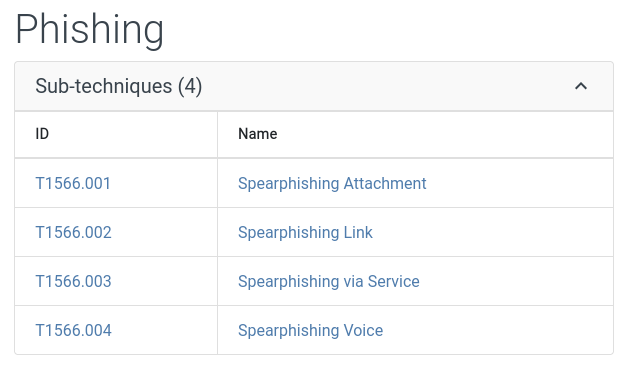
We received a malicious file through the attachment.
Answer: T1566.001