APKrypt - HTB Easy Mobile Challenge | Hardcoded AES Key Decryption
Complete walkthrough of APKrypt from Hack The Box. An easy mobile challenge where an Android app checks a VIP code against an MD5 hash and, on success, decrypts a hardcoded Base64 string to reveal the flag. Decompiling the APK with jadx-gui exposes a generateKey method that returns a hardcoded AES key instead of a random one. Feeding the encrypted string and the key `Dgu8Trf6Ge4Ki9Lb` into an online AES ECB decryptor recovers the flag.
Challenge Overview
Can you get the ticket without the VIP code?
Solution
Initial Files
The challenge’s initial files are the challenge APK and the README, which says:
1
1. Install this application in an API Level 29 or earlier (i.e. Android 10.0 (Google APIs)).
We already installed the emulator in our other mobile challenge Manager
Emulator
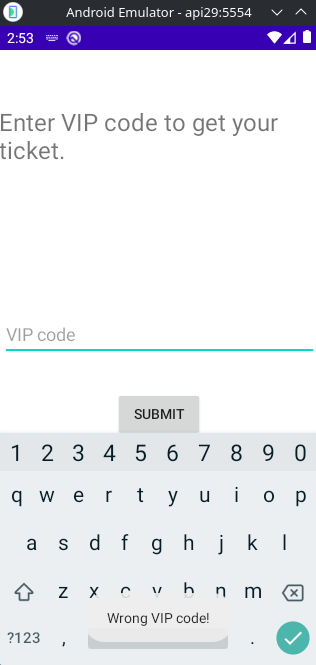
The application on the emulator only shows us an input, and if we click the submit button the message Wrong VIP code! appears.
Source Code
Opening the source code with jadx-gui we can see that there is a single java file containing the app’s code. The command to open the APK in jadx-gui is:
1
jadx-gui challenge/apkrypt/APKrypt.apk
Here’s the extracted code:
1
2
3
4
5
6
7
8
9
10
11
12
13
14
15
16
17
18
19
20
21
22
23
24
25
26
27
28
29
30
31
32
33
34
35
36
37
38
39
40
41
42
43
44
45
46
47
48
49
50
51
52
53
54
55
56
57
58
59
60
public class MainActivity extends Activity {
    Button b1;
    EditText ed1;

    @Override // android.app.Activity
    protected void onCreate(Bundle bundle) {
        super.onCreate(bundle);
        setContentView(R.layout.activity_main);
        this.b1 = (Button) findViewById(R.id.button);
        this.ed1 = (EditText) findViewById(R.id.editTextVipCode);
        this.b1.setOnClickListener(new View.OnClickListener() { // from class: com.example.apkrypt.MainActivity.1
            @Override // android.view.View.OnClickListener
            public void onClick(View view) {
                try {
                    if (MainActivity.md5(MainActivity.this.ed1.getText().toString()).equals("735c3628699822c4c1c09219f317a8e9")) {
                        Toast.makeText(MainActivity.this.getApplicationContext(), MainActivity.decrypt("k+RLD5J86JRYnluaZLF3Zs/yJrVdVfGo1CQy5k0+tCZDJZTozBWPn2lExQYDHH1l"), 1).show();
                    } else {
                        Toast.makeText(MainActivity.this.getApplicationContext(), "Wrong VIP code!", 0).show();
                    }
                } catch (Exception e) {
                    e.printStackTrace();
                }
            }
        });
    }

    public static String md5(String str) {
        try {
            MessageDigest messageDigest = MessageDigest.getInstance("MD5");
            messageDigest.update(str.getBytes());
            byte[] bArrDigest = messageDigest.digest();
            StringBuffer stringBuffer = new StringBuffer();
            for (byte b : bArrDigest) {
                stringBuffer.append(Integer.toHexString(b & 255));
            }
            return stringBuffer.toString();
        } catch (NoSuchAlgorithmException e) {
            e.printStackTrace();
            return "";
        }
    }

    public static String encrypt(String str) throws Exception {
        Key keyGenerateKey = generateKey();
        Cipher cipher = Cipher.getInstance("AES");
        cipher.init(1, keyGenerateKey);
        return Base64.encodeToString(cipher.doFinal(str.getBytes("utf-8")), 0);
    }

    public static String decrypt(String str) throws Exception {
        Key keyGenerateKey = generateKey();
        Cipher cipher = Cipher.getInstance("AES");
        cipher.init(2, keyGenerateKey);
        return new String(cipher.doFinal(Base64.decode(str, 0)), "utf-8");
    }

    private static Key generateKey() throws Exception {
        return new SecretKeySpec("Dgu8Trf6Ge4Ki9Lb".getBytes(), "AES");
    }
}
As we can see, the last method generateKey does not actually generate a random key, but a hardcoded one. The key is Dgu8Trf6Ge4Ki9Lb. The string that was encrypted is written in the OnClick method of the submit button.
decrypting
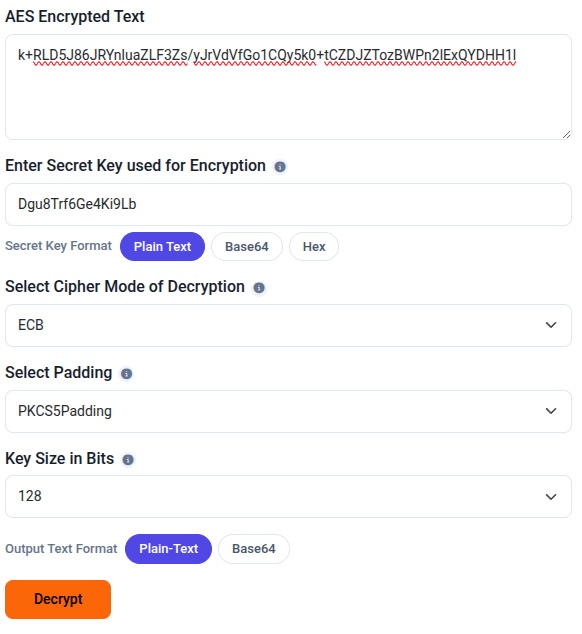
We can go to an online site to do AES decryption in ECB mode and get the flag.
Flag obtained.